

Table of Contents
Overview
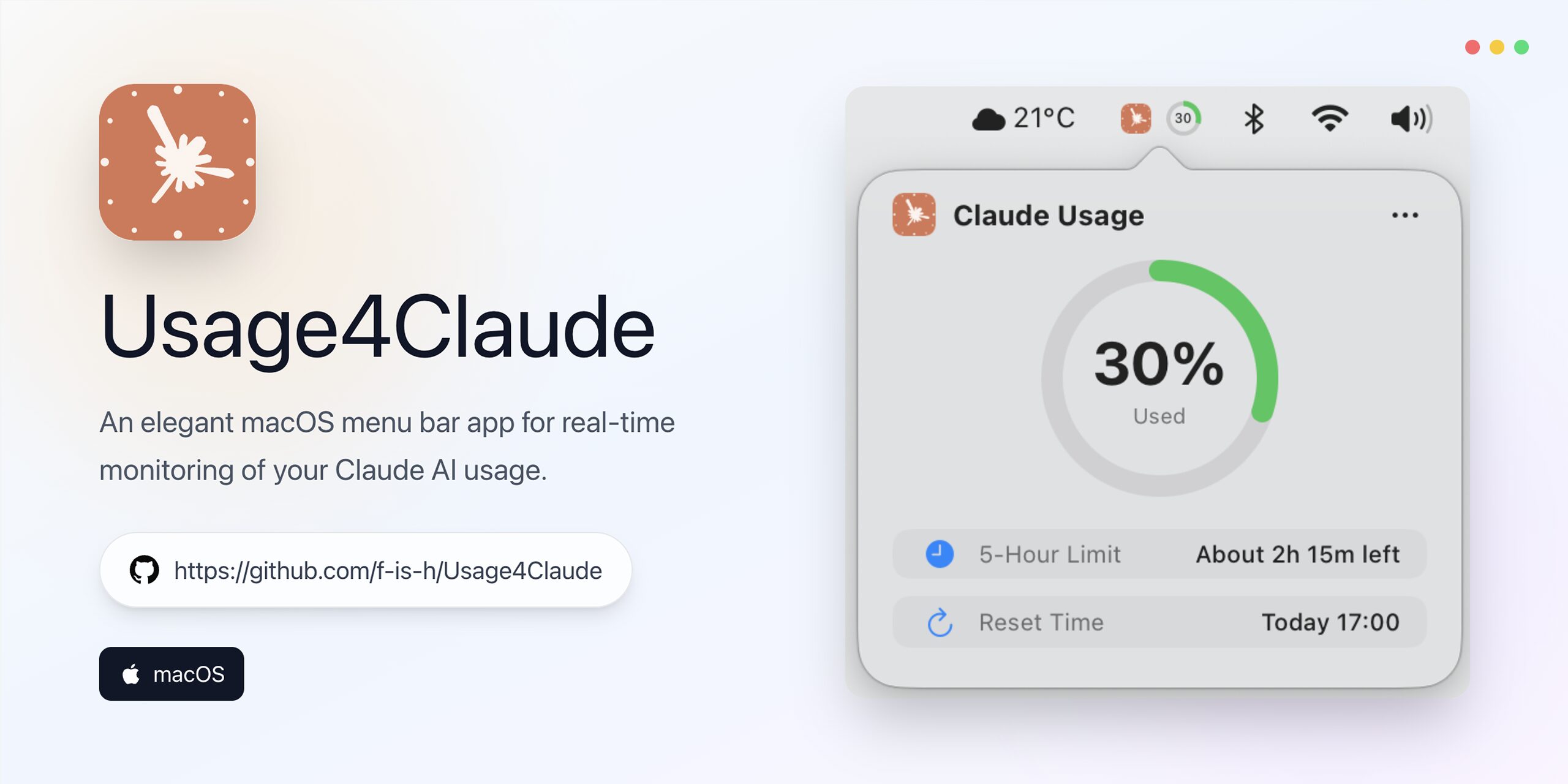
For macOS users who rely heavily on Claude AI for their workflows, understanding usage patterns and staying within quota limits is essential for maintaining productivity and managing costs effectively. Usage4Claude provides an elegant solution: a native macOS menu bar application designed specifically for real-time monitoring of your Claude AI consumption across all access points. Developed as an open-source project by f-is-h and launched in late October 2024, this lightweight tool delivers instant visibility into your remaining quota, ensuring you’re always aware of consumption levels without disrupting your workflow.
Key Features
This thoughtfully designed monitoring tool combines essential capabilities with an unobtrusive user experience:
Real-time Usage Quota Display: View your current Claude AI usage status directly in your macOS menu bar, providing constant awareness without requiring you to switch contexts or visit external dashboards. The display updates automatically to reflect your consumption across web, desktop, mobile, and Claude Code usage.
Smart Color Alerts: Visual intelligence simplifies quota management through intuitive color coding. The menu bar icon transitions from green (normal usage) to orange (approaching limit) to red (critical threshold), helping you anticipate quota exhaustion before it disrupts your work.
Adaptive Refresh Intervals: The application intelligently adjusts its data refresh frequency between 1, 3, 5, or 10 minutes based on your usage patterns and remaining quota, balancing real-time accuracy with efficient API consumption to minimize unnecessary polling.
Three Display Modes: Customize your menu bar presentation with flexible viewing options: percentage-based display showing exact quota remaining, minimalist icon-only mode for cleaner aesthetics, or combined view blending both approaches to match your workspace preferences.
Secure Credential Storage via macOS Keychain: Your Claude AI authentication credentials are protected using macOS Keychain, which employs robust AES-256 encryption by default, ensuring maximum security without requiring additional password management.
Lightweight Native Architecture: Purpose-built for macOS using Swift and native frameworks, the application maintains minimal CPU and memory footprint, running efficiently in the background without impacting system performance or battery life on MacBook devices.
How It Works
Usage4Claude streamlines the monitoring experience through a simple, secure implementation. After downloading the application from the GitHub repository (f-is-h/Usage4Claude), users complete a straightforward one-time credential setup process, connecting their Claude AI account credentials to enable monitoring. These credentials are immediately stored in the macOS Keychain with AES-256 encryption, operating within Apple’s sandboxed environment for enhanced security.
Once configured, the application continuously tracks your Claude AI usage quota by querying Anthropic’s usage APIs at intelligently determined intervals. It displays current consumption prominently in your macOS menu bar, automatically updating as you interact with Claude across any platform—whether through the web interface at claude.ai, the desktop application, mobile apps, or Claude Code in your development workflow.
The smart refresh mechanism dynamically adjusts polling frequency based on your usage velocity: when you’re actively consuming quota quickly, refresh rates increase to provide near-real-time updates; during periods of light usage, the application reduces API calls to conserve resources. Visual alerts powered by color-coded indicators provide immediate, glanceable guidance on your remaining quota and estimated time until reset, helping you manage intensive AI sessions strategically to avoid unexpected interruptions.
Use Cases
Usage4Claude addresses critical monitoring needs across various user profiles who depend on Claude AI:
AI Developers and Engineers: Manage Claude Code consumption during intensive development sprints, debugging sessions, or automated testing workflows where token usage can spike unpredictably. Real-time visibility prevents mid-session quota exhaustion that would halt development progress.
Content Creators and Writers: Maintain awareness of quota limits during content generation workflows to ensure uninterrupted creative sessions. Understanding consumption patterns helps schedule intensive writing projects around quota resets.
Researchers and Academics: Track usage during extended research sessions involving complex queries, literature analysis, or iterative problem-solving where Claude consumption may be difficult to predict in advance.
Enterprise Teams on Shared Accounts: Individual team members gain visibility into their personal contribution to shared organizational quotas, enabling better coordination and preventing one user from inadvertently consuming resources needed by colleagues.
Freelancers and Consultants: Professionals who bill clients based on AI usage can track consumption to accurately attribute costs, justify expenses, and optimize their Claude subscription tier selection.
Pros \& Cons
Advantages
Native macOS Integration: Purpose-built using Swift and native APIs provides seamless performance, responsive UI, and deep integration with macOS system features like menu bar presentation, notifications, and system preferences.
Real-time Adaptive Monitoring: Intelligent refresh algorithms ensure up-to-date information when you need it most while minimizing unnecessary API calls during periods of low activity, optimizing both accuracy and efficiency.
Strong Security Implementation: macOS Keychain storage with AES-256 encryption, combined with sandboxed app architecture, protects your Claude AI credentials using Apple’s battle-tested security infrastructure without requiring third-party password managers.
Minimal Resource Consumption: Lightweight native code ensures the application runs continuously in the background without noticeable impact on CPU usage, memory allocation, or battery performance on portable devices.
Open Source Transparency: The project’s open-source nature on GitHub enables security audits, community contributions, and customization for developers who want to extend functionality or verify code behavior.
Disadvantages
macOS-Exclusive Platform: The tool serves only macOS users, leaving Windows, Linux, and ChromeOS users without an equivalent solution from this project.
Manual Credential Configuration: Initial setup requires users to manually provide Claude AI credentials, which may present a barrier for less technical users unfamiliar with API authentication or credential management.
Claude-Only Monitoring: The application focuses exclusively on Claude AI quota tracking and cannot monitor usage across other AI services like ChatGPT, Gemini, or Perplexity, limiting its utility for users who employ multiple AI platforms.
Dependent on Anthropic API Availability: Monitoring accuracy and functionality rely entirely on Anthropic’s usage API remaining accessible, accurate, and stable. API changes or service disruptions could temporarily affect the tool’s operation.
Limited to Quota Monitoring: The tool tracks consumption and quota limits but doesn’t provide deeper analytics like cost attribution by project, usage trends over time, or recommendations for subscription tier optimization.
How Does It Compare?
Usage4Claude enters a growing ecosystem of Claude monitoring tools, each serving different user needs and deployment scenarios. Understanding the competitive landscape requires examining tools across multiple categories:
Direct Competitors: macOS Menu Bar Claude Monitors
CCTray (by goniszewski) offers the closest direct comparison as another native macOS menu bar application for Claude monitoring. Like Usage4Claude, it displays real-time usage data with color-coded states, but CCTray distinguishes itself through richer data visualization including trend indicators, sparkline charts showing recent patterns, and a rotating display cycling through cost, burn rate, and remaining session time. CCTray specifically targets Claude Code usage through integration with the ccusage CLI tool, making it particularly valuable for developers. Both tools share similar Swift-based architecture and security approaches, but CCTray provides more analytical depth at the potential cost of slightly higher complexity.
SessionWatcher (lightweight macOS menu bar app, announced September 2025) focuses on Claude Code usage specifically, tracking sessions, tokens, and cost estimates with a streamlined interface. Built for macOS 15+, it employs SwiftUI for modern presentation and Sparkle for automatic updates, positioning itself as the simplest solution for developers who primarily need Claude Code monitoring without broader platform coverage.
Claude-nein (by forketyfork) represents another native macOS menu bar option targeting Claude Code spending in real-time, emphasizing cost tracking over quota management. Its more focused scope makes it ideal for users primarily concerned with budget control.
Command-Line Tools for Terminal-Based Monitoring
ccusage is the foundational CLI tool that many macOS menu bar apps build upon. Created as a fast, simple command-line interface, it provides quick ad-hoc analysis of local Claude Code usage data through terminal commands. While powerful for developers comfortable with terminal workflows, it lacks the persistent, glanceable visibility that menu bar apps provide. Many users combine ccusage with menu bar tools—using the CLI for detailed historical analysis and the GUI for daily awareness.
Claude-Code-Usage-Monitor (by Maciek-roboblog) takes CLI monitoring to the next level with a beautiful real-time terminal dashboard featuring advanced analytics, machine learning-based predictions, and Rich UI presentation. This Python-based tool provides interactive progress bars, burn rate calculations predicting session exhaustion, and proactive warnings when approaching limits. It’s plan-aware (Pro, Max5, Max20) and timezone-intelligent, making it excellent for developers who live in their terminal. However, it requires keeping a terminal window visible, unlike menu bar apps that work invisibly in the background.
Enterprise and Team-Level Monitoring Solutions
claude-code-otel (by ColeMurray) transcends individual monitoring by providing a complete self-hosted observability stack for organizations. Built on industry-standard components (OpenTelemetry, Prometheus, Loki, Grafana), it aggregates data from multiple users, provides pre-built dashboards for deep analysis of cost, user activity, tool performance, productivity metrics, API latency, and errors. This solution enables team-wide monitoring, trend identification, and centralized cost management while maintaining data sovereignty since everything runs on your infrastructure. For individual developers or small teams, claude-code-otel is overkill, but for organizations with 10+ engineers using Claude Code, it’s the professional choice.
Grafana for Anthropic (official integration, August 2025) provides real-time insights into Claude LLM costs and performance directly within Grafana Cloud, leveraging the Anthropic Usage and Cost API. With pre-built dashboards and alerts, it’s designed for enterprises already using Grafana for infrastructure monitoring who want to unify AI observability alongside traditional metrics.
Datadog Cloud Cost Management for Anthropic (October 2025) enables organizations to monitor Claude usage and cost data broken down by model, workspace, and service tier directly in Datadog, correlating AI spend with infrastructure metrics, application telemetry, and cloud service costs. For enterprises with existing Datadog investments, this provides comprehensive observability without additional tools.
Browser and Cross-Platform Solutions
Claude Usage Tracker (Chrome extension, 4.9/5 rating with 23 reviews) helps users monitor Claude.ai usage caps based on tokens sent, syncing across devices using Firebase. Unlike platform-specific tools, this extension works on any operating system with Chrome, calculating token consumption from uploaded files, project knowledge, chat history, and AI responses. It sends notifications when usage limits have been replenished and provides tooltips explaining various metrics. Limitations include inability to track web search results and some MCP integrations. For users primarily accessing Claude through the browser rather than Claude Code, this extension offers an accessible alternative to native apps.
Specialized Use Case Tools
Viberank creates a gamified leaderboard experience for Claude Code usage, allowing developers to upload their cc.json files, view detailed analytics, and see global rankings. While not a real-time monitoring solution, it provides social comparison and competitive motivation elements absent from pure utility tools.
Positioning Summary
Usage4Claude occupies a sweet spot for individual macOS users seeking lightweight, always-visible quota monitoring without complexity:
Versus CLI tools (ccusage, Claude-Code-Usage-Monitor): Usage4Claude provides persistent menu bar visibility without requiring terminal windows, making it ideal for users who don’t want to dedicate screen space to monitoring or who work primarily outside the terminal.
Versus comprehensive monitoring solutions (CCTray, SessionWatcher): Usage4Claude offers cleaner simplicity with its focused feature set. CCTray provides richer analytics and visualizations for users willing to trade simplicity for depth, while SessionWatcher targets macOS 15+ users specifically interested in Claude Code.
Versus enterprise solutions (claude-code-otel, Grafana, Datadog): Usage4Claude serves individual users and small teams who don’t need organization-wide observability infrastructure or aren’t already invested in enterprise monitoring platforms.
Versus browser extensions (Claude Usage Tracker): Usage4Claude provides platform-wide monitoring covering desktop, mobile, and Claude Code in addition to web usage, while browser extensions only track activity within the browser.
For macOS users who value clean aesthetics, minimal configuration, and always-visible quota awareness without analytical complexity, Usage4Claude delivers exactly what’s needed. For developers requiring detailed usage analytics, cost tracking, or predictive burn rate calculations, CCTray or Claude-Code-Usage-Monitor offer superior depth. For enterprises managing team-wide Claude adoption, claude-code-otel or commercial observability integrations provide the necessary scale. But for straightforward, secure, lightweight quota monitoring on macOS, Usage4Claude is an excellent choice that does one thing exceptionally well.
Final Thoughts
For macOS users who depend on Claude AI across workflows, Usage4Claude represents an essential productivity tool that elegantly solves the quota visibility challenge. By providing real-time, secure, and genuinely unobtrusive monitoring of Claude AI usage directly in your menu bar, it empowers proactive consumption management, helps avoid workflow-disrupting quota exhaustion, and maintains productivity without cognitive overhead. The application’s native design ensures seamless macOS integration, while robust security features protect your credentials using Apple’s battle-tested Keychain infrastructure.
While platform limitations exclude non-macOS users and the focused feature set lacks deep analytics found in more comprehensive tools, these represent intentional design choices favoring simplicity and reliability over feature sprawl. For individual developers, content creators, researchers, and professionals who value clean interfaces, minimal resource consumption, and transparent open-source code, Usage4Claude delivers exactly what quota monitoring should be: invisible when things are fine, immediately informative when attention is needed, and never in the way of actual work.