
Table of Contents
Overview
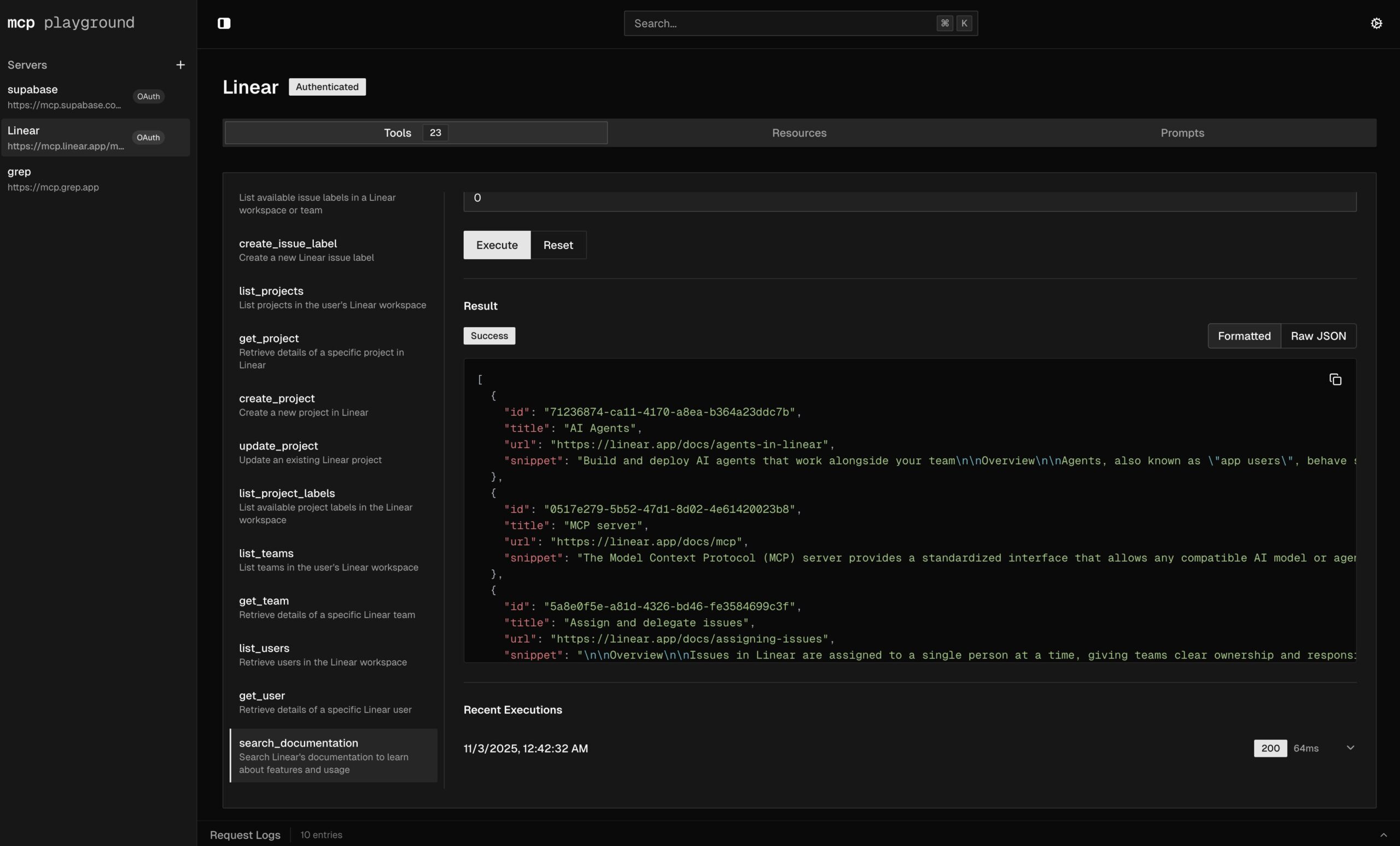
MCP Playground is an open-source web-based developer tool designed for inspecting, testing, and debugging Model Context Protocol (MCP) servers. Launched in November 2025 and featured on Product Hunt with strong community validation, MCP Playground provides an accessible, browser-based environment for developers working with MCP integrations. The platform enables interactive exploration of tools, resources, and prompts exposed by MCP servers, making it an ideal choice for developers seeking a straightforward web-based testing experience. Whether debugging MCP implementations, testing new server configurations, or learning how MCP protocols work, MCP Playground streamlines the development workflow without requiring local installation or complex setup.
Key Features
MCP Playground delivers focused capabilities for MCP server interaction and testing.
- Interactive MCP server inspection: Gain comprehensive insights into your MCP servers with a dynamic, responsive browser-based interface. Connect directly to MCP servers and explore their complete structure in real time.
- Live prompt exploration and testing: Test and refine prompts interactively, observing immediate responses and behaviors. Experiment with different prompt configurations to optimize AI model interactions without requiring code changes.
-
Tool and resource discovery: Easily uncover and understand the various tools and functionalities available from MCP servers. The interface clearly displays all available tools with their schemas, parameters, and descriptions.
-
Debugging MCP integrations: Pinpoint and resolve issues within MCP-compliant applications efficiently. Examine detailed request and response flows to understand exactly what your MCP servers are doing.
-
Resource visualization and inspection: Get clear, structured visual representation of all available resources exposed by servers, including metadata, MIME types, and descriptions. Inspect resource content directly through the interface.
-
Web-based access with zero installation: Enjoy complete browser-based functionality without requiring any local software installation, Docker containers, or complex environment setup. Simply open your browser and start testing.
-
Open-source transparency: The tool is completely open-source (GitHub: emergent-lab/mcp-playground), enabling community contributions, transparency, and customization for specific team needs.
How It Works
MCP Playground simplifies MCP server testing through an intuitive web interface. Developers connect directly to MCP servers via HTTP endpoints through their web browser. Once connected, the platform provides immediate access to Resources, Prompts, and Tools tabs displaying all server capabilities. Developers can interactively invoke tools, test prompts, and inspect resources with custom inputs and parameters.
For each interaction, the interface displays structured responses, execution results, and any error messages. This visual, interactive approach enables developers to understand MCP server behavior thoroughly before integrating servers into production applications. The web-based architecture means developers can test multiple MCP servers across different URLs and configurations without context switching between applications.
Use Cases
MCP Playground serves diverse scenarios across MCP development and deployment.
- MCP API and tool development: Accelerate creation and refinement of new tools and APIs adhering to the MCP standard. Test tools as you build them to ensure they function correctly and respond appropriately to varied inputs.
-
Prompt engineering and optimization: Experiment with different prompt templates and configurations, observing their outputs in real time to optimize AI model interactions and response quality.
-
MCP server debugging: Quickly identify and resolve issues within MCP server implementations. Trace execution flows and inspect responses to understand failure scenarios or unexpected behavior.
-
Integration quality assurance: Ensure seamless and correct integration of MCP servers into applications through systematic testing. Validate that servers comply with MCP specifications and behave as documented.
-
Technical demonstrations and education: Showcase MCP server capabilities to stakeholders, product managers, and development teams in an interactive, visual manner. Serve as an excellent educational tool for understanding MCP protocol structure and interactions.
-
Protocol learning and training: Provide clear, hands-on learning environment for understanding the Model Context Protocol, MCP server architecture, and how tools, resources, and prompts interact within the protocol.
-
Cross-environment testing: Test MCP servers deployed across different environments—development, staging, production—from a single interface without requiring environment-specific clients or configurations.
Pros & Cons
Advantages
- Streamlines MCP debugging workflow: Significantly simplifies the process of connecting to and troubleshooting MCP servers compared to CLI-only alternatives or complex custom testing scripts.
-
Zero friction entry point: Being web-based with no installation requirements, developers can immediately start testing without environment setup, dependency management, or configuration challenges.
-
Clear MCP protocol education: Provides an intuitive, interactive way to understand the underlying structure and principles of the Model Context Protocol through visual, hands-on exploration.
-
Open-source community tool: Completely transparent codebase enables customization, contribution, and adaptation for specific team workflows and requirements.
-
Immediate browser accessibility: Access from any machine with a browser and internet connection, supporting remote teams and distributed development workflows without local client requirements.
Disadvantages
-
MCP-specific scope: The tool is specifically designed for Model Context Protocol testing. Developers working primarily with other API standards or protocols will need general-purpose API testing tools.
-
Limited automation capabilities: While excellent for manual exploration and debugging, MCP Playground lacks the advanced scripting and automation features that CLI-based tools or desktop applications provide for complex testing workflows.
-
Not suitable for production monitoring: The tool is optimized for development and testing phases rather than production monitoring, logging, or long-term analytics of MCP server behavior.
-
Depends on web connectivity: Being web-based, the tool requires consistent internet connectivity and access to servers. Offline testing or air-gapped environments require alternative approaches.
-
Limited team collaboration features: Unlike some enterprise API testing platforms, MCP Playground lacks built-in team collaboration, request sharing, or organizational workflow features (though community forks may add these capabilities).
How Does It Compare?
The landscape of MCP testing tools has evolved significantly in 2025, with multiple solutions addressing different development needs. MCP Playground competes within a broader ecosystem that includes both general-purpose API testing tools and MCP-specific solutions.
The official MCP Inspector, maintained by Anthropic through the modelcontextprotocol.io project, represents the authoritative, officially-supported testing interface for MCP servers. Like MCP Playground, MCP Inspector provides a browser-based interface with Resources, Prompts, and Tools tabs for interactive testing. MCP Inspector serves as the reference implementation for MCP testing. However, both tools target the same use case—interactive, visual MCP server exploration—and serve complementary functions within the MCP ecosystem.
TRMX MCP Playground (the desktop version) explicitly positions itself as “Postman for MCPs,” offering a desktop application with integrated LLM support (Fireworks AI, Groq), mock server capabilities, and CLI tooling alongside web-based testing. TRMX provides broader functionality for teams requiring LLM integration, mock services, and automation but introduces installation requirements and local setup complexity that MCP Playground avoids.
MCPJam Inspector extends the MCP testing ecosystem by adding support for multiple LLM providers, including OpenAI SDK compatibility, offering developers flexibility in LLM selection during testing workflows.
General-purpose API testing tools like Postman, Insomnia, and Thunder Client lack MCP-specific support and protocol understanding. These tools require manual setup to handle MCP’s specific data structures, authentication flows, and response formats. While some development teams use these tools with workarounds, they don’t provide native MCP support that specialized tools deliver.
MCP Playground’s core differentiation lies in its simplicity and accessibility: web-based deployment eliminating installation friction, open-source transparency enabling community customization, and focused MCP-specific design avoiding unnecessary complexity. For developers seeking the fastest path to MCP server testing with minimal setup and maximum accessibility across teams, MCP Playground’s web-first approach provides distinct advantages. Teams requiring production monitoring, complex automation, LLM integration, or desktop application workflows should evaluate TRMX, official Inspector capabilities, or consider complementary CLI-based tools like MCP Tools. Organizations preferring general-purpose API testing tools may standardize on Postman or Insomnia and manage MCP-specific complexity through custom workflows.
Pricing and Accessibility
MCP Playground is completely free and open-source with no licensing costs or subscription requirements. Community-driven development means ongoing improvements and customizations are contributed by the developer community. The barrier to entry is minimal—simply visit mcpplayground.io in any modern browser to begin testing MCP servers immediately.
Final Thoughts
MCP Playground stands out as an accessible, community-driven solution for MCP server testing and debugging. Launched in November 2025 with strong Product Hunt community support (170+ upvotes), the platform demonstrates meaningful demand for developer-friendly MCP tools. Its web-first approach and zero-installation accessibility make it an excellent entry point for developers new to MCP, while its open-source nature ensures continuous community-driven improvements.
For development teams seeking straightforward, browser-based MCP testing without installation complexity, learning curve, or cost, MCP Playground delivers genuine value. The tool excels in educational contexts, rapid prototyping, and distributed team scenarios where browser accessibility matters. However, teams requiring production monitoring, complex automation, integrated LLM testing, or desktop application workflows should evaluate the broader ecosystem of MCP testing solutions including TRMX MCP Playground, official MCP Inspector capabilities, and CLI-based alternatives. For many development workflows, MCP Playground serves as an ideal starting point for MCP protocol learning and initial server testing before advancing to more specialized tools as project needs evolve.
https://www.mcpplayground.io/