
Table of Contents
Overview
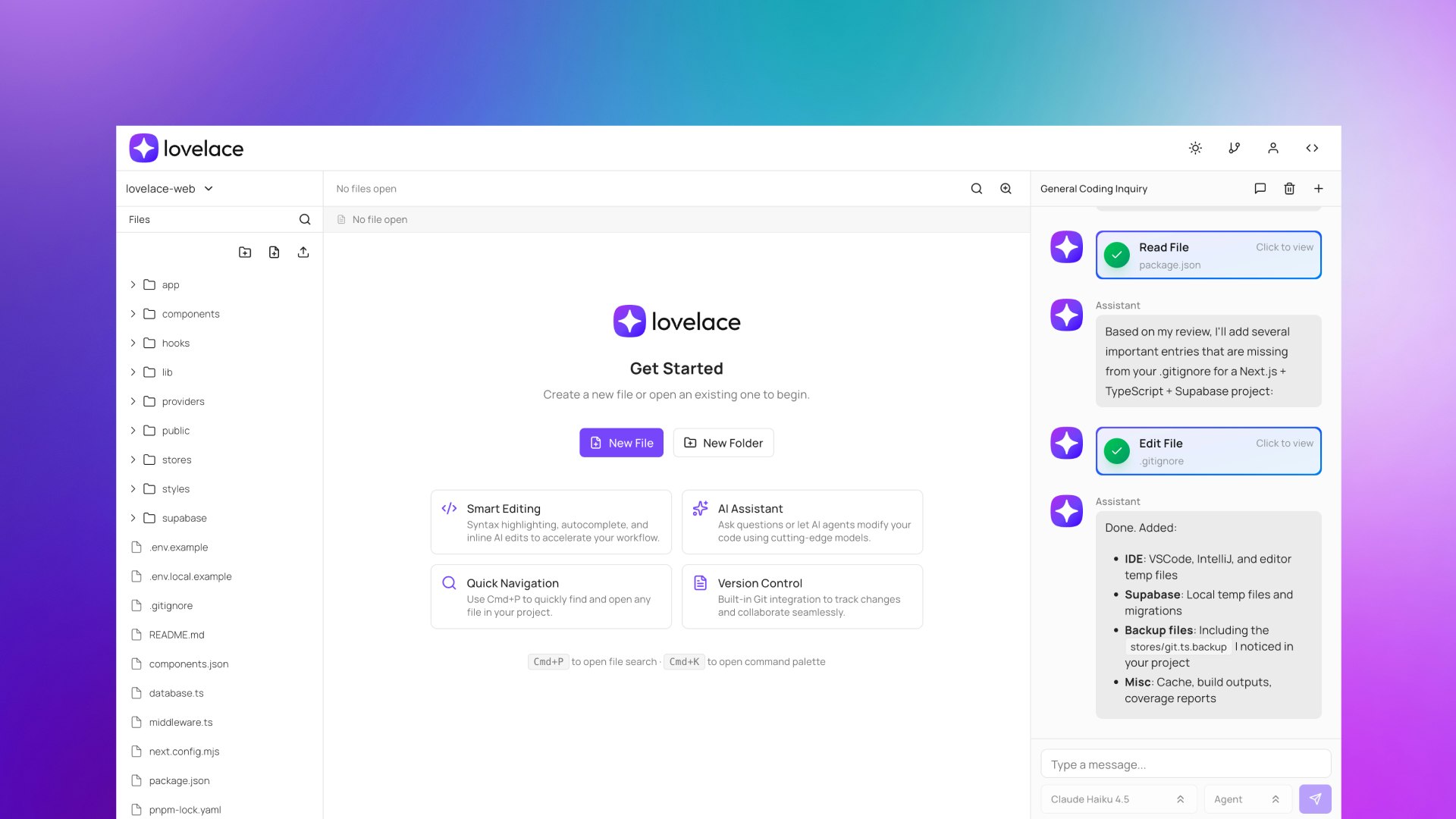
Lovelace is a lightweight, browser-based AI IDE built with pure web technologies (TypeScript + Next.js) that enables developers to code from anywhere on any device without installing heavyweight applications or relying on local desktop environments. Created by Lambros Photios, CTO of Adaca, a Sydney-based tech consultancy, Lovelace was specifically designed to solve a critical challenge: teams using AI-enhanced tools like Cursor on limited-compute devices and distributed locations. The platform delivers AI-powered code completion, integrated AI agents, and cloud-based workspace management accessible from tablets, phones, and any browser. Launched in November 2025, Lovelace emphasizes genuine development work—not just “vibe coding”—enabling teams to handle urgent production fixes, review pull requests during commutes, and prototype features from any location with real development capability.
Key Features
Lovelace delivers a comprehensive set of capabilities specifically optimized for remote, distributed development.
- Context-aware AI code completion: Get lightning-fast suggestions that adapt to your coding style, project structure, and framework in real time. The autocomplete learns from your codebase patterns and provides intelligent, contextual predictions that accelerate development without overwhelming suggestion volume.z
- Intelligent AI agents in Agent and Ask modes: Leverage powerful AI agents that execute multi-step commands, rewrite logic, update dependencies across your entire codebase, and handle complex development tasks from a single prompt. The Ask mode enables interactive questioning about your code, while Agent mode executes autonomous, multi-step operations.
-
Cloud-based IDE with zero installation: Access a full development environment directly from your browser using pure web technologies. No Electron overhead, no local installations, no dependency management—just open your browser and start coding.
-
Integrated PR review and feedback: Review pull requests efficiently even when away from your primary machine. Comment on code changes, approve reviews, and handle code feedback directly from your phone or tablet.
-
Remote production debugging: Diagnose and fix production issues from anywhere without requiring access to your main development machine. Remote debugging enables quick issue resolution while traveling, during client meetings, or from any location.
-
Responsive mobile and tablet support: Code, debug, and manage projects from virtually any device—smartphones, tablets, laptops. The responsive design ensures full IDE functionality on any screen size.
-
GitHub, GitLab, and Bitbucket integration: Seamlessly connect to your existing repositories and version control workflows. Clone, push, pull, and manage all git operations directly from Lovelace without context switching.
-
Inline editor for rapid file changes: Make quick modifications to individual files with simple prompts. The lightweight inline editor handles refactoring, commenting, and debugging of single files without full context loading.
-
Enterprise-grade security and compliance: Lovelace is designed from the ground up with security and compliance as core principles. The platform maintains ISO 27001, SOC 2, GDPR, and data sovereignty compliance. Your code is your own—Lovelace never trains on your data, and all AI interactions remain private and scoped to your workspace.
-
Risk monitoring dashboard: Leverage AI to monitor for software threats across your code, dependencies, and plugins. The risk monitoring dashboard provides visibility across your entire codebase so you can address issues before they reach production.
-
Jira and monday.com integrations: Connect directly to project management tools, reducing context switching and keeping development work aligned with project tracking. Assign tasks, share prompts, and collaborate on code reviews seamlessly.
-
Containerized deployment support: Deploy directly to containerized environments from your workspace. This feature (currently in testing) enables developers to move from code to deployed applications without leaving the IDE.
How It Works
Lovelace transforms remote development through a streamlined, browser-native workflow. Developers simply log into Lovelace via any browser, gaining instant access to their personalized development environment. From there, connect to your Git repositories (GitHub, GitLab, or Bitbucket) to load your project code directly into the cloud-based workspace.
The core experience combines two powerful modes: the visual IDE for traditional code editing and the AI Agent system for accelerated development. As you code, the context-aware AI autocomplete provides intelligent suggestions adapted to your project. For larger tasks—whether rewriting logic, updating dependencies, or implementing features—simply describe what you need in natural language. The AI Agent parses your request, understands your codebase context, and executes multi-step operations across multiple files.
For urgent scenarios like production debugging or PR reviews on your phone, Lovelace’s responsive design delivers full IDE capabilities without compromising functionality. The risk monitoring dashboard continuously analyzes your code and dependencies in the background, alerting you to potential security issues before deployment.
Throughout this workflow, your data remains secure. Region-specific data storage ensures compliance with local regulations. Your code is never used for AI training—all interactions remain private and scoped to your workspace. The lightweight, browser-first architecture means Lovelace works smoothly on any device without demanding high computational resources or local storage space.
Use Cases
Lovelace serves distributed development teams and individual developers who need genuine development capability beyond their primary machine.
- Distributed team development: Empower teams to work collaboratively from different geographical locations with a consistent, cloud-based environment. Real-time collaboration, shared workspaces, and integrated communication keep distributed teams synchronized without local setup complexity.
-
Remote code review and approval: Review and approve pull requests during commutes, travel, or any time you’re away from your primary workstation. The responsive mobile interface enables full code review functionality from phones or tablets.
-
Production debugging from anywhere: Quickly diagnose and resolve critical production issues remotely while traveling, at client sites, or during incidents that require immediate attention. Remote debugging enables fast issue resolution without requiring access to your main development environment.
-
Mobile and tablet development: Develop, test, debug, and deploy code directly from tablets or smartphones. Lovelace transforms any device into a capable coding station for on-the-go development work.
-
AI-assisted prototyping and feature development: Rapidly prototype new ideas and implement features with AI agent assistance. Describe features in natural language and let the AI handle complex, multi-file implementation, dramatically accelerating the initial development phase.
-
Team workspace management and onboarding: Centralize development workspaces for entire teams, ensuring consistency and easy access for all members. New team members immediately access consistent, cloud-based environments without local setup, reducing onboarding friction.
-
Risk monitoring and compliance verification: Continuously monitor code, dependencies, and plugins for security vulnerabilities and compliance issues. The risk monitoring dashboard provides visibility and early warning before issues reach production.
Pros & Cons
Advantages
- Enables genuine development from anywhere: Provides real development capability—not just editing—enabling developers to handle urgent fixes, review PRs, and implement features from any location with any device.
-
AI agent speed without local environment demands: Leverages powerful AI agents to accelerate development without requiring developers to run heavyweight desktop applications or invest in high-end local hardware.
-
Easy team collaboration and workspace sharing: Simplifies collaboration and project setup with intuitive cloud-based workspace management. Shared access, real-time collaboration, and centralized configuration eliminate setup friction.
-
Enterprise security and compliance by default: Built with security, compliance, and data ownership from the ground up. ISO 27001, SOC 2, GDPR, and data sovereignty alignment ensure enterprises can deploy with confidence.
-
Lightweight design with no Electron bloat: Pure web technologies eliminate the performance overhead and resource demands of Electron-based IDEs, ensuring smooth performance even on lower-spec devices.
-
IP protection and data privacy: Your code is your own. Lovelace never trains on user data, all AI interactions remain private and workspace-scoped, and region-specific data storage aligns with local compliance requirements.
-
Free to use with credits system: Start using Lovelace immediately with generous credit allocation. The credits model enables teams to explore functionality without upfront commitment.
Disadvantages
-
May lack some desktop IDE features: As a browser-based solution, it may not offer the exhaustive feature set, extensive plugins, or deep customization options found in traditional locally-installed desktop IDEs like VS Code with all extensions.
-
Depends on internet connectivity and cloud reliability: Performance and accessibility depend on stable internet connection and cloud infrastructure reliability. Teams in low-bandwidth environments or requiring offline capability may face constraints.
-
Newer entrant in competitive market: As a newer player, Lovelace faces established competitors with broader feature sets, larger user bases, and longer track records. Feature gaps and ecosystem maturity may continue improving.
-
Limited by browser constraints: Some advanced debugging, system-level development, or performance-critical tasks may encounter limitations compared to native desktop IDEs with full system access.
How Does It Compare?
When evaluating cloud-based development environments in 2025, Lovelace operates in a diverse competitive landscape with specialized solutions addressing different developer needs.
GitHub Codespaces represents Microsoft’s cloud development vision, built directly on VS Code in the browser with deep GitHub ecosystem integration. Codespaces excels for teams already invested in GitHub workflows, offering seamless integration with GitHub Actions, Issues, and Pull Requests. However, Codespaces remains GitHub-centric and doesn’t prioritize accessibility across all devices or lightweight performance on lower-spec machines. Codespaces is ideal for GitHub-native workflows but demands GitHub as your primary platform.
Gitpod focuses on automated, “ready-to-code” workspace setup, spinning up pre-configured environments from Git repositories within seconds. Gitpod excels at reducing setup friction and onboarding developers quickly. However, Gitpod’s strength is workspace automation rather than AI-assisted development. Developers seeking immediate productivity from git URL prefer Gitpod; developers seeking AI-enhanced coding prefer Lovelace.
Replit emphasizes collaborative, educational development with strong multi-language support and instant deployment. Replit is designed for beginners, students, and rapid prototyping. However, Replit is less focused on production workflows or enterprise compliance. Replit serves educational and prototype scenarios; Lovelace serves production-ready development.
AWS Cloud9 provides enterprise-grade cloud IDE with deep AWS service integration. Cloud9 excels for AWS-centric teams managing infrastructure-as-code and cloud-native development. However, Cloud9 is enterprise-focused and complex for individual developers or small teams. AWS-centric organizations prefer Cloud9; distributed teams prefer Lovelace’s simplicity.
Codeanywhere delivers a lightweight cloud IDE optimizing resource efficiency. Codeanywhere competes directly with Lovelace on lightweight performance, accessible pricing, and multi-device support. The key differentiator is Lovelace’s integrated AI agents and security-first architecture—features Codeanywhere lacks.
Cursor (desktop) represents the most direct AI-enhanced development experience but operates as a VS Code fork requiring local installation. Cursor delivers superior AI capability for developers working primarily on a single machine but requires high-end hardware. Cursor serves primary-machine developers; Lovelace serves distributed, remote-first teams.
Lovelace’s core differentiation rests on several pillars: AI-native development with integrated agents executing multi-step operations, not just autocomplete. Security and compliance designed from the ground up, not retrofitted. Lightweight browser-first architecture enabling full development capability on any device without Electron overhead. Specific positioning for “when you can’t use your main IDE”—PR reviews on phones, production fixes from tablets, prototyping during client meetings.
For development teams demanding genuine development capability from distributed locations, strong security and compliance requirements, and accessibility across all device types, Lovelace’s unified approach delivers distinct advantages. Teams fully committed to GitHub workflows should evaluate Codespaces. Enterprise AWS users should consider Cloud9. Developers prioritizing workspace setup automation should evaluate Gitpod. For teams seeking AI-enhanced, security-first, accessible development across any device, Lovelace represents the most comprehensive platform.
Pricing and Accessibility
Lovelace is free to use with a credits system. Developers receive initial credit allocation enabling exploration of core functionality. The credits model enables team adoption without upfront commitment or complex procurement. Additional credits are available for teams with higher usage requirements. Enterprise teams should contact Lovelace for custom arrangements and dedicated support options.
Final Thoughts
Lovelace represents a thoughtful solution to a genuine problem: developers need real development capability from anywhere, not just code editing or “vibe coding” features. Created by a practicing CTO who experienced this challenge firsthand at Adaca, Lovelace embodies pragmatic design focused on solving actual distributed development workflows rather than pursuing revolutionary positioning.
Launched in November 2025 and built with pure web technologies to eliminate Electron overhead, Lovelace combines accessible, lightweight design with enterprise-grade security and AI-native development. The platform’s emphasis on genuine development work—PR reviews from phones, production debugging from tablets, feature implementation from anywhere—positions it uniquely for the distributed development reality of 2025.
For individual developers and small teams seeking cost-effective, secure, AI-enhanced development without local setup complexity, Lovelace provides compelling value. Enterprise teams with GitHub commitments, AWS centricity, or unique workspace automation needs should evaluate whether specialized alternatives better serve their specific requirements. For distributed teams prioritizing accessibility, security compliance, and real development capability from any device, Lovelace merits serious consideration as an essential part of modern development infrastructure.