
Table of Contents
Overview
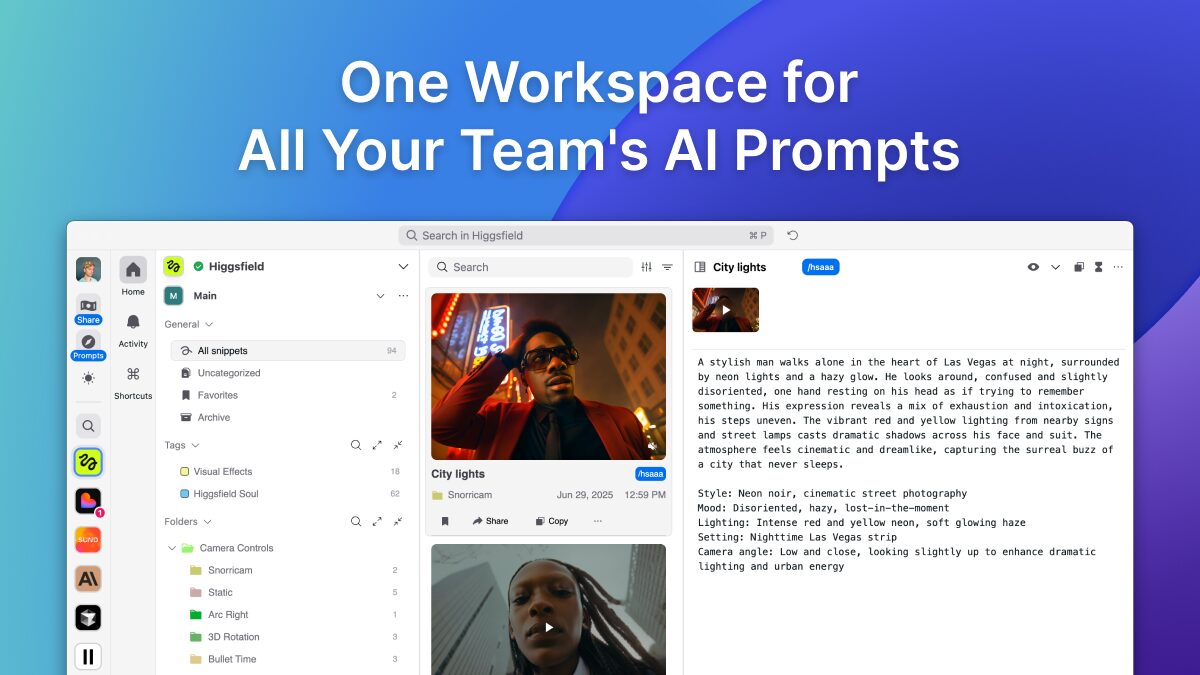
In today’s fast-paced AI landscape, teams often face a common, frustrating problem: valuable AI prompts get scattered and lost across countless apps. From Notion pages and GitHub repos to endless Google Docs, managing a library of effective prompts can quickly become a chaotic mess. Snippets AI steps in to solve this exact issue. It’s a dedicated, all-in-one prompt manager designed to replace makeshift systems, providing a single source of truth for your team’s most valuable AI assets. With Snippets AI, you can save all your best prompts in one place, organize them effortlessly, and share them with your team instantly.
Key Features
Snippets AI is packed with features designed to streamline your team’s prompt engineering workflow. Here are some of the highlights:
- Centralized Prompt Storage: Say goodbye to scattered files. This feature provides one secure, accessible, and organized hub for all your team’s prompts with AES-256 encryption at rest and TLS in transit.
- Instant Team Sharing: Collaboration is key. Instantly share prompts, folders, or entire libraries with your team through shareable workspaces, ensuring everyone is working with the best and most up-to-date inputs. Real-time desktop notifications alert team members when snippets are updated.
- Organize, Categorize, and Tag Prompts: Bring order to your prompt library with flexible organization tools. Use categories and tags to structure your prompts in a way that makes sense for your workflow. Global favorites allow you to access preferred prompts from any workspace.
- Integrated Search and Versioning: Never lose a great prompt again. The powerful search function helps you find exactly what you need in seconds, while versioning allows you to track changes and revert to previous iterations. Prompt variations feature lets you test different versions.
- Cross-Platform Accessibility: Press Option + Space to open quick access and insert prompts instantly across ChatGPT, Claude, Gemini, IDEs, terminals, and browsers without copy-pasting.
- API Access: Developer-friendly API with simple, transparent pricing at \$0.0001 per request, claiming to be 6x more cost-effective than competitors.
How It Works
Getting started with Snippets AI is designed to be intuitive and efficient. The platform simplifies the entire lifecycle of a prompt. You begin by saving your prompts directly within the application, creating a central repository from day one. From there, you can easily organize each prompt using a flexible system of tags and categories, making it simple to find them later. When you or a team member needs a prompt, it can be retrieved or shared instantly through keyboard shortcuts or the API. Finally, Snippets AI helps you track changes and iterations over time, ensuring you always have a clear history of what works best.
Use Cases
Snippets AI is a versatile tool that can benefit a wide range of users. Here are a few key use cases where it truly shines:
- For AI Teams Managing Prompt Libraries: Engineering and product teams can establish a single source of truth for all prompt engineering efforts, ensuring consistency and quality in development. The platform supports infrastructure as code templates and security scan automation.
- For Organizations Using GenAI Across Multiple Tools: Marketing, sales, and support departments can maintain brand voice and output quality by using a standardized set of prompts across various generative AI platforms. Content teams use it for maintaining design system documentation and component libraries.
- Version-Control for Workflows: For any team that relies on iterating and improving prompts, Snippets AI provides essential version control to track tests, compare results, and maintain a history of successful prompt strategies. QA engineers store test scripts with tagging for easier management.
- Developer Productivity: Developers who repeat code, SQL queries, or debugging steps can save significant time. The platform offers syntax highlighting for code snippets and resizable windows that can be docked.
Pros \& Cons
Like any tool, Snippets AI has its unique strengths and some considerations to keep in mind.
Advantages
- Centralized: It effectively eliminates the chaos of scattered documents by bringing all your prompts into a single, unified platform with daily backups and DDoS protection.
- Integrated: As a purpose-built tool, it offers specialized features for prompt management that general-purpose tools like Notion or Google Docs lack, including prompt variations and global shortcuts.
- Easy for Teams: The platform is built for collaboration with public workspaces, real-time notifications, and drag-and-drop functionality, making it simple to share, access, and manage team-wide prompts.
- Security-Focused: Features AES-256 encryption, TLS protocols, application-level encryption for sensitive information, and regular penetration testing.
Disadvantages
- May Not Replace All Features: While it excels at prompt management, it isn’t a full replacement for the broad document editing capabilities of Google Docs or the complex code management features of GitHub. It lacks the deep technical debugging capabilities of specialized observability platforms.
- New Workflow Learning Curve: Adopting any new tool requires an adjustment period. Teams will need to invest a small amount of time to learn the new workflow and integrate it into their daily processes.
- Limited Analytics: Compared to enterprise-grade solutions, Snippets AI offers minimal analytics and insights, focusing more on organization than on detailed performance metrics.
- Free Tier Restrictions: The free plan only supports up to 100 prompts and 2 team members, which may be insufficient for growing teams.
How Does It Compare?
The prompt management space is growing rapidly, and Snippets AI positions itself as a focused, team-oriented solution. It competes directly with other dedicated tools like PromptHub, LangSmith, Langfuse, and PromptLayer. However, its main competition often comes from the non-specialized systems teams are already using.
Direct Competitors
LangSmith (by LangChain):
- Pricing: Developer plan is free (1 user, 5,000 traces/month). Plus plan costs \$39 per user/month with 10,000 traces included.
- Strengths: Advanced tracing, debugging, and production-level observability for LLM applications. Full-scale evaluation tools and enterprise-grade features.
- Weaknesses: Steep learning curve, closed-source, and can be overkill for teams just managing prompts. Self-hosting only available on paid plans.
- Best For: Production-level LLM applications and enterprises needing deep observability.
Phoenix by Arize AI:
- Pricing: Completely open-source and free to use.
- Strengths: Framework-agnostic, works with LangChain, LlamaIndex, CrewAI. Designed for experimentation, evaluation, and troubleshooting. Gives full control over data and infrastructure.
- Weaknesses: Requires self-hosting or local deployment. More technical setup needed compared to cloud solutions.
- Best For: Builders, researchers, and teams preferring open-source tools with maximum flexibility.
Langfuse:
- Pricing: Free Hobby plan (50k units/month, 2 users). Core plan at \$29/month (100k units). Pro plan at \$199/month with unlimited data access.
- Strengths: Comprehensive logging of AI interactions, pipeline visibility, performance metrics, and compliance features. Unlimited users on paid plans.
- Weaknesses: More technical interface best suited for users comfortable with logs and dashboards. Steeper learning curve for non-engineers.
- Best For: Engineering-heavy teams building production-grade AI applications needing detailed auditing.
PromptLayer:
- Pricing: Free plan (5,000 requests, 7-day retention). Pro plan at \$50 per user/month (100,000 requests, unlimited retention). Enterprise plan with custom pricing.
- Strengths: Full version control and comparisons, tracks prompt edits and output changes over time, multi-AI provider support.
- Weaknesses: Limited collaboration features, minimal real-time usage features, focuses more on historical tracking than active creation.
- Best For: Prompt researchers, compliance-focused teams, and those experimenting with iterative prompt improvements.
PromptHub:
- Pricing: Free tier (10 prompts, basic editor). Pro tier with unlimited prompts, API access (1,000 calls/month), and team collaboration. Enterprise tier with custom integrations and SSO.
- Strengths: Git-based versioning with branches and pull requests, multi-model testing, prompt enhancers, collaborative management.
- Weaknesses: Newer player with smaller community compared to established alternatives.
- Best For: Teams wanting Git-style version control for prompts.
AirOps:
- Pricing: Not transparently listed; enterprise-focused.
- Strengths: Workflow management, SEO integrations, scalable content solutions tailored for business needs.
- Weaknesses: Less focused on pure prompt management, more of a comprehensive AI workflow platform.
- Best For: Marketing and sales teams needing content generation at scale.
Compared to General-Purpose Tools
Compared to a custom setup in Notion or Confluence, Snippets AI offers purpose-built features like versioning, advanced search, and keyboard shortcuts specifically for prompts. While you can use Google Docs/Sheets to list prompts, it lacks the organization, sharing, security, and API access features of a dedicated platform. The free tier of Snippets AI makes it accessible for small teams, while Notion AI requires a paid Notion subscription.
Final Thoughts
For any team serious about leveraging generative AI, managing prompts effectively is no longer a luxury—it’s a necessity. Snippets AI provides a clear, professional, and powerful solution to the widespread problem of prompt chaos. By centralizing, organizing, and simplifying access to your most important AI prompts, it empowers teams to work faster, smarter, and more consistently.
The platform’s strength lies in its simplicity and focus on collaboration rather than deep technical observability. For teams already using LangChain in production, LangSmith offers better integration. For those needing open-source flexibility, Phoenix provides more control. For detailed logging and compliance, Langfuse or PromptLayer may be superior choices.
However, if your primary pain point is disorganized prompts scattered across documents and chat threads, Snippets AI’s combination of an intuitive interface, real-time collaboration, and affordable pricing (starting at \$0 with a generous free tier) makes it a compelling option. Its API access and security features also mean it can grow with your team from small projects to enterprise deployments.
If your organization is struggling to keep its prompts in order, Snippets AI is a tool well worth considering, especially for small to mid-sized teams focused on workflow efficiency rather than production-level debugging.