
Table of Contents
Overview
In a world saturated with complex note-taking apps, the simple act of jotting down a thought can feel like a chore. We spend more time organizing, creating folders, applying tags, and building intricate systems, than we do thinking. Dim enters the scene as a breath of fresh air: a minimalist note app for iOS built on a powerful premise of effortless capture. It strips away the complexity and lets your ideas organize themselves through AI-powered automatic tagging, creating a self-organizing collection of thoughts with zero manual effort.
Key Features
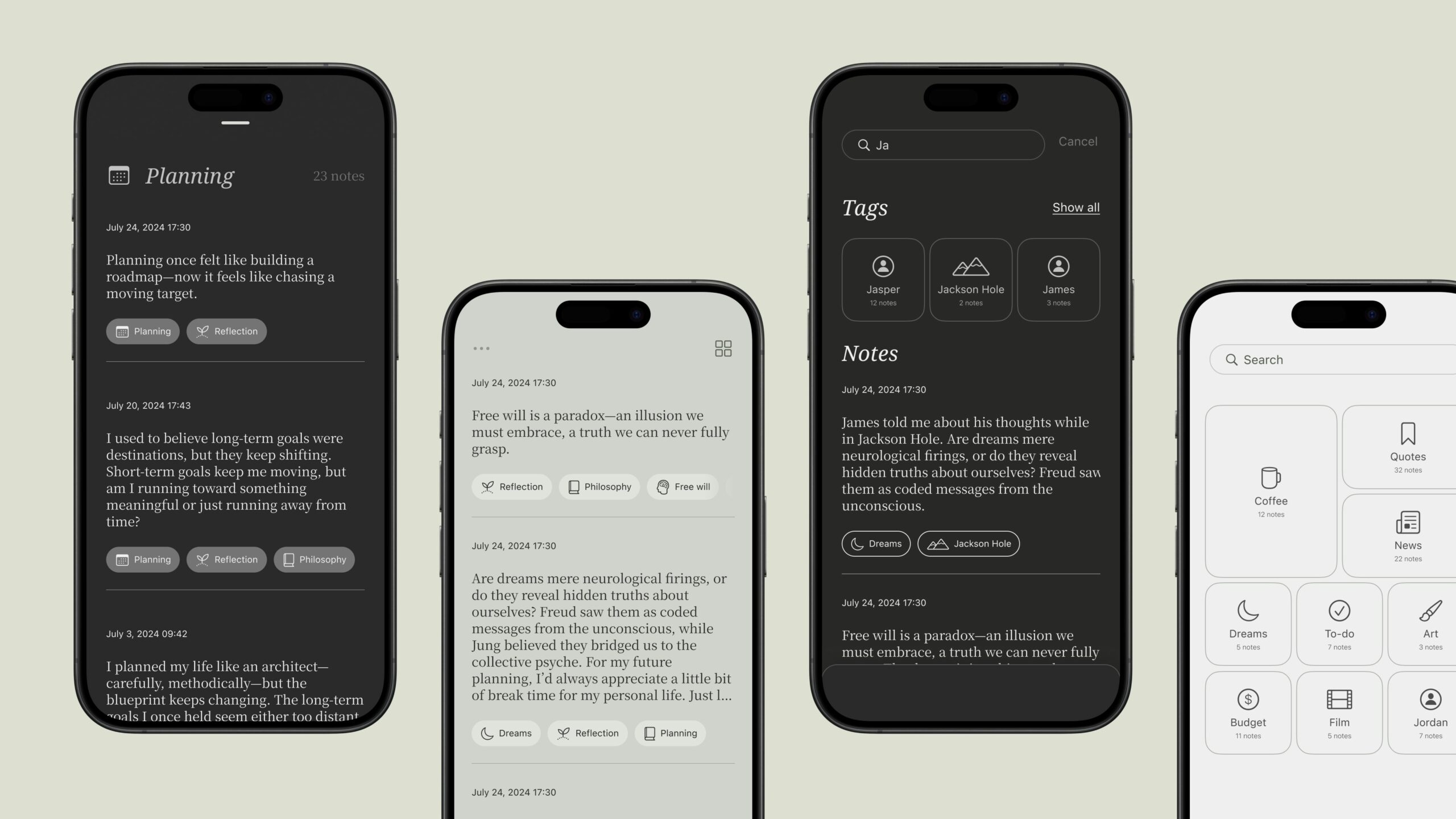
Dim stands out through its simplicity and the intelligent engine working behind the scenes. Here are the core features that make it unique:
- Automatic Tagging: Forget manual organization. Dim uses a large language model (LLM) backend to analyze the content of every note you write and automatically assigns relevant tags based on semantic similarity to your existing notes. This creates cohesive groupings without you lifting a finger.
- Minimalist Interface: The user experience is clean, simple, and optimized for one thing: capturing your thoughts. The half-screen card design encourages brevity and immediacy while supporting longer notes when needed.
- Instant Launch: The app is designed for rapid capture. Pull out your phone and start writing immediately, reducing the friction that causes fleeting ideas to be lost.
- Tag Collections: Tapping any tag instantly surfaces all related notes, making it natural and fluid to resurface past thoughts. Users can browse all tags through Tag Navigation, creating a lightweight but effective organizational structure.
- SF Symbols Integration: Each generated tag is paired with a relevant icon from Apple’s SF Symbols library, enhancing visual recognition and context.
How It Works
The process behind Dim is elegantly straightforward. You open the app to a simple, clean half-screen editor and start writing your thoughts as plain text. Once saved, your note enters a backend pipeline where an LLM analyzes its content and assigns tags based on semantic similarity to your existing notes. By considering your note history, Dim connects related ideas under shared tags, avoiding a clutter of one-off labels and making your note library feel more cohesive. Over time, this effortless process of writing and auto-tagging helps you see patterns in your thinking, turning scattered thoughts into connected insights.
Use Cases
Dim is designed for anyone who values speed and simplicity over complex systems. It is particularly well-suited for:
- Effortless Idea Capture: Perfect for quickly jotting down ideas, meeting notes, or research snippets without breaking your flow to think about where they should be stored.
- Lightweight Personal Knowledge Management: Ideal for building a personal collection of notes where themes and topics self-organize through automatic tagging, revealing patterns in your thinking over time.
- Writers, Students, and Knowledge Workers: A fantastic tool for those who prefer a minimal user interface but still want the long-term benefit of being able to easily find and connect past notes.
Pros and Cons
No tool is perfect for everyone. Here is a balanced look at where Dim shines and where it might fall short.
Advantages
- Extremely Low-Friction: The minimalist design makes note capture incredibly fast and easy, encouraging you to write more freely.
- Effortless Organization: The automatic tagging system handles all the organization for you, saving time and mental energy.
- Clean, Focused UX: The clean interface is designed to reduce cognitive load and keep you focused on your thoughts.
- Free to Use: The app is currently available at no cost on the App Store.
- Modern iOS Design: Features haptic feedback, polished animations, and integration with SF Symbols for a native iOS feel.
Disadvantages
- iOS Only: Currently available only for iPhone requiring iOS 18.0 or later. No Android, web, or desktop versions exist.
- Limited Feature Set: As a newly launched app (November 2025), Dim lacks advanced features like collaboration, task management, or extensive formatting options found in mature PKM tools.
- No Knowledge Graph Visualization: Unlike tools such as Obsidian or Reflect, Dim does not provide a visual graph view showing connections between notes.
- Dependent on Tag Quality: The entire system relies on the accuracy of the automatic tagging. If the AI misinterprets your content, the organization may be less effective.
- No Cross-Device Sync: Being iOS-only means your notes are limited to your iPhone ecosystem.
- Early Stage Product: Version 1.0.3 means some features are still in development and the app may lack polish in certain areas.
How Does It Compare?
In the crowded space of note-taking apps, Dim carves out a unique niche as an AI-powered auto-tagging solution. Here is how it compares to other relevant tools in 2025:
Compared to mymind, which also offers zero-organization AI tagging for bookmarks, images, and notes, Dim focuses specifically on text notes with a mobile-first approach. mymind provides broader content types and works across more platforms.
Compared to Mem AI, another self-organizing note app with AI-powered organization and knowledge surfacing, Dim takes a simpler approach. Mem offers deeper AI features like semantic search, collections, and a copilot that surfaces relevant notes, while Dim focuses purely on the auto-tagging concept.
Compared to Reflect Notes, which combines calendar integration, bi-directional linking, and GPT-4 powered features, Dim is significantly more minimalist. Reflect targets users who want AI assistance for journaling and connected thinking with explicit note links.
Compared to Obsidian, the popular local-first knowledge management tool, the difference is fundamental. Obsidian is built for users who want to manually create and curate a detailed knowledge graph with bi-directional links. Dim flips that model by letting connections emerge organically through AI-generated tags.
Compared to Apple Notes and Simplenote, both traditional minimalist note apps, Dim adds the intelligent auto-tagging layer that neither of these tools offers. Apple Notes has recently added Apple Intelligence features, but not semantic auto-tagging.
Compared to Capacities, which uses an object-based system with typed notes and AI assistance, Dim is far simpler. Capacities targets power users building structured knowledge bases, while Dim targets those who just want to write without thinking.
Compared to Heptabase, the visual whiteboard-style PKM tool with tagging and databases, Dim is intentionally minimalist. Heptabase excels at spatial organization and visual thinking, while Dim focuses purely on frictionless text capture.
What is Coming Next
According to the development team, several features are currently in development:
- Natural Language Search: The ability to search by describing what you are looking for in natural language.
- Tag Summarization: As you write more, the tag system becomes more contextualized with evolving summaries of what each tag contains.
- Beautiful Sharing Cards: Visual cards designed for sharing your ideas and thoughts with others.
Final Thoughts
Dim is a compelling solution for a specific type of user: the minimalist thinker, the rapid-fire ideator, and anyone tired of digital housekeeping. It addresses the problem of capturing thoughts without the burden of organizing them through an innovative LLM-powered auto-tagging approach. Currently limited to iOS and still in its early stages following its November 2025 Product Hunt launch, Dim shows promise for users who want a beautifully simple space to think and write. While power users who need deep customization, collaboration, cross-platform access, or visual knowledge graphs should look elsewhere, Dim excels at its core mission: letting your ideas connect themselves. For iPhone users seeking a truly frictionless note-taking experience, Dim is absolutely worth exploring.