
Table of Contents
Overview
In today’s competitive software landscape, an AI copilot is quickly becoming a must-have feature, not just a nice-to-have. The challenge? Building one from scratch is a massive undertaking. After countless conversations with app builders, the team behind Crow identified a universal pain point: everyone wants an AI assistant in their product, but no one has the time to wire it up. Crow is their answer—a powerful tool designed to add a chat-first copilot that can take real actions within any product, all in a matter of minutes.
Key Features
Crow packs a focused set of features designed for rapid implementation and powerful functionality. Here’s what stands out:
- Embeddable “Chat-first” Copilot: Easily embed a sleek, conversational AI interface directly into your application, providing users with an intuitive way to interact with your software.
- Action Execution on Product Features: This isn’t just a chatbot. Crow can understand user requests and translate them into real actions, like clicking buttons, filling out forms, or navigating to different pages within your app.
- Quick Integration: True to its promise, Crow is built for speed. The “minutes to wire up” claim means developers can get a functional copilot running without a lengthy or complex setup process.
- Context-Aware Product Control: The AI understands the user’s context within your application, allowing for more intelligent and relevant assistance that feels seamlessly integrated into the user experience.
How It Works
The magic behind Crow lies in its straightforward and elegant integration process. Developers begin by integrating the Crow SDK or API into their application’s codebase. Once connected, the AI gets to work learning the product’s core functions and user interface elements. It intelligently maps natural language chat commands from a user to specific, executable actions within the app, such as triggering an API call or activating a feature. In essence, it acts as a smart translator between human language and your product’s functionality.
Use Cases
So, how can you leverage Crow in your own product? The possibilities are vast, but here are a few key applications:
- Adding “Ask to Do” Features: Empower users to simply ask the copilot to perform tasks. Instead of navigating complex menus, a user could type “Create a new invoice for Client X” and have Crow execute the entire workflow.
- Simplifying Complex UIs: For feature-rich applications with a steep learning curve, a chat interface can be a game-changer. Crow allows users to bypass complex navigation and access deep functionality through simple conversation.
- In-app Customer Support Automation: Handle common queries and guide users through troubleshooting steps directly within your app. The copilot can answer questions and perform actions to resolve issues, freeing up your human support team for more complex problems.
Pros \& Cons
Like any tool, Crow has its unique strengths and potential limitations. It’s important to consider both sides.
Advantages
- Drastically reduces development time for building sophisticated AI features, allowing teams to ship a copilot in a fraction of the time it would take to build from scratch.
Disadvantages
- Relies on the quality of the host app’s API/structure. A well-structured application with clean APIs will yield the best results.
- Likely requires maintenance as the app updates. As you add or change features in your product, the copilot’s action mappings may need to be updated to stay in sync.
How Does It Compare?
The AI agent space includes tools like CopilotKit and SuperAGI, but Crow carves out a specific and valuable niche. While competitors often provide general agent frameworks for a wide range of tasks, Crow focuses laser-specifically on the “embedded copilot” for SaaS builders. This specialization means it’s highly optimized for integrating an action-taking assistant directly into an existing product, rather than serving as a broader, more generalized AI toolkit.
Final Thoughts
For SaaS companies and app builders looking to quickly and effectively integrate a powerful AI copilot, Crow presents a compelling solution. Its primary value is its speed and focus, abstracting away the immense complexity of building an action-oriented AI from the ground up. While it requires a well-structured app and ongoing maintenance, the trade-off for drastically reduced development time is a powerful incentive. If your goal is to add a smart, interactive, and helpful assistant to your product without derailing your roadmap, Crow is certainly a tool worth exploring.
Now I’ll create the fact-checked and revised version of the content.
Crow – AI Copilot for Product Integration
https://www.usecrow.org/Overview
Building an AI copilot from scratch is a significant undertaking that many development teams struggle to prioritize. The team behind Crow identified a common challenge among app builders: the desire to add an AI assistant to their products without the complexity of building one from the ground up. Crow is designed to add a chat-first copilot capable of executing real actions within any product, with a setup process measured in minutes rather than weeks.
Key Features
Crow provides a focused set of capabilities designed for rapid implementation and functional AI assistance:
Embeddable Chat-First Copilot: Deploy a conversational AI interface directly into your application through a simple script widget, providing users with an intuitive way to interact with your software.
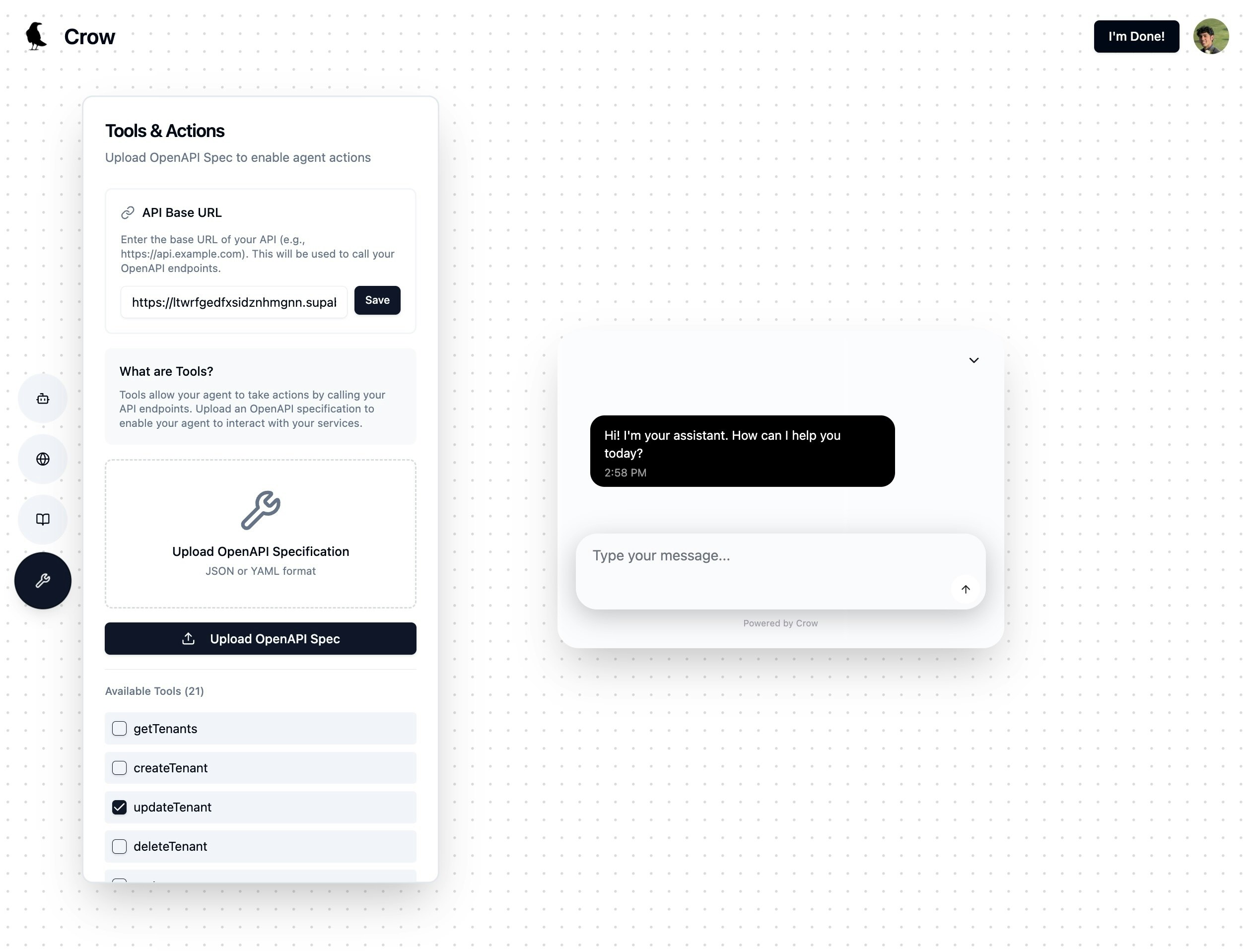
Backend Action Execution via OpenAPI: Unlike basic chatbots, Crow connects directly to your backend endpoints by parsing OpenAPI specifications. It converts your existing API endpoints into tools that the AI agent can call deterministically, enabling real backend operations rather than just frontend UI manipulation.
RAG-Powered Knowledge Integration: Train your AI agent on your website content and upload documents (from 10 to 100+) to provide contextual knowledge. Crow’s retrieval-augmented generation systems pull relevant context for accurate responses.
Custom Agent Configuration: Customize your AI agent’s tone, intent, and behavior through prompt configuration, allowing the copilot to match your product’s voice and user expectations.
Authentication Integration: Set up authentication integration to allow the copilot to take actions on behalf of users securely within your application.
How It Works
Crow’s integration follows a six-step process:
- Configure your AI agent’s personality through custom prompts
- Train the agent on your website content for contextual understanding
- Upload additional documents to expand the agent’s knowledge base
- Connect your backend by uploading your OpenAPI specification and enabling specific endpoints as tools
- Add the widget script to your application
- Set up authentication integration for user-specific actions
The platform handles tool wiring, context management, UI rendering, streaming responses, and knowledge integration. Developers add one script, and Crow manages the complexity of connecting natural language requests to backend API calls.
Use Cases
Crow can be leveraged in several practical applications:
Task Automation Through Natural Language: Users can request actions like “Create a new invoice for Client X” and have the copilot execute the workflow by calling the appropriate backend endpoints.
Simplifying Complex Application Navigation: For feature-rich applications with steep learning curves, a chat interface allows users to access deep functionality through simple conversation rather than navigating complex menus.
In-App Customer Support: Handle common queries and guide users through troubleshooting directly within your app, with the copilot able to both answer questions and perform actions to resolve issues.
Pros and Cons
Advantages
Significantly reduces development time for implementing AI copilot features by abstracting away tool wiring, context management, and UI components. The OpenAPI integration approach means existing well-documented APIs can be quickly converted into AI-callable tools.
Disadvantages
Effectiveness depends on the quality and structure of your backend APIs. Applications with well-documented OpenAPI specifications will achieve better results than those with poorly structured or undocumented endpoints. As products evolve and APIs change, the copilot’s tool mappings may require updates to maintain synchronization.
How Does It Compare?
The embedded AI copilot space includes several approaches, each serving different needs:
CopilotKit
- Type: Open-source frontend framework for React/Next.js applications
- Focus: Developer-first toolkit for building custom AI copilots with deep frontend integration
- Key Differentiator: Provides both frontend and backend action capabilities through hooks and the AG-UI protocol
- Pricing: Free open-source; Cloud hosting from free tier (100 MAUs) to \$249/month (Pro)
- Best For: Developers who want full control over copilot behavior and deep React integration
CommandBar (Command AI)
- Type: Embedded AI user assistance platform
- Focus: In-app guidance, walkthroughs, and AI-powered chat for user onboarding
- Key Differentiator: Combines AI chat with behavioral targeting and personalized nudges
- Pricing: Free tier (2,500 MAUs), Starter \$249/month, Growth \$899/month
- Best For: Product teams focused on user onboarding and in-app guidance
Voiceflow
- Type: Conversational AI design platform
- Focus: Visual builder for voice and chat agents with team collaboration features
- Key Differentiator: Drag-and-drop workflow design with multi-LLM support
- Pricing: Free starter tier, Pro \$60/month, Business \$150/month per editor
- Best For: Teams designing complex conversational flows who prefer visual tools
Dify
- Type: Open-source LLMOps platform
- Focus: Building AI applications with visual workflow orchestration and RAG
- Key Differentiator: 260+ plugins and comprehensive workflow automation capabilities
- Pricing: Free sandbox, Professional \$59/month, Team \$159/month
- Best For: Teams building various LLM applications beyond embedded copilots
Relevance AI
- Type: No-code AI agent platform
- Focus: Building task-based AI agents for business workflow automation
- Key Differentiator: Multi-agent teams and 2000+ app integrations
- Pricing: Free tier, Pro \$19/month, Team \$199/month, Business \$599/month
- Best For: Business teams automating workflows without coding
SuperAGI
- Type: Open-source autonomous AI agent framework
- Focus: Building and deploying autonomous multi-agent systems
- Key Differentiator: Concurrent agent execution, agent memory systems, and tool marketplace
- Pricing: Free (open-source)
- Best For: Developers building complex autonomous agent systems
Crow’s Position
Crow differentiates itself through its OpenAPI-first approach to backend integration. While CopilotKit requires developers to define actions in code and CommandBar focuses on user guidance, Crow automatically converts existing API endpoints into AI-callable tools through OpenAPI specification parsing. This makes it particularly suited for SaaS products with well-documented REST APIs that want rapid deployment without significant custom development.
Final Thoughts
For SaaS companies and app builders seeking to integrate an AI copilot without extensive development investment, Crow offers a streamlined approach. Its primary value lies in the speed of implementation and the direct connection to backend functionality through OpenAPI specifications. The platform handles the infrastructure complexity of building an action-oriented AI assistant, including tool wiring, context management, and UI components.
Success with Crow depends on having well-structured APIs and OpenAPI documentation. Teams with mature API architectures will find the integration straightforward, while those with legacy or undocumented systems may need to invest in API documentation first. For products where users would benefit from natural language interaction with backend functionality, Crow provides a practical path to deployment without derailing existing development roadmaps.
https://www.usecrow.org/