
Table of Contents
Overview
Ever had a brilliant app idea but lacked the coding skills, time, or budget to bring it to life? AppForceStudio is a groundbreaking platform designed to shatter those barriers. It empowers anyone—from solo founders and designers to developers seeking efficiency—to design, code, and publish real, functional apps in a matter of minutes. By leveraging the power of AI, AppForceStudio transforms your concepts into App Store-ready products, helping you go from idea to launch instantly without getting bogged down in heavy coding.
Key Features
AppForceStudio is packed with powerful features designed to accelerate the app development lifecycle. Here are the highlights:
- Text-to-App (AI Prompting): This is the core of the platform. Simply describe your app idea using natural language, and the AI will generate the user interface and underlying code automatically.
- Cross-platform (React Native/Web): Build once and deploy everywhere. The platform generates code for React Native, allowing you to publish native apps for both iOS and Android, as well as for the web, from a single project.
- Visual “Playground” Editors: Once the AI generates the initial app, you aren’t locked in. You can jump into intuitive, visual editors to tweak the design, refine the layout, and customize components to match your vision perfectly.
- Instant Apple App Store/Google Play Export: Say goodbye to complex deployment processes. AppForceStudio streamlines the final step, allowing for quick and easy exporting directly to the world’s largest app marketplaces.
How It Works
The process of creating an app with AppForceStudio is refreshingly simple and intuitive. It boils down to a few key steps:
- Describe Your Vision: Start by typing out a description of the app you want to build. You can detail features, layouts, and user flows in plain English. Alternatively, you can upload a screenshot or a wireframe of an existing design you like.
- AI Generation: The platform’s AI gets to work, interpreting your input to generate the complete user interface and the foundational code for your application.
- Refine and Customize: With the initial version ready, you can use the visual “Playground” editor to make adjustments. Drag and drop elements, change colors, modify text, and fine-tune the user experience until it’s perfect.
- Publish: Once you are satisfied with your app, you can instantly export the project for the Apple App Store, Google Play Store, or the web.
Use Cases
AppForceStudio is a versatile tool that can serve a wide range of needs. Here are some of the most common applications:
- Rapid MVP Creation for Startups: Instead of spending months and thousands of dollars on development, startups can build and launch a Minimum Viable Product (MVP) in days to test their ideas and gather user feedback quickly.
- Building Internal Business Tools: Companies can rapidly develop custom internal apps for things like inventory management, employee directories, or project tracking without needing a dedicated development team.
- Solo Founders Validating Mobile App Ideas: If you’re a solo entrepreneur, AppForceStudio provides the leverage you need to build a functional prototype, validate your concept with real users, and attract potential investors.
Pros \& Cons
Like any tool, AppForceStudio has its unique strengths and weaknesses. Here’s a balanced look at what you can expect.
Advantages
- Extremely fast “idea to app” speed: The AI-driven approach dramatically reduces development time, allowing you to go from a simple text prompt to a functional app in minutes.
- Very affordable entry price: The platform is priced to be accessible, making it a financially viable option for solo founders, small businesses, and bootstrapped startups.
Disadvantages
- Code quality may require manual cleanup: While the AI-generated code is functional, it may sometimes require manual review and refinement by a developer for optimization or complex integrations.
- Likely less flexible than custom dev for complex logic: For applications with highly intricate backend logic, unique API integrations, or very specific performance requirements, traditional custom development may still offer more control and flexibility.
How Does It Compare?
When looking at the no-code/low-code landscape, tools like FlutterFlow and Glide often come to mind. The primary difference lies in the core approach. Competitors like FlutterFlow primarily focus on a visual-first, drag-and-drop interface where you build the app piece by piece. AppForceStudio, on the other hand, uses a more aggressive “Text-to-App” AI automation model. This means your first step is describing the outcome, letting AI do the heavy lifting of initial creation, which you then refine. This makes it potentially faster for generating initial versions and prototypes.
Final Thoughts
AppForceStudio stands out as a powerful and exciting tool for anyone looking to build an app quickly and affordably. Its AI-first, text-to-app approach is a genuine game-changer, democratizing app development and putting it within reach of non-technical founders and designers. While it may not be the perfect fit for every highly complex project, it is an exceptional solution for creating MVPs, internal tools, and straightforward consumer apps. If speed and accessibility are your top priorities, AppForceStudio is undoubtedly a platform worth exploring.
Now I have comprehensive information about AppForceStudio and its competitors. Let me compile the fact-checked and revised version.
AppForceStudio
Overview
Building a mobile app traditionally requires significant coding expertise, time, and budget. AppForceStudio aims to lower these barriers by combining AI-driven development with visual design tools. The platform enables users to design, code, and publish iOS, Android, and web applications using a combination of AI prompting and drag-and-drop visual editors. AppForceStudio positions itself as a Figma-like experience built specifically for app development, allowing founders, designers, small businesses, and developers to move from concept to published app faster than traditional development approaches.
Key Features
AppForceStudio provides a range of capabilities designed to accelerate app development:
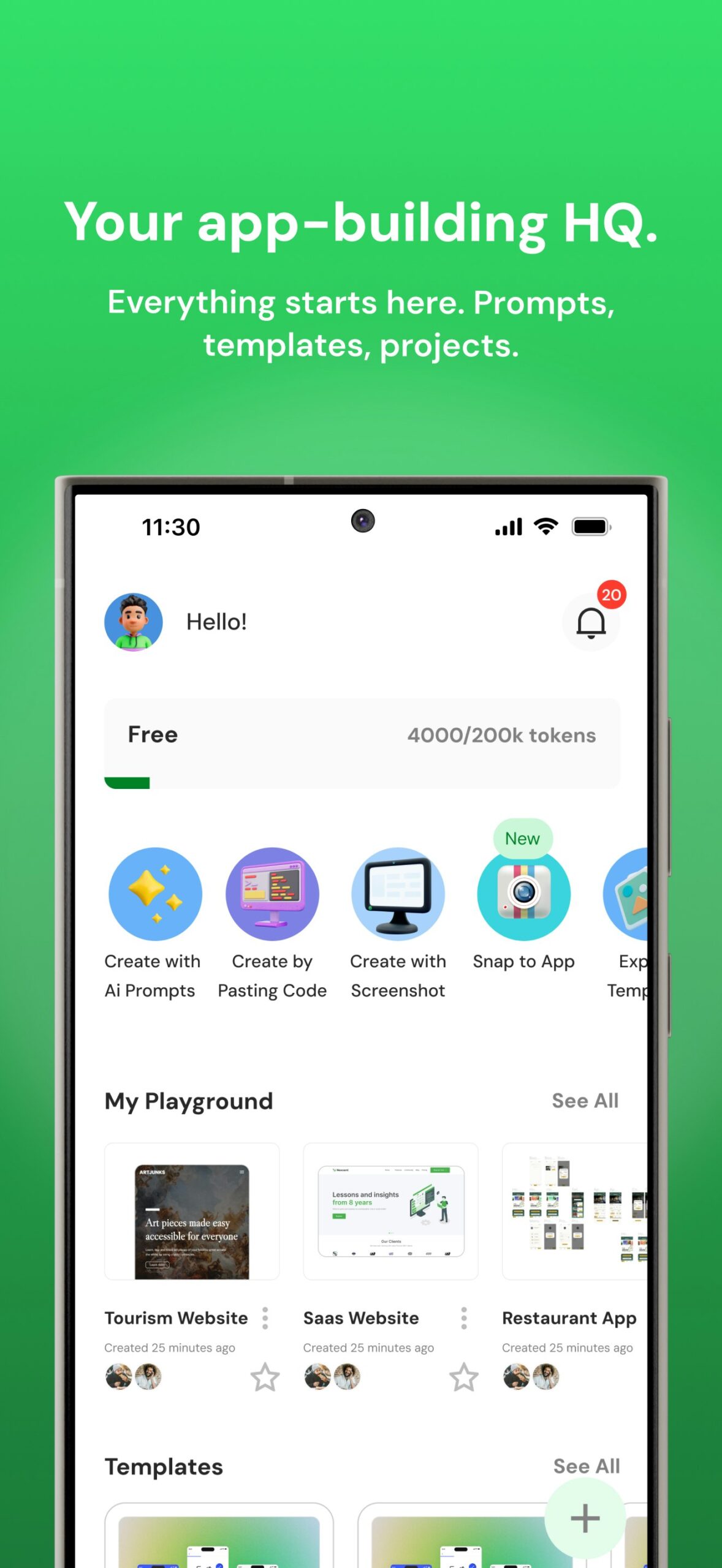
AI Prompting and Code Generation: Describe your app idea in natural language or upload screenshots and wireframes. The AI interprets your input and generates initial UI layouts and code foundations, which you can then customize through visual tools.
Visual Playground Editors: After AI generation, refine your app using intuitive visual editors. Drag and drop elements, customize layouts, modify styles, and adjust components without writing code. The platform includes storyboarding tools for mapping user flows and screen relationships.
Multi-Language Native Code Export: Export production-ready code in HTML, Kotlin, or Swift. This allows you to build once and deploy to iOS, Android, and web platforms. The exported code can be used for app store submissions or further development.
Screenshot to Code: Upload existing designs, wireframes, or screenshots and let the AI convert them into functional app components.
Real-Time Collaboration: Team members can work together on projects simultaneously, with changes syncing automatically across workspaces.
Mobile App for Development: The platform includes a mobile companion app that allows you to continue editing and previewing projects from your phone, with automatic sync to the desktop workspace.
How It Works
AppForceStudio combines AI assistance with visual development in a structured workflow:
- Start with AI prompts describing your app vision, or upload screenshots and wireframes of existing designs you want to replicate.
- The AI generates initial UI components, screens, and code foundations based on your input.
- Use the visual playground editor to customize and refine the generated output. Drag and drop elements, adjust styling, and configure navigation flows.
- Preview your app in real-time across devices to test the user experience.
- Export native code in your preferred language (HTML, Kotlin, or Swift) for deployment to app stores or web hosting.
The platform supports iterative development, allowing you to return to the AI assistant for additional features or modifications as your project evolves.
Use Cases
AppForceStudio serves several practical development scenarios:
Rapid MVP Creation: Startups can build and launch minimum viable products quickly to test market fit and gather user feedback before investing in full-scale development.
Design-to-App Conversion: Designers can transform Figma mockups and visual designs into functional applications without requiring dedicated development resources.
Internal Business Tools: Companies can build custom internal apps for inventory management, employee directories, project tracking, or other operational needs without maintaining a dedicated development team.
Educational Projects: Students and educators can learn app development concepts through hands-on building with immediate visual feedback.
Prototyping and Validation: Solo entrepreneurs and small teams can create functional prototypes to validate concepts with users and demonstrate ideas to potential investors.
Pros and Cons
Advantages
The combination of AI prompting and visual editing significantly reduces the time from concept to functional app. The platform offers accessible pricing with a free tier and paid plans starting at \$10 per month, making it financially viable for individuals and small teams. Multi-language code export (HTML, Kotlin, Swift) provides flexibility in deployment targets and allows developers to continue working with the generated code outside the platform.
Disadvantages
AI-generated code may require manual review and refinement for optimization, security hardening, or complex integrations. Applications with intricate backend logic, custom algorithms, or specialized performance requirements may still benefit from traditional development approaches. The platform is relatively new compared to established competitors, so the long-term track record and community resources are still developing.
How Does It Compare?
The no-code and low-code app development space includes several established platforms with different approaches:
FlutterFlow
- Type: Visual app builder using Google’s Flutter framework
- Focus: Native mobile app development with visual drag-and-drop interface
- Code Output: Generates Flutter/Dart code; supports code export and GitHub integration
- Key Differentiator: Deep integration with Firebase and Supabase for backend; one-click app store deployment
- Pricing: Free tier available; Basic \$39/month; Growth \$80/month (first user) + \$55/month (additional); Business plans available (pricing updated August 2025)
- Best For: Teams wanting visual development with Flutter’s cross-platform capabilities and code ownership
Glide
- Type: No-code app builder powered by spreadsheets and data sources
- Focus: Business apps and internal tools built from data
- Code Output: No source code export; apps run on Glide’s infrastructure
- Key Differentiator: Builds apps directly from Google Sheets, Airtable, or Excel; strong for data-driven business applications
- Pricing: Free tier (10 users); Explorer \$19/month; Maker \$49/month; Business \$199/month; Enterprise custom (pricing updated November 2025)
- Best For: Teams building internal tools, dashboards, and data-driven applications quickly
Adalo
- Type: No-code mobile app builder with native publishing
- Focus: Consumer and business mobile apps with drag-and-drop design
- Code Output: No direct source code export; generates native iOS and Android apps
- Key Differentiator: Component marketplace with 50+ premium components; cross-platform publishing from single builds
- Pricing: Free tier available; Starter \$45/month; Professional \$65/month; Team \$200/month; Business \$250/month
- Best For: Non-technical founders building consumer apps with native mobile experience
Draftbit
- Type: Low-code mobile app builder with React Native code export
- Focus: Visual development with full source code ownership
- Code Output: Exports clean React Native code that developers can modify
- Key Differentiator: Bridges no-code and traditional development; AI assistance with expert support; full code ownership
- Pricing: Contact for current pricing; offers various tiers based on features and team size
- Best For: Teams wanting visual development with the option to hand off to developers for advanced customization
Bolt.new
- Type: AI-powered full-stack app generator
- Focus: Browser-based app creation from natural language prompts
- Code Output: Generates complete applications with frontend, backend, and database; deployable code
- Key Differentiator: Zero setup; generates entire applications from prompts; instant deployment
- Pricing: Freemium model with usage-based pricing
- Best For: Rapid prototyping and MVPs where speed to first version is the priority
AppForceStudio’s Position
AppForceStudio differentiates itself through its combination of AI-first prompting with multi-language native code export (HTML, Kotlin, Swift). While FlutterFlow generates Flutter code and Draftbit exports React Native, AppForceStudio offers flexibility in output language, allowing teams to choose the codebase that best fits their existing stack or deployment requirements. The screenshot-to-code feature and visual storyboarding tools position it as particularly useful for converting existing designs into functional apps. With pricing starting at a free tier and paid plans from \$10/month, it offers accessible entry for individuals and small teams compared to some competitors.
Final Thoughts
AppForceStudio addresses a genuine need for faster, more accessible app development. Its combination of AI-assisted generation, visual editing, and multi-language code export provides flexibility for different types of users and deployment targets.
The platform is well-suited for founders validating ideas, designers converting mockups to functional apps, and small businesses building internal tools. For complex applications requiring sophisticated backend logic, custom algorithms, or enterprise-scale infrastructure, traditional development or more specialized platforms may still be appropriate.
With its free tier and affordable paid plans, AppForceStudio presents low risk for experimentation. Teams can test whether the AI-assisted workflow fits their needs before committing significant resources. As with any AI-generated code, thorough review and testing remain important before production deployment, but for prototyping, MVPs, and straightforward applications, the platform offers a practical path from idea to published app.