
Table of Contents
Overview
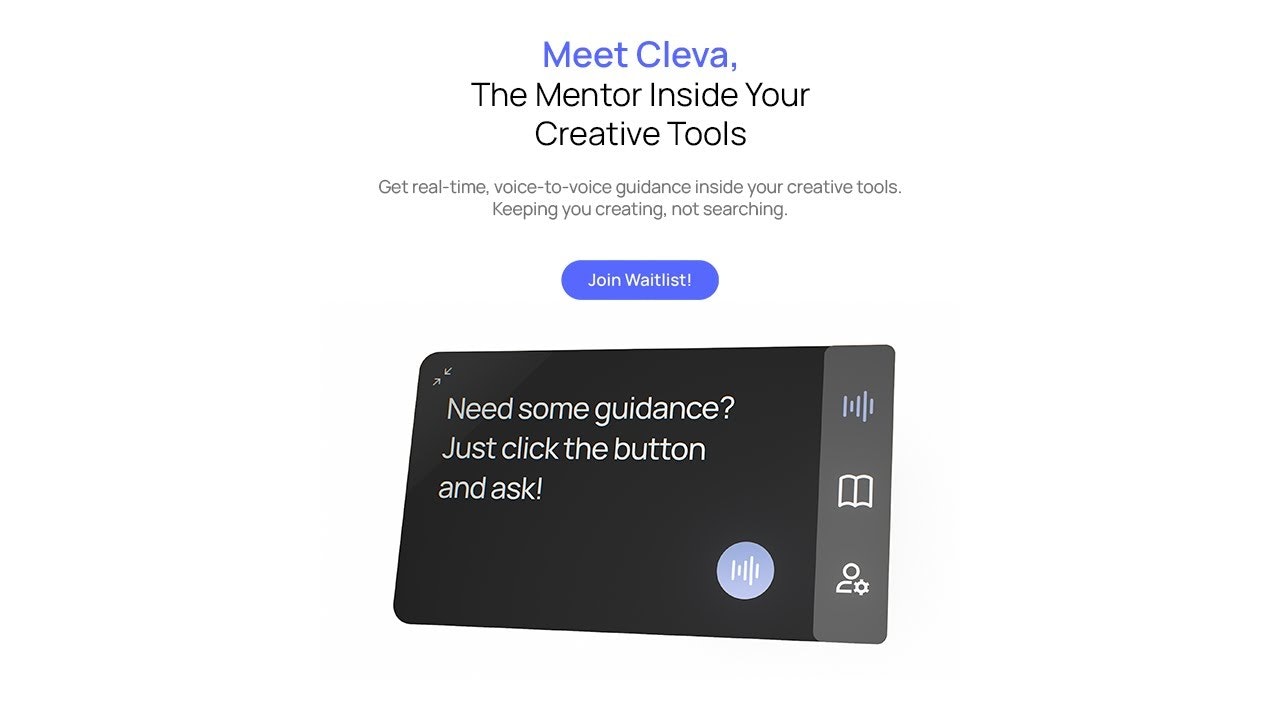
In a world saturated with AI tools that promise to create for you, Cleva.io enters the market with a refreshingly different mission: to teach you to create. Cleva is an in-app, voice-based coach designed to be your personal tutor for complex creative software. Instead of generating finished products, Cleva empowers users by providing real-time, interactive guidance within the tools you use every day, including Figma, Photoshop, After Effects, Blender, Premiere Pro, Illustrator, and DaVinci Resolve. It’s like having an expert sitting next to you, ready to answer any question, anytime, without ever having to leave your project. The platform soft-launched on Product Hunt on December 2, 2025, positioning itself as a mentor rather than an automation tool.
Key Features
Cleva packs a powerful set of features aimed at transforming how we learn and master creative applications. Here’s what makes it stand out:
- Voice-Based Interaction: Simply ask your questions out loud. This hands-free approach means you can stay focused on your canvas and keep your creative flow uninterrupted. The system uses natural language processing optimized for creative terminology across multiple software domains.
- Screen Context Understanding: This is Cleva’s secret sauce. It doesn’t just hear your words; it sees your screen, understanding your specific project, layers, selected tools, nodes, and viewport to provide truly relevant guidance. The application uses selective screen analysis focused exclusively on active creative software windows.
- Step-by-Step Interactive Guidance: Forget pausing and rewinding long videos. Cleva walks you through tasks one step at a time, directly within your software, ensuring you learn by doing. The guidance includes both auditory instructions and visual cues overlaid on your interface.
- Support for Major Creative Tools: Cleva integrates with Adobe Creative Suite (Photoshop, Illustrator, After Effects, Premiere Pro), Figma, Blender, and DaVinci Resolve, with ongoing expansion based on user voting for additional applications like Cinema 4D and Affinity Designer.
- Micro-Learning Modules: Instead of overwhelming you with lengthy tutorials, Cleva delivers information in short, digestible, interactive modules that address your immediate needs. These modules generate customized learning paths for specific tasks and track progress through multi-step workflows.
- Zero Setup Integration: The platform requires no API connections or complex configurations, with immediate functionality upon launching supported applications. Performance optimization ensures minimal resource consumption during operation.
How It Works
Getting started with this AI coach is remarkably straightforward. The process is designed to integrate seamlessly into your existing workflow:
First, you download the Cleva application—a quick, lightweight desktop application with no long setup or plugins required. As you’re working on a design or model, simply ask a voice question like, “How do I mask this layer?” or “What’s the best way to create a bevel effect here?” Cleva instantly analyzes your screen, understands the context of your question, and verbally guides you through the exact steps and clicks needed to accomplish the task. All processing occurs locally on your device to ensure privacy, with no external data transmission of project content or screen images.
Use Cases
The applications for this kind of just-in-time learning are vast. Here are a few scenarios where Cleva can be a game-changer:
- Learning New Software On the Job: Quickly get up to speed with a new program for a project without spending days watching tutorials. The platform covers both fundamental operations and professional workflows including Photoshop frequency separation, Figma component variants, Blender geometry nodes, and After Effects expressions.
- Overcoming “Blank Canvas” Syndrome: Stuck on how to start a complex 3D model? Ask Cleva for initial steps or techniques to get the ball rolling with tailored guidance based on your current project state.
- Upskilling Employees: A fantastic tool for creative teams, allowing junior members to learn advanced techniques and become self-sufficient faster. The AI database includes industry-standard methodologies with complexity scaling automatically based on detected user proficiency.
- Replacing Video Tutorials: Move beyond passive learning. Instead of watching someone else work, get interactive, personalized help that applies directly to your own project with hands-on exercises within your actual workspace.
- Just-in-Time Problem Solving: Troubleshoot common workflow issues on the spot without disrupting your creative momentum, particularly critical for complex, multi-hour workflows where interruptions compound productivity losses.
Pros \& Cons
Like any tool, Cleva has its unique strengths and potential considerations.
Advantages
- Promotes Active Learning: By guiding you instead of doing the work for you, Cleva helps you build and retain skills more effectively than passive generation tools, preserving artistic ownership and creative growth.
- Hands-Free Voice Control: Keep your hands on your mouse and keyboard. The voice interface is a major workflow enhancement for busy creatives, enabling you to maintain focus on your creative process.
- Context-Aware Help: The guidance is tailored to your specific situation, making it far more useful than generic advice from a search engine. The system interprets visual context beyond text-based queries for hyper-contextual assistance.
- Privacy-First Design: All processing occurs locally on your device with no external data transmission, ensuring your work stays private with no cloud detours or lag.
- Zero Workflow Disruption: Unlike tutorial platforms that require switching between software and browsers, Cleva embeds learning directly within live projects using isolated practice files.
Disadvantages
- System Resources: Continuously monitoring your screen and processing voice commands requires significant system resources, potentially impacting performance on older machines. Users report occasional slowdowns during processor-intensive tasks.
- Privacy Concerns: The nature of screen analysis, even if processed locally, may raise privacy concerns for users or companies working on sensitive projects. Some enterprise environments may restrict such applications.
- Limited Availability: As of December 2025, Cleva is still in early access with a waitlist system, limiting immediate availability for all interested users.
- Learning Curve for AI Interaction: Users must learn to articulate questions effectively to receive optimal guidance, which can require experimentation with phrasing and terminology.
- Tool Support Gaps: While covering major creative applications, some specialized or newer software may not yet be supported, though expansion is ongoing based on community voting.
How Does It Compare?
Cleva.io vs. ChatGPT Voice/Advanced Voice Mode
ChatGPT Voice Mode is a general-purpose conversational AI that processes voice input and provides verbal responses across any topic.
Key Differences:
- Domain Specialization: ChatGPT Voice is general-purpose with broad knowledge but no deep integration with creative software. Cleva is specifically trained on creative tool interfaces, workflows, and techniques.
- Screen Context: ChatGPT cannot see your screen or understand your specific project state. Cleva’s screen context analysis provides tool-specific, situationally aware guidance.
- Workflow Integration: ChatGPT operates as a separate application requiring manual switching. Cleva runs alongside your creative tools as a lightweight desktop application.
- Learning Focus: ChatGPT provides direct answers and can generate content. Cleva focuses on teaching skills and explaining techniques for user skill development.
When to Choose Cleva: For learning creative software, mastering complex techniques, and receiving contextual guidance within your actual project environment.
When to Choose ChatGPT Voice: For general creative brainstorming, conceptual discussions, and when you need AI to generate ideas or content rather than teach techniques.
Cleva.io vs. Adobe AI Assistant
Adobe AI Assistant is an in-app conversational AI that helps users create and edit content within Adobe Express, Photoshop, and other Creative Cloud apps.
Key Differences:
- Scope: Adobe AI Assistant focuses on content generation and automated editing tasks. Cleva focuses exclusively on skill development and guided instruction without generating content.
- Tool Support: Adobe AI Assistant only works within Adobe’s ecosystem. Cleva supports multiple vendors including Adobe, Figma, Blender, and DaVinci Resolve.
- Philosophy: Adobe’s assistant aims to automate tasks and speed up workflows through AI generation. Cleva’s mentor approach emphasizes learning and skill mastery over automation.
- Voice Interaction: Adobe AI Assistant primarily uses text-based chat interfaces. Cleva’s voice-first design enables hands-free operation.
When to Choose Cleva: When you want to learn Adobe tools deeply, prefer voice interaction, or work across multiple creative software ecosystems.
When to Choose Adobe AI Assistant: When you want AI to perform tasks automatically within Adobe applications and prioritize content generation over skill development.
Cleva.io vs. Cephable
Cephable is an accessible control app that provides voice commands, dictation, and adaptive speech controls for creative applications, focusing on hands-free operation.
Key Differences:
- Primary Function: Cephable is a voice control system for executing commands and navigating interfaces. Cleva is an educational coach that teaches techniques and provides guided learning.
- Target Audience: Cephable serves users with physical disabilities and those seeking hands-free control. Cleva targets creators learning software and upskilling their capabilities.
- AI Intelligence: Cephable uses command recognition and speech-to-text. Cleva employs advanced AI to understand creative context, diagnose user intent, and provide explanatory guidance.
- Learning Component: Cephable executes commands but doesn’t explain techniques. Cleva focuses on pedagogical effectiveness and skill retention through interactive instruction.
When to Choose Cleva: When your goal is learning creative software, understanding techniques, and building skills through guided instruction.
When to Choose Cephable: When you need hands-free control for accessibility reasons or want to execute commands quickly without learning underlying techniques.
Cleva.io vs. Traditional Video Tutorial Platforms (Udemy, YouTube)
Udemy and YouTube offer extensive libraries of pre-recorded video tutorials for creative software.
Key Differences:
- Interactivity: Video tutorials provide passive, linear learning experiences. Cleva offers active, interactive guidance directly within your project with real-time feedback.
- Personalization: Videos offer generic instruction not tailored to your specific project. Cleva’s screen context analysis provides personalized guidance based on your exact situation.
- Efficiency: Videos require searching, watching, pausing, and manually applying steps. Cleva delivers just-in-time help without breaking your creative flow.
- Retention: Passive video watching has lower skill retention compared to Cleva’s learn-by-doing approach with hands-on exercises.
When to Choose Cleva: When you need immediate, contextual help on active projects and prefer learning through doing rather than watching.
When to Choose Video Tutorials: When you want comprehensive courses on fundamental concepts, need to see complete project walkthroughs, or prefer structured learning paths.
Cleva.io vs. AI Content Generation Tools (Midjourney, DALL-E, Firefly)
AI Content Generation Tools automatically create images, designs, and creative assets from text prompts.
Key Differences:
- Purpose: Content generation tools create finished assets automatically. Cleva teaches you to create assets yourself, building your skills and creative judgment.
- Skill Development: Generation tools bypass the learning process. Cleva focuses on pedagogical effectiveness, ensuring you understand techniques and can apply them independently.
- Creative Ownership: Generated content raises questions of originality and skill. Cleva preserves your artistic ownership and helps develop your unique style.
- Workflow: Generation tools replace human creation. Cleva augments human creativity by building expertise and confidence.
When to Choose Cleva: When you want to develop genuine creative skills, build a professional portfolio, and maintain artistic ownership over your work.
When to Choose AI Generation Tools: When you need quick assets for prototypes, lack time for manual creation, or require variations for inspiration.
Final Thoughts
Cleva.io represents a significant shift in AI-assisted creativity, focusing on empowerment over automation. By acting as a personal, on-demand tutor, it bridges the gap between ambition and ability, helping users conquer the steep learning curves of professional creative software. For freelancers, students, and creative teams looking to accelerate their skills and solve problems more efficiently, Cleva is a truly innovative tool that champions the most important creator of all: you.
The platform’s philosophy—”AI shouldn’t replace creativity, it should help creators learn, grow, and master their craft”—positions it uniquely in a market saturated with automation tools. By providing contextual, step-by-step guidance without generating content, Cleva preserves creative ownership while accelerating skill acquisition.
However, potential users should consider the current limitations: the waitlist system restricts immediate access, system requirements may strain older hardware, and the learning curve for effective AI interaction requires patience. The local processing model, while privacy-friendly, means users must wait for feature updates rather than receiving cloud-based improvements automatically.
For creative teams, the ROI is compelling: reduced training time, faster upskilling of junior members, and preservation of senior artists’ time previously spent on mentorship. Individual freelancers gain independence from constant tutorial hunting and can tackle more complex projects with confidence.
Cleva.io is best viewed as a long-term investment in skill development rather than a shortcut to finished work. It shines when used consistently across projects, gradually building expertise through contextual learning. While it won’t replace formal education or years of practice, it significantly compresses the learning timeline for professional creative software.
As the platform expands its tool support and refines its AI coaching capabilities, it has the potential to become an indispensable companion for creative professionals. The key to success lies in embracing it as a mentor rather than a magic wand—engaging actively with its guidance, experimenting with techniques, and building genuine expertise through practice.
https://www.cleva.io/for-creators