
Table of Contents
Overview
In a world saturated with meetings, capturing and acting on key information has become a critical challenge. While many tools can record and transcribe your calls, Fellow 5.0 aims to redefine the entire process. Released on December 2, 2025, it’s not just another meeting bot; it’s a comprehensive meeting intelligence platform designed to give you unparalleled flexibility, privacy, and control over how you capture, summarize, and leverage your most important conversations.
With its unique approach to recording—offering both bot-based and botless capture options—and deep integration capabilities through Model Context Protocol (MCP), Fellow 5.0 positions itself as a powerful ally for teams that demand more than just a simple transcript. The platform emphasizes enterprise-grade privacy and security, making it suitable for organizations handling sensitive information.
Key Features
Fellow 5.0 is packed with features designed for the modern, security-conscious enterprise:
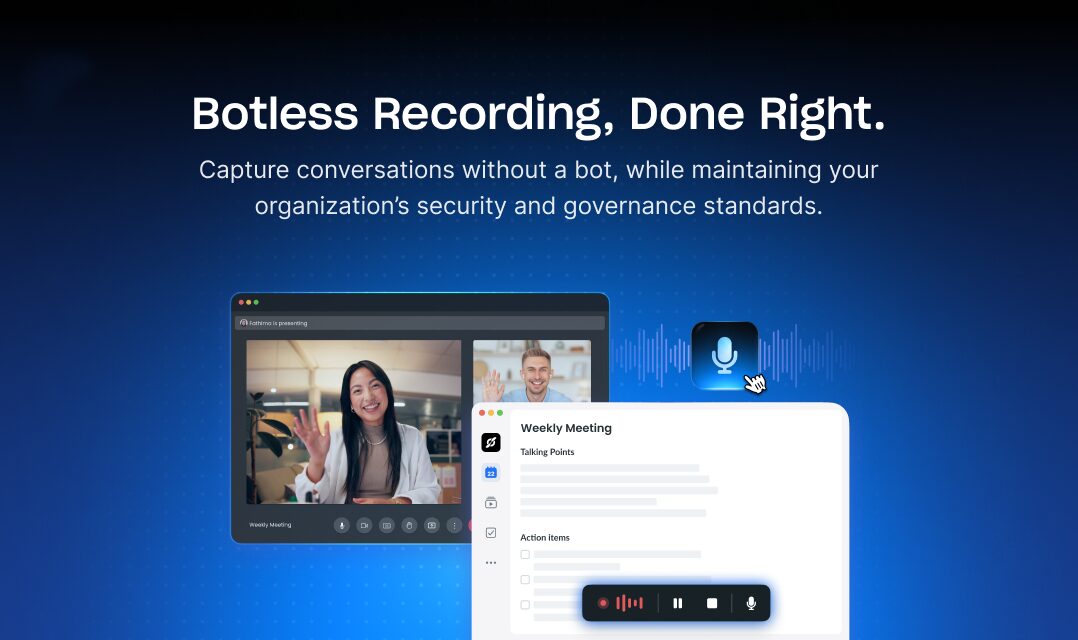
- Bot and Botless Recording Options: Enjoy the ultimate flexibility in how you capture meetings. You can invite the Fellow bot as a participant or use the “botless” option to record directly from your desktop without an extra attendee, which is perfect for in-person meetings, Slack huddles, or sensitive external calls. Botless recording captures audio only (not video) and maintains transparency for internal participants while appearing seamless to external guests.
- Zoom-Native Capture: For Zoom users, Fellow 5.0 introduces Zoom-native capture that uses Zoom’s built-in recording disclosures, providing full video and audio recording with automatic transcription and AI-generated notes without a bot joining the call. This integration provides high-fidelity recording with thoughtful privacy under admin-defined security policies.
- Custom AI Meeting Recaps: Move beyond generic summaries. Fellow allows you to customize the AI recaps using pre-built templates for various meeting types (1:1s, sales calls, project syncs) or design your own to focus on what matters most to your team, whether it’s action items, key decisions, or specific project updates. Custom templates ensure consistent, role-specific insights without manual rework.
- MCP Server Integration: Powered by the Model Context Protocol (MCP), Fellow connects your meeting intelligence to your other tools through a secure, queryable data source. This creates a unified, intelligent system where meeting notes, transcripts, and action items can seamlessly flow into tools like Claude, ChatGPT, HubSpot, Linear, or Google Drive, enabling AI assistants to fetch meeting context alongside project data for smarter decisions.
- Ask Fellow AI Chatbot: This feature acts as a personal Chief of Staff, allowing users to query their meeting data across all meetings to quickly catch up, answer specific questions, draft follow-up emails, analyze sentiment, and identify cross-meeting patterns.
- Enterprise Privacy \& Compliance: Built with security at its core, Fellow 5.0 operates under a secure and compliant framework with SOC 2, HIPAA, and GDPR certifications. Every recording (bot or botless) is encrypted, stored within Fellow’s secure infrastructure (never on local devices), and governed by admin-defined policies for retention, access, and sharing. The platform does not train AI models on customer data.
- Extensive Integrations: Natively integrates with over 50 enterprise tools including Zoom, Google Meet, Microsoft Teams, Slack, Salesforce, HubSpot, Asana, Monday.com, and more, with smarter Zapier workflows enabling automation of post-meeting tasks.
- 99 Language Support: Provides transcription and AI meeting recaps in 99 languages, significantly exceeding many competitors.
How It Works
Getting started with Fellow 5.0 is a straightforward process designed to integrate smoothly into your existing workflow.
First, the tool captures meeting audio through multiple methods. For bot-based recording, the Fellow AI bot joins your call on platforms like Zoom, Google Meet, or Microsoft Teams. For botless recording, you select “Record without bot” from your meeting note or pop-up modal in the Fellow desktop app, which captures audio directly from your device without a bot participant. For Zoom users, Zoom-native capture provides full video and audio recording using Zoom’s built-in recording disclosures.
Once the audio is captured, Fellow’s powerful AI engine processes it for highly accurate transcription and intelligent summaries with human-level accuracy. The AI generates custom recaps based on your selected templates, extracting action items, key decisions, and relevant insights automatically.
Finally, the real magic happens when it connects these insights across your organization. Through the Model Context Protocol, the key takeaways, decisions, and action items from your meeting are no longer siloed; they become part of a connected intelligence layer accessible to AI tools like Claude and ChatGPT, enriching your entire productivity stack. Zapier workflows can automatically trigger follow-ups, sync action items to project management tools, and deliver summaries to Slack or internal dashboards.
Use Cases
Fellow 5.0 is versatile enough to support a wide range of professional scenarios:
- Corporate Meeting Management: Streamline how your entire organization prepares for, runs, and follows up on meetings with collaborative agendas, pre-meeting briefs, and automated post-meeting workflows, ensuring consistency and accountability at scale.
- Automated Documentation: Eliminate the need for manual note-taking. Fellow automatically generates detailed records of discussions, decisions, and action items, saving countless hours. Transcripts, summaries, and notes remain searchable and centrally organized.
- Cross-Functional Team Alignment: Keep every team member, from engineering to marketing, on the same page. Shareable, accurate recaps ensure that even those who couldn’t attend are fully informed with context-rich knowledge.
- Secure Executive Record-Keeping: Provide a confidential and reliable way for leadership teams to document high-stakes meetings, strategic planning sessions, and board discussions with enterprise-grade security and access controls.
- Client-Facing Meetings: Use botless recording to capture valuable insights from customer calls, vendor negotiations, or candidate interviews without the potential awkwardness of a visible bot participant, while maintaining full governance and compliance.
- Ad Hoc and Informal Discussions: Capture spontaneous 1:1s, quick syncs, Slack huddles, and in-person meetings that often contain valuable decisions and next steps without scheduling formal meetings.
Pros \& Cons
Like any tool, Fellow 5.0 has its unique strengths and potential challenges.
Advantages
- High Flexibility: The choice between bot, botless, and Zoom-native recording is a significant advantage, making the tool less intrusive and more adaptable to different meeting types—from external client calls to internal strategic discussions.
- Strong Privacy Focus: The emphasis on enterprise-grade security and compliance (SOC 2, HIPAA, GDPR) makes it a trustworthy choice for organizations handling sensitive information. Admin-defined policies govern all recordings with audit trails.
- MCP Support: Integration with the Model Context Protocol makes Fellow a forward-thinking tool, ready to be part of a more connected and intelligent software ecosystem, enabling AI assistants to leverage meeting data securely.
- Transparent Internal Recording: Even botless recordings maintain transparency for internal participants, avoiding the ethical concerns of “shadow recordings” while providing discretion for external participants.
- Comprehensive Meeting Workflow: Unlike pure transcription tools, Fellow supports the entire meeting lifecycle—before (agendas, briefs), during (real-time transcription), and after (recaps, action items, automations).
- Exceptional Language Support: 99-language transcription significantly exceeds competitors like Otter.ai (3 languages).
Disadvantages
- Requires Team Adoption: To unlock its full potential for alignment and documentation, the tool needs to be adopted and used consistently across a team or organization.
- Another Tool in the Stack: For some teams, adding another subscription service to their productivity stack can be a hurdle, requiring clear justification for its value beyond existing tools.
- Desktop App Required for Botless: Botless recording requires installation of the Fellow desktop app for secure device-level audio capture, adding a technical dependency.
- Learning Curve: While the platform is user-friendly, fully leveraging custom templates, MCP integration, automations, and enterprise features requires time investment and training.
- Cost Considerations: While Fellow offers a free tier, pricing for advanced features and enterprise plans is not publicly disclosed, requiring direct engagement for budget planning.
How Does It Compare?
Fellow 5.0 vs. Otter.ai
Otter.ai is a popular AI meeting assistant focused on high-quality transcription and basic summaries with strong brand recognition.
Recording Options:
- Fellow 5.0: Bot-based, botless desktop recording, and Zoom-native capture providing ultimate flexibility
- Otter.ai: Primarily bot-based recording with OtterPilot joining calls; limited botless options
Language Support:
- Fellow 5.0: 99 languages for transcription and AI recaps
- Otter.ai: English, Spanish, and French only (3 languages)
Integration Depth:
- Fellow 5.0: MCP Server integration enables AI assistants (Claude, ChatGPT) to query meeting data directly; 50+ native integrations with deep workflow automation via Zapier
- Otter.ai: Standard integrations with calendar and communication tools; lacks MCP-level AI assistant connectivity
Meeting Workflow:
- Fellow 5.0: Comprehensive before/during/after meeting support with collaborative agendas, pre-meeting briefs, custom recap templates, and Ask Fellow chatbot
- Otter.ai: Focuses primarily on during and post-meeting transcription and summaries; lighter pre-meeting features
Privacy \& Security:
- Fellow 5.0: Enterprise-grade with SOC 2, HIPAA, GDPR compliance; does not train AI on customer data; admin-defined governance policies
- Otter.ai: Offers business security features but with less emphasis on enterprise compliance; some plans use data for model improvement
When to Choose Fellow 5.0: For enterprise security requirements, multilingual teams, botless recording needs, MCP-connected AI workflows, and comprehensive meeting lifecycle management.
When to Choose Otter.ai: For simpler transcription needs, tight integration with specific platforms (Zoom, MS Teams), and when established brand recognition matters more than advanced features.
Fellow 5.0 vs. Fireflies.ai
Fireflies.ai is an AI meeting assistant specializing in automated note-taking, transcription, and conversation analytics.
Recording Flexibility:
- Fellow 5.0: Bot, botless desktop, and Zoom-native recording options
- Fireflies.ai: Primarily bot-based recording with Fred joining calls; no native botless recording
Custom Recaps:
- Fellow 5.0: Custom recap templates with pre-built options for different meeting types; users can design role-specific, workflow-aligned templates
- Fireflies.ai: Standard AI summaries with filters and search; less customization for recap formats
AI Assistant Integration:
- Fellow 5.0: MCP Server enables Claude, ChatGPT, and other AI assistants to query meeting data securely as a data source
- Fireflies.ai: Conversation intelligence with analytics dashboards; lacks MCP-level AI assistant connectivity
Ask/Search Functionality:
- Fellow 5.0: Ask Fellow acts as Chief of Staff, answering questions across meetings, drafting emails, analyzing sentiment
- Fireflies.ai: AskFred allows searching within meetings; strong conversation analytics with topic tracking and sentiment analysis
Integrations:
- Fellow 5.0: 50+ native integrations with CRMs, project management tools; advanced Zapier automation workflows
- Fireflies.ai: Extensive integrations with Slack, Salesforce, HubSpot, and collaboration tools; strong CRM syncing
When to Choose Fellow 5.0: For botless recording requirements, MCP-connected AI workflows, enterprise governance needs, and custom recap templating.
When to Choose Fireflies.ai: For strong conversation analytics, topic tracking across meetings, and when Fred bot recording is acceptable.
Fellow 5.0 vs. Fathom
Fathom is a free AI meeting assistant focusing on simplicity and ease of use.
Pricing:
- Fellow 5.0: Freemium model with paid plans for advanced features (exact pricing not publicly disclosed)
- Fathom: Completely free for individuals with no meeting limits
Recording Options:
- Fellow 5.0: Bot, botless desktop, and Zoom-native recording
- Fathom: Bot-based recording only
Feature Depth:
- Fellow 5.0: Comprehensive meeting lifecycle management with collaborative agendas, custom templates, MCP integration, Ask Fellow chatbot, enterprise governance
- Fathom: Focused on core transcription and summary features with simplicity; less extensive workflow management
Enterprise Features:
- Fellow 5.0: SOC 2, HIPAA, GDPR compliance; admin-defined policies; RBAC; audit trails
- Fathom: Limited enterprise features; primarily designed for individual and small team use
When to Choose Fellow 5.0: For enterprise deployments, botless recording needs, comprehensive meeting management, and advanced AI assistant integrations.
When to Choose Fathom: For individuals or small teams prioritizing zero cost, simplicity, and basic transcription/summary needs.
Fellow 5.0 vs. Grain
Grain is an AI meeting recorder focused on video highlight reels and coaching workflows, particularly for customer-facing teams.
Focus Area:
- Fellow 5.0: Comprehensive meeting intelligence platform for all meeting types with enterprise governance
- Grain: Specializes in customer call recording, coaching, and creating shareable video highlight reels
Recording Options:
- Fellow 5.0: Bot, botless desktop, and Zoom-native recording
- Grain: Bot-based recording with emphasis on video capture for coaching
Key Differentiators:
- Fellow 5.0: MCP Server integration, Ask Fellow chatbot, custom recap templates, enterprise compliance
- Grain: Video clip creation, coaching workflows, deal intelligence, revenue team focus
Use Case Alignment:
- Fellow 5.0: Cross-functional teams needing meeting intelligence for all meeting types (internal/external)
- Grain: Sales, customer success, and support teams needing video coaching and deal room workflows
When to Choose Fellow 5.0: For enterprise-wide meeting management, botless recording, comprehensive governance, and MCP-connected AI workflows.
When to Choose Grain: For revenue teams focused on coaching, creating video highlights, and deal room collaboration.
Fellow 5.0 vs. Avoma
Avoma is an AI meeting assistant designed for revenue teams with strong CRM integration and conversation intelligence.
Target Audience:
- Fellow 5.0: Cross-functional enterprise teams seeking comprehensive meeting management
- Avoma: Revenue organizations (sales, customer success) needing conversation intelligence
Recording Options:
- Fellow 5.0: Bot, botless desktop, and Zoom-native recording
- Avoma: Bot-based recording with focus on customer-facing calls
Conversation Intelligence:
- Fellow 5.0: Ask Fellow chatbot for querying across meetings; general-purpose analytics
- Avoma: Deep conversation intelligence with keyword tracking, topic detection, coaching scorecards tailored for revenue workflows
When to Choose Fellow 5.0: For enterprise governance, botless recording, MCP integration, and comprehensive cross-functional meeting management.
When to Choose Avoma: For revenue teams needing specialized conversation intelligence, coaching scorecards, and revenue-specific analytics.
Final Thoughts
Fellow 5.0 is an impressive and powerful tool for any organization looking to take its meeting management to the next level. Its standout features—flexible recording options (bot, botless, Zoom-native), custom recaps, Ask Fellow AI chatbot, MCP Server integration, and strong commitment to privacy—make it a top contender for teams that need more than just a transcript.
The platform’s December 2025 launch represents a significant evolution beyond pure transcription services into comprehensive meeting intelligence. The botless recording capability, in particular, addresses a critical gap in the market: providing governance-compliant, transparent capture for sensitive meetings without visible bots. This makes Fellow uniquely suitable for client-facing calls, executive discussions, and regulatory environments where bot presence may be inappropriate.
The Model Context Protocol integration positions Fellow at the forefront of AI-connected workflows, enabling secure meeting data access for AI assistants like Claude and ChatGPT. This “connected intelligence” approach transforms meeting data from static records into active, queryable knowledge that enriches decision-making across tools.
However, prospective users should consider adoption requirements: the tool requires consistent team-wide usage to deliver maximum value, desktop app installation for botless recording, and investment in template customization and workflow setup. For organizations already using meeting tools, the value proposition must clearly justify adding another subscription.
If your team is ready to move beyond simple recording and embrace a fully integrated meeting workflow with enterprise-grade security, Fellow 5.0 is absolutely worth a look. Organizations prioritizing privacy, multilingual support (99 languages), and AI-connected workflows will find particular value. For teams satisfied with basic transcription or not requiring botless recording, simpler alternatives like Otter.ai or free options like Fathom may suffice.
https://fellow.ai/go/fellow-5-0