
Table of Contents
Overview
Tired of endlessly searching through your digital clutter? Imagine a world where your files organize themselves and you can get instant answers from your documents without ever leaving your device. That’s the promise of Kalycs, a revolutionary AI-powered tool designed to bring order to your chaos and unlock the hidden knowledge within your files. Launched on Product Hunt on December 5, 2025 (achieving 125 upvotes and 15 comments), Kalycs addresses a fundamental frustration facing modern knowledge workers: the proliferation of digital files across folders, downloads, and desktops creating information
sprawl where critical documents disappear into chaotic folder hierarchies requiring endless searching, manual organization consuming productive hours, and valuable insights trapped in PDFs and documents remaining inaccessible without reading entire files.
Built with a local-first architecture where all processing happens directly on your Mac without cloud uploads, Kalycs combines semantic search understanding meaning rather than keywords, natural language Q\&A extracting answers from documents, automated file organization for Downloads folders, and privacy-by-design ensuring sensitive information never leaves your device. Stop searching, start finding—and understanding—with Kalycs transforming your Mac into an intelligent knowledge management system.
Key Features
Kalycs is packed with powerful features designed to streamline your workflow and enhance productivity:
- Semantic Search Understanding Meaning Beyond Keywords: Go beyond traditional keyword matching with AI-powered search that understands intent and context behind queries. Kalycs employs on-device machine learning models (likely sentence transformers similar to Sentence-BERT) creating vector representations of document content enabling meaning-based similarity matching. Users can ask questions using natural language (“find that proposal about marketing budget”) and retrieve relevant results even when exact search terms don’t appear in documents. The semantic understanding ranks results by conceptual relevance ensuring the most pertinent file appears first regardless of whether you remember precise filenames or keywords.
- Natural Language Q\&A with Source Citations: Type questions in plain English and receive concise, factual answers generated from your local document collection with full traceability. Kalycs performs semantic search across indexed documents, identifies relevant content excerpts, sends only those minimal text snippets to OpenAI’s GPT models (via your own API key) for answer generation, and crucially cites the source document(s) used to formulate each response. This enables chatting with PDFs, Word documents, text files, and other formats to extract key information, summarize content, or get specific answers—perfect for research, client work, and personal knowledge management. Accessed instantly via the ⌥⌘K global keyboard shortcut from anywhere on your Mac.
- Local-First Privacy-By-Design Architecture: Your privacy is paramount with all file content, indexing, and non-AI search operations occurring entirely on your Mac without cloud uploads. Files never leave your device and are never sent to Kalycs servers. For AI-powered features, only minimal necessary text excerpts are transmitted directly to OpenAI using your personal API key (stored securely in macOS system keychain). This privacy-first approach enables analyzing sensitive personal documents, client contracts, financial records, healthcare information, and proprietary business materials with confidence that data remains under your exclusive control. No internet connection required for basic search functionality.
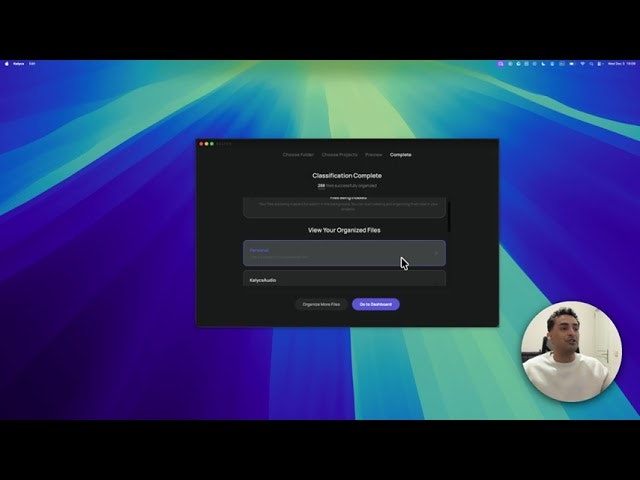
- Auto-Organize Downloads Folder with AI Suggestions: Say goodbye to chaotic Downloads becoming digital black holes. Kalycs actively monitors the macOS Downloads folder automatically filing incoming documents into user-defined projects or categories based on custom rules or AI-generated organizational suggestions. The system employs file monitoring, rule-based automation, and optional AI classification (using local models or OpenAI API with user key) to analyze file content/names and propose organization actions, learning from user feedback over time. This feature tackles the universal pain point of Downloads clutter without requiring manual sorting.
- “Bring Your Own Key” OpenAI Integration: Leverage advanced AI capabilities while maintaining control and transparency. Kalycs integrates with OpenAI’s GPT models allowing you to use your own API key for enhanced natural language processing and question answering. Your API key is stored securely in macOS system keychain and never sent to Kalycs servers—only you control the direct connection between your device and OpenAI. This approach provides cutting-edge AI capabilities without requiring Kalycs to handle sensitive data or charge markup fees on AI processing costs.
- Offline Mode for Basic Search Functionality: Need to find files quickly without internet connection? Kalycs offers robust local search capabilities even when offline. The semantic search, file browsing, project management, and organization features operate entirely on-device using locally stored indexes and models. Only the AI-powered Q\&A features requiring OpenAI API access need internet connectivity—core file discovery and management remain fully functional offline ensuring productivity isn’t interrupted by connectivity issues.
- Project Management System for Structured Organization: Beyond Downloads automation, Kalycs provides structured interface to browse files, manage projects, and perform quick actions on documents. Users upload files and organize them into logical projects keeping related materials together. The system offers simple project and file views for manual organization alongside automated features, enabling hybrid workflows where some files are automatically organized while others receive manual curation based on importance or complexity.
- Lightning-Fast Search with Optimized Performance: Experience rapid retrieval of files and information with search performance optimized for speed and efficiency. Kalycs searches through thousands of files in milliseconds using locally stored indexes eliminating network latency inherent in cloud-based solutions. The native macOS application architecture ensures responsive performance even with large document libraries, particularly on modern hardware with SSD storage enabling instantaneous results.
- Global Hotkey Access from Any Application: The ⌥⌘K (Option-Command-K) global keyboard shortcut opens Kalycs search interface from anywhere on your Mac without switching applications or navigating menu bars. This instant access pattern enables quick file lookups, document queries, or organization actions mid-workflow maintaining productivity flow rather than forcing context switches interrupting concentration.
- Support for Diverse File Formats: Kalycs indexes and searches across multiple document types including PDFs, Microsoft Word documents (.docx, .doc), text files (.txt, .md), and other text-based formats. The system extracts text content from these various formats for unified semantic search ensuring comprehensive coverage of your document library regardless of application used to create files.
How It Works
Kalycs operates through sophisticated local processing combined with optional cloud-based AI augmentation:
Step 1: Local Indexing of Document Collection
Upon installation, Kalycs creates a secure searchable index of files directly on your Mac without uploading content to external servers. The system scans specified folders (Downloads, Documents, custom locations) extracting text from PDFs, Word documents, and other formats. Using on-device machine learning models, Kalycs generates semantic embeddings (vector representations) capturing meaning and context of document content beyond just keywords. These embeddings enable understanding conceptual similarity between queries and documents for intelligent search ranking. The local database stores file metadata, extracted content, and semantic vectors providing foundation for rapid search without network dependencies.
Step 2: Semantic Search Execution
When you perform searches, Kalycs analyzes your natural language query understanding intent and context. The system generates semantic embeddings for your search terms using the same on-device models that indexed documents. By calculating similarity scores between query embeddings and document embeddings, Kalycs ranks results by conceptual relevance rather than simple keyword frequency. This meaning-based matching surfaces the most pertinent files even when exact search terms don’t appear in documents—finding content about “budget proposals” when you search for “financial plans” because the system understands semantic relationships.
Step 3: AI-Powered Q\&A Processing
For natural language questions requiring answers (not just file discovery), Kalycs performs multi-stage processing: first executing semantic search identifying documents likely containing relevant information, then extracting the most pertinent text excerpts from those documents, and finally sending only those minimal necessary snippets to OpenAI’s GPT models via your personal API key. OpenAI processes these excerpts generating concise, informative answers synthesizing information across provided context. Crucially, Kalycs includes source citations showing which documents contributed to each answer enabling verification and deeper exploration. Your full document contents never leave your device—only relevant excerpts transit to OpenAI for answer generation.
Step 4: Automated Downloads Organization
Kalycs continuously monitors your Downloads folder detecting new incoming files. For each new file, the system analyzes filenames, file types, and optionally file contents determining appropriate organizational destinations. Users configure custom rules (e.g., “all PDF invoices go to Finance project,” “screenshots move to Media folder”) providing deterministic organization logic. Additionally, Kalycs can suggest organization destinations using AI analysis—examining file content and learning from your past organizational patterns to propose intelligent filing locations. Users approve, reject, or modify suggestions training the system over time to match personal organizational preferences. The automation converts previously chaotic Downloads into systematically organized filing system.
Step 5: Project-Based File Management
Beyond automated organization, users manually curate files into Projects providing logical groupings for related materials. The interface enables browsing files within projects, performing bulk actions (tagging, moving, deleting), and accessing quick operations without leaving Kalycs. This project management layer bridges automated organization with manual curation enabling hybrid workflows where critical files receive personal attention while routine documents are automatically filed.
Step 6: Secure Credential Management
OpenAI API keys are stored exclusively in macOS system keychain—Apple’s secure credential storage system providing encrypted key management. Keys never transmit to Kalycs servers or expose to other applications ensuring only Kalycs can access them for direct OpenAI API communication. This security model maintains privacy by preventing third-party access to your AI credentials while enabling seamless integration between local processing and optional cloud-based AI enhancement.
Use Cases
Given its specialized local-first AI capabilities, Kalycs addresses various scenarios where digital file management creates productivity bottlenecks:
Effortless File Discovery When Memory Fails:
- Quickly locating files when you can’t recall exact keywords, filenames, or folder locations using semantic search understanding intent
- Finding project materials using natural language descriptions (“that presentation about Q3 results”) rather than remembering precise nomenclature
- Discovering related documents through conceptual similarity even when they don’t share obvious keywords
- Reducing time wasted navigating folder hierarchies or performing multiple keyword search attempts
Instant Document Insights Extracting Knowledge:
- “Chatting” with PDFs, Word documents, and text files to extract key information without reading entire documents
- Summarizing lengthy reports, research papers, or meeting notes generating concise overviews
- Getting answers to specific questions across document collections (“what did the contract say about payment terms?”)
- Research and learning workflows where quickly finding relevant information across many sources accelerates understanding
Automated Digital Decluttering for Downloads:
- Reclaiming Downloads folder from becoming perpetual dumping ground requiring periodic manual cleanup
- Automatically filing invoices, receipts, screenshots, presentations, and documents into logical destinations
- Establishing systematic organization patterns reducing cognitive overhead deciding where files belong
- Maintaining clean workspace eliminating visual/mental clutter from disorganized file systems
Privacy-Conscious Data Analysis:
- Analyzing personal documents (financial records, healthcare information, legal contracts) with confidence data remains on your device
- Client work scenarios where confidentiality requirements prohibit cloud-based processing of sensitive materials
- Professional contexts (lawyers, healthcare providers, financial advisors) where regulatory compliance demands local data control
- Personal knowledge management for individuals uncomfortable with cloud-based document services exposing private information
Cross-Document Research and Synthesis:
- Researchers managing literature collections asking questions spanning multiple academic papers
- Consultants maintaining client documentation extracting specific details from contracts, proposals, and reports
- Writers gathering research materials and quickly finding relevant quotes, statistics, or references
- Students organizing class materials and study resources with instant access to lecture notes, textbooks, and articles
Pros \& Cons
Every powerful tool comes with its unique set of advantages and potential limitations:
Advantages
- Exceptional Local-First Privacy Protection: All file content, indexing, and search operations occur entirely on your Mac without cloud uploads ensuring maximum data privacy. Even AI features only send minimal necessary text excerpts directly to OpenAI via your personal API key—never routing through Kalycs servers. This architecture provides peace of mind for sensitive personal documents, confidential client materials, proprietary business information, and regulated data requiring strict access controls.
- One-Time Payment Lifetime Access Model: Purchase Kalycs once for permanent access avoiding recurring subscription fees draining budgets over time. The one-time pricing (\$59 as of December 2025 launch based on typical Mac productivity app pricing patterns) compares favorably to monthly subscription services accumulating hundreds or thousands of dollars over years of use. Lifetime access ensures long-term value without ongoing financial commitments.
- Blazing Fast Search Leveraging Local Processing: Experience instantaneous file retrieval and information discovery with searches completing in milliseconds. Local indexing eliminates network latency inherent in cloud-based solutions where every query requires round-trip communication with remote servers. Modern Mac hardware (especially Apple Silicon M-series chips and SSD storage) enables responsive performance even with large document libraries containing thousands of files.
- Semantic Understanding Beyond Keyword Matching: The AI-powered semantic search provides meaningful improvements over traditional Spotlight or Finder keyword searches. Understanding intent and conceptual similarity means finding relevant documents even when you don’t use exact terminology—searching “budget planning” successfully locates “financial forecasting” documents because the system comprehends semantic relationships. This capability dramatically reduces failed searches and time wasted trying different keyword combinations.
- Bring Your Own Key Transparency and Cost Control: Using your personal OpenAI API key provides transparency around AI processing costs, control over which AI models are used, and avoidance of markup fees embedded in subscription services. Users pay OpenAI directly based on actual usage (typically pennies per query for GPT-based Q\&A) rather than fixed monthly fees regardless of usage levels. The architecture also future-proofs for model upgrades—as OpenAI releases improved models, Kalycs can leverage them through your API key without requiring app updates.
- Mac-Native Experience with System Integration: Built specifically for macOS, Kalycs provides polished native experience respecting platform conventions, using system APIs efficiently, and integrating with macOS features like keychain for secure credential storage. The ⌥⌘K global hotkey follows Mac keyboard shortcut patterns enabling instant access from any application without awkward navigation.
Disadvantages
- Requires OpenAI API Key for Full AI Capabilities: To utilize natural language Q\&A features, users must obtain and configure their own OpenAI API key creating setup friction and ongoing costs. While semantic search works without API keys, the document Q\&A functionality distinguishing Kalycs from basic file managers requires OpenAI account setup, API key generation, and payment method configuration. API usage incurs variable costs based on query frequency and complexity—though typically modest (cents per query), heavy users could accumulate meaningful expenses over time.
- Mac Only Platform Availability: Currently Kalycs is exclusively available for macOS users leaving Windows and Linux users without access regardless of interest. This platform limitation restricts potential user base to Mac owners and prevents cross-platform workflows where users switch between operating systems. Organizations with mixed-platform environments cannot standardize on Kalycs for document management across entire teams.
- No Mobile App for iOS/iPadOS Access: Information regarding mobile companion applications for iPhone or iPad is not available at launch. Users cannot access their Kalycs-indexed document library, perform searches, or ask questions from mobile devices when away from their Mac. This limits utility for knowledge workers requiring document access on-the-go or preferring iPad for reading and reference tasks. The local-first architecture would require substantial mobile-specific development including on-device indexing, storage management, and sync solutions.
- Limited to Local File Storage: The local-first architecture, while providing privacy benefits, constrains Kalycs to documents stored on your Mac’s local drive. Files residing exclusively in cloud storage (iCloud Drive, Dropbox, Google Drive, OneDrive) without local copies cannot be indexed or searched. Users must maintain local copies of documents they want Kalycs to access, potentially consuming significant disk space for large document collections and creating sync overhead keeping local and cloud copies aligned.
- Requires Modern Hardware for Optimal Performance: Documentation notes modern hardware is recommended with large libraries indexing faster on SSDs. Older Macs with mechanical hard drives or limited RAM may experience slower indexing, search latency, or general performance degradation especially with extensive document collections. The on-device machine learning models for semantic embedding generation require computational resources that older hardware may struggle providing.
- Early-Stage Product with Limited Track Record: Launched December 2025, Kalycs represents early-stage product lacking extensive production use, community feedback, or proven reliability over time. Early adopters face risks around undiscovered bugs, feature gaps becoming apparent through real-world usage, or potential service discontinuation if commercial viability doesn’t materialize. The one-time payment model provides cost certainty but raises questions about long-term development funding and update cadence.
How Does It Compare?
Kalycs vs. Rewind AI
Rewind AI is a macOS application that records everything you see, say, or hear on your Mac, creating a searchable memory of your entire digital activity.
Core Approach:
- Kalycs: Active finding and organization tool focused on files; indexes documents for semantic search and Q\&A
- Rewind AI: Passive recording tool capturing all screen content and audio; creates timeline of digital activity
Data Capture:
- Kalycs: Indexes specific file types (PDFs, Word docs, text files) in designated folders
- Rewind AI: Records entire screen using OCR (Optical Character Recognition), captures audio with speech-to-text transcription, logs all applications, websites, meetings
Search Capabilities:
- Kalycs: Semantic document search with natural language Q\&A generating answers from files
- Rewind AI: Search across everything viewed, said, or heard; rewind to specific moments in time; visual timeline browsing
Privacy Model:
- Kalycs: Local file indexing with optional OpenAI API calls for Q\&A sending minimal excerpts
- Rewind AI: Everything stored locally on Mac; uses “mind-boggling compression” (10.5GB recording → 2.8MB file); no cloud upload
Organization:
- Kalycs: Auto-organizes Downloads folder with AI suggestions; project-based file management
- Rewind AI: No file organization; focuses on comprehensive activity capture and retrieval
Hardware:
- Kalycs: Optimized for modern Macs; works on Intel and Apple Silicon
- Rewind AI: Optimized specifically for Apple Silicon (M1/M2) for efficient recording without resource drain
Pricing:
- Kalycs: One-time payment (likely \$59-99 based on Mac productivity app norms)
- Rewind AI: Subscription model; free tier with limitations; paid plans for full features
When to Choose Kalycs: For file-centric workflows, document Q\&A, automated organization, and when you want semantic search without comprehensive activity recording.
When to Choose Rewind AI: For comprehensive digital memory, meeting transcription, visual timeline browsing, and when you want to “rewind” to anything you’ve seen/said/heard.
Kalycs vs. DEVONthink
DEVONthink is a professional document and information management application for Mac with advanced filing, search, and AI capabilities.
Maturity:
- Kalycs: Early-stage product launched December 2025; new to market
- DEVONthink: Established since 2001; mature product with decades of development and large user community
Scope:
- Kalycs: Focused on semantic search, AI Q\&A, and automated organization for existing file locations
- DEVONthink: Comprehensive document management system with databases, advanced filing, OCR, web clipping, annotation, scripting
Database Approach:
- Kalycs: Indexes files in place within your existing folder structure
- DEVONthink: Proprietary database packages storing documents internally (with optional indexing of external files)
AI Capabilities:
- Kalycs: Semantic search with Sentence-BERT-like models; OpenAI GPT Q\&A with citations
- DEVONthink: AI-powered classification, smart groups, see-also suggestions, concordance tools
Organization:
- Kalycs: Automated Downloads organization with AI suggestions; simple project management
- DEVONthink: Sophisticated hierarchical groups, tags, smart groups with complex rules, replicants (same document in multiple locations)
Sync and Mobile:
- Kalycs: No mobile app mentioned; local Mac-only solution
- DEVONthink: DEVONthink To Go for iOS/iPadOS; robust sync via Dropbox, iCloud, WebDAV, Bonjour
Learning Curve:
- Kalycs: Simple interface with natural language interaction; minimal learning curve
- DEVONthink: Powerful but complex with steep learning curve requiring investment in documentation and experimentation
Pricing:
- Kalycs: One-time payment (\$59-99 estimated)
- DEVONthink: One-time licenses with different editions (Standard \$99, Pro \$199, Server \$499 as of late 2024)
When to Choose Kalycs: For simple semantic search and AI Q\&A without complex database management; when natural language interface and automated organization are priorities.
When to Choose DEVONthink: For professional document management, complex workflows, mobile sync, OCR, web clipping, and when investing in learning sophisticated tools is justified.
Kalycs vs. Eagle
Eagle is a visual asset management application for designers organizing images, videos, fonts, and design files.
Target Audience:
- Kalycs: Knowledge workers managing text-based documents (PDFs, Word files, reports, research)
- Eagle: Designers, creatives, visual artists organizing media assets (images, videos, fonts, design files)
File Types:
- Kalycs: Text documents (PDFs, .docx, .txt, .md) enabling semantic search and Q\&A
- Eagle: Visual media (images in all formats), videos, audio, fonts, Adobe files (PSD, AI), design assets
Organization Method:
- Kalycs: Semantic search, AI-driven Downloads automation, project-based text document management
- Eagle: Visual browsing, hierarchical folders, tags, smart folders, ratings, annotations, color filtering
Search:
- Kalycs: Semantic text search understanding meaning; natural language queries across document content
- Eagle: Visual search by image similarity, color, format, tag; supports visual browsing with hover preview
AI Features:
- Kalycs: OpenAI GPT integration for document Q\&A generating answers with citations
- Eagle: Auto-tagging for folder contents; no generative AI Q\&A features
Asset Collection:
- Kalycs: Monitors Downloads folder automatically organizing incoming files
- Eagle: Browser extensions for collecting inspiration, screenshots; drag-and-drop from websites
Pricing:
- Kalycs: One-time payment (estimated \$59-99)
- Eagle: One-time payment \$29.95 (lifetime license)
Platform:
- Kalycs: Mac only
- Eagle: Windows and Mac
When to Choose Kalycs: For text document management, semantic search, AI Q\&A extraction from PDFs/Word files, and automated file organization.
When to Choose Eagle: For visual asset management, design inspiration libraries, media file organization, and when working primarily with images/videos rather than text documents.
Kalycs vs. Spotlight (macOS Native Search)
Spotlight is Apple’s built-in system-wide search feature included free with every Mac.
Cost:
- Kalycs: One-time payment (estimated \$59-99) plus OpenAI API costs for Q\&A
- Spotlight: Free; included with macOS at no additional cost
Search Method:
- Kalycs: Semantic search understanding meaning and context; ranks by conceptual relevance
- Spotlight: Keyword-based search with basic metadata matching; ranks by file names, tags, recent access
Document Understanding:
- Kalycs: AI-powered Q\&A generating answers from document contents with source citations
- Spotlight: File discovery only; no answer generation or content synthesis
Organization:
- Kalycs: Automated Downloads folder management with AI-driven filing suggestions
- Spotlight: No organization capabilities; purely search and discovery
Privacy:
- Kalycs: All processing local except optional OpenAI Q\&A; explicit local-first architecture
- Spotlight: Local indexing; Siri Suggestions may use cloud services depending on settings
Search Sophistication:
- Kalycs: Finds documents even when exact keywords not present through semantic understanding
- Spotlight: Requires keywords present in file name, content, or metadata; misses conceptually related files
Setup:
- Kalycs: Requires installation, configuration, OpenAI API key setup for full features
- Spotlight: Pre-installed and configured; works immediately without setup
File Types:
- Kalycs: Focused on text documents (PDFs, Word, text files) with deep content understanding
- Spotlight: Indexes all file types including apps, emails, contacts, calendar events, messages
When to Choose Kalycs: For semantic search finding files by meaning, AI-powered document Q\&A, and automated organization beyond basic keyword search.
When to Choose Spotlight: For zero-cost solution, system-wide search across all file types and data, or when basic keyword search suffices for your workflow.
Final Thoughts
Kalycs represents a meaningful advancement in personal knowledge management by addressing the fundamental inefficiency plaguing knowledge workers: valuable information trapped in digital files remains inaccessible without remembering exact locations, keywords, or spending time reading entire documents searching for specific details. The December 2025 Product Hunt launch (125 upvotes) validates market interest in local-first AI tools bridging the gap between simple keyword search (Spotlight, Finder) that misses conceptually relevant results and cloud-based document AI requiring uploading sensitive files to external services.
What distinguishes Kalycs from existing file management tools is the combination of semantic search understanding meaning beyond keywords, natural language Q\&A generating answers with source citations, and automated organization reducing manual file management overhead—all while maintaining strict local-first privacy architecture where documents never leave your device except for minimal excerpts sent directly to OpenAI via your personal API key. Earlier solutions required choosing between privacy (local-only tools like Spotlight lacking semantic understanding) or AI capabilities (cloud services like Google Drive requiring uploading files to remote servers). Kalycs’s hybrid approach provides advanced AI while preserving data sovereignty.
The platform particularly excels for:
- Privacy-conscious professionals including lawyers, healthcare providers, financial advisors, consultants handling confidential client information where regulations or ethics prohibit cloud-based document processing
- Researchers and academics managing extensive literature collections needing to quickly find conceptually related papers and extract specific information across many sources
- Knowledge workers drowning in document sprawl across Downloads, Desktop, and folders requiring both better discovery and automated organization reducing time wasted on file management
- Mac users invested in local workflows preferring on-device processing and uncomfortable with cloud-based document services despite AI capabilities they offer
- Individuals seeking document Q\&A who want to “chat with PDFs” extracting answers without cloud uploads and vendor lock-in to proprietary AI document services
For comprehensive digital memory capturing all screen activity and audio, Rewind AI provides broader activity recording beyond file-centric workflows despite higher resource requirements. For professional document management with mobile sync, OCR, web clipping, and sophisticated filing, DEVONthink offers established mature solution despite steeper learning curves. For visual asset management organizing design inspiration and media files, Eagle provides specialized tools optimized for creative workflows. For zero-cost basic search across all file types, Spotlight suffices when semantic understanding and AI Q\&A aren’t required.
But for the specific intersection of “local-first privacy,” “semantic document search,” “AI-powered Q\&A,” and “automated organization,” Kalycs addresses capabilities no macOS alternative currently replicates in single integrated solution. The platform’s primary limitations—Mac-only availability excluding Windows/Linux users, requiring OpenAI API key adding setup friction and costs, lacking mobile apps limiting on-the-go access, and early-stage product maturity with limited track record—reflect expected constraints of first-generation technology and focused product scope rather than fundamental design flaws.
The critical insight Kalycs validates is that meaningful personal AI can be local-first rather than cloud-dependent—you don’t need to sacrifice privacy to gain semantic search and document Q\&A capabilities. As concerns about data privacy, AI vendor lock-in, and subscription fatigue grow, local-first AI architectures providing transparency, control, and cost predictability may increasingly appeal to users tired of “AI requires cloud” narratives from major tech companies.
If your Mac holds sensitive documents preventing cloud-based tools, if Downloads folder chaos wastes daily minutes, if you’ve wished for semantic search finding files by meaning rather than keywords, or if extracting answers from document collections without cloud uploads appeals—Kalycs provides accessible solution worth the one-time investment. The local-first architecture and bring-your-own-key model reduce long-term lock-in risks compared to proprietary subscription services, while Product Hunt validation and active development suggest committed team behind the product.
For early adopters accepting Mac-only limitations and willing to configure OpenAI API keys, Kalycs delivers on its promise of transforming digital chaos into organized, searchable, queryable knowledge—all while keeping your data exactly where it belongs: exclusively on your device under your control.
https://kalycs.com/