
Table of Contents
- Overview
- Key Features
- How It Works
- Use Cases
- Pros \& Cons
- How Does It Compare?
- ACE Studio 2.0 vs. Synthesizer V Studio 2 Pro (Specialized AI Vocal Synthesis)
- ACE Studio 2.0 vs. VOCALOID6 (Established Vocal Synthesis Platform)
- ACE Studio 2.0 vs. Suno AI (Text-to-Music Generation Service)
- ACE Studio 2.0 vs. Udio (AI Music Generation with Upload Feature)
- ACE Studio 2.0 vs. AIVA (AI Classical and Cinematic Composition)
- ACE Studio 2.0 vs. Soundful (Royalty-Free Background Music Generator)
- Final Thoughts
Overview
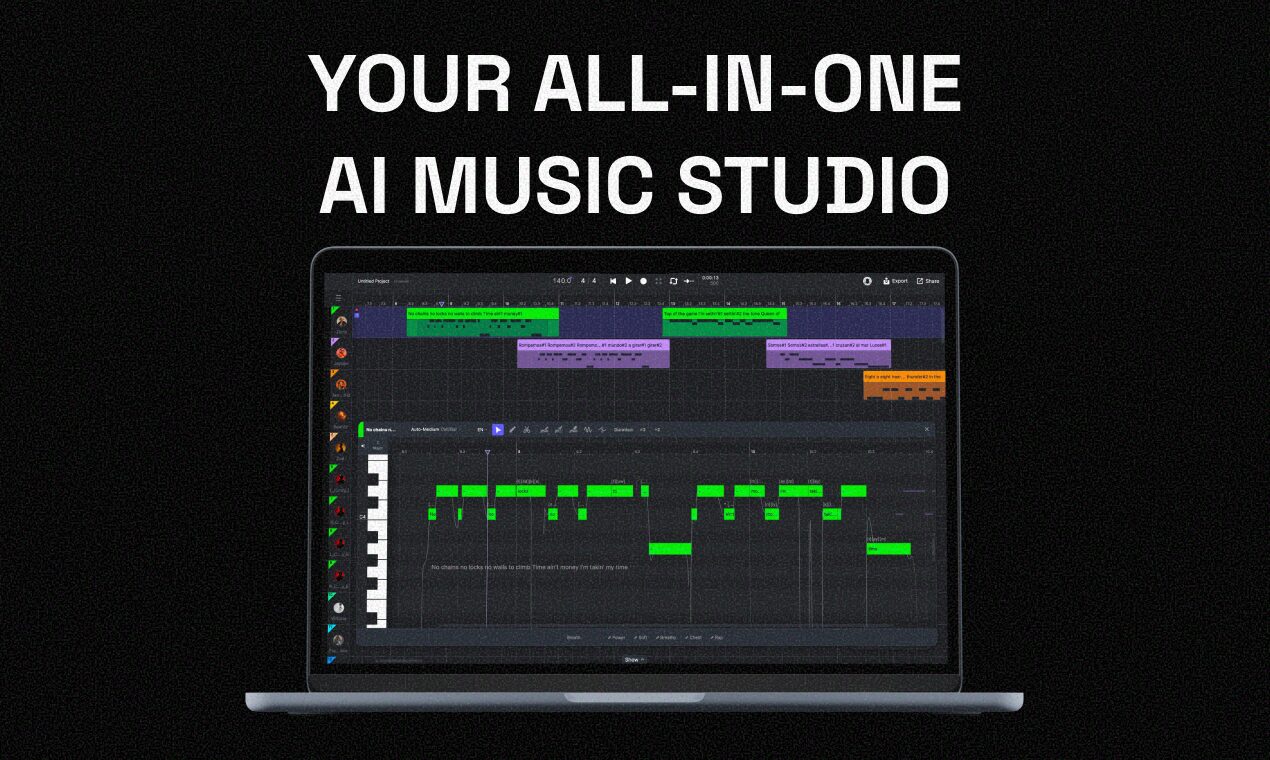
ACE Studio 2.0 is an AI-first comprehensive music workstation that unifies AI vocals, AI instruments, voice cloning, stem separation, and full-song generation enabling solo creators to move from initial musical idea to release-ready production within one unified environment. Released December 8, 2025 by Los Angeles-based Timedomain (launched on Product Hunt achieving #3 Product of the Day with 435 upvotes and 112 comments, though controversially lost 400 votes due to detected spam), ACE Studio 2.0 represents the evolution from its original AI vocal synthesis focus into a complete all-in-one AI music production ecosystem designed to keep musicians ahead in the AI era.
ACE Studio addresses fundamental barriers facing independent artists: the prohibitive cost of studio time, hiring professional vocalists and instrumentalists, and the time-consuming nature of traditional music production. Existing AI music tools typically focus on isolated capabilities requiring creators to jump between multiple platforms fragmenting workflows. ACE Studio 2.0 consolidates these functionalities into a single intuitive Canvas workspace enabling comprehensive music creation from vocal synthesis through instrument generation to full arrangement without external dependencies or traditional recording equipment.
The platform targets musicians, composers, songwriters, content creators, YouTubers, and producers seeking to streamline workflows, reduce production costs, and overcome traditional music-making limitations. By providing realistic AI-powered singing voices (140+ voice models across 8 languages), authentic AI instruments (18+ professional instruments including strings, brass, woodwinds), and generative AI kits creating samples, loops, and compositional layers, ACE Studio 2.0 democratizes high-quality music production making professional-grade tools accessible for solo artists and small teams previously excluded by resource constraints.
Key Features
- 140+ AI Voice Models Across 8 Languages: The Vocal Synth library now includes over 140 AI voice models spanning diverse vocal styles including multi-lingual Rap, Pop, Chanson, Ballad, Kids Choir, and Country. The system supports 8 languages: English, Chinese, Japanese, Korean, Spanish, Italian, French, and Portuguese enabling cross-lingual singing synthesis where any voice model can perform in any supported language regardless of the original singer’s linguistic capabilities. Users input MIDI melodies and lyrics generating realistic expressive singing performances with controllable vocal characteristics including emotion, pitch, timing, vibrato, breathiness, and articulation nuances.
- 18+ Professional AI Instruments with Articulation Control: ACE Studio 2.0 significantly expanded instrumental capabilities adding 18+ AI instruments created by professional artists. The library includes bowed strings (violins by Bob Magnuson, violas, cellos), brass (trumpet by Xiaochuan Li), woodwinds (saxophones by Bob Magnuson and Carlo Alfonso), and ethnic instruments (duduk). These AI instruments generate realistic performances from MIDI input capturing authentic playing techniques, articulation variations, and timbral characteristics of physical instruments. Users control expressive parameters creating humanized performances without traditional recording sessions or expensive sample libraries.
- Three Generative AI Kits for Creative Enhancement: Version 2.0 introduces three new Generative AI Kits transforming creative workflows: Inspire Me generates musical ideas, samples, and loops from text descriptions or musical context helping overcome composer’s block; Music Enhancer refines rough creative sketches into polished arrangements adding harmonic complexity, rhythmic interest, and production polish; Add a Layer generates complementary musical elements (bass lines, drum patterns, melodic counterpoints) enriching existing compositions. These generative tools employ AI understanding of musical theory, genre conventions, and arrangement principles assisting rather than replacing human creativity.
- Advanced Stem Splitter for Audio Isolation: The enhanced stem splitter separates mixed audio files into isolated component tracks (vocals, drums, bass, instruments) enabling remixing, vocal extraction, instrumental creation, or re-arrangement of existing recordings. Improvements in version 2.0 increased separation accuracy, reduced artifacts, and accelerated processing speed. This tool proves invaluable for producers wanting to isolate vocals for voice conversion, create karaoke tracks, remix songs, or analyze production techniques through component examination.
- Vocal-to-MIDI with Lyric Extraction: The updated vocal-to-MIDI feature converts sung or hummed melodies into editable MIDI data while simultaneously extracting lyrics phonetically transcribed from audio. Import existing vocal recordings, ACE Studio analyzes pitch contours and rhythmic patterns generating MIDI note sequences matching the original performance. This capability enables rapid melodic ideation through vocal sketching, conversion of demo vocals into refined AI performances, or transformation of voice memos into fully produced tracks without manual MIDI programming.
- Voice Cloning for Custom Vocal Models: ACE Studio 2.0 enables users creating custom AI voice models from recorded vocal samples. Upload clean vocal recordings paired with aligned lyrics, the system trains personalized voice models capturing the unique timbral identity, vocal range, and stylistic characteristics of the source voice. Once trained, custom voices perform new melodies and lyrics maintaining the original vocal identity enabling unlimited vocal performances without repeated recording sessions. This feature benefits artists wanting consistent vocal characters, producers creating synthetic singers, or content creators needing specific voice identities.
- Unified Canvas DAW-Like Interface: The redesigned Canvas workspace provides comprehensive DAW-like environment integrating all ACE Studio capabilities within single interface. Users arrange AI vocals, AI instruments, audio tracks, and MIDI sequences on timeline with familiar multi-track editing, mixing console, automation lanes, and transport controls. The unified approach eliminates constant application switching streamlining creative flow from initial composition through final mixdown. The Canvas supports non-destructive editing, version history, project templates, and collaborative workflows.
- Seamless DAW Integration via ACE Bridge Plugin: ACE Studio 2.0 connects to external DAWs (Logic Pro, Ableton Live, FL Studio, Cubase, Pro Tools) through the improved ACE Bridge plugin. This integration enables users composing in preferred DAW environments while accessing ACE Studio’s AI capabilities through plugin interface. Workflow improvements include enhanced synchronization, reduced latency, streamlined vocal rendering, and better MIDI routing. Users leverage ACE Studio’s AI while maintaining familiar production environments and existing plugin ecosystems.
- Key and Style Change Tools for Arrangement Flexibility: The platform provides intelligent transposition and style transformation tools. Key changing automatically transposes melodies, harmonies, and vocal performances to different keys maintaining musical relationships and voice model ranges. Style changing adapts arrangements across genres applying genre-specific instrumentation, rhythmic patterns, harmonic vocabularies, and production aesthetics. These tools accelerate creative exploration enabling rapid iteration across musical variations without manual re-arrangement.
- Harmony and Backing Vocal Generation: ACE Studio automatically generates harmonies and backing vocals from lead vocal lines. Users specify harmonic intervals, voicing preferences, and stylistic approaches; the system creates complementary vocal parts with intelligent voice leading, consonant intervals, and rhythmic coordination. This automated harmony generation eliminates tedious manual doubling or hiring backing vocalists enabling solo creators producing full vocal arrangements.
- Royalty-Free AI Voice Models with Commercial Licensing: ACE Studio provides extensive library of royalty-free AI voice models cleared for commercial use. Unlike sampling or hiring session singers requiring complex licensing negotiations, ACE Studio’s voices come with straightforward commercial rights enabling creators monetizing productions without ongoing royalty obligations or copyright complications. Custom trained voices maintain user ownership of generated performances.
How It Works
ACE Studio 2.0 operates through integrated workflow combining AI synthesis, traditional DAW functionality, and intelligent music generation tools:
Step 1: Project Creation in Canvas Workspace
Users begin by opening ACE Studio 2.0’s Canvas interface initializing new project. The workspace presents familiar DAW-style layout with timeline, track lanes, mixer, and transport controls. Set project tempo, time signature, and key establishing musical foundation. The Canvas accommodates multiple track types: AI vocalist tracks, AI instrument tracks, audio tracks for recorded content, and MIDI tracks for sequencing.
Step 2: Vocal Creation via MIDI and Lyrics
For AI vocal generation, create singer track selecting from 140+ voice models filtered by gender, vocal range, language, and style (Pop, Rap, Ballad, Country, etc.). Input melody through MIDI keyboard recording, drawing notes in piano roll, or importing MIDI files from external sources. Enter lyrics aligned to notes either typing directly, pasting text, or using vocal-to-MIDI feature converting sung recordings. ACE Studio’s AI engine synthesizes singing performance applying natural phrasing, pitch variation, vibrato, and emotional expression matching musical context.
Step 3: Vocal Refinement with Expression Controls
After initial synthesis, refine vocal performance through detailed expression controls. Adjust individual note parameters including pitch curves (for bends, scoops, falls), vibrato depth and speed, breathiness, vocal tension, and timing. The phonetic editor enables pronunciation correction ensuring proper lyric articulation. Expression automation curves control dynamic changes (volume swells, intensity builds) throughout performance. AI Retake functionality generates performance variations offering alternative interpretations without re-inputting data.
Step 4: AI Instrument Addition and Arrangement
Add AI instruments (strings, brass, woodwinds, ethnic instruments) creating accompaniment. Similar to vocals, input MIDI sequences defining melodies, harmonies, bass lines, or rhythmic patterns. Each AI instrument provides articulation controls (legato, staccato, tremolo, vibrato, dynamics) shaping realistic playing techniques. Layer multiple instrument tracks building full orchestrations or ensemble arrangements. The system maintains musical coherence through intelligent mixing and automatic panning suggestions.
Step 5: Generative AI Kit Enhancement
Employ Generative AI Kits enriching arrangements. Use Inspire Me generating complementary musical ideas (counter-melodies, rhythmic figures, harmonic progressions) from existing material. Apply Music Enhancer refining rough compositions adding production sophistication, arrangement density, and harmonic interest. Utilize Add a Layer generating specific instrumental or rhythmic elements (drum patterns, bass lines, pad textures) supporting existing tracks. These generative tools accelerate composition while maintaining user creative control through iterative refinement.
Step 6: Audio Import and Stem Separation
Import existing audio files (reference tracks, recorded instruments, vocal demos) into Canvas. Apply stem splitter isolating vocals, drums, bass, and instrumental components. Extracted stems become editable tracks enabling re-voicing vocals with AI models, replacing instruments, adjusting arrangements, or creating remixes. Use vocal-to-MIDI converting extracted vocals into editable MIDI and lyrics enabling transformation of existing songs into new arrangements with different vocalists, keys, or styles.
Step 7: Voice Cloning for Custom Models
For personalized vocal identities, use voice cloning feature. Upload clean vocal recordings (speaking or singing samples) with phonetic transcriptions or lyrics. ACE Studio analyzes vocal characteristics training custom AI model capturing unique timbre, range, and stylistic nuances. Training duration varies based on sample quantity and quality (typically several hours). Once trained, custom voice performs any melody and lyrics maintaining original vocal identity enabling consistent character voices across projects.
Step 8: Mixing, Automation, and Export
Complete productions using integrated mixing console. Adjust track levels, panning, and apply basic effects (EQ, compression, reverb) balancing musical elements. Automation lanes enable dynamic parameter changes throughout timeline (volume fades, effect modulation, expression variations). Export final mixes as high-quality audio files (WAV, MP3) for distribution, streaming, or further processing in external DAWs via ACE Bridge plugin. The system supports stem exports enabling separate track delivery for collaborative production or remixing.
Use Cases
Given its comprehensive AI music production capabilities, ACE Studio 2.0 addresses numerous creative scenarios:
Re-voicing Existing Songs for Covers and Reinterpretations:
- Import original song audio, use stem splitter isolating vocals, convert vocals to MIDI and lyrics via vocal-to-MIDI feature, select different AI voice model re-rendering performance with new vocal identity
- Change song gender (male to female or vice versa) exploring alternative interpretations maintaining original melody
- Create multilingual versions translating lyrics using ACE Studio’s 8-language support enabling global market reach
- Generate character-specific versions for theatrical productions, animations, or narrative content requiring consistent vocal personas
Generating Custom Vocals for Producers Without Singers:
- Producers lacking vocalist access create professional-sounding vocal performances from MIDI melodies and written lyrics eliminating recording session costs
- Test multiple vocal styles, genders, and emotional deliveries rapidly iterating until achieving desired artistic vision
- Create complete demo tracks with realistic vocals presenting songwriting ideas to collaborators, publishers, or artists
- Produce release-ready independent music maintaining full creative control without dependency on session musician availability or budgets
Changing Gender, Key, or Style of Songs:
- Transpose songs to different keys accommodating various vocal ranges or instrumental contexts through intelligent key change tools
- Transform arrangement styles converting pop songs to acoustic ballads, electronic tracks to orchestral arrangements, or hip-hop to country genres
- Experiment with gender-swapped vocals exploring how songs sound with male versus female voices informing arrangement decisions
- Create multiple versions for A/B testing audience preferences or providing variety for streaming platform algorithms
Creating Harmonies and Alternate Versions for Releases or Demos:
- Automatically generate vocal harmonies, backing vocals, and doubling tracks enriching lead vocals without hiring additional singers
- Produce alternate mixes with different vocal arrangements, instrumental configurations, or production aesthetics maximizing content output
- Create radio edits, extended versions, acoustic renditions, or instrumental versions from single master composition
- Generate stems for DJ remixes, user-generated content licensing, or synchronization opportunities requiring flexible deliverables
Rapid Prototyping for Songwriting and Composition:
- Quickly capture melodic ideas through vocal-to-MIDI feature converting hummed or sung sketches into editable sequences
- Experiment with harmonic progressions, instrumental arrangements, and vocal styles accelerating compositional iteration
- Test lyric phrasing and melodic contours with realistic AI vocals before committing to expensive recording sessions
- Generate musical examples for teaching, workshops, or academic presentations demonstrating compositional concepts
Content Creation for YouTube, Social Media, and Podcasts:
- Create custom background music, theme songs, intros, outros, and transition music perfectly matching content requirements without copyright concerns
- Produce jingles, advertisement music, or branded audio content reflecting specific messaging and emotional tones
- Generate character voices or narration vocals for animated content, educational videos, or storytelling projects
- Develop podcast intro music, segment separators, and closing themes maintaining consistent audio branding
Educational Applications for Music Theory and Production:
- Visualize harmonic relationships, melodic construction, and arrangement principles through AI-generated examples
- Students experiment with orchestration, instrumentation, and vocal arrangement without physical instrument access
- Teachers demonstrate genre conventions, stylistic characteristics, and production techniques through rapid musical example generation
- Music technology courses explore AI’s role in creative workflows, algorithmic composition, and future music production paradigms
Pros \& Cons
Advantages
- Comprehensive All-in-One Solution Eliminating Workflow Fragmentation: ACE Studio 2.0 consolidates vocal synthesis, instrument generation, stem separation, voice cloning, generative composition, and DAW functionality within unified environment eliminating constant application switching, file exports/imports, and compatibility issues plaguing multi-tool workflows. This integration accelerates creative flow enabling seamless transitions from initial ideas through final production.
- Enables Non-Singers Producing Professional-Sounding Vocal Tracks: The 140+ AI voice models with realistic synthesis eliminate dependency on hiring vocalists or possessing singing ability. Solo creators produce radio-quality vocal performances previously requiring expensive studio sessions, professional singers, and audio engineering expertise democratizing high-production vocal content.
- Significant Cost Reduction for Independent Artists: By eliminating recurring expenses for session musicians, studio rental, and vocal recording, ACE Studio 2.0 reduces music production costs dramatically. Independent artists operate with professional-grade capabilities within fixed affordable pricing (ACE Studio Artist \$398, ACE Studio Artist Pro \$528 one-time purchases) versus ongoing per-project costs of traditional production.
- Extensive Voice and Instrument Library Providing Musical Diversity: The 140+ voices spanning 8 languages with diverse styles (Rap, Pop, Ballad, Country, Kids Choir, Chanson) combined with 18+ professional AI instruments (strings, brass, woodwinds, ethnic) provide vast sonic palette enabling genre-diverse production without massive sample library investments or instrument collections.
- Voice Cloning Creates Unlimited Personalized Vocal Performances: Custom voice model training enables consistent character voices, branded artist identities, or synthetic singers performing unlimited songs maintaining recognizable vocal personality. This capability benefits content series, franchise projects, or artists building signature sounds without repeated recording availability constraints.
- Generative AI Kits Accelerate Creative Workflows: Inspire Me, Music Enhancer, and Add a Layer tools overcome composer’s block, refine rough ideas, and enrich arrangements through intelligent AI assistance. These generative capabilities complement rather than replace human creativity providing starting points, variations, and enhancements accelerating composition while maintaining artistic control.
- Cross-Lingual Capabilities Enable Global Content Creation: Any voice model performing in 8 languages enables creators producing multilingual content accessing international markets without hiring language-specific vocalists. This linguistic flexibility supports global distribution strategies, educational content, or culturally diverse artistic projects.
- Royalty-Free Licensing Simplifies Commercial Usage: Unlike sampling or hiring session musicians requiring complex rights negotiations, ACE Studio’s AI voices and instruments come with straightforward commercial licensing enabling monetization without ongoing royalty obligations, clearance complications, or copyright disputes.
Disadvantages
- Desktop Application Workflow Heavier for Casual Users: ACE Studio 2.0 operates as full desktop application requiring installation, project management, and DAW-style interface familiarity creating learning curve steeper than simple web-based music generators. Casual users wanting quick musical snippets may find the comprehensive environment overwhelming compared to streamlined text-to-music services.
- Quality Depends on Chosen AI Models and Source Audio: While ACE Studio provides professional-grade synthesis, output quality varies based on voice model selection, instrumental choice, MIDI programming skill, and source audio quality for stem separation or vocal conversion. Poorly crafted input produces mediocre results regardless of AI sophistication—quality output requires musical understanding and production competency.
- Limited Track Record as Recently Released Platform: Launched December 8, 2025, ACE Studio 2.0 represents very recent major version lacking extensive production deployment, comprehensive user reviews, or proven reliability across diverse use cases. Early adopters face potential undiscovered bugs, feature gaps, or workflow inefficiencies becoming apparent through broader usage.
- AI Instrument Articulation Controls Still Evolving: User feedback indicates AI instrument expression controls (glissando effects, advanced articulations, nuanced dynamics) remain under development compared to mature virtual instrument libraries offering granular performance shaping. Musicians requiring detailed articulation control may find current capabilities limiting versus specialized sample-based instruments.
- External Plugin Integration Adds Workflow Steps: While ACE Bridge enables DAW integration, some users report needing to bounce individual tracks when using external plugins adding steps versus native DAW instrument workflows. This friction partially undermines seamless integration promise requiring periodic exports/imports disrupting creative flow.
- Pricing Not Transparent for Ongoing Features: While one-time pricing exists (Artist \$398, Artist Pro \$528), full feature access, update policies, cloud service dependencies, or potential subscription components remain incompletely disclosed. Users cannot accurately forecast long-term ownership costs or understand monetization model fully potentially discovering unexpected limitations or fees post-purchase.
- Learning Curve for Maximizing Platform Capabilities: Users note learning curve fully utilizing ACE Studio 2.0’s depth and achieving desired sounds. The comprehensive feature set while powerful requires investment mastering voice expression controls, instrument articulations, generative kit parameters, and workflow optimization. Beginners may struggle initially before achieving professional results.
- AI Generation Quality Varies by Genre and Complexity: While ACE Studio handles mainstream genres well (Pop, Rock, Ballad), highly specialized musical styles (avant-garde classical, complex jazz improvisation, regional folk traditions), unconventional arrangements, or cutting-edge production techniques may challenge AI’s training data limitations producing less authentic results requiring manual refinement.
How Does It Compare?
ACE Studio 2.0 vs. Synthesizer V Studio 2 Pro (Specialized AI Vocal Synthesis)
Synthesizer V Studio 2 Pro by Dreamtonics is advanced AI vocal synthesizer achieving human-level naturalness in blind tests across 50 musicians leveraging deep neural network synthesis engine for life-like singing voices.
Core Focus:
- ACE Studio 2.0: All-in-one AI music workstation combining vocals, instruments, generative composition within unified production environment
- Synthesizer V: Specialized vocal synthesis engine focusing exclusively on singing voice generation with maximal vocal control and expression
Vocal Capabilities:
- ACE Studio 2.0: 140+ voice models across 8 languages with detailed expression controls, voice cloning, vocal-to-MIDI conversion
- Synthesizer V: Premium focus on vocal realism with AI Retakes, cross-lingual synthesis (sing any language regardless of original singer), extensive phonetic control, vocal mode customization
Instrumental and Composition Tools:
- ACE Studio 2.0: Integrated 18+ AI instruments, generative AI kits, stem splitter, comprehensive DAW environment
- Synthesizer V: Vocal-only focus requiring external DAW or instruments for full production; no integrated instrumental generation
Platform Availability:
- ACE Studio 2.0: Desktop application (Windows, macOS) with unified Canvas workspace
- Synthesizer V: Standalone, VST3, AU plugin, ARA support enabling seamless DAW integration (Logic, Cubase, Studio One)
Pricing:
- ACE Studio 2.0: One-time purchase Artist \$398, Artist Pro \$528 including voice library and instruments
- Synthesizer V: Studio Basic Free, Studio Pro \$89; voice databases sold separately (~\$59-\$89 each) accumulating costs with voice collection expansion
Vocal Quality and Realism:
- ACE Studio 2.0: Professional-grade AI vocals suitable for production with good expressiveness
- Synthesizer V: Industry-leading vocal realism achieving human-level naturalness ratings; superior for projects demanding maximum vocal authenticity
Workflow Philosophy:
- ACE Studio 2.0: Self-contained production environment enabling complete tracks without external tools
- Synthesizer V: Specialized vocal instrument integrating into existing DAW workflows leveraging user’s established production setup
When to Choose ACE Studio 2.0: For all-in-one music production combining vocals, instruments, and generative tools within unified environment; ideal for solo creators wanting complete self-contained solution.
When to Choose Synthesizer V: For maximum vocal realism and expression integrating into existing DAW workflows; perfect for producers prioritizing vocal quality above integrated production features.
ACE Studio 2.0 vs. VOCALOID6 (Established Vocal Synthesis Platform)
VOCALOID6 by Yamaha is comprehensive vocal synthesis software featuring groundbreaking VOCALOID:AI engine producing natural expressive singing voices with compatibility for all VOCALOID3+ voicebanks.
Platform Maturity:
- ACE Studio 2.0: Recently launched December 2025; early-stage platform with limited production track record
- VOCALOID6: Established platform with 4-year development since previous version; decades of VOCALOID legacy dating to 2003 with extensive user community
AI Technology:
- ACE Studio 2.0: Modern AI synthesis leveraging contemporary deep learning for vocals, instruments, and generative composition
- VOCALOID6: VOCALOID:AI synthesis engine using deep learning analyzing singing characteristics (tone, expression) of real vocalists; frequency-domain concatenative synthesis architecture
Voice Library:
- ACE Studio 2.0: 140+ voice models across 8 languages with integrated royalty-free licensing
- VOCALOID6: Compatible with all VOCALOID3+ voicebanks providing massive voice library accumulated over platform generations; VOCALO CHANGER converts user’s singing to VOCALOID voices
Production Scope:
- ACE Studio 2.0: All-in-one workstation with AI instruments, generative kits, stem separation, voice cloning, DAW environment
- VOCALOID6: Focused vocal synthesis requiring external DAW for full production; includes Cubase AI music production software bundle
Vocal Expression Features:
- ACE Studio 2.0: Expression controls for vibrato, breathiness, timing, pitch curves, AI Retakes for variations
- VOCALOID6: Advanced editing tools visualizing notes, waveforms, pitch with curved lines; TAKE functionality for doubles, harmonies, layering techniques; Attack/Release controls
DAW Integration:
- ACE Studio 2.0: ACE Bridge plugin connecting to external DAWs; standalone Canvas interface
- VOCALOID6: ARA2 (Audio Random Access) support for seamless integration with compatible DAWs; bundled Cubase AI for immediate production capability
Pricing:
- ACE Studio 2.0: Artist \$398, Artist Pro \$528 one-time purchase
- VOCALOID6: Software typically \$225; individual voicebanks sold separately requiring ongoing investment building voice collection
Community and Resources:
- ACE Studio 2.0: Emerging community with developing tutorials and user base
- VOCALOID6: Massive global community with extensive tutorials, forums, third-party tools, decades of accumulated knowledge base
When to Choose ACE Studio 2.0: For comprehensive all-in-one AI music production with integrated instruments and generative tools; ideal for creators wanting self-contained modern AI workflow.
When to Choose VOCALOID6: For established platform with vast voice library, proven reliability, extensive community support; perfect for producers investing in long-term vocal synthesis ecosystem with compatibility legacy.
ACE Studio 2.0 vs. Suno AI (Text-to-Music Generation Service)
Suno AI is text-to-music generation platform creating complete songs with vocals and instrumentals from simple text prompts; version 4.5+ supports 1,200+ genres, 8-minute tracks, 44.1kHz studio-quality audio.
Core Approach:
- ACE Studio 2.0: Traditional production workflow requiring MIDI input, lyric entry, arrangement decisions enabling detailed creative control
- Suno AI: Prompt-based generation creating complete songs from text descriptions (genre, mood, theme); minimal user control over musical details
User Control Level:
- ACE Studio 2.0: Granular control over every note, lyric, expression parameter, instrument articulation, arrangement structure enabling precise artistic vision
- Suno AI: High-level control through text prompts, genre selection, style tags; limited ability adjusting specific musical elements post-generation
Production Workflow:
- ACE Studio 2.0: DAW-style production requiring musical knowledge, MIDI programming, arrangement skills building tracks incrementally
- Suno AI: Instant song generation in seconds requiring only text description; extend, remix, or regenerate entire songs with prompt modifications
Target Users:
- ACE Studio 2.0: Musicians, producers, composers wanting hands-on creative control and traditional production workflows enhanced by AI
- Suno AI: Content creators, non-musicians, rapid prototypers needing complete songs instantly without musical knowledge or production skills
Platform Access:
- ACE Studio 2.0: Desktop application (Windows, macOS) requiring installation and project management
- Suno AI: Web-based and mobile app (iOS, Android) enabling music creation anywhere with internet connection
Output Customization:
- ACE Studio 2.0: Iterate on same composition refining vocals, adjusting instruments, modifying arrangements maintaining consistent project evolution
- Suno AI: Generate multiple variations regenerating entire songs; limited ability editing specific sections without full regeneration
Pricing:
- ACE Studio 2.0: One-time purchase Artist \$398, Artist Pro \$528
- Suno AI: Free tier (50 credits/day, 10 songs); Pro \$10/month (2,500 credits); Premier \$30/month (10,000 credits); commercial use requires paid tiers
Commercial Licensing:
- ACE Studio 2.0: Royalty-free commercial use for generated content
- Suno AI: Commercial licensing available on Pro/Premier plans; specific usage rights depend on subscription tier
Creative Process:
- ACE Studio 2.0: Composition-focused enabling musicians expressing specific artistic visions through detailed musical decisions
- Suno AI: Discovery-focused enabling experimentation generating diverse musical ideas through prompt variations and AI creativity
When to Choose ACE Studio 2.0: For detailed creative control over musical composition, vocal performance, and arrangement; ideal for musicians wanting traditional production workflows augmented by AI capabilities.
When to Choose Suno AI: For instant complete song generation from text prompts without musical knowledge; perfect for rapid content creation, inspiration, or non-musicians needing background music quickly.
ACE Studio 2.0 vs. Udio (AI Music Generation with Upload Feature)
Udio is AI-powered music generation platform creating songs from text prompts with capabilities uploading custom melodies for AI enhancement; supports custom lyrics, genre mashups, track extension, stem downloads.
Generation Approach:
- ACE Studio 2.0: MIDI-based composition with AI synthesis of vocals and instruments; user defines exact melodies, harmonies, rhythms through traditional sequencing
- Udio: Prompt-based AI generation creating music from text descriptions; upload feature enables AI building upon user-provided melodies
User Input Method:
- ACE Studio 2.0: Traditional DAW workflow with piano roll, MIDI editing, lyric alignment, expression automation requiring musical literacy
- Udio: Natural language prompts describing genre, mood, style; upload audio clips for AI interpretation and extension; minimal musical knowledge required
Vocal Control:
- ACE Studio 2.0: 140+ specific voice models with detailed performance parameters (vibrato, breathiness, pitch, timing); voice cloning for custom models
- Udio: AI-generated vocals matching prompt descriptions; less control over specific vocal characteristics or consistent voice identity across projects
Workflow Structure:
- ACE Studio 2.0: Linear traditional production building arrangements track-by-track with mixing console and automation
- Udio: Iterative generation extending clips into sections (intro, verse, chorus, outro); remix feature creating variations; build songs incrementally through section generation
Instrument Generation:
- ACE Studio 2.0: 18+ specific AI instruments (strings, brass, woodwinds) with articulation control and MIDI-based performance programming
- Udio: Holistic instrumental generation as part of full-song creation; instruments emerge from AI interpretation rather than explicit user programming
Platform Type:
- ACE Studio 2.0: Desktop application requiring installation with offline capability and project file management
- Udio: Web-based platform accessible through browser; mobile-friendly interface; requires internet connection
Pricing:
- ACE Studio 2.0: One-time Artist \$398, Artist Pro \$528
- Udio: Free plan (10 songs/day, limited features); Standard plan \$10/month (1,200 generations/month, commercial use); Pro plan \$30/month (3,600 generations/month, stem downloads)
Output Downloads:
- ACE Studio 2.0: Export mixed audio or individual track stems for external DAW processing
- Udio: Download songs as audio/video files; Pro tier includes stem downloads (vocals, drums, bass, other) for detailed post-production
Creative Philosophy:
- ACE Studio 2.0: Composer-centric enabling musicians implementing specific artistic visions through detailed musical control
- Udio: Collaborative AI partnership where users guide direction through prompts and uploads while AI contributes creative interpretation and generation
When to Choose ACE Studio 2.0: For traditional music production workflows with detailed control over every musical element; ideal for composers and producers wanting specific artistic outcomes through hands-on creation.
When to Choose Udio: For rapid AI-driven song generation from descriptions or uploaded melodies without detailed production work; perfect for quick content creation, inspiration, or experimenting with AI musical interpretation.
ACE Studio 2.0 vs. AIVA (AI Classical and Cinematic Composition)
AIVA (Artificial Intelligence Virtual Artist) is AI composer specializing in classical, symphonic, and cinematic music recognized by SACEM; creates emotional soundtracks for films, commercials, games, trailers.
Musical Focus:
- ACE Studio 2.0: Broad contemporary music focus covering Pop, Rap, Rock, Ballad, Country with vocal-centric production
- AIVA: Specialized classical, symphonic, cinematic, orchestral music; also supports rock, pop, jazz, ambient, ethnic styles (Indian, Chinese); instrumental-focused compositions
Target Market:
- ACE Studio 2.0: Independent musicians, songwriters, content creators producing vocal-driven contemporary music
- AIVA: Film composers, game developers, advertising agencies, content producers needing background scores and cinematic soundtracks
Creative Control:
- ACE Studio 2.0: MIDI-based composition with detailed note-level control, vocal expression, instrument articulation shaping
- AIVA: Preset-based generation using curated style templates (classical, cinematic genres); upload influence tracks guiding AI toward similar musical characteristics
Vocal Capabilities:
- ACE Studio 2.0: Core strength with 140+ AI singing voices, voice cloning, multilingual support, detailed vocal performance control
- AIVA: Instrumental-only focus; no vocal synthesis capabilities requiring external solutions for sung content
Composition Process:
- ACE Studio 2.0: User composes melodies, harmonies, arrangements explicitly through MIDI programming and lyric writing
- AIVA: AI generates compositions based on learned patterns from classical music corpus (Bach, Beethoven, Mozart); uses deep learning and reinforcement learning detecting musical regularities
Track Duration:
- ACE Studio 2.0: Unlimited length determined by user’s arrangement and project scope
- AIVA: Generates short compositions up to 3 minutes; Music Engine commercial product creates various styles within duration limit
Recognition and Rights:
- ACE Studio 2.0: Commercial licensing for generated content; Timedomain as developer/provider
- AIVA: World’s first AI composer recognized by music society (SACEM); registered composer holding copyright for music it creates; published composer with studio albums
Pricing:
- ACE Studio 2.0: One-time Artist \$398, Artist Pro \$528
- AIVA: Free tier (limited functionality); Standard ~\$15/month; Pro ~\$49/month enabling commercial use and copyright ownership
Output Application:
- ACE Studio 2.0: Complete song production with vocals and instruments for music releases, demos, content creation
- AIVA: Background scores, soundtracks, cinematic music for visual media, games, advertising requiring instrumental compositions
When to Choose ACE Studio 2.0: For vocal-driven contemporary music production across Pop, Rock, Rap, Ballad genres; ideal for songwriters and musicians creating complete songs with singing.
When to Choose AIVA: For classical, symphonic, cinematic instrumental compositions for film, games, advertising; perfect for content producers needing background scores without vocals.
ACE Studio 2.0 vs. Soundful (Royalty-Free Background Music Generator)
Soundful is AI music generator creating unique royalty-free background music for videos, streams, podcasts using Song Synth technology; offers 50+ templates across genres (EDM, Chill Beats, Meditation) with tempo and key customization.
Primary Use Case:
- ACE Studio 2.0: Full song production with vocals and instruments for music releases, artistic projects, detailed compositions
- Soundful: Background music generation for content creation (videos, podcasts, streams) requiring instrumental tracks without vocals
Creative Depth:
- ACE Studio 2.0: Comprehensive production tools enabling detailed musical decisions, arrangement control, vocal performance shaping
- Soundful: Template-based generation with high-level parameters (genre, mood, tempo); limited detailed musical control prioritizing speed over customization
Vocal Capabilities:
- ACE Studio 2.0: 140+ AI singing voices with extensive vocal synthesis and voice cloning capabilities
- Soundful: Instrumental-only; no vocal generation features
Platform Type:
- ACE Studio 2.0: Desktop application with full DAW environment requiring installation and project management
- Soundful: Web-based platform generating tracks instantly in browser; mobile-friendly interface
Output Flexibility:
- ACE Studio 2.0: Export mixed audio or stems; integrate with external DAWs; unlimited track length
- Soundful: Download MP3/WAV formats; STEM packs (Premium/Pro plans) for advanced editing; template-defined length
Pricing:
- ACE Studio 2.0: One-time Artist \$398, Artist Pro \$528
- Soundful: Free Standard (personal projects); Premium ~\$10/month (social media creators); Pro plan for business use with enhanced features
Target Audience:
- ACE Studio 2.0: Musicians, songwriters, producers creating artistic music with vocals and detailed arrangements
- Soundful: Content creators, YouTubers, podcasters, streamers needing background music quickly without musical expertise
Commercial Licensing:
- ACE Studio 2.0: Royalty-free commercial use of generated music
- Soundful: Royalty-free tracks for various applications; licensing tiers accommodate different commercial use cases
Musical Complexity:
- ACE Studio 2.0: Supports complex arrangements, vocal harmonies, instrumental layering, detailed expression
- Soundful: Simplified instrumental loops and tracks optimized for background usage rather than foreground musical focus
When to Choose ACE Studio 2.0: For creating complete songs with vocals and detailed musical control for artistic releases or complex productions.
When to Choose Soundful: For instant background music generation for content creation (videos, podcasts, streams) prioritizing speed and simplicity over detailed musical composition.
Final Thoughts
ACE Studio 2.0 represents significant advancement in AI music production technology by consolidating previously fragmented capabilities—vocal synthesis, instrument generation, stem separation, voice cloning, generative composition, and DAW functionality—within unified comprehensive workstation. The December 8, 2025 release demonstrates Timedomain’s vision transforming solo creators into complete production teams capable of moving from initial musical concept to release-ready tracks without traditional recording infrastructure, session musicians, or expensive studio time. For independent artists, content creators, and songwriters frustrated by production barriers—cost, skill requirements, resource access—ACE Studio 2.0 provides genuinely democratizing solution making professional-grade music creation accessible regardless of financial resources or formal training.
The integration within unified Canvas workspace creates synergistic value exceeding individual tool capabilities. While standalone vocal synthesizers (Synthesizer V), text-to-music generators (Suno, Udio), or specialized composers (AIVA) excel within narrow domains, ACE Studio 2.0 uniquely combines comprehensive production ecosystem eliminating constant application switching, format conversion, or workflow fragmentation. This holistic approach addresses music creation systematically from initial composition through vocal performance, instrumental arrangement, generative enhancement, mixing, and final export treating production as integrated creative journey rather than disconnected technical tasks.
The platform particularly excels for:
Solo Musicians and Independent Artists producing complete tracks without hiring vocalists or instrumentalists while maintaining detailed creative control over every musical element enabling professional output matching artistic vision precisely
Content Creators and YouTubers requiring custom music, theme songs, character voices, or background scores perfectly matching content requirements without copyright concerns, royalty obligations, or licensing complications
Songwriters and Composers rapidly prototyping musical ideas through realistic vocal and instrumental mockups testing arrangements, lyrics, and melodies before committing to expensive recording sessions accelerating creative iteration
Music Producers experimenting with vocal styles, gender variations, language versions, or arrangement alternatives exploring creative possibilities impossible with traditional recording constraints or budgets
Educational Institutions teaching music production, composition, and arrangement providing students access to professional-grade synthesis, instrumentation, and production workflows without physical instrument investments or recording equipment
For users requiring instant complete songs from text prompts without musical knowledge, Suno AI’s prompt-based generation delivers unmatched speed and simplicity eliminating composition entirely through AI creativity. For maximum vocal realism integrating into established DAW workflows, Synthesizer V Studio 2 Pro’s specialized synthesis achieves human-level naturalness surpassing broader platforms. For established platform maturity with vast voice library and decades of community resources, VOCALOID6’s legacy ecosystem provides proven reliability and extensive voicebank compatibility. For classical and cinematic orchestral compositions, AIVA’s specialized focus on symphonic music serves film scoring and game soundtrack requirements ACE Studio doesn’t prioritize.
But for the specific intersection of “comprehensive AI music workstation,” “integrated vocals, instruments, and generative tools,” and “unified production environment,” ACE Studio 2.0 addresses capabilities no fragmented alternative combination replicates efficiently. The platform’s primary limitations—recently-launched status lacking extensive production validation, desktop-only workflow heavier than web-based generators, quality variability depending on user skill and model selection, and incomplete pricing transparency regarding long-term features—reflect expected constraints of ambitious software pioneering new paradigm in AI-assisted music production consolidating traditionally separate domains.
The critical value proposition centers on workflow unification and creative empowerment: if you regularly produce music requiring vocals, instruments, and complete arrangements; if traditional production costs or resource access limits creative output; if maintaining detailed artistic control while leveraging AI assistance appeals; or if streamlined workflow eliminating multiple applications and format conversions increases productivity—ACE Studio 2.0 provides compelling solution worth serious consideration.
The evolution from original AI vocal synthesis focus into comprehensive music workstation positions ACE Studio 2.0 as reference implementation for next-generation integrated AI production environments. As AI music capabilities mature, fragmented tool ecosystems requiring constant context-switching will disadvantage versus unified platforms enabling seamless creative flow. ACE Studio’s architecture anticipates this trajectory providing foundation for continuous capability expansion through software updates, model improvements, and feature additions without platform migration disruptions.
For early adopters accepting recently-launched software tradeoffs (limited track record, evolving feature completeness, potential workflow refinements), ACE Studio 2.0 delivers on transformative promise: empowering solo creators operating as complete production teams creating professional-quality music from idea to release within single environment—democratizing high-end music production previously reserved for well-funded studios or established artists with extensive collaborator networks.
https://acestudio.ai/