

Table of Contents
Overview
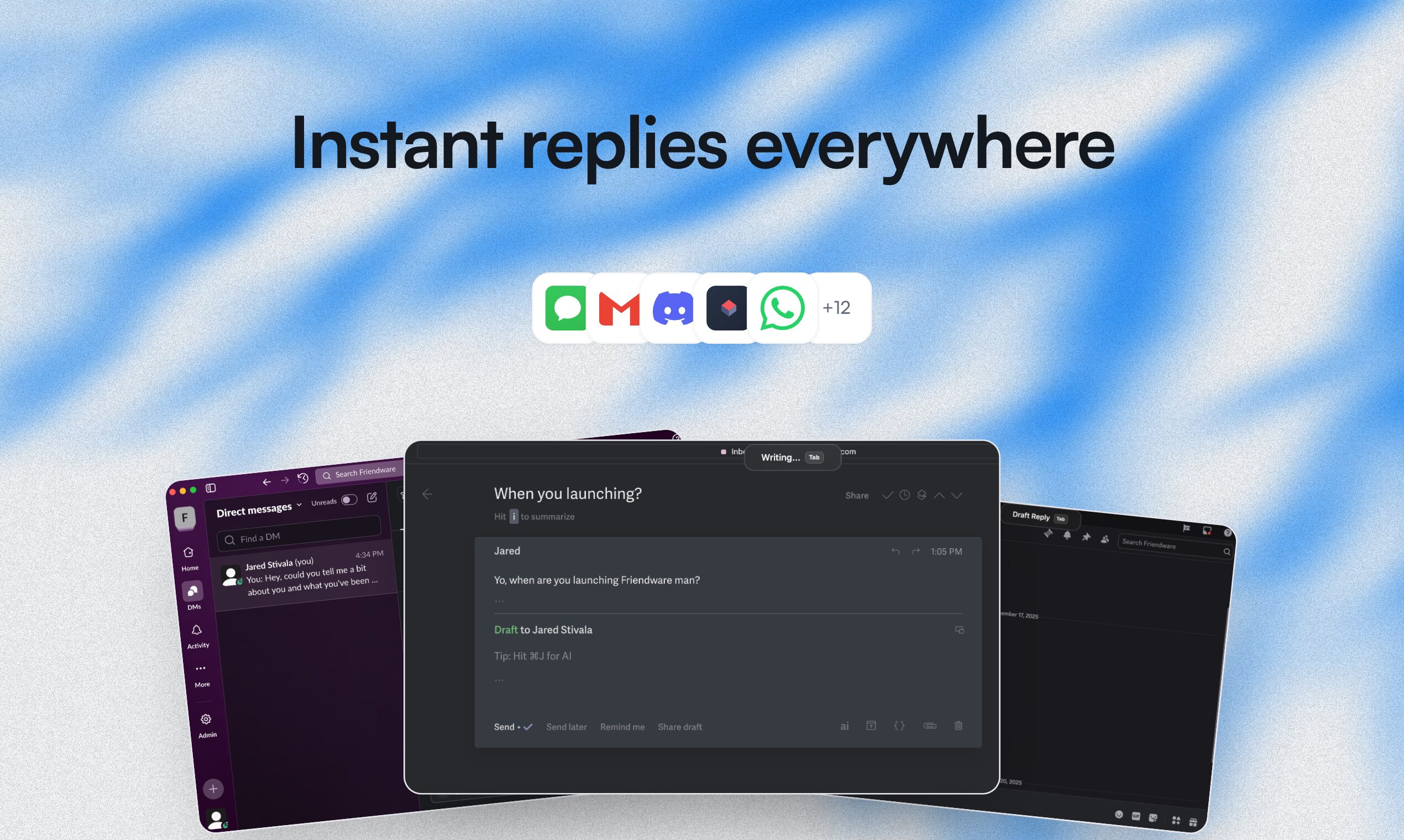
The typical workflow for leveraging AI assistance in 2026 involves constant interruption—pausing current tasks to open ChatGPT or Claude, explaining context through copied text, waiting for responses, then manually transferring results back into work applications. This cycle breaks concentration and creates friction that reduces AI’s practical utility despite its capabilities. Friendware, launched on Product Hunt in late December 2025 with 192 upvotes ranking 30th for the week, attempts to eliminate this friction through a macOS-native AI assistant integrating directly into the operating system. Built by independent developer Jared Stivala, Friendware implements universal “tab-to-complete” functionality accessible across any application—email clients, messaging apps, document editors, social media, terminals—enabling instant AI assistance through a single Tab keypress without switching contexts, explaining situations, or manually transferring data. The system reads visible screen content understanding current context, generates relevant completions or suggestions matching user writing style, and delivers results inline maintaining workflow continuity versus forcing application switching.
Key Features
- Universal Tab-to-Complete Across All macOS Apps: Press Tab in any application to trigger AI-powered text completion, response suggestions, or action recommendations without leaving current workspace. Functions identically whether composing emails in Mail, chatting in Slack, writing documents in Notes, tweeting on social media, or coding in terminal environments.
- Screen-Aware Contextual Understanding: Analyzes visible on-screen content including current conversation threads, document text, webpage content, and application state to understand context without requiring users to manually explain situations, copy relevant information, or provide background prompts before receiving assistance.
- Personalized Tone and Style Adaptation: Learns individual writing patterns including formality levels, vocabulary choices, sentence structure, and communication style across different contacts and contexts. Generates suggestions matching how users naturally communicate with specific people—casual with friends, professional with colleagues, technical with developers.
- Instant Response Generation for Communication: Dramatically reduces message composition time from approximately 45 seconds for manual typing to under 5 seconds for AI-assisted completion according to product claims, particularly valuable for repetitive communications like customer support, email responses, or social media engagement.
- Proactive Intelligent Suggestions: Moves beyond reactive “request-response” AI interaction by anticipating needs based on context, offering relevant suggestions without explicit prompting, identifying automation opportunities, and surfacing helpful actions aligned with current tasks maintaining flow state.
- Founding Member Lifetime Access: Early adopters during launch period receive lifetime access without recurring subscriptions for one-time payment, plus dedicated onboarding support, direct feedback channels shaping product roadmap, and community access connecting with other power users. Current pricing transitioned from initial \$149 one-time to \$29 monthly subscription model.
- Privacy-First Local Processing Approach: Emphasizes on-device processing where possible reducing data transmission to external servers, though specific implementation details regarding which operations run locally versus cloud-based require clarification from developer for privacy-conscious users.
How It Works
Friendware operates as macOS system-level application integrating deeply with operating system APIs to access screen content and intercept keyboard input across all applications. After installation, the software runs persistently in background monitoring active windows without requiring per-application configuration.
When users press the Tab key in any text input context, Friendware captures this trigger signal and analyzes visible screen content to gather context. The analysis includes text currently displayed in active window, conversation history if messaging application, document content if working in editors, webpage text if browsing, and application-specific metadata helping understand current task.
The system processes this contextual information through AI models likely including GPT-4, Claude, or similar large language models accessed via APIs, though specific model providers remain undisclosed in public documentation. The context feeds into generation request alongside user’s writing style preferences and personalization settings learned from previous interactions.
AI generates completion suggestions, response drafts, or recommended actions based on understood context and user intent inferred from current activity. For email responses, it drafts contextually appropriate replies considering thread history and sender relationship. For document writing, it suggests logical next sentences maintaining topic and tone. For coding, it proposes relevant code snippets or documentation references.
Generated suggestions appear inline at cursor position without opening separate windows or requiring application switching. Users can accept suggestions with single keypress, reject to continue typing manually, or partially accept modifying as needed, maintaining keyboard-centric workflow without mouse interaction forcing context breaks.
The personalization engine observes user edits, acceptances, and rejections over time, refining understanding of individual writing style, preferred phrasing, technical vocabulary usage, and communication patterns with different contacts. This learning presumably happens either through local pattern analysis or cloud-based model fine-tuning depending on architecture choices impacting privacy considerations.
The macOS-exclusive implementation leverages Apple’s Accessibility APIs for screen content access and system-wide keyboard event monitoring, explaining why cross-platform Windows or Linux versions don’t currently exist and require fundamentally different architecture given different operating system capabilities and permission models.
Use Cases
- Customer Support and Service: Support agents handle high-volume ticket responses using Tab-triggered suggestions pulling customer information from visible CRM screens, generating contextual replies based on issue description, maintaining consistent tone across team, and dramatically reducing response time without sacrificing personalization quality.
- Email Management and Communication: Knowledge workers processing dozens of daily emails use quick Tab completions generating professional responses, scheduling confirmations, status updates, and routine correspondence freeing time for high-value deep work versus spending hours on email composition.
- Content Creation and Writing: Writers, bloggers, and content creators accelerate draft production using AI suggestions for sentence completions, paragraph continuations, phrasing alternatives, and structural improvements while maintaining their unique voice through personalization versus generic AI writing.
- Software Development and Coding: Developers receive contextual code completions understanding current file, project structure, and coding patterns without manually describing requirements to separate coding AI, plus documentation references, error explanations, and snippet suggestions inline within development environments.
- Social Media Management: Social media managers craft engaging posts, responses to comments, and community engagement across platforms using AI assistance understanding brand voice, audience context, and conversation flow without constant switching between social platforms and AI tools for content generation.
- Multilingual Communication: Users communicating across languages receive translation assistance, culturally appropriate phrasing suggestions, and localized expressions helping bridge language barriers in real-time conversations without disruptive dictionary lookups or separate translation tool usage.
Pros \& Cons
Advantages
- Eliminates Context Switching Friction: Maintains continuous workflow within single application without forcing breaks to open ChatGPT, explain context, wait for responses, then manually transfer results back—the primary frustration current AI tools create for productivity-focused users.
- Dramatic Time Savings for Repetitive Tasks: Claimed 10x reduction in message composition time from 45 seconds manual typing to under 5 seconds AI-assisted completion provides substantial productivity gains for communication-heavy roles processing hundreds of messages weekly.
- Universal Application Coverage: Single keyboard shortcut (Tab) works identically across email, messaging, documents, social media, terminals, and any macOS text input versus learning different AI integration methods per application or lacking AI assistance in certain tools entirely.
- Personalized Output Quality: Learning individual writing styles generates suggestions feeling authentically personal versus generic AI tone requiring extensive manual editing, improving acceptance rates and reducing post-generation refinement time.
- Keyboard-Centric Workflow Preservation: Inline completions without mouse interaction or window management preserve flow state for keyboard-focused power users where even minimal UI elements or switching penalties disrupt concentration and productivity.
- Lifetime Access for Early Adopters: One-time payment lifetime model versus recurring subscriptions eliminates ongoing costs and subscription fatigue, though transition to \$29 monthly pricing for newer users creates two-tier access model typical of early-stage software.
Disadvantages
- macOS Exclusivity Limits Addressable Market: Windows, Linux, and mobile users cannot benefit requiring multi-platform teams to maintain separate workflows creating inconsistency, and excluding significant user populations from value proposition entirely despite similar needs.
- Privacy Concerns from System-Wide Screen Access: Reading all on-screen content including potentially sensitive information like passwords, financial data, private conversations, and confidential documents raises legitimate privacy concerns despite developer likely implementing safeguards—specific data handling policies require transparent documentation.
- Early-Stage Product Maturity: Launched December 2025 with limited user base means fewer battle-tested workflows, potential undiscovered bugs, uncertain long-term viability, and missing features mature alternatives provide, creating adoption risk for mission-critical workflows.
- Text-Optimized with Limited Visual Context: Current implementation focuses on text content only according to available documentation, limiting utility for workflows requiring image analysis, diagram understanding, screenshot context, or visual design collaboration where screen content is primarily graphical.
- Pricing Model Uncertainty: Transition from \$149 one-time lifetime to \$29 monthly subscription creates confusion about current pricing, whether lifetime access remains available, grandfathering policies for early users, and long-term business model sustainability affecting adoption decisions.
- Potential Over-Reliance on AI Assistance: Always-available inline AI may reduce manual writing practice and critical thinking development if users reflexively accept suggestions without thoughtful evaluation, potentially degrading writing skills and analytical capabilities over time.
- Accuracy and Context Misinterpretation Risks: Early-stage AI suggestions may occasionally misread context, generate inappropriate responses for sensitive situations, or produce factually incorrect completions requiring careful review before acceptance—particularly problematic for high-stakes communication.
How Does It Compare?
The AI productivity assistant landscape in early 2026 features diverse approaches from browser extensions to specialized writing tools and system-level integrations. Here’s how Friendware positions itself:
Text Blaze (Text Expansion with AI)
Text Blaze provides keyboard shortcuts expanding into customizable text templates, snippets, and forms with AI-powered dynamic content generation. The tool works across browsers and applications through Chrome extension and desktop app with pricing from free tier through \$2.99-8.99 monthly for premium features. Text Blaze excels at structured template expansion for repetitive formatted content like email signatures, form responses, and standardized documents. Both Text Blaze and Friendware offer keyboard-triggered text assistance reducing manual typing. Text Blaze provides superior template management, form logic, and structured content organization suited for standardized outputs. Friendware offers contextual AI generation understanding on-screen information producing unique responses versus template-based repetition. Text Blaze suits users needing consistent formatted outputs across many similar situations. Friendware serves those wanting context-aware unique generations versus template filling.
GitHub Copilot (Code-Specific AI Assistant)
GitHub Copilot delivers AI-powered code completion within IDEs including Visual Studio Code, JetBrains products, and Vim with pricing at \$10 monthly individual or \$19 monthly business. Copilot specializes exclusively in software development providing function implementations, code suggestions, documentation generation, and test writing based on code context. GitHub Copilot and Friendware both offer inline AI completions triggered during typing within development environments. Copilot provides deeper code-specific intelligence understanding programming languages, frameworks, repositories, and best practices with extensive training on open-source code. Friendware offers broader application coverage working across email, messaging, documents beyond just coding environments, though likely less sophisticated for pure code generation tasks. Copilot suits developers wanting specialized coding AI. Friendware serves knowledge workers needing AI assistance across diverse applications including coding.
Grammarly (Writing Enhancement AI)
Grammarly provides real-time writing suggestions for grammar, clarity, tone, and style across web and desktop applications with free tier and Premium at \$12-15 monthly. Grammarly emphasizes error correction, style improvement, and writing quality enhancement versus content generation. Both Grammarly and Friendware offer inline writing assistance without leaving applications. Grammarly focuses on improving existing text through editing suggestions, grammar corrections, and style refinements with deep writing mechanics understanding. Friendware emphasizes generating new content through AI completion based on context versus refining already-written text. Grammarly suits users wanting writing quality improvement and error correction. Friendware serves those wanting AI-assisted content generation and response drafting.
Raycast AI (macOS Launcher with AI)
Raycast reimagines macOS Spotlight launcher adding AI capabilities including text generation, summarization, translation, and command execution through keyboard-triggered interface. Pricing starts free with Pro at \$8 monthly adding AI features. Raycast provides productivity commands, application launching, clipboard management, and extensions ecosystem alongside AI capabilities. Raycast and Friendware both target macOS power users with keyboard-centric AI access. Raycast offers broader productivity tooling including launcher, clipboard, snippets, and system commands with AI as one component among many. Friendware focuses exclusively on inline AI text completion deeply integrated into active application versus separate overlay interface. Raycast suits users wanting all-in-one productivity hub replacing multiple tools. Friendware serves those prioritizing seamless inline AI versus switching to launcher interface.
Magical (Browser Extension AI Assistant)
Magical provides browser-based AI text expansion, response generation, and workflow automation through Chrome and Firefox extensions. Free tier includes basic features with Pro at \$12-24 monthly adding advanced capabilities. Magical specializes in browser-based workflows including CRM data entry, message templates, and form filling with AI enhancement. Magical and Friendware both offer contextual AI text assistance reducing manual work. Magical provides browser-specific optimizations including form autofill, CRM integration, and web workflow automation. Friendware offers native macOS system-level integration working beyond just browsers including email clients, messaging apps, and desktop applications. Magical suits browser-centric workflows and CRM users. Friendware serves macOS users wanting universal coverage beyond web applications.
Superhuman (Email-Specific AI)
Superhuman delivers premium email client with integrated AI features including response suggestions, email summarization, and smart categorization at \$30 monthly. Superhuman specializes exclusively in email optimization with beautiful design and extensive keyboard shortcuts appealing to email power users. Superhuman and Friendware both offer AI-assisted email composition. Superhuman provides comprehensive email client replacement with AI as one feature among threading, snoozing, tracking, and send-later capabilities. Friendware works across existing email clients plus all other applications without requiring email client replacement. Superhuman suits users willing to pay premium for complete email experience transformation. Friendware serves those wanting AI assistance across all applications without abandoning current email setup.
TextExpander (Traditional Text Expansion)
TextExpander pioneered text snippet expansion managing thousands of keyboard shortcuts expanding into frequently-used text, templates, and formatted content. Pricing runs \$3.33-8.33 monthly for individuals and teams. TextExpander provides mature snippet organization, team sharing, and extensive customization without AI intelligence. TextExpander and Friendware both reduce manual typing through keyboard-triggered expansion. TextExpander uses deterministic template-based expansion requiring pre-configuration of each shortcut versus Friendware’s dynamic AI generation understanding context. TextExpander offers superior organization, team collaboration, and predictable outputs. Friendware provides contextual intelligence generating unique responses without pre-configuration. TextExpander suits users wanting controlled template expansion. Friendware serves those wanting dynamic AI generation.
Final Thoughts
Friendware represents an ambitious attempt to fundamentally rethink AI assistance interaction models, moving from the dominant “chat in separate window” paradigm toward invisible, always-available contextual intelligence woven into operating system fabric. By implementing universal tab-to-complete functionality across all macOS applications with screen-aware context understanding, Friendware addresses genuine friction points plaguing current AI productivity tools—constant application switching, repetitive context explanation, and manual copy-paste workflows breaking concentration.
The product’s strongest value proposition centers on maintaining flow state for keyboard-focused power users. For professionals spending significant portions of their day composing emails, responding to messages, drafting documents, or writing code, the ability to trigger contextually appropriate AI assistance with single Tab keypress without leaving active application could deliver substantial productivity gains. The claimed 10x reduction in message composition time from 45 seconds to under 5 seconds, while potentially optimistic as marketing claim, directionally indicates the time savings possible through eliminating AI interaction friction.
The personalization capability learning individual writing styles addresses a common complaint about AI-generated content—it sounds generic and requires extensive editing to match personal voice. By observing user edits and preferences over time, Friendware theoretically generates suggestions feeling authentically personal rather than obviously AI-written, improving acceptance rates and reducing post-generation refinement time. For users sending dozens of daily communications, this personalization transforms AI from awkward assistant requiring constant correction into genuine productivity multiplier.
However, significant practical considerations warrant careful evaluation before adoption. The system-wide screen content access required for contextual understanding raises legitimate privacy concerns. Reading everything visible on screen potentially exposes sensitive information including passwords, financial data, confidential documents, and private conversations. While the developer likely implements safeguards like excluded applications or privacy controls, specific data handling policies require transparent documentation addressing what information gets processed, where it’s sent, how it’s stored, and whether it trains models or remains ephemeral.
The macOS exclusivity fundamentally limits addressable market and creates workflow inconsistency for multi-platform teams. Windows and Linux users cannot benefit, mobile users lack access, and mixed-OS environments force maintaining separate AI assistance approaches creating cognitive overhead. While macOS focus enables deeper operating system integration leveraging Apple’s Accessibility APIs, it also caps potential user base and limits value for cross-platform organizations.
The early-stage maturity presents typical startup risks. Launched December 2025 with limited user base means fewer battle-tested workflows, potential undiscovered bugs, uncertain long-term viability, and missing features mature alternatives provide. The pricing model transition from \$149 one-time lifetime to \$29 monthly subscription creates confusion about current access options, whether lifetime availability continues, and business model sustainability. Early adopters accepting founding member lifetime access gain long-term value but assume risk the product discontinues or significantly changes.
The competitive landscape shows alternative approaches to AI productivity assistance each with distinct trade-offs. GitHub Copilot provides superior code-specific intelligence but lacks broader application coverage. Grammarly offers deeper writing mechanics understanding but focuses on editing versus generation. Raycast delivers comprehensive productivity tooling but requires switching to launcher interface. Superhuman provides beautiful email-specific experience but works only in one application domain. Friendware differentiates through universal coverage with inline integration, though potentially at cost of specialization depth any single domain.
Ideal users for Friendware include macOS power users spending significant daily time on written communication across diverse applications, knowledge workers processing high-volume email and messaging requiring response acceleration, developers wanting coding assistance integrated beyond just IDEs into documentation and communication workflows, and keyboard-centric professionals for whom even minimal UI switching or mouse interaction disrupts productivity flow. The tool particularly suits early adopters comfortable with bleeding-edge software and willing to provide feedback shaping product evolution.
Conversely, Friendware poorly serves Windows/Linux users requiring cross-platform tooling, privacy-conscious individuals uncomfortable with system-wide screen access without extensive transparency guarantees, users in highly regulated industries requiring detailed security certification and compliance documentation, those needing primarily visual/graphical context versus text-only analysis, or individuals preferring mature fully-featured products over early-stage software with uncertain roadmap.
As the product matures, critical success factors include transparent privacy documentation addressing data handling concerns, potential Windows/Linux ports expanding addressable market though requiring substantial architecture rework, pricing model clarification eliminating confusion about lifetime versus subscription access, feature expansion supporting visual context beyond text-only analysis, and generating compelling case studies demonstrating measurable productivity improvements validating time-saving claims beyond anecdotal evidence.
For macOS users genuinely frustrated by AI interaction friction—constantly switching to ChatGPT, explaining context repeatedly, and manually transferring results—Friendware offers a compelling alternative vision. The paradigm shift from “AI as separate tool you visit” to “AI as invisible layer you invoke inline” represents potentially transformative workflow improvement if execution delivers on promise. Whether that potential justifies early adoption risks versus waiting for product maturation and competitive responses from established players depends entirely on individual risk tolerance, workflow needs, and value placed on eliminating context-switching friction in AI-assisted productivity.