
Table of Contents
Overview
NativeBridge addresses the significant bottlenecks in mobile application development, specifically the fragmentation of hardware and the high cost of maintaining physical device farms. By utilizing a proprietary WebRTC-based streaming architecture, the platform delivers native app performance to web browsers with sub-100ms latency. This allows non-technical stakeholders, such as product managers and clients, to interact with the app on real devices without installing any specialized software or APK files.
The platform distinguishes itself by integrating AI-powered automation via the Maestro testing framework. Unlike traditional scripted tests that are often brittle and break with minor UI changes, NativeBridge uses AI to interpret user flows and automatically generate adaptive test scripts. This ensures that regression testing remains robust even as the application’s interface evolves.
Key Features
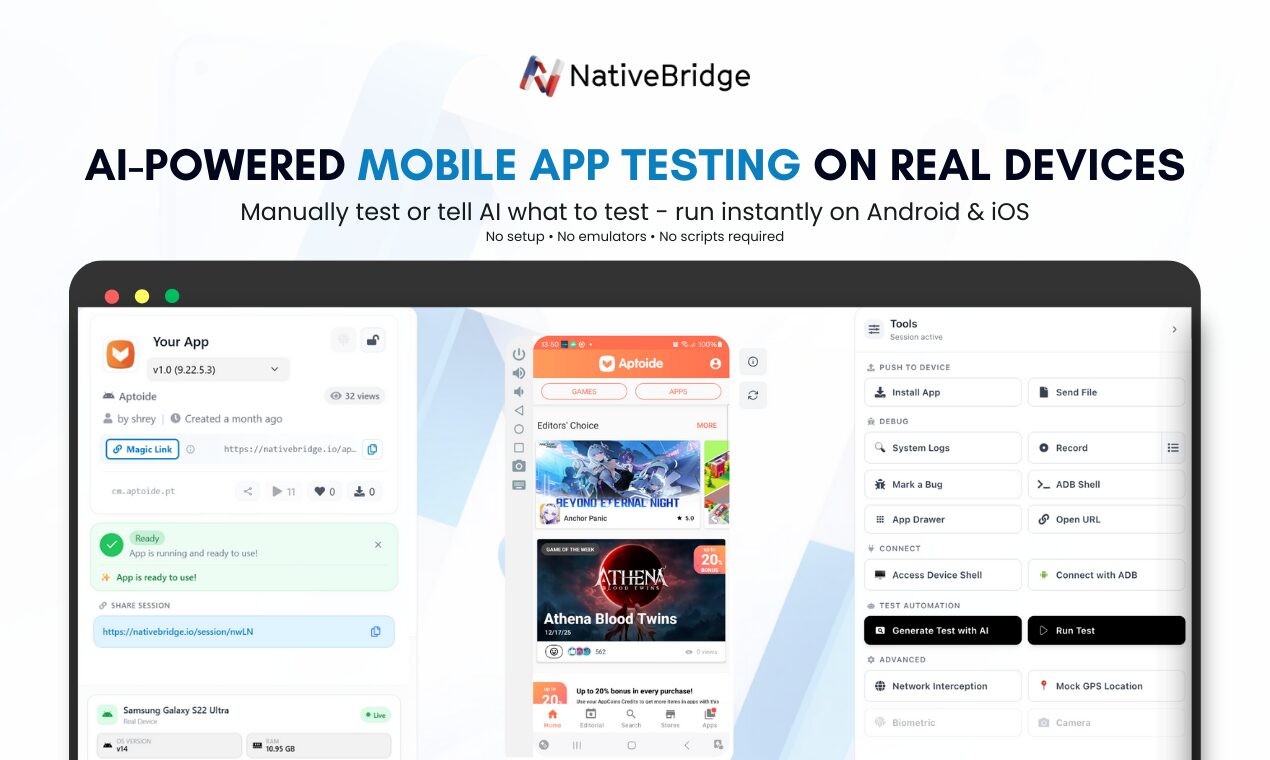
- Magic Link Distribution: Generate shareable URLs for app builds that provide instant, browser-based access to real mobile devices without requiring installations or complex provisioning.
- AI-Powered Testing with Maestro: Utilize AI to automate mobile testing, allowing the system to learn user behaviors and generate comprehensive test scripts that adapt to UI changes.
- Real Device Streaming: Access a cloud-hosted fleet of actual iOS and Android hardware rather than relying on emulators, ensuring that performance and bug reproduction are consistent with real-world usage.
- Low-Latency Architecture: Employs WebRTC technology to provide a responsive testing experience with sub-100ms latency, making remote device control feel local.
- Automated Crash Capture: Automatically record and log system crashes during testing sessions, providing developers with rich diagnostic data and reproduction steps.
- CI/CD Pipeline Integration: Connect directly with development workflows to automatically generate Magic Links for every new build, facilitating continuous feedback and rapid iteration.
- Unified Bug Reporting: Share interactive bug reports that include session recordings, logs, and device metadata to streamline the communication between QA and engineering teams.
- Cross-Platform Support: Manage both iOS and Android testing within a single unified dashboard, reducing the need for multiple platform-specific tools.
How It Works
The workflow begins with the developer uploading an app build (IPA for iOS or APK for Android) to the NativeBridge platform or through its VS Code extension. Once the build is uploaded, the system generates a unique Magic Link. This link can be distributed to anyone on the team, from QA testers to designers and clients.
When a recipient clicks the link, a real mobile device is provisioned in the cloud, and the app is streamed directly to their web browser using WebRTC. The user can interact with the app just as they would on a physical phone. During the session, the AI-powered Maestro integration can be activated to run automated test scripts or record new user flows for future automation.
If a bug or crash occurs, the platform captures all relevant session data, including a video recording and technical logs. This data is then packaged into a shareable report, allowing developers to see exactly what happened on the real hardware. The integration with CI/CD tools ensures that this process is automated for every new version of the software.
Use Cases
- Remote Stakeholder Reviews: Product managers and clients can review the latest app builds via a browser link without needing to handle physical devices or technical installation processes.
- QA and Bug Reproduction: Quality assurance teams can reproduce reported bugs on the exact hardware and OS versions where they occurred, ensuring high-fidelity troubleshooting.
- Automated Regression Testing: Engineering teams can use AI-driven scripts to run repetitive tests across multiple device types for every pull request, catching edge-case bugs early in the cycle.
- Design and UX Validation: Designers can verify how layouts and animations render on various screen sizes and hardware specifications to ensure a consistent user experience.
- Collaborative Debugging: Developers can share a live session with a teammate via a Magic Link to debug complex issues together in real-time.
Pros and Cons
- Pros: Eliminates the high capital expenditure of building physical device labs. Magic Links significantly reduce the friction of app distribution and feedback. The AI-integrated Maestro support makes automated testing more resilient to UI changes. Low latency via WebRTC ensures a smooth user experience.
- Cons: Performance is dependent on the tester’s internet connection stability. Early-stage AI features may still require manual oversight for complex logic. Cloud-based sessions may have slight input lag compared to local physical hardware.
Pricing
NativeBridge offers a tiered pricing model designed to scale with team size and testing requirements:
- Free Tier: Includes 8+ hours of monthly testing time on Android emulators and iOS simulators, suitable for individual developers and small-scale testing.
- Paid Plans: Starting at $29 per user per month, providing unlimited testing sessions on real Android and iOS devices, priority hardware access, and advanced CI/CD integration features.
- Enterprise Solutions: Custom pricing is available for large organizations requiring dedicated device instances, enhanced security compliance, and full API access.
How Does It Compare?
- BrowserStack: A market leader with a massive device fleet, but often criticized for isolated sessions and high costs. NativeBridge competes by offering easier collaboration via Magic Links and more competitive pricing for smaller teams.
- Sauce Labs: Provides extensive enterprise-grade testing features. NativeBridge differentiates itself with a focus on AI-driven test generation using Maestro and a “web-first” sharing philosophy that simplifies access for non-technical users.
- Appetize.io: Primarily focused on app streaming for demos and marketing. NativeBridge offers deeper engineering-focused features like AI automation, crash reporting, and developer tool integrations.
- LambdaTest: Offers a broad range of browser and mobile testing options. NativeBridge focuses specifically on the mobile-native experience, using WebRTC to achieve lower latency for real-device interactions.
Final Thoughts
NativeBridge is a promising entrant into the mobile DevOps space, specifically targeting the coordination gap between developers and stakeholders. By prioritizing accessibility through Magic Links and intelligence through AI-powered automation, it significantly lowers the barrier to high-fidelity mobile testing. While it enters a crowded market established by giants like BrowserStack, its focus on ease of sharing and modern, low-latency streaming makes it a compelling choice for startups and agile development teams looking to accelerate their release cycles in 2026.