
Table of Contents
Overview
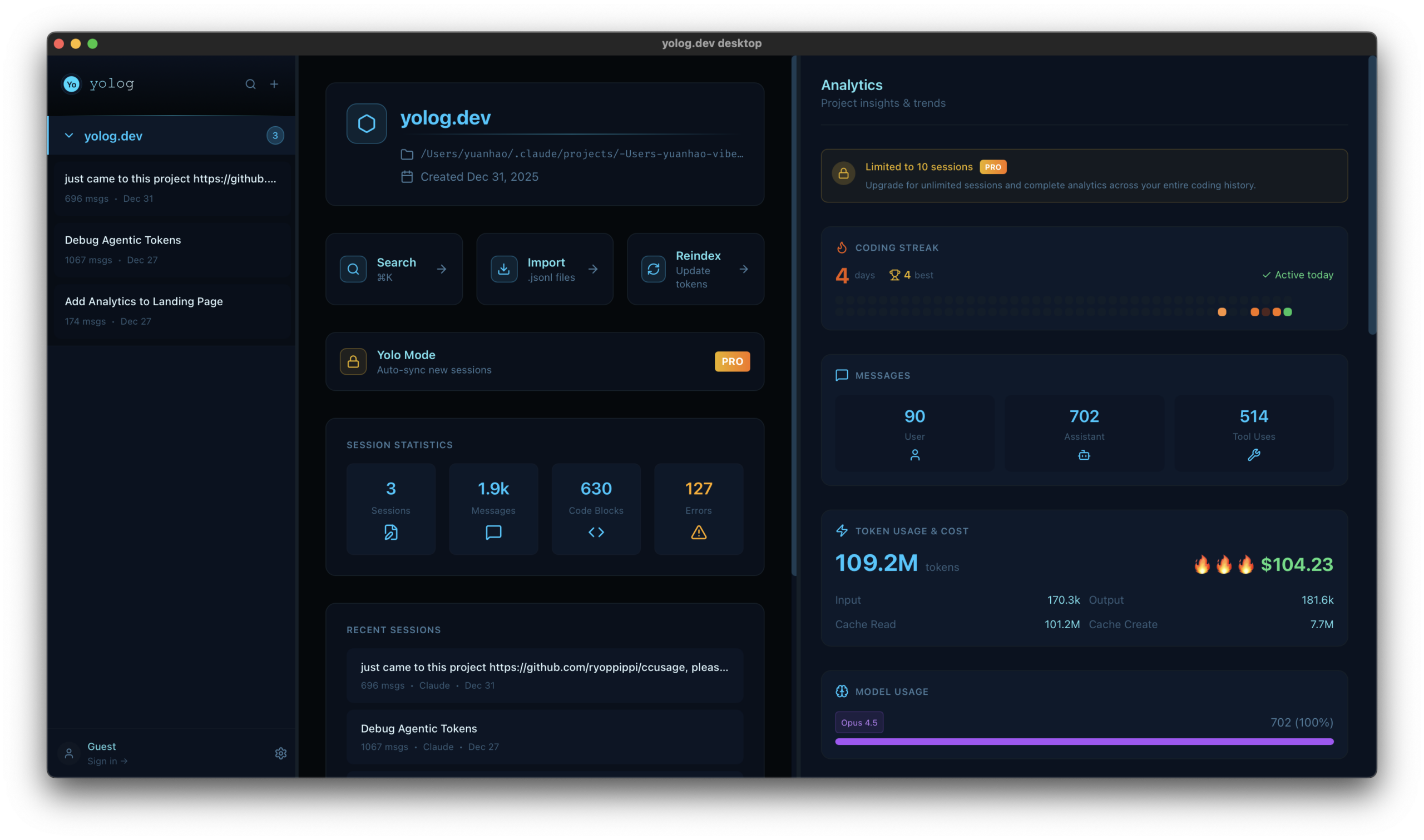
The application is built specifically for users of agentic coding tools like Claude Code and Cursor. It provides a chronological playback of coding sessions, allowing developers to see the step-by-step evolution of their project through a visual timeline. Beyond simple viewing, yolog.dev introduces vibe metrics—unique analytical data that measures your flow state, token leverage, and API burn rate. This local-first tool prioritizes security by keeping all sensitive code and prompt data on the user’s machine, packaged in a lightweight 10MB application.
Key Features
- Session Archive & Playback: Imports JSONL logs from Claude Code to provide a full, interactive replay of past coding sessions with a functional timeline.
- Semantic Search Engine: Allows users to find specific code snippets, design decisions, or prompts using natural language queries across all historical logs.
- Vibe Metrics Dashboard: Tracks performance indicators such as prompt-to-code leverage, token efficiency, and coding streaks to measure AI-assisted productivity.
- Granular Cost Tracking: Breaks down API expenditures by project and session, helping individual developers and teams monitor their compute spend in real-time.
- Privacy-First Local Storage: Operates entirely offline with zero cloud uploads, ensuring that intellectual property and private keys never leave the device.
- Flow & Streak Detection: Analyzes session frequency and duration to identify peak productivity periods and maintain coding momentum.
- Lightweight 10MB Footprint: Optimized native construction that provides high-performance indexing without consuming significant system resources.
How It Works
yolog.dev Desktop works by monitoring the default log directories used by AI assistants (such as the hidden .claude folders in a user’s home directory). Once a JSONL file is detected, the app parses the raw data into a structured format, indexing the content for semantic search. The user can then open the dashboard to see a bird’s-eye view of their coding history. Clicking into a session opens a replay mode where the user can scroll through the conversation just as it appeared in the terminal, with added visual indicators for tool usage, file edits, and error states.
Use Cases
- AI Rationale Auditing: Reviewing the specific reasoning an AI provided for a complex architectural change several days after the session ended.
- Compute Budgeting: Identifying which projects are consuming the most tokens to optimize prompt strategies and lower monthly API bills.
- Vibe Coding Knowledge Retention: Searching for a specific prompt that successfully solved a bug in a past project to reuse it in a current workflow.
- Developer Advocacy & Sharing: Exporting sanitized playback snippets to “build in public” or demonstrate a specific AI-driven workflow to teammates.
Pros and Cons
- Pros: Solves the critical issue of lost context in ephemeral AI sessions. Local-first architecture is ideal for security-conscious engineers. Lowers the barrier to entry for analyzing API costs.
- Cons: Primarily limited to users of agentic CLI tools like Claude Code. Some advanced collaborative features are currently reserved for the higher paid tiers.
Pricing
- Free Tier: Includes basic session archiving, manual JSONL imports, and standard timeline playback.
- Starter Package: $6/month. Adds advanced semantic search, project-level cost tracking, and basic vibe metrics.
- Developer Plan: $25/month. Unlocks full analytical suites, unlimited project indexing, and priority updates for new AI tool integrations.
How Does It Compare?
- ClaudeBar / clog: These are simple JSONL viewers. yolog.dev distinguishes itself by adding “Vibe Metrics” and semantic search, turning a simple log viewer into a comprehensive analytical platform.
- Helicone / LangSmith: These are enterprise-grade observability platforms for backend APIs. yolog.dev is a developer-facing desktop tool focused on the individual coding experience and local workflow efficiency.
- Rewind AI: A general-purpose screen recorder that captures everything. yolog.dev is specifically optimized for code, parsing the actual structured data of the AI sessions rather than just recording pixels.
- claude-code-viewer: An open-source web-based viewer. yolog.dev is a native desktop app that offers more permanent indexing and local file system watching for a smoother experience.
Final Thoughts
yolog.dev Desktop is the first dedicated “black box recorder” for the age of agentic coding. As software development shifts toward a model where humans supervise AI agents, the ability to audit, search, and measure those agents becomes paramount. By treating the conversation between a developer and their AI as a valuable data asset, yolog.dev ensures that “vibe coding” isn’t just about the moment, but about building a reusable library of intelligence. It is a necessary tool for any developer looking to take their AI-assisted workflow from experimental to professional.