

Table of Contents
Overview
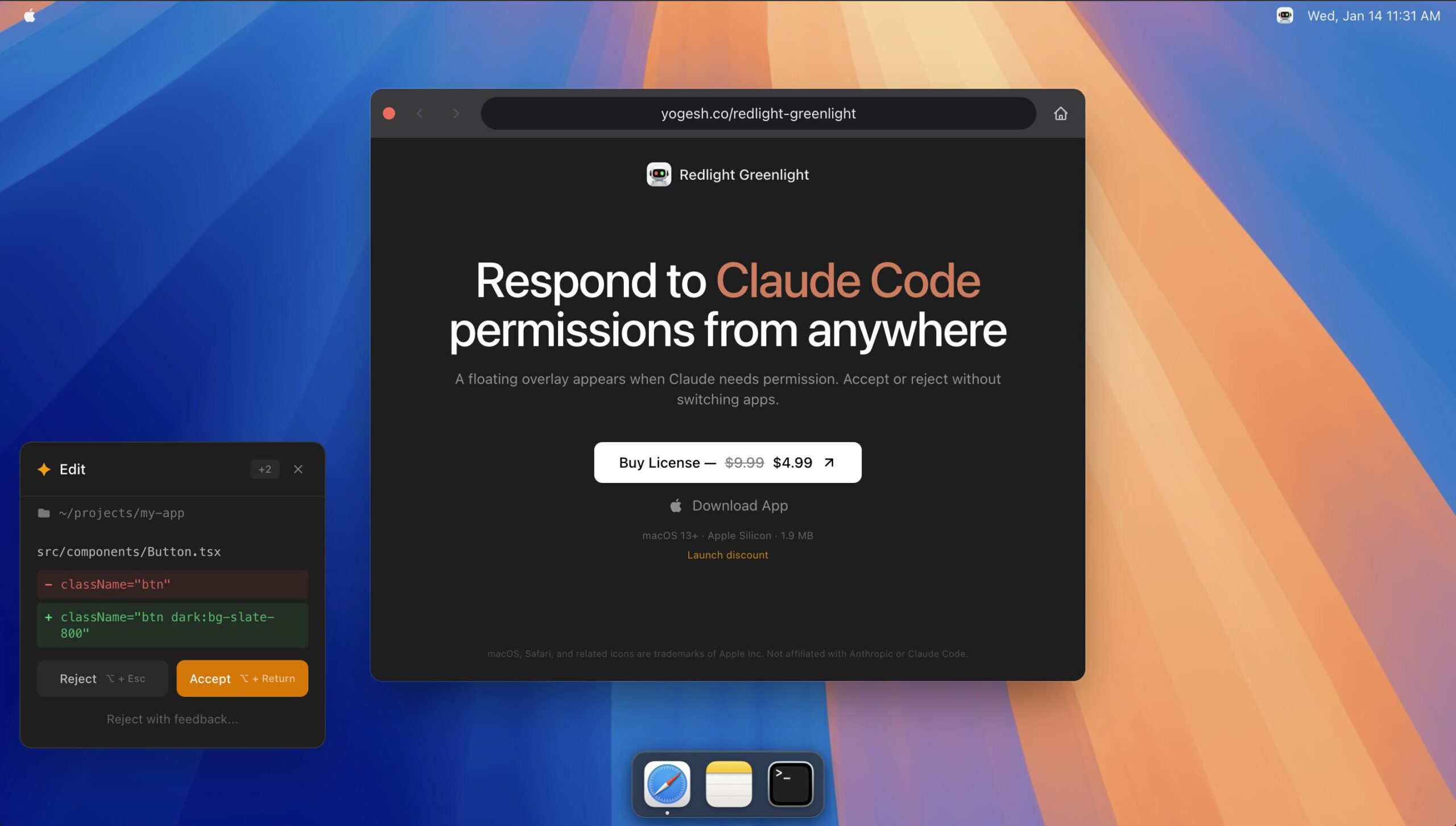
Redlight Greenlight is a specialized macOS productivity utility designed for developers who frequently use the Claude Code command-line interface (CLI). It addresses a specific friction point in AI-assisted development: the constant need to switch back to the terminal to manually approve or deny file edits and command executions. By intercepting these permission prompts and surfacing them in a global GUI overlay, the app allows users to maintain their focus within their primary IDE or browser, effectively reducing “terminal fatigue” and context-switching overhead.
Key Features
- Floating Permission Overlay: Automatically surfaces Claude Code’s requested commands and directories in a non-intrusive window that remains on top of active applications.
- Global Keyboard Shortcuts: Enables instant responses with Opt+Return to accept, Opt+Esc to reject, and Opt+D to dismiss, allowing for hands-on-keyboard efficiency.
- Request Queue Management: Stores and handles multiple pending permission requests in order, ensuring no prompts are missed during complex automated tasks.
- Native macOS Integration: Built as a lightweight menu bar app optimized for macOS 13+, featuring native UI elements and support for both Intel and Apple Silicon.
- Command Transparency: Displays the exact shell command and current working directory in the overlay so users can verify safety before granting permission.
How It Works
The application operates as a background observer that listens for specific permission-related output from the Claude Code CLI. When a request is detected, Redlight Greenlight intercepts the signal and triggers its native macOS overlay. This overlay acts as a proxy for the terminal input; when a user clicks a button or uses a shortcut in the overlay, the app sends the corresponding “yes” or “no” input back to the terminal session. This bridge allows the developer to stay in their flow state without ever needing to look at or interact directly with the terminal window for routine approvals.
Use Cases
- Heavy CLI Users: Developers who utilize Claude Code for large-scale refactoring or multi-file edits where frequent permission “Y/N” prompts are common.
- Multi-Tasking Developers: Programmers who work across multiple windows (e.g., browser, terminal, and IDE) and want to approve AI actions while reviewing documentation or UI changes.
- Workflow Optimization: Teams looking to minimize cognitive load by automating the “busy work” of manual terminal interactions during AI-driven development.
Pros & Cons
Advantages
- Focus Preservation: Dramatically reduces context switching by keeping the developer in their primary workspace during AI operations.
- Enhanced Safety: The clear display of raw commands in the overlay encourages quick but deliberate inspection before approval.
- Zero Configuration: Integrates seamlessly with the standard Claude Code installation without requiring complex API keys or local server setups.
Disadvantages
- Platform Limitation: Currently restricted to macOS users, leaving Windows and Linux developers to rely on traditional terminal interactions.
- Niche Utility: Its value is strictly tied to the usage frequency of the Claude Code CLI; users of IDE-native agents (like Cursor) may find it redundant.
- Potential Redundancy: Users risk paying for a feature that may eventually be integrated into the native Claude Code tool or various terminal emulators.
How Does It Compare?
- Standard Terminal CLI
- Best for: Occasional users or those who prefer a traditional, no-frills development environment.
- Key Distinction: Requires manual tabbing to the terminal and typing “y” or “n” for every prompt, which can lead to high workflow friction during long sessions.
- Claude Code –dangerously-skip-permissions Flag
- Best for: Speed-focused developers working in safe, disposable, or git-tracked environments.
- Key Distinction: This built-in flag bypasses all prompts entirely. While faster than any GUI, it presents a significant security risk by allowing the AI to execute any command without oversight.
- Cursor Agent (IDE)
- Best for: Developers who prefer a full GUI-based IDE experience over a command-line workflow.
- Key Distinction: Cursor provides a built-in agent with its own permission UI. Redlight Greenlight is for those who prefer the flexibility of the Claude Code CLI but want an IDE-like approval experience.
- OpenCode / Codex
- Best for: Developers seeking alternatives with different autonomy models.
- Key Distinction: Tools like Codex are often permissive by default or require fewer individual “nit-pick” permissions. Redlight Greenlight maintains the “earned trust” model of Claude Code while making it more user-friendly.
Final Thoughts
Redlight Greenlight is a prime example of a “micro-utility” that solves a very specific but highly annoying problem for power users. As agentic AI tools like Claude Code become more autonomous, the bottleneck shifted from “writing the code” to “approving the changes.” This app successfully bridges that gap by providing a modern GUI layer for a CLI-first tool. For professional Mac developers who find themselves constantly fighting terminal prompts, the small one-time cost of this utility is likely to pay for itself in recovered focus and reduced frustration within the first few intensive coding sessions.