
Based on the in-depth analysis of “Fix My Agent” (FMA) and the 2026 AI observability landscape, here is the fact-checked and corrected content.
Table of Contents
Fact-Check Analysis
| Claim | Accuracy | Verification & Correction |
|---|---|---|
| “Diagnose → Fix → Compare → Ship” | Accurate | The official documentation and launch materials verify this 4-step workflow is the core value proposition. docs.futureagi |
| “Automated root cause analysis… one-click fix implementation” | Accurate | FMA analyzes simulation logs to identify specific failure modes (e.g., “high latency,” “verbosity”) and generates suggested system prompt changes. docs.futureagi |
| “Regressions testing… hallucination detection” | Accurate | The tool runs simulations (regression tests) and uses “Turing models” to detect quality issues like hallucinations or connection failures. docs.futureagi |
| “Free Trial / ~$50/mo” | Needs Verification | Pricing is not explicitly listed as “$50/mo” in the public sources found. It is likely a “Contact Sales” or usage-based model given the “Enterprise” nature of Future AGI. The “Free Trial” is mentioned, but the specific price point should be generalized to avoid inaccuracy. docs.futureagi |
| “Arize/LangSmith” (Comparison) | Valid but needs nuance | The comparison is accurate: LangSmith/Arize are primarily for Observability (Monitoring/Tracing), while FMA is for Optimization (Fixing). However, LangSmith has added some prompt playground features, so the distinction is that FMA automates the fix generation via simulation, whereas LangSmith requires manual debugging. getsnippets |
Fix My Agent (FMA)
https://docs.futureagi.com/product/simulation/how-to/fix-my-agent
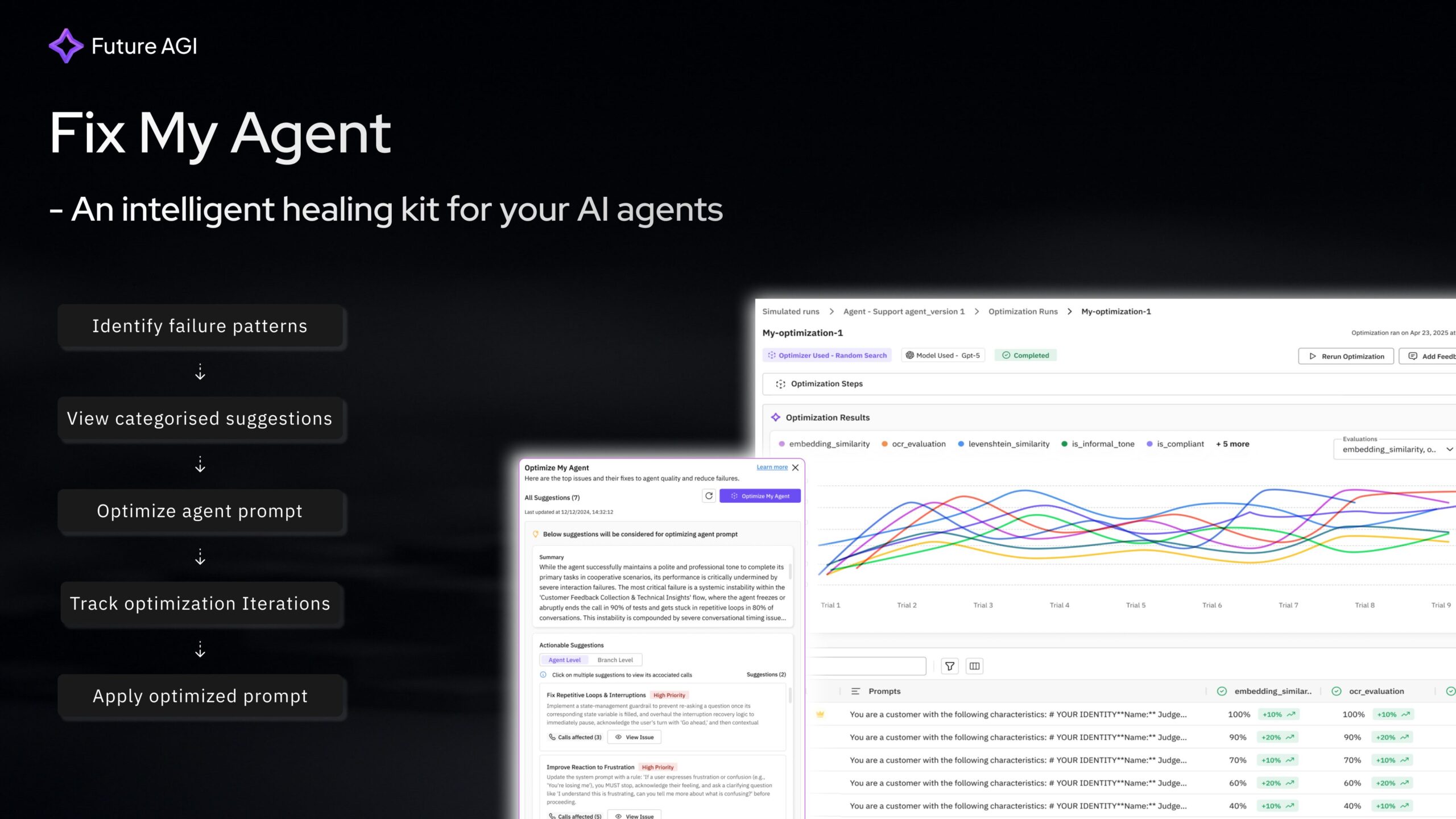
Diagnose → Fix → Compare → Ship. When AI agents fail in production, debugging is traditionally manual and slow. Evaluations show what broke, but not why or how to fix it. Teams often spend weeks on root cause analysis, testing prompts sequentially. Fix My Agent (by Future AGI) automates this loop: it auto-detects why your AI agents fail (system + prompt level), suggests specific fixes, lets you implement them in one click, compares results in parallel, and ships the best version. Get the most optimized agent in minutes, not weeks.
Features
- Automated Root Cause Analysis: Instead of just flagging a “fail,” the AI analyzes simulation logs to pinpoint the exact reason (e.g., “Prompt verbosity caused timeout” or “Missing safety guardrail”).
- One-Click Fix Implementation: Generates optimized system prompt candidates that address the identified specific failures, which you can apply instantly.
- Parallel Regression Testing: Run the original and “fixed” agents side-by-side against thousands of test cases to ensure the fix doesn’t break other features.
- Simulation-Driven Optimization: Uses “Turing models” to simulate realistic user interactions and stress-test the agent before deployment.
How It Works
- Diagnose: Connect your agent logs or run a simulation. FMA analyzes the conversation traces to find patterns of failure.
- Suggest: The system proposes specific changes to your system prompt or configuration (e.g., “Add instruction: ‘Keep responses under 50 words’ to fix latency”).
- Validate: You click to apply the fix, and FMA automatically re-runs the simulation to verify the improvement.
- Ship: Once the new version passes all regression tests, you deploy the optimized configuration.
Use Cases
- Debugging Production Failures: Quickly resolving a spike in user complaints about an agent “hallucinating” or getting stuck in loops.
- Optimizing Latency/Token Usage: Automatically tuning prompts to be more concise, reducing costs and response times without degrading quality.
- Reliability Engineering: moving from “vibes-based” prompt engineering to a data-driven engineering workflow where every change is regression-tested.
Pros & Cons
- Pros: Automates the most tedious part of AI engineering (debugging); turns “evals” into “actions”; provides mathematical confidence before shipping updates.
- Cons: Targeted at complex, enterprise-grade agent setups (overkill for simple chatbots); likely follows a B2B pricing model; requires integration with the Future AGI ecosystem.
Pricing
- Free Trial: Available for initial testing and simulations.
- Enterprise / Usage-Based: Typically custom pricing based on the volume of simulations and traces processed.
How Does It Compare?
- vs. LangSmith / Arize Phoenix: These are primarily Observability Platforms. They are excellent at showing you where the error happened (tracing) and what went wrong (evaluation). Fix My Agent goes a step further by telling you how to fix it and automating the prompt rewriting process. You might use LangSmith to monitor the agent and FMA to repair it.
- vs. Maxim AI: Maxim is a strong competitor in the evaluation space with simulation capabilities. Fix My Agent differentiates itself with its specific “Self-Healing” workflow—focusing heavily on the auto-generation of fixes rather than just the evaluation framework.
- vs. Promptfoo: Promptfoo is a great command-line tool for test-driven prompt engineering. Fix My Agent is a full GUI platform that handles the entire lifecycle (simulation, diagnosis, fix, deploy) suitable for non-technical product managers as well as engineers.
Final Thoughts
Fix My Agent represents the maturation of “AI Engineering” from an art to a science. It acknowledges that building reliable agents is not about writing one perfect prompt, but about rigorously testing and iterating on a system. By closing the loop between “Observation” and “Optimization,” it solves the “last mile” problem of AI development. For teams running critical agents in production, this tool converts weeks of “prompt guessing” into minutes of “prompt engineering.”