

Table of Contents
Doclific
Doclific is an open-source internal documentation tool that lives inside your code repository, combining a Notion-like rich text editor with code-aware features to prevent the documentation drift that plagues most engineering teams.
What It Does
Doclific addresses a fundamental problem in software development: documentation decay. Traditional documentation platforms exist separately from code repositories, making it easy for docs to become outdated as codebases evolve. Doclific solves this by storing documentation directly within your repository structure, where it follows the same version control, branching, and review workflows as your code.
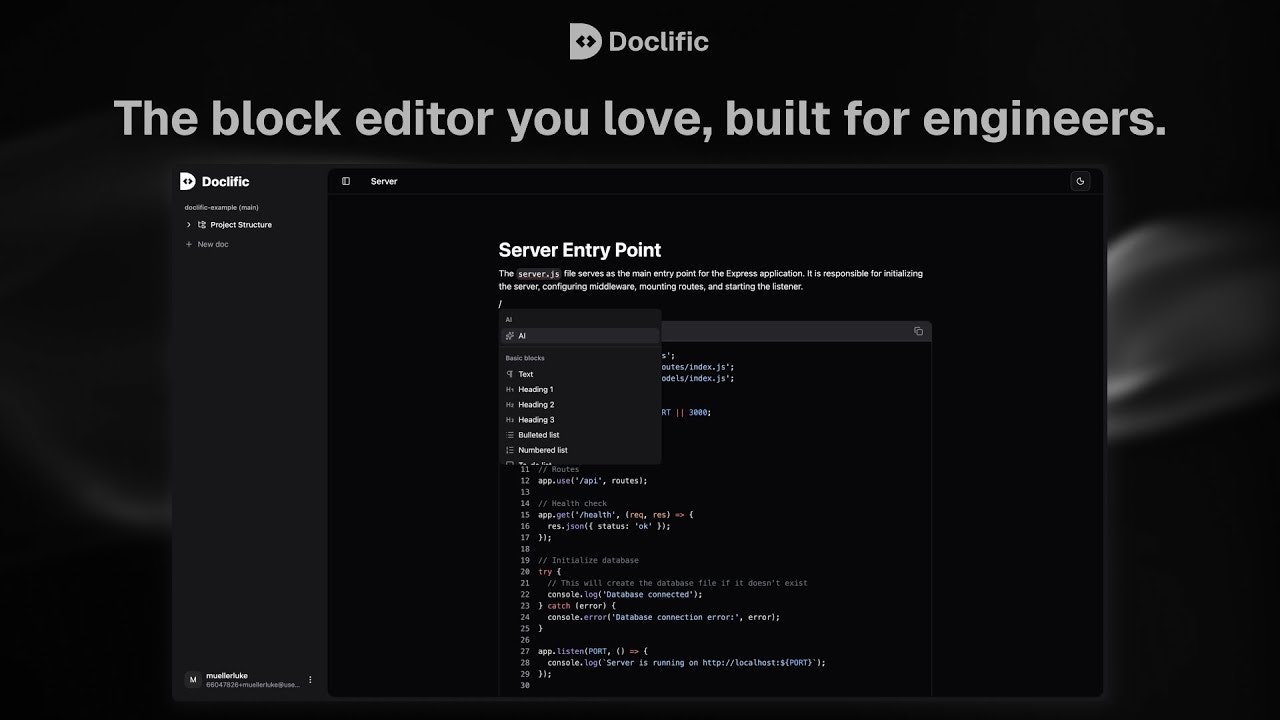
Unlike static site generators that require writing raw Markdown files, Doclific provides a local web interface with a visual editor. Developers run a CLI command to launch the documentation server, edit content using familiar block-based editing (similar to Notion), and save changes that automatically commit to the repository. This approach maintains the benefits of docs-as-code while removing the friction of manual file editing.
Core Features
Notion-Like Editor: Rich text editing with blocks for headings, lists, code snippets, and embedded content. The visual interface removes the need to write raw Markdown syntax while preserving the underlying structure as version-controlled files.
Smart Code Snippets: Reference specific lines of code from repository files directly in documentation. These snippets link to actual source files, making it possible for future tooling to detect when referenced code changes.
ERD Diagramming with AI: Create Entity Relationship Diagrams to visualize database schemas. AI assistance helps generate ERD structures from existing code or database definitions, reducing manual drawing work.
Architecture Whiteboarding: Interactive canvas for documenting system designs, service architectures, and technical workflows visually. This keeps architectural documentation alongside implementation details.
Local-First Operation: Runs entirely on your development machine without requiring external services. Install via a single CLI command and launch the editor locally. No sign-ups, no hosted dashboards, no data leaving your infrastructure.
AI-Powered Doc Generation: Connect your Google Gemini API key to generate documentation from code automatically. Additional AI provider support is planned for future releases.
Git-Native Workflow: Documentation changes appear as standard commits in pull requests. Teams can review documentation updates using the same code review processes they already use for implementation changes.
How It Works
Install Doclific using the provided CLI tool, which sets up the necessary configuration in your repository. Run the local server command to launch the documentation editor in your browser. Create pages, write content using the block editor, insert code references, and design diagrams. All edits save directly to files within your repository structure, managed by an internal state tracking system (checksums.txt) that monitors file integrity.
When you commit documentation changes, they become part of your repository history just like code commits. Other team members clone or pull the repository and access the same documentation through their local Doclific instance.
Ideal Use Cases
API Documentation Maintenance: Keeping endpoint references, parameter definitions, and example requests synchronized with actual API implementations through code-linked snippets.
System Architecture Documentation: Maintaining up-to-date diagrams and descriptions of service architectures, data flows, and integration patterns that evolve alongside the systems they document.
Onboarding Engineering Teams: Providing new developers with accurate, version-controlled technical context that reflects the current state of the codebase rather than outdated wiki pages.
Strengths and Considerations
Strengths: Complete privacy with no external dependencies or data transmission. Zero cost as fully open-source software under MIT license. Version control integration means documentation history travels with code history. Visual editor removes Markdown syntax barriers while preserving docs-as-code benefits. Local-first architecture ensures teams own their complete documentation stack.
Considerations: CI integration for automated drift detection is currently in development (“Coming Soon”), meaning proactive alerting for outdated snippets is not yet available. Requires team adoption of docs-as-code philosophy; non-technical stakeholders cannot easily access documentation without cloning repositories and running CLI tools. Visual editor runs locally rather than as a hosted service, so there is no web-based editing from browsers without local setup. The project is relatively new (launched January 2026), so the ecosystem and plugin support are still developing.
Pricing
Completely free and open-source under the MIT license. Available on GitHub for self-hosting with no usage restrictions, seat limits, or premium tiers.
How Does It Compare?
Mintlify: A hosted docs platform emphasizing beautiful, fast documentation sites with automatic API reference generation from OpenAPI specs. Mintlify uses MDX files stored in Git but renders through their hosted infrastructure. Offers AI chat trained on documentation content and advanced analytics. Pricing starts at $300/month for 5 editors. Mintlify provides superior polish and end-user experience but requires cloud hosting, whereas Doclific operates entirely locally for complete data control.
GitBook: Cross-functional documentation platform combining visual WYSIWYG editing with optional Git sync. Emphasizes collaboration features like inline comments, approval workflows, and team spaces. Pricing starts at $65/month plus $12/user. GitBook excels at enabling non-technical users to contribute to docs, while Doclific targets developer-first workflows where all contributors are comfortable with Git and CLI tools.
Docusaurus: Facebook’s open-source static site generator specifically for documentation. Writes documentation as Markdown/MDX files and builds them into static HTML sites. Completely free and open-source like Doclific, but requires more manual configuration and lacks the visual editing experience. Docusaurus offers powerful customization through React components but demands more developer time for setup and maintenance. Doclific trades some customization flexibility for faster setup and visual editing convenience.
ReadMe: Hosted API documentation platform with strong focus on API references, interactive API explorers, and developer hubs. Pricing starts at $99/month for startups. ReadMe specializes in external-facing developer documentation with API key management and usage analytics, whereas Doclific targets internal team documentation stored privately in repositories.
Readme.so (Free Markdown Editor): A browser-based README generator for quickly creating repository README files using templates. Completely different use case; designed for creating single-file project descriptions rather than comprehensive internal documentation systems like Doclific.
Final Thoughts
Doclific represents a compelling middle ground in the documentation tools spectrum. It preserves the version control benefits and privacy of local Markdown-based systems like Docusaurus while adding the editing convenience of hosted platforms like Notion. For engineering teams frustrated by the complexity of static site generators but unwilling to upload sensitive technical documentation to third-party platforms, Doclific offers an attractive alternative. The project’s MIT license and open-source nature eliminate vendor lock-in concerns, though teams should be aware that advanced features like automated CI drift detection are still under development. It works best for teams where all contributors are comfortable using Git and CLI tools, as the local-first architecture is less accessible for non-technical collaborators compared to hosted alternatives like GitBook.