

Table of Contents
AgentEcho
AgentEcho is an open-source visual feedback tool designed to bridge the gap between frontend UI review and AI coding agents. Released in January 2026, it allows developers to annotate DOM elements directly in the browser and export the context as structured Markdown, specifically optimized for prompting LLMs like Claude or ChatGPT to fix the issues.
What It Is
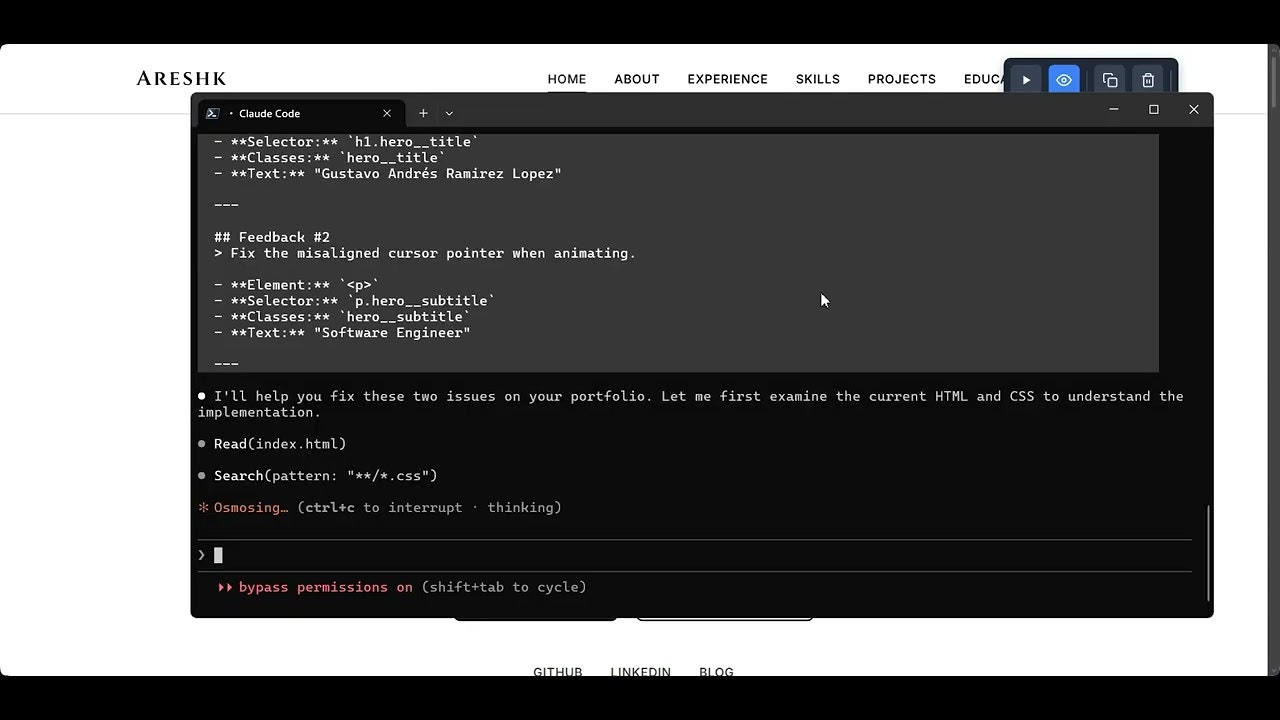
AgentEcho is a browser extension (Chrome/Edge) that turns any webpage into a canvas for feedback. Unlike traditional screenshot tools that just capture pixels, AgentEcho captures the underlying DOM context. Users activate the “picker” mode to select elements, creating numbered markers that persist on the page. Each marker captures not just the visual note, but also the element’s HTML tag, ID, classes, and computed CSS. This data is aggregated into a clean Markdown snippet that you can paste directly into an AI coding agent or GitHub issue, giving the AI the exact technical context it needs to propose a code fix.
Key Features
- DOM-Aware Annotation: Clicking an element doesn’t just place a dot; it records the specific DOM node, allowing for precise identification in the generated report.
- AI-Optimized Markdown: Generates a clipboard-ready report that formats the feedback, element selectors, and notes into a structure that LLMs can easily parse to generate code fixes.
- Framework Detection: Automatically detects if the underlying application is using React or Angular, adding relevant component context to the report (Vue/Svelte support planned).
- Smart Selector Generation: Algorithms generate unique, stable CSS selectors for marked elements, ensuring that the feedback points to the correct component even if the page layout shifts slightly.
- Local & Offline: Runs entirely within the browser with no external server dependencies, ensuring privacy for internal enterprise tools or localhost development.
Use Cases
- AI-Assisted Bug Fixing: Generating “perfect prompts” for coding agents by providing them with both the visual complaint (“this button is off-center”) and the technical reality (“div#submit-btn with class .flex-row”).
- Frontend QA Reviews: allowing designers to leave specific feedback on staging environments that developers can map directly to code components.
- Documentation: Quickly creating annotated diagrams of UI flows for technical documentation or user manuals.
Pros and Cons
- Pros: Completely free and open-source; significantly improves AI coding agent performance by providing structural context; lightweight with no account required; privacy-friendly (no data leaves your machine).
- Cons: Currently limited to Chromium-based browsers (Chrome/Edge); no built-in cloud syncing for team collaboration (local export only); requires manual installation (loading unpacked extension) unless using the paid store version.
Pricing
- Open Source: Free to use and build from source (GitHub).
- Chrome Web Store: Small one-time fee for the convenience of one-click installation and automatic updates.
How Does It Compare?
- Jam.dev: The industry leader for bug reporting. Jam records video, network requests, and console logs automatically. Comparison: Jam is a heavy-duty platform for comprehensive debugging and team collaboration. AgentEcho is a lightweight, text-first tool specifically optimized for the “Copy-Paste to LLM” workflow.
- Marker.io: Focuses on deep integration with Jira/Trello for QA teams. Comparison: Marker.io is better for enterprise QA workflows where tickets need to land in a project management board. AgentEcho is better for developers who want to fix the issue immediately using AI.
- Bird Eats Bug: Specializes in screen recording with technical overlays. Comparison: Bird is video-centric. AgentEcho is static/text-centric, making it faster for quick “point-and-click” feedback sessions where video is overkill.
- html-to-design: Captures pages as Figma files. Comparison: html-to-design is for moving code to design. AgentEcho is for moving design feedback to code (via AI).
Final Thoughts
AgentEcho creates a new micro-category of developer tools: “AI Context Bridges.” As developers increasingly rely on tools like Cursor, Windsurf, and Claude to write frontend code, the bottleneck has shifted from writing code to describing what needs to change. Screenshots are insufficient for LLMs because models cannot “inspect element” on a PNG file.
By extracting the DOM structure alongside the human feedback, AgentEcho solves this “context gap.” It is an essential utility for solo developers or small teams who want to leverage AI for UI polish without manually copying and pasting HTML snippets into their prompt window. While it lacks the collaborative cloud features of giants like Jam.dev, its specific focus on “AI-readiness” makes it a superior choice for the modern AI-assisted development loop.