

Table of Contents
- 1. Executive Snapshot
- 2. Impact and Evidence
- 3. Technical Blueprint
- 4. Trust and Governance
- 5. Unique Capabilities
- 6. Adoption Pathways
- 7. Use Case Portfolio
- 8. Balanced Analysis
- 9. Transparent Pricing
- 10. Market Positioning
- 11. Leadership Profile
- 12. Community and Endorsements
- 13. Strategic Outlook
- Final Thoughts
1. Executive Snapshot
Core Offering Overview
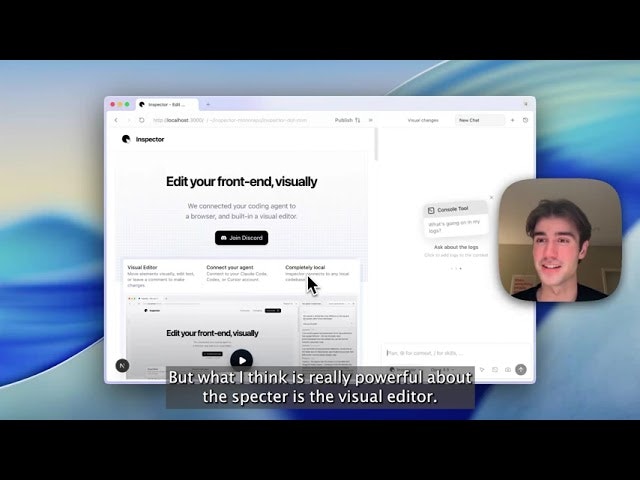
Inspector is a desktop application for MacOS that functions as a visual front-end editor tightly integrated with AI coding agents. It connects directly to popular AI-powered development tools — specifically Claude Code from Anthropic, OpenAI Codex, and Cursor — and provides a browser-based visual interface where users can click to edit text, drag to reposition elements, and leave comments that trigger code changes. Unlike standard browser developer tools where modifications disappear on page refresh, Inspector writes every visual adjustment back into the actual source files of a local codebase. The company describes itself as “Figma for your actual codebase,” positioning the product at the intersection of visual design and AI-assisted code generation.
Inspector was built to address a pain point familiar to front-end engineers: the constant context-switching between Figma for wireframing, the IDE for coding, and Chrome DevTools for debugging. By unifying these steps into a single environment where the browser itself becomes the IDE, Inspector eliminates the “game of telephone” that occurs when trying to give AI agents the right context from the DOM, the codebase, and the rendered output.
The product runs entirely locally. All code, data, and chat histories remain on the user’s device. Inspector does not train on proprietary code, making it suitable for teams with strict data-handling requirements. It is currently available for MacOS (both Apple Silicon and Intel), with a Windows version on a waitlist.
Key Achievements and Milestones
- Accepted into Y Combinator’s F25 batch (Fall 2025), one of the most competitive startup accelerators globally.
- Launched on YC on November 11, 2025, with public introduction of the product and founding story.
- Achieved Product Hunt #1 Product of the Day on February 8, 2026, accumulating over 533 upvotes and 56 comments within the first days of launch.
- Garnered 882 followers on Product Hunt as of mid-February 2026.
- Created and open-sourced PanelBench (panelbench.com), a suite of 89 visual test cases designed to benchmark code-first visual editors. In this benchmark, Inspector failed only 4 out of 89 tests, while Cursor’s built-in visual editor failed 43 — a result that generated discussion on Hacker News.
- Introduced MCP (Model Context Protocol) server integration with OAuth support, expanding the product’s extensibility and interoperability with external AI tooling.
Adoption Statistics
Inspector is in its early-stage growth phase as a recently launched YC startup. Specific user counts have not been publicly disclosed, but adoption signals include:
- 882 Product Hunt followers and 533+ upvotes within the first week of the February 2026 Product Hunt launch.
- Active Discord community for user support and feedback.
- Testimonials from other YC startups (e.g., Slashy, Dash) citing meaningful productivity gains.
- Featured in multiple AI tool directories including AIToolly, Aikii, GetApp, and F6S.
- Listed on the F6S directory under top California-based design companies.
2. Impact and Evidence
Client Success Stories
While Inspector is still in its early commercial phase, several verified user testimonials provide insight into real-world impact:
- A user associated with Dash (a YC startup) stated on Product Hunt that “Inspector has saved me like at least 5 hours over the past week,” pointing to measurable time savings in day-to-day front-end iteration.
- Slashy, another startup, commented that “Inspector has helped us a lot with our development workflows overall, made life way easier and has allowed us to just not use Figma,” indicating that Inspector can fully replace traditional design handoff tools for certain workflows.
- The co-founders themselves reported that before building Inspector, they were “spending 12 hours a day tweaking front-ends” while building web-based games — the inefficiency that directly motivated the product’s creation.
Performance Metrics and Benchmarks
Inspector’s most notable performance validation comes from PanelBench, its proprietary benchmark suite:
- 89 visual test cases were created to evaluate how accurately a code-first visual editor reports values and applies changes.
- Inspector passed 85 of 89 tests (approximately 95.5% accuracy).
- Cursor’s visual editor, the most direct competitor with a built-in visual editing feature launched in December 2025, passed only 46 of 89 tests (approximately 51.7% accuracy).
- The benchmark was made publicly available at panelbench.com and was posted on Hacker News, generating community discussion and independent scrutiny.
Third-Party Validations
- Y Combinator selection (F25 batch) serves as a significant third-party endorsement, as YC accepts roughly 1.5–2% of applicants.
- Product Hunt #1 Product of the Day ranking on February 8, 2026, indicates strong community interest and validation from the tech product community.
- Listed and reviewed on multiple independent directories: GetApp, AIToolly, Aikii, and F6S.
3. Technical Blueprint
System Architecture Overview
Inspector operates as a native MacOS desktop application that embeds a browser environment. This browser is not a standard web browser — it is a hybrid environment where the browser itself functions as the IDE. Key architectural elements include:
- A visual rendering engine that displays the user’s front-end application as it would appear in a real browser.
- A code-linking layer that maps every rendered DOM element back to its exact line in the source code. This is particularly optimized for React applications, where components are mapped to their JSX source with high precision.
- An agent integration layer that passes visual context (screenshots, element metadata, console logs) directly to the connected AI coding agent.
- A local file system interface that reads from and writes to the user’s local project directory, ensuring that all “apply” operations produce real file changes.
The application runs completely locally. There is no server-side processing of the user’s code. The only external communication occurs when connecting to third-party AI agents (Claude Code, Cursor, Codex) via their respective APIs, and optionally when using GitHub integration for version control operations.
API and SDK Integrations
- AI Agent Connections: Inspector supports connecting to Claude Code (Anthropic), Cursor, and OpenAI Codex. These agents receive enhanced context from Inspector — including DOM-aware screenshots, element-level code references, and console logs — enabling more accurate and targeted code generation.
- MCP Server Integration: The most recent changelog update introduced full Model Context Protocol support. Users can connect to MCP servers directly from Inspector, with OAuth authentication for secure token handling, automatic token refresh, a server management UI, a built-in JSON editor for configurations, and resource and prompt management capabilities.
- GitHub Integration: Inspector connects to GitHub, enabling users to create branches, commit changes, and publish pull requests without leaving the application.
- .inspectorrules Configuration: Teams can define project-specific conventions (e.g., “always use design tokens from theme.ts”) in a .inspectorrules file. These rules are injected into every AI-assisted edit, ensuring output consistency with team standards.
Scalability and Reliability Data
As a desktop application that operates locally, Inspector’s scalability model differs from cloud-based SaaS products. Key points:
- Performance is tied to the user’s local machine resources (CPU, RAM, disk I/O).
- The local-first architecture eliminates network latency for core editing operations.
- The application supports both Apple Silicon and Intel MacOS chips.
- Since there is no centralized server for code processing, there are no shared infrastructure bottlenecks.
- Reliability for AI-assisted features depends on the uptime and performance of the connected third-party agents (Claude Code, Cursor, Codex) and their respective API endpoints.
4. Trust and Governance
Security Certifications
Inspector has not publicly disclosed ISO 27001, SOC 2, or similar formal security certifications as of February 2026. This is typical for an early-stage YC startup that recently launched its product. The company’s security posture currently rests on its local-first architecture rather than compliance frameworks.
Data Privacy Measures
Privacy is positioned as a core design principle of Inspector:
- All data is stored locally on the user’s device.
- Inspector does not train on proprietary code.
- All chat histories with AI agents are kept on the user’s device.
- No code is sent to Inspector’s own servers for processing.
- The only external data transmission occurs when the user explicitly connects to a third-party AI agent (Claude Code, Cursor, Codex), in which case the data flows to that agent’s API under that agent’s privacy terms.
This local-first approach provides strong inherent privacy guarantees, as no centralized Inspector infrastructure handles sensitive code.
Regulatory Compliance
No specific regulatory compliance certifications (GDPR, HIPAA, CCPA, etc.) have been publicly documented by Inspector. However, the local-only data model inherently simplifies compliance since the application does not collect, store, or process user data on its own servers. Users’ data residency is entirely determined by their own local machines and the third-party AI services they choose to connect.
5. Unique Capabilities
Visual Editor with Code Linking
Inspector’s visual editor goes beyond simple CSS-tweaking tools. Users can:
- Move elements visually via drag-and-drop, with changes written to actual source files.
- Double-click to edit text directly on the rendered page.
- Leave comments on elements that trigger AI-assisted code modifications.
- Press “Apply” to persist all visual adjustments into the codebase.
The “Cursor Select” feature allows clicking any rendered element to instantly add its corresponding source code to the AI agent’s context — eliminating the need to manually hunt through file trees or inspect element classes.
Framework-Aware Intelligence
Inspector detects the styling abstractions in use within a project. For example:
- If an element uses Tailwind CSS classes, Inspector updates the className (e.g., changing shadow-md to shadow-lg) rather than injecting raw inline styles.
- React applications receive the deepest integration: Inspector links exact lines of React JSX to the components they render, providing perfect context for AI agents.
- While optimized for React, Inspector works with any front-end framework, though advanced visual context features are React-focused.
DOM-Aware Screenshots
Unlike generic screenshots, Inspector’s page-aware screenshots snap to specific DOM elements, capturing precisely what’s needed for feedback or agent context. These screenshots are automatically attached to the chat context when working with an AI agent.
Console Log Integration
Developers can add runtime console logs to the AI agent’s context with a single click. This bridges the gap between visual debugging and AI-assisted code repair, allowing the agent to see both what the UI looks like and what errors are occurring at runtime.
MCP Server Support
The recent addition of Model Context Protocol integration allows Inspector to connect to external MCP servers with OAuth-based authentication. This expands the tool’s capabilities to include accessing MCP server resources and prompts from within the Inspector environment.
Git Worktrees
Inspector supports git worktrees, allowing developers to separate different streams of changes into isolated working directories — a feature particularly valuable for managing multiple experimental UI iterations simultaneously.
6. Adoption Pathways
Integration Workflow
Getting started with Inspector follows a streamlined process:
- Download and install the MacOS application (available for both Silicon and Intel chips).
- Open a local codebase folder or start from one of Inspector’s built-in templates.
- Connect an AI agent account (Claude Code, Cursor, or Codex).
- Begin editing visually — move elements, edit text, or use the AI chat to prompt changes.
- Press “Apply” to write changes back to local files.
- Optionally connect to GitHub to commit, branch, and open pull requests.
No complex setup or configuration is required. The application is designed to be functional immediately after installation.
Customization Options
- .inspectorrules file: Teams define project-specific conventions that are injected into every AI-assisted edit, ensuring consistency with existing design systems and coding standards.
- MCP server configurations: Users can add, edit, and remove MCP servers from the Settings panel, with a built-in JSON editor for fine-tuned configuration.
- Agent flexibility: Users choose which AI agent to connect, allowing teams to use whichever model provider fits their workflow and budget.
Onboarding and Support Channels
- Discord community: The primary support and feedback channel, where users interact directly with the founding team and other users.
- FAQ page: Available at tryinspector.com/faq, covering getting started, AI agent integration, features, comparisons, and technical questions.
- Product Hunt community: Active engagement by the founders in the Product Hunt comments, providing detailed responses to user questions.
- Built-in templates: New users can start with provided templates rather than bringing their own codebase, lowering the barrier to first experience.
7. Use Case Portfolio
Developer Workflows
Developers use Inspector primarily to accelerate front-end iteration cycles. Instead of the traditional loop of wireframing in Figma → coding in the IDE → debugging in Chrome DevTools, they work directly in the browser where the rendered output, the code, and the AI agent all share the same context. This is especially powerful for:
- Rapid UI prototyping and iteration.
- Debugging visual layout issues with instant code context.
- Refactoring and styling with AI assistance that understands both the visual output and the source code.
Designer-to-Code Workflows
Inspector enables designers to push changes directly to production codebases without writing code. A designer can:
- Open the project in Inspector.
- Make visual adjustments (spacing, text, layout) using familiar drag-and-drop interactions.
- Let the AI agent handle the code translation.
- Ship the changes directly to the repository via GitHub integration.
This fundamentally alters the design-to-development handoff, eliminating screenshots, Figma-to-code translation, and “please fix” tickets.
Vibe Coding and Continuation Projects
For projects started with AI app builders like Lovable, Figma Make, or Bolt, Inspector serves as a refinement layer. Users can download the generated code, open it in Inspector, and continue iterating with high visual control and agent assistance — addressing the common pain point of AI-generated code that needs polish.
ROI Considerations
Based on user testimonials, Inspector saves approximately 5+ hours per week for active front-end developers. For teams, the elimination of design-to-code handoff processes represents additional time savings. At $20 per month (or free for core features), the cost-to-value ratio is favorable even with modest time savings.
8. Balanced Analysis
Strengths with Evidence
- Visual accuracy: The PanelBench benchmark demonstrates 95.5% accuracy (85/89 tests passed), significantly outperforming the closest competitor’s built-in visual editor (51.7%).
- Privacy-first architecture: Fully local operation eliminates data privacy concerns that plague cloud-based alternatives.
- Agent-agnostic design: Supporting Claude Code, Cursor, and Codex means users are not locked into a single AI provider.
- YC backing: Acceptance into Y Combinator’s F25 batch provides validation from one of the most selective startup accelerators.
- Framework intelligence: The ability to detect and respect existing styling frameworks (Tailwind, design tokens) prevents the common problem of AI-generated code that breaks design system consistency.
- Strong React integration: Deep code-linking for React applications provides a level of precision that generic visual editors lack.
- Free core features: The visual editing features are available at no cost; only the Inspector Agent requires a paid subscription.
Limitations and Mitigation Strategies
- MacOS only: Windows and Linux users cannot currently use Inspector. Mitigation: Windows waitlist is active; cross-platform support is expected as the product matures.
- React optimization bias: While Inspector works with any front-end framework, the advanced visual context engine is optimized for React. Teams using Vue, Svelte, or Angular may not receive the same depth of code-linking. Mitigation: The team has stated framework-agnostic support is a goal.
- Early-stage maturity: As a recently launched product from a two-person founding team, Inspector may lack the robustness and feature breadth of more established tools. Mitigation: YC backing provides resources for rapid iteration; the team ships updates frequently as evidenced by the changelog.
- No formal security certifications: Enterprise buyers requiring SOC 2 or ISO 27001 compliance may hesitate. Mitigation: The local-first architecture inherently minimizes security risk surface area.
- Dependency on third-party agents: Inspector’s AI capabilities rely on Claude Code, Cursor, and Codex APIs. Any downtime or API changes from these providers could affect Inspector’s functionality. Mitigation: Supporting multiple agents provides redundancy.
- Limited benchmark independence: PanelBench was created by Inspector’s own team, which could raise questions about benchmark objectivity. Mitigation: The benchmark has been open-sourced, allowing independent verification.
9. Transparent Pricing
Plan Tiers and Cost Breakdown
Inspector’s pricing model, as disclosed by the co-founders on Product Hunt, consists of:
- Free Tier:
- Connecting Claude Code, Cursor CLI, and Codex is always free.
- Free users get access to the same visual editing features as paid users.
- No time-limited trial — the free features are permanently available.
- Paid Tier ($20/month):
- Access to Inspector Agent, which provides GLM 4.7 running at 2x speed on Cerebras infrastructure.
- The Inspector Agent gives users who have not connected their own AI coding agent a way to experience AI-assisted editing with $20 worth of compute included.
- The team has indicated that upcoming features will make the Inspector Agent even more powerful.
- Product Hunt Special: $20 in free usage credits offered during the February 2026 launch.
Total Cost of Ownership Projections
For an individual developer:
– Free usage: $0/month (using own Claude Code, Cursor, or Codex subscription).
– With Inspector Agent: $20/month ($240/year).
– Primary cost consideration is the existing AI agent subscription (e.g., Cursor Pro at $20/month, Claude Code usage-based billing).
For a team:
– Inspector itself does not charge per-seat licensing for its free visual editing features.
– Costs scale with the team’s choice of AI agent provider and their usage patterns.
– The .inspectorrules system allows standardization without additional per-team-member costs.
10. Market Positioning
Competitor Comparison
| Feature | Inspector | Cursor Visual Editor | Onlook | Builder.io | Piny |
|---|---|---|---|---|---|
| Type | Standalone MacOS app | Built into Cursor IDE | Open-source editor | Visual development platform | VS Code extension |
| AI Agent Support | Claude Code, Cursor, Codex | Cursor models only | Limited AI features | Builder AI | N/A (IDE-level) |
| Visual Accuracy (PanelBench) | 85/89 (95.5%) | 46/89 (51.7%) | Not benchmarked | Not benchmarked | Not benchmarked |
| Framework Focus | React (optimized), all frameworks | Framework-agnostic | React and Next.js only | Framework-agnostic | Astro, React, Next.js, Tailwind |
| Code Linking | Exact line-level (React) | Element-level | Component-level | Component-level | Class-level |
| Pricing | Free core / $20/mo Agent | Included with Cursor Pro ($20/mo) | Free (open source) | Free tier / paid plans | Free core features |
| Local/Cloud | Fully local | Local (IDE) | Local | Cloud + local | Local (VS Code) |
| GitHub Integration | Yes (branch, commit, PR) | Via Cursor IDE | Yes | Yes | Via IDE |
| Design System Awareness | .inspectorrules, Tailwind detection | Limited | Tailwind, design tokens | Strong | Tailwind focus |
| Platform | MacOS only | Windows, MacOS, Linux | MacOS, Windows, Linux | Web-based | Windows, MacOS, Linux |
Unique Differentiators
- Highest benchmarked visual accuracy among code-first visual editors based on the 89-test PanelBench suite.
- Agent-agnostic architecture: The only visual front-end editor that natively supports three major AI coding agents simultaneously.
- Privacy-by-design: Fully local execution with no server-side code processing, a differentiator from cloud-based competitors.
- MCP server integration: Unique extensibility via the Model Context Protocol, enabling connection to external AI tooling ecosystems.
- PanelBench as an open standard: By open-sourcing their benchmark, Inspector is attempting to define the evaluation standard for the emerging visual editor category.
11. Leadership Profile
Quentin Romero Lauro — Co-Founder and CEO
- Education: UC Berkeley, Electrical Engineering and Computer Sciences (EECS); research at Carnegie Mellon University’s Human-Computer Interaction Institute (CMU HCII).
- Professional Experience: Software Engineer at Character.AI (Conversational AI, Product Engineering Team); previously at University of Pittsburgh.
- Research Background: Published at ACM CSCW 2024 — “Exploring the Role of Social Support When Integrating Generative AI into Small Business Workflows” (co-authored with Jeffrey P. Bigham and Yasmine Kotturi). Built “raggy,” an interactive notebook for RAG pipeline debugging at UC Berkeley, planned for submission to UIST 2025.
- Focus: Designs and builds technologies that help people of all backgrounds harness the power of AI. Research interests span human-computer interaction and AI interface design.
Michael Klikushin — Co-Founder and CTO
- Education: Georgia Institute of Technology, Computer Science (dropped out with 6 classes remaining to pursue Inspector full-time).
- Professional Experience: Software Engineer Intern at Oracle (AI Agents for IAM, Redwood City); Software Engineer Intern at Federal Reserve Bank of Richmond; Research Intern at CMU Human-Computer Interaction Institute (engagement tracking algorithms for AI tutors).
- Entrepreneurial Background: Co-founded Bubble Date prior to Inspector.
- Founding Story: Met Quentin during freshman year while both were conducting HCI research at CMU. Their shared frustration with the fragmented front-end development workflow led directly to Inspector’s creation.
Patent Filings and Publications
No patent filings specific to Inspector have been identified in public databases as of February 2026. Quentin Romero Lauro has one indexed publication on Google Scholar related to generative AI in small business workflows.
12. Community and Endorsements
Industry Partnerships and Ecosystem
- Y Combinator (F25 batch): Inspector is backed by Y Combinator, providing access to YC’s network of alumni, investors, and enterprise partners.
- Product Hunt community: Active engagement during the February 2026 launch, with detailed responses from founders to user questions, feature requests, and technical inquiries.
- Discord community: Primary gathering point for Inspector users, serving as both support channel and feedback loop for product development.
- YC peer companies: Testimonials from fellow YC startups Slashy and Dash indicate adoption within the YC ecosystem.
Media Mentions and Recognition
- Product Hunt #1 Product of the Day (February 8, 2026).
- Hacker News front page with the PanelBench benchmark post (“We evaluated Cursor’s Visual Editor on 89 test cases. 43 fail”).
- LinkedIn virality: Michael Klikushin’s post about dropping out of Georgia Tech to build Inspector generated significant engagement in the developer and startup communities.
- Featured on Y Combinator’s official LinkedIn: YC promoted Inspector’s launch to its 1.5+ million followers.
- Listed on multiple AI tool directories: AIToolly, Aikii, GetApp, F6S, and Slashdot software comparison pages.
- LinkedIn post by co-founder (“Designing in Figma is dead”) shared on February 5, 2026, generated community discussion about the future of design-to-code workflows.
13. Strategic Outlook
Future Roadmap and Innovations
While Inspector has not published a formal public roadmap, several direction indicators can be gathered from founder statements and product updates:
- Windows support: A waitlist is active, indicating cross-platform expansion is planned.
- Enhanced Inspector Agent: The founders stated on Product Hunt that they are “working on some really cool stuff that makes Inspector Agent even more powerful.”
- Expanded MCP integration: The recent addition of MCP server support with OAuth suggests a strategy of becoming a hub for AI tooling interoperability.
- Deeper framework support: While React is currently the strongest integration, the team has indicated interest in expanding the depth of code-linking to additional frameworks.
- Open-source benchmarking: PanelBench positions Inspector as the standard-setter for visual editor evaluation, a strategic move that benefits the product as the category grows.
Market Trends and Recommendations
The visual front-end editor category is experiencing rapid growth, driven by several converging trends:
- Rise of vibe coding: The broader market for AI-assisted coding tools is projected to continue accelerating, with the enterprise AI dev tools market expected to reach $8 billion by 2027. Inspector sits at the intersection of this trend and the specific need for visual front-end iteration.
- Agent convergence: As AI coding agents become more capable, the bottleneck shifts from code generation quality to context quality. Inspector addresses this by providing agents with rich visual, DOM, and runtime context — a value proposition that becomes more important as agents improve.
- Design-development convergence: The traditional separation between design (Figma) and development (IDE) is collapsing. Tools that bridge this gap, like Inspector, are positioned to capture both designer and developer workflows.
- Local-first movement: Growing concerns about code privacy and data sovereignty favor local-first tools over cloud-based alternatives, particularly for enterprise adoption.
Inspector’s key risk is the potential for incumbent tools (especially Cursor, which already launched its own visual editor) to improve their built-in visual editing capabilities and reduce the need for a separate tool. However, Inspector’s significantly higher benchmark accuracy (95.5% vs. 51.7%) suggests a meaningful technical lead. The agent-agnostic approach also protects against single-vendor dependency.
Final Thoughts
Inspector represents a focused, technically ambitious entry into the rapidly evolving AI-assisted front-end development space. Its core thesis — that AI coding agents need rich visual context to be truly effective for front-end work, and that this context is best provided through a dedicated visual environment rather than a bolt-on feature — is well-supported by both the PanelBench results and user testimonials.
The founding team brings a rare combination of HCI research depth (CMU HCII) and practical product engineering experience (Character.AI, Oracle) that is directly relevant to the problem they are solving. Their academic work on AI tool adoption and RAG pipeline interfaces provides a theoretical foundation that informs Inspector’s design philosophy.
At its current stage, Inspector is best suited for individual developers and small teams (particularly React-focused teams) who are already using AI coding agents and want to dramatically accelerate their front-end iteration speed. The free tier makes experimentation risk-free, and the local-first architecture addresses privacy concerns that may deter adoption of cloud-based alternatives.
For enterprise buyers, the lack of formal security certifications and the MacOS-only constraint are current barriers that the team will likely need to address as they scale. However, the local-only data model provides a strong inherent privacy foundation that may satisfy many enterprise requirements even without formal certifications.
The open-sourcing of PanelBench is a strategically savvy move that positions Inspector as the category definer — if their benchmark becomes the standard evaluation tool for visual editors, Inspector’s lead in that benchmark becomes self-reinforcing.
In a market where the lines between design tools, code editors, and AI agents are rapidly blurring, Inspector has staked out a clear and defensible position: the best visual context layer for AI coding agents. Whether that position expands into a broader platform or remains a focused productivity tool will depend on the team’s execution in the coming months. The YC backing, strong Product Hunt reception, and early user enthusiasm suggest the foundation is solid.