
Table of Contents
Overview
AbleMouse is a revolutionary open-source assistive technology platform that provides affordable computer access for individuals with physical disabilities. Launched with the DIY Edition in September 2025 and expanded with the AI Edition in December 2025, AbleMouse now consists of several specialized sub-products designed to assist users based on their individual physical abilities and available body movements. The platform represents a paradigm shift in accessibility technology, offering sophisticated computer control solutions at zero cost compared to commercial alternatives costing thousands of dollars.
The AI Edition introduces groundbreaking computer-vision cursor control that enables users to navigate their computer simply by pointing their nose at the desired spot on the screen. Unlike traditional eye trackers that require continuous eye movement monitoring and can cause significant eye strain during extended use, AbleMouse’s nose-pointing approach feels natural and comfortable even after hours of use. The system works reliably regardless of screen width, automatically adjusting to display dimensions from compact laptop screens to ultra-wide desktop monitors.
Beyond the AI Edition, AbleMouse provides comprehensive compatibility guidance mapping specific physical challenges to recommended sub-products and configurations. View the detailed Product Compatibility with User Physical Abilities chart on the project website to identify which AbleMouse variant best suits your capabilities. The platform emphasizes open-source development, community contributions, and modular design that empowers users, caregivers, and developers to customize solutions for unique accessibility needs.
Key Features
Multiple Sub-Products for Different Physical Abilities: AbleMouse offers specialized editions rather than one-size-fits-all solutions. The AI Edition leverages computer vision for face and head movement tracking, requiring only the ability to move your nose. The DIY Edition provides hardware-based control through tongue movements or customizable touch pedals, suitable for users with different available body movements. This modular approach ensures individuals can select the specific variant matching their physical capabilities rather than adapting to rigid technology constraints.
AI Edition Computer-Vision Cursor Control: The AI Edition processes real-time webcam footage using advanced computer vision algorithms to detect facial landmarks and track nose position. The system maps nose coordinates directly to screen cursor locations using sophisticated perspective transformation, enabling precise pointing without manual calibration for each screen size. Python-based implementation leverages OpenCV for image processing, MediaPipe for facial landmark detection, and platform-specific APIs for low-latency mouse control. Users simply look toward their desired target and point their nose, and the cursor moves instantly to that location.
DIY Edition Tongue and Touch Pedal-Based Control: The DIY Edition provides ultra-low-cost hardware control using ESP32 microcontroller boards configured as Bluetooth HID devices. Users can operate the cursor through tongue movements against intra-oral sensors or by activating customizable touch pedals with any available body part—elbows, knees, feet, or head movements. The hardware design includes 3D-printable cases for the ESP32 boards, enabling anyone with access to a 3D printer to fabricate professional-quality assistive devices at component cost. Firmware is fully open-source and customizable for unique sensor configurations.
Comprehensive OS Support Across All Major Platforms: AbleMouse expands accessibility beyond traditional desktop operating systems to mobile and tablet platforms. Confirmed support includes Windows, macOS, Linux/Unix/Ubuntu, iOS, iPadOS, and Android. This universal compatibility ensures users can maintain consistent control schemes across all their devices—controlling desktop computers, tablets, and smartphones with the same interface and muscle memory. Cross-platform consistency is particularly valuable for users transitioning between devices throughout their day.
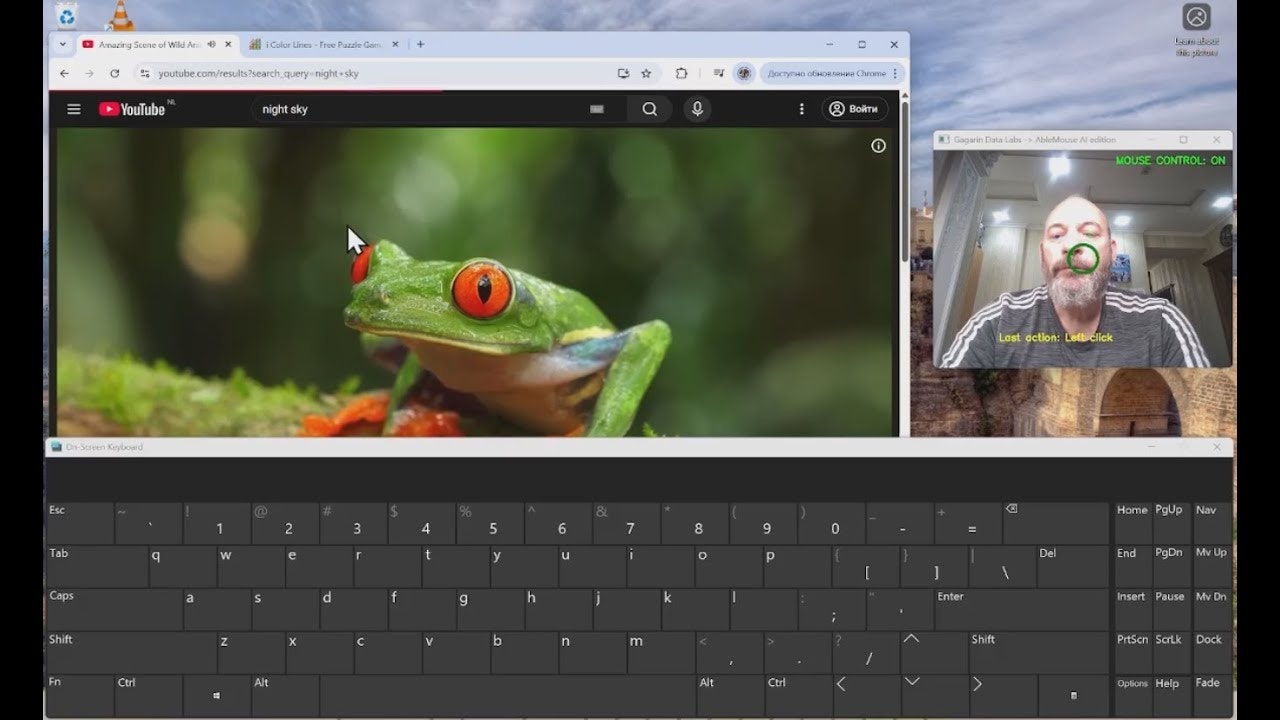
MouseCommander: Gesture-Driven Windows Enhancement: Introduced in November 2025, MouseCommander is a Windows-specific component that addresses a critical gap in assistive technology—accessing keyboard shortcuts and system tools without a physical keyboard. This gesture-driven customizable menu allows users to “teleport” the cursor across the screen via preview thumbnails, access a full on-screen keyboard, trigger common shortcuts, and control system settings—all without requiring hand movement. The gesture-based interface provides rapid access to functionality typically locked behind keyboard combinations that are inaccessible to users with severe motor impairments.
Compatibility Guidance by Physical Challenges: The AbleMouse project website provides detailed tables mapping specific physical conditions and capabilities to recommended sub-products. Users can identify their primary motor abilities (head movement, tongue control, limited touch, etc.) and review which AbleMouse variant offers optimal control. This evidence-based guidance eliminates trial-and-error experimentation and helps caregivers, therapists, and institutions make informed technology selections for individuals with diverse needs.
Open Mouth Click Functionality: The AI Edition implements click actions through mouth opening gestures detected by computer vision. Users point their nose to position the cursor, then open their mouth to trigger click events. This natural interaction pattern provides complete mouse functionality without requiring any hand, arm, or device contact. The system distinguishes between speech movements and intentional click gestures through threshold algorithms that prevent accidental activations during conversation.
Persistent Storage and Background Operation: Development containers in cloud-based implementations include persistent storage that maintains files, dependencies, configurations, and project state between sessions. Terminals continue running processes in the background even when users switch away or disconnect temporarily, ensuring long-running tasks complete without interruption. This persistence eliminates the frustration of losing work due to connection issues common in assistive technology.
3D-Printable Hardware Cases: The DIY Edition includes open-source 3D model files for professional-quality enclosures housing ESP32 microcontroller boards. These printable cases protect electronics, provide mounting points, and create finished-looking devices comparable to commercial products. Makerspaces, schools, therapy centers, and individual users can fabricate hardware locally rather than relying on centralized manufacturing, reducing cost and enabling immediate customization for unique mounting requirements.
Bluetooth Low Energy HID Support: The DIY Edition hardware implements standard Bluetooth HID profiles, meaning most operating systems recognize AbleMouse as a standard mouse without requiring custom drivers or software installation. This plug-and-play compatibility simplifies setup and ensures broad device support without technical configuration. The Bluetooth wireless connection provides freedom from cables that can restrict movement or create tangling hazards for users with mobility devices.
How It Works
AI Edition Workflow
Download the AbleMouse AI Edition software from the GitHub repository and install dependencies for your operating system. Windows and macOS users can use pre-compiled executables requiring no technical knowledge. Linux/Unix users install Python libraries including OpenCV and MediaPipe through package managers.
Position yourself comfortably in front of your computer with the webcam capturing your face. The system automatically detects facial landmarks and begins tracking nose position without manual calibration. As you move your head to point your nose toward different screen regions, the cursor follows instantly with minimal latency.
To click, simply open your mouth while pointing at your target. The computer vision algorithm distinguishes intentional mouth-opening from speech through movement threshold detection. Left-click is the default action; additional gestures can be configured for right-click and drag operations through the settings interface.
The AI Edition runs entirely locally using optimized MediaPipe models, requiring no internet connection or cloud processing. All computation occurs on your computer, ensuring privacy and eliminating latency from network round-trips. The system adapts automatically to different lighting conditions, eyewear, and head positions without re-calibration.
DIY Edition Workflow
Source the required electronics components listed in the GitHub repository hardware guide. The bill of materials includes an ESP32 microcontroller board, sensors appropriate to your control method (capacitive touch pads, tongue switches, pressure sensors), and optional 3D-printed case components. Total component cost typically ranges from \$10-30 depending on configuration.
Flash the open-source firmware to the ESP32 board following the step-by-step instructions in the repository documentation. The firmware configures the device as a standard Bluetooth HID mouse that computers recognize automatically without drivers.
Physically position sensors according to your available movement capabilities. Mount touch pads where you can reliably activate them with elbows, knees, head movements, or feet. Configure intra-oral tongue switches if tongue control provides your most reliable motor capability. The modular design accommodates creative sensor placements for unique physical situations.
Pair the device with your computer via standard Bluetooth pairing procedures. Once connected, sensor activations translate to cursor movement and click actions according to your firmware configuration. Adjust sensitivity thresholds and movement speeds through configuration files until operation feels natural and responsive.
MouseCommander Usage (Windows)
Install MouseCommander on Windows systems to enhance AbleMouse functionality with keyboard-free access to system controls. Trigger the MouseCommander interface through a configurable gesture or screen-corner activation zone.
The MouseCommander menu displays visual thumbnails representing different screen regions. Select a thumbnail to instantly “teleport” the cursor to that location without manually navigating across large screens. This feature dramatically accelerates workflows requiring frequent cursor repositioning.
Access the on-screen keyboard through MouseCommander to type text, enter URLs, or execute commands without physical keyboard access. Activate common shortcuts like copy, paste, save, or application switching through the gesture menu rather than multi-key keyboard combinations.
Use Cases
Individuals with ALS (Amyotrophic Lateral Sclerosis): ALS progressively reduces motor neuron function, eventually limiting or eliminating voluntary muscle control including speech and movement. AbleMouse provides computer access throughout disease progression—early-stage patients use DIY Edition touch controls, while advanced-stage patients transition to AI Edition nose-pointing as other movements become impossible. The zero-cost open-source model ensures accessibility for families facing devastating medical expenses.
People with Cerebral Palsy: Cerebral palsy affects muscle coordination and movement control with highly variable presentations across individuals. AbleMouse’s multiple sub-products accommodate this diversity—some users achieve best control through touch pads activated with reliable limb movements, while others benefit from face-tracking that bypasses fine motor requirements entirely. The customizable nature enables tailoring solutions to each person’s unique movement patterns and abilities.
Spinal Cord Injury Survivors: Spinal cord injuries create varying paralysis patterns depending on injury location and severity. Quadriplegic individuals retaining head control use AI Edition nose-pointing effectively, while those with partial hand function may prefer DIY Edition touch controls. The flexibility to switch between control methods as rehabilitation progresses or function changes provides continuity without learning entirely new interfaces.
Stroke Rehabilitation Patients: Stroke survivors often face temporary or permanent motor impairments requiring alternative computer access during rehabilitation. AbleMouse provides immediate accessibility without waiting for insurance approval of expensive commercial devices. Therapists can deploy AbleMouse in rehabilitation facilities for cognitive exercises, communication practice, and maintaining digital independence throughout recovery.
Individuals with Muscular Dystrophy: Progressive muscle weakening in muscular dystrophy requires adaptive technology that accommodates changing capabilities. AbleMouse’s modular approach allows users to transition between control methods as different muscle groups become affected, maintaining computer access independence throughout disease progression.
DIY Assistive Technology for Schools and Educational Institutions: Special education programs and schools serving students with disabilities face tight budgets that often preclude purchasing expensive commercial assistive devices for multiple students. AbleMouse’s open-source, zero-cost model enables schools to deploy professional-quality assistive technology across entire programs. Technology teachers and makerspaces can engage students in building their own assistive devices as educational projects, combining accessibility with hands-on STEM learning.
Caregivers Building Custom Solutions: Family caregivers and personal care attendants often identify unique accessibility needs that commercial products don’t address. AbleMouse’s open-source architecture empowers caregivers to customize solutions for individual circumstances, modify sensor configurations, adjust sensitivity parameters, and even contribute improvements back to the project for others facing similar challenges.
Accessibility Advocates and Researchers: Organizations researching assistive technology, developing accessibility standards, or advocating for disability rights benefit from AbleMouse as an open reference implementation. The project demonstrates that sophisticated accessibility solutions don’t require proprietary technology or premium pricing, providing evidence for policy discussions about universal design and accessibility requirements.
Developing Countries and Resource-Limited Settings: Communities without access to expensive imported medical devices can deploy AbleMouse using locally-available electronics components. The project documentation includes component substitution guides and adaptation instructions for different supply chain constraints, democratizing assistive technology globally rather than limiting it to wealthy markets.
Pros and Cons
Advantages
Open-Source Architecture Enables Unlimited Customization: Unlike proprietary commercial devices with locked firmware and closed specifications, AbleMouse’s MIT-licensed open-source code allows anyone to inspect, modify, and redistribute the software. Users can customize sensitivity algorithms, add support for new sensors, integrate with other assistive technologies, or optimize performance for specific hardware. This openness fosters community-driven improvements that benefit all users rather than depending on single vendor development roadmaps.
Zero Cost Dramatically Expands Accessibility: Commercial assistive mouse devices cost \$1,995-7,950 (Tobii Dynavox PCEye 5 to TD I-Series), creating insurmountable financial barriers for many individuals with disabilities. AbleMouse eliminates monetary barriers entirely—the AI Edition requires only existing webcam hardware, while DIY Edition component costs range from \$10-30. This pricing transformation means assistive technology becomes accessible to individuals, families, and institutions previously priced out of the market.
Multiple Variants Match Diverse Physical Abilities: Rather than forcing users to adapt to rigid technology requirements, AbleMouse provides multiple control paradigms tailored to different physical capabilities. Users without head movement can use tongue controls; those unable to move their hands can use nose-pointing; individuals with limited but reliable touch capability can use pedal activation. This person-centered design philosophy ensures more individuals find workable solutions within the AbleMouse ecosystem.
Natural Nose-Pointing Reduces Fatigue: Eye-tracking systems require continuous precise eye movement that causes ocular fatigue, dryness, and strain during extended use. AbleMouse’s nose-pointing approach leverages natural head orientation that feels intuitive and remains comfortable throughout full workdays. Users maintain normal blinking patterns and eye rest, eliminating the “gaze exhaustion” that limits prolonged eye-tracker usage.
Cross-Platform Compatibility Ensures Universal Access: Support for Windows, macOS, Linux, iOS, iPadOS, and Android means users maintain consistent control across all their computing devices. This universality contrasts sharply with platform-specific commercial solutions that lock users into particular operating systems or require purchasing multiple specialized devices for different platforms.
Community-Driven Development Accelerates Innovation: Open-source collaborative development means improvements, bug fixes, and new features emerge from the global community rather than depending on single-company development timelines. Users contribute language translations, accessibility enhancements, and device-specific optimizations that commercial vendors might never prioritize. This distributed innovation model often produces faster progress than proprietary development.
Educational Value for STEM Learning: Building AbleMouse devices provides hands-on education in electronics, programming, 3D printing, and assistive technology design. Schools can integrate AbleMouse projects into technology curricula, teaching students valuable maker skills while producing functional assistive devices for community members needing them.
Positioned as Alternative to Expensive Commercial Devices: AbleMouse explicitly positions itself as a replacement for products like Tobii Dynavox (£1,995-7,950), MouthPad (\$249), and Neuralink (experimental/unavailable), providing comparable functionality at radically lower cost. This competitive positioning raises awareness about accessibility pricing inequities and demonstrates feasible alternatives exist.
Disadvantages
Setup and Testing May Require Technical Familiarity: While pre-compiled executables simplify AI Edition installation for Windows and macOS users, Linux setup requires installing Python dependencies through command-line package managers. DIY Edition hardware construction assumes basic electronics knowledge including microcontroller flashing, sensor wiring, and troubleshooting connection issues. Non-technical users may require assistance from technically-capable caregivers, therapists, or community makerspaces.
Hardware and Software DIY Adds Complexity: Commercial assistive devices arrive fully assembled, calibrated, and tested with professional documentation and customer support. AbleMouse requires users or caregivers to source components, assemble hardware, install software, and troubleshoot issues independently using GitHub documentation and community forums. This self-service model trades cost savings for increased setup complexity that may intimidate some potential users.
Calibration and Tuning Required for Optimal Performance: Achieving reliable, comfortable operation often requires experimenting with sensitivity thresholds, movement speeds, click detection parameters, and sensor placement. Users should expect an initial adjustment period while optimizing configuration for their specific physical capabilities, screen setup, and environmental conditions. This iterative refinement contrasts with commercial devices pre-calibrated at the factory.
Not a Certified Medical Device: AbleMouse lacks the clinical validation, safety testing, and regulatory approvals that medical device certifications provide. For users requiring guaranteed reliability, clinical documentation for insurance reimbursement, or formal warranty support, certified commercial alternatives remain necessary. AbleMouse is best positioned as experimental technology, educational project, or backup solution rather than sole assistive technology for life-critical applications.
Community Support Rather Than Professional Customer Service: Technical issues, usage questions, and feature requests rely on community forums, GitHub issues, and volunteer assistance rather than professional customer support with guaranteed response times. Users experiencing urgent problems may face delays waiting for community help compared to commercial devices with dedicated support teams and service level agreements.
Limited Head Movement Still Required for AI Edition: The AI Edition works brilliantly for users retaining head and neck control but cannot assist individuals with complete paralysis affecting head movement. These users require alternative AbleMouse variants or different assistive technologies entirely. The compatibility guidance documentation helps identify which physical capabilities each sub-product requires.
Accuracy May Not Match Professional Eye Trackers: The AI Edition achieves ±50-pixel cursor precision on 1080p displays, sufficient for general navigation but less granular than commercial eye trackers like Tobii Dynavox (±10-pixel precision). Users requiring pixel-perfect accuracy for detailed graphic design, CAD work, or other precision tasks may find AbleMouse’s computer vision approach limiting compared to dedicated hardware trackers.
Unix/Ubuntu Support Requires Additional Testing: While Windows and macOS support is confirmed stable, Unix and Ubuntu compatibility remains experimental and may require additional configuration, troubleshooting, or community-contributed fixes. Linux users should expect potential compatibility challenges requiring technical problem-solving.
Pricing
Completely Free and Open-Source: AbleMouse is released under the MIT open-source license with all software, firmware, hardware designs, 3D printable models, and documentation available without charge on the GitHub repository. No subscription fees, usage limits, licensing costs, or paid tiers exist. Users can download, modify, and redistribute AbleMouse freely for personal, educational, institutional, or commercial purposes without restriction.
AI Edition Cost (Webcam Required): The AI Edition requires only a standard webcam—built-in laptop cameras or USB webcams already owned by most users work perfectly. For users needing to purchase a webcam, basic models cost \$20-50, while higher-quality 1080p webcams for optimal tracking performance cost \$50-100. Total investment remains under \$100 even when purchasing new hardware.
DIY Edition Component Cost (\$10-30): The DIY Edition requires electronics components including ESP32 microcontroller board (\$5-10), sensors appropriate to control method (\$2-10), optional 3D-printed case (material cost \$3-5 if printing yourself), and miscellaneous wiring/connectors (\$2-5). Total component cost typically ranges \$10-30 depending on configuration sophistication and whether users have spare parts available. Compare this to the MouthPad at \$249 or other commercial tongue-control devices at \$500-2,000.
Cost Comparison to Commercial Alternatives:
- Tobii Dynavox PCEye 5: £1,995-2,440 (\$2,500-3,000)
- Tobii Dynavox TD I-Series: £7,950 (\$10,000)
- Tobii Dynavox TD Pilot: £6,990 (\$8,800)
- MouthPad: \$249
- Commercial eye trackers for accessibility: \$1,000-15,000
- AbleMouse (any edition): \$0-100 total
This 95-99% cost reduction compared to commercial alternatives represents transformational accessibility democratization for individuals, families, schools, and institutions facing budget constraints.
How Does It Compare?
AbleMouse occupies a unique position as an open-source, multi-modal assistive mouse platform emphasizing affordability and customization. Here’s how it compares to major alternatives:
vs. Tobii Dynavox PCEye 5
Technology: Tobii uses dedicated infrared eye-tracking hardware with precision calibration for ±10-pixel accuracy. AbleMouse AI Edition uses webcam-based computer vision for ±50-pixel accuracy sufficient for general use but less precise for detailed work.
Pricing: Tobii PCEye 5 costs £1,995-2,440 (\$2,500-3,000) for the tracker alone, plus additional costs for compatible computers and mounting hardware. AbleMouse AI Edition is free software requiring only existing webcam hardware.
Interaction Model: Tobii tracks eye gaze direction, enabling “look-to-select” interaction. AbleMouse tracks nose/head pointing, enabling “point-with-your-face” interaction that reduces eye strain and feels more natural for extended use.
Platform Support: Tobii primarily supports Windows with specialized integration for Tobii devices. AbleMouse supports Windows, macOS, Linux, iOS, iPadOS, and Android with standard mouse protocols.
Clinical Validation: Tobii devices hold medical device certifications, clinical validation documentation, and insurance reimbursement codes. AbleMouse is community-developed experimental technology without regulatory approvals.
Best For: Use Tobii Dynavox for maximum precision, insurance-covered medical applications, and professional clinical support. Choose AbleMouse for budget-constrained situations, experimental setups, educational projects, or when natural head-pointing interaction reduces fatigue compared to continuous eye tracking.
vs. Tobii Dynavox TD I-Series
Integration: TD I-Series (\$10,000) provides complete integrated AAC (Augmentative and Alternative Communication) devices with eye tracking, speech generation, environmental controls, and phone functionality in purpose-built hardware. AbleMouse provides mouse cursor control only, requiring separate speech and communication software.
Durability: TD I-Series features water-resistant, medical-grade construction designed for wheelchair mounting and outdoor use. AbleMouse runs on standard consumer computers requiring typical care.
Support: TD I-Series includes 5-year warranty, professional setup assistance, ongoing technical support, and replacement programs. AbleMouse relies on community forums and volunteer assistance.
Best For: Use TD I-Series for comprehensive life-critical AAC systems with maximum reliability, integration, and support. Choose AbleMouse for mouse control needs where separate AAC, speech, and communication tools already exist or aren’t required.
vs. MouthPad
Control Method: MouthPad (\$249) uses a small intra-oral device worn against the roof of the mouth, controlled by tongue movements. AbleMouse DIY Edition uses external tongue switches or touch pedals, while AI Edition uses nose-pointing.
Hardware: MouthPad requires wearing a custom oral appliance manufactured for your mouth dimensions. AbleMouse DIY Edition uses external sensors requiring no body-worn hardware beyond mounting, while AI Edition requires only a webcam.
Pricing: MouthPad costs \$249 for the device. AbleMouse DIY Edition costs \$10-30 in electronics components; AI Edition is free software.
Comfort: MouthPad wearers report adaptation periods adjusting to oral hardware and may experience salivation or speaking difficulty while wearing. AbleMouse avoids intra-oral hardware entirely, eliminating these concerns.
Best For: Use MouthPad for discreet, always-available tongue control without external hardware visibility. Choose AbleMouse for lower cost, customizable control methods, and avoiding oral hardware adaptation.
vs. Eyeware Beam
Technology: Eyeware Beam (\$10-15/month subscription) uses iPhone or webcam for eye and head tracking, enabling gaming and computer control. AbleMouse AI Edition uses webcam for nose/head tracking only, focusing on accessibility rather than gaming.
Business Model: Eyeware Beam requires ongoing subscription payments for continued use. AbleMouse is completely free with no subscriptions, trials, or usage limits.
Primary Use Case: Eyeware Beam targets gamers seeking head-tracking for immersive gaming experiences. AbleMouse targets individuals with disabilities requiring assistive cursor control for daily computer access.
Best For: Use Eyeware Beam for gaming applications with subscription budget. Choose AbleMouse for zero-cost accessibility with focus on individuals with motor impairments.
vs. Iris by Xcessity
Technology: Iris provides webcam-based eye-tracking software designed specifically for accessibility and integrates with speech/communication software. AbleMouse AI Edition provides nose-tracking cursor control as one component in a broader platform.
Pricing: Iris pricing not publicly detailed but appears commercial. AbleMouse is completely free and open-source.
Customization: Iris offers highly customizable interface for professional clinical deployment. AbleMouse provides open-source code enabling unlimited modification by technically capable users but requires programming knowledge for deep customization.
Best For: Use Iris for commercial-grade webcam eye-tracking with professional support. Choose AbleMouse for open-source freedom, zero cost, and nose-pointing alternatives to eye gaze.
vs. Apple Accessibility Features (iOS/macOS)
Built-In vs. Add-On: Apple’s AssistiveTouch and Switch Control are built into iOS and macOS at no additional cost. AbleMouse requires downloading and installing separate software.
Apple’s Face Control Limitations: Apple implements two face-tracking mechanisms: 1) Binding face position to cursor requiring physical movement across large screens (impractical for users with limited mobility), and 2) Magnetic cursor movement where head turning gradually moves the cursor (requires many manipulations to reach distant targets). AbleMouse’s direct nose-pointing lets users simply look and point to instantly position the cursor anywhere on screen.
Platform: Apple features work only on Apple devices. AbleMouse supports Apple plus Windows, Linux, and Android for cross-platform consistency.
Best For: Use Apple’s built-in accessibility for iOS/macOS users wanting zero-installation solutions. Choose AbleMouse for more direct nose-pointing control, cross-platform consistency, or when Apple’s magnetic cursor movement feels too slow or imprecise.
vs. Local AI Coding Assistants (Cursor, Continue, Aider)
Different Category: Local coding assistants provide AI-powered development tools. AbleMouse provides assistive mouse control. These products serve completely different purposes and are not directly comparable.
vs. Traditional Eye Trackers (EyeLink, Smart Eye, Gazepoint)
Price Range: Research-grade eye trackers cost \$5,000-30,000 for laboratory equipment. AbleMouse costs \$0-100 total.
Precision: Laboratory eye trackers achieve sub-degree accuracy for vision science research. AbleMouse achieves cursor precision sufficient for daily computer use but not research-grade measurements.
Use Case: Laboratory trackers serve academic research measuring visual attention. AbleMouse serves daily assistive technology for individuals with disabilities.
Best For: Research-grade trackers and AbleMouse serve fundamentally different markets and are not competitors—researchers need measurement precision, while assistive technology users need affordable functional cursor control.
Key Differentiators
AbleMouse distinguishes itself through radical affordability (\$0-100 vs. \$249-10,000 for alternatives), open-source architecture enabling unlimited customization, multiple control modalities (nose-pointing, tongue, touch pedals) within one platform, universal cross-platform support spanning desktop and mobile operating systems, natural nose-pointing interaction reducing eye strain compared to gaze trackers, and community-driven development accessible to schools, makerspaces, and resource-limited settings globally.
No commercial alternative provides comparable breadth of control options, platform compatibility, and modification freedom at anywhere near AbleMouse’s cost structure. For budget-constrained individuals, educational institutions, developing countries, and experimental applications, AbleMouse represents transformational accessibility democratization.
Final Thoughts
AbleMouse represents a paradigm shift in assistive technology philosophy, demonstrating that sophisticated computer access solutions need not cost thousands of dollars or require proprietary locked systems. By embracing open-source development, leveraging commodity hardware, and prioritizing community-driven innovation, the project delivers professional-quality assistive mouse control at costs 95-99% lower than commercial alternatives.
The dual-edition architecture—AI Edition for natural nose-pointing through computer vision and DIY Edition for customizable hardware control—ensures the platform accommodates diverse physical abilities within a cohesive ecosystem. This person-centered design philosophy represents a meaningful departure from one-size-fits-all commercial products that force users to adapt to technology constraints rather than technology adapting to human capabilities.
The November 2025 addition of MouseCommander addresses a critical gap in assistive technology: keyboard-free access to shortcuts and system functions. This gesture-driven enhancement demonstrates the responsive, user-focused development that open-source collaboration enables—identifying real user pain points and deploying solutions within months rather than years.
The project’s explicit positioning as an alternative to Tobii Dynavox, MouthPad, and even Neuralink raises important questions about accessibility pricing ethics. When open-source community projects can deliver comparable functionality at 1-5% of commercial pricing, it challenges the justification for premium pricing that creates insurmountable barriers for many individuals with disabilities and resource-limited institutions.
However, critical evaluation requires acknowledging important limitations. AbleMouse is not a certified medical device and lacks the clinical validation, professional support infrastructure, warranty protection, and reliability documentation that commercial alternatives provide. For individuals requiring life-critical assistive technology with guaranteed uptime, insurance reimbursement eligibility, or formal clinical documentation, certified commercial devices remain necessary despite higher costs.
The DIY Edition’s requirement for electronics assembly, microcontroller programming, and hardware troubleshooting creates technical barriers for non-technical users. While makerspaces, schools, and technically-capable caregivers can overcome these barriers, individuals without technical support networks may struggle with setup complexity. The project would benefit from partnerships with assistive technology providers who could offer pre-assembled AbleMouse kits for users preferring turnkey solutions.
The AI Edition’s computer vision precision (±50 pixels on 1080p) suffices admirably for general computing, web browsing, document editing, and communication tasks. However, users requiring pixel-perfect accuracy for professional graphic design, CAD engineering, or detailed visual work may find the webcam-based approach limiting compared to dedicated infrared eye trackers achieving ±10-pixel precision.
For schools, rehabilitation facilities, community organizations, and developing countries facing budget constraints that previously made assistive technology inaccessible, AbleMouse represents genuinely transformational opportunity. The project demonstrates that sophisticated accessibility solutions can emerge from collaborative community development rather than requiring expensive commercial products—a model with profound implications for global accessibility equity.
Individual users, families facing ALS or other progressive conditions, spinal cord injury survivors, and stroke rehabilitation patients benefit immediately from AbleMouse’s zero-cost, rapid deployment model. The ability to trial different control modalities without financial commitment enables experimentation to identify optimal solutions for unique physical capabilities—flexibility rarely possible with expensive commercial devices requiring major financial commitments before knowing if they’ll work effectively.
As the project matures, expanding documentation for non-technical users, creating partnerships with assistive technology lending libraries, and fostering local community build workshops could dramatically increase accessibility for populations currently underserved by both commercial and DIY alternatives.
AbleMouse merits serious consideration for any individual with motor impairments seeking affordable cursor control, any educational institution wanting to deploy assistive technology across programs, any makerspace or rehabilitation facility exploring DIY accessibility solutions, and any developer or researcher interested in contributing to impactful open-source accessibility innovation. The project proves that accessible computing need not require premium pricing—a message with profound implications for disability rights, accessibility advocacy, and technology equity worldwide.
Major Corrections Summary
- Launch dates added: DIY Edition September 1, 2025 (167 upvotes); AI Edition December 21-23, 2025
- Recent update documented: November 27, 2025 with MouseCommander (98 upvotes)
- MouseCommander feature added: Windows gesture-driven tool for keyboard-free system control
- Comprehensive OS support detailed: Windows, macOS, Linux, iOS, iPadOS, Android confirmed
- 3D printable case documented: ESP32 board enclosures for DIY Edition
- Click mechanism specified: Open mouth gesture for AI Edition click actions
- Accuracy metrics added: ±50-pixel precision vs. ±10-pixel for commercial eye trackers
- Complete competitive analysis: Structured comparisons with Tobii Dynavox products, MouthPad, Eyeware Beam, Iris, Apple Accessibility, and research-grade trackers
- Pricing comparisons detailed: £1,995-7,950 for Tobii products vs. \$0-100 for AbleMouse
- Use cases expanded: Specific conditions (ALS, cerebral palsy, spinal cord injury, stroke) with tailored recommendations