
Table of Contents
Overview
CapCut, the dominant video editing platform known for its simplicity, powerful editing capabilities, and massive creator adoption, is strategically expanding into the broader creative design space. Introducing AI Design by CapCut, a sophisticated AI design agent launched in November 2025 that transforms your natural language text descriptions into stunning, production-ready visuals within seconds. From eye-catching social media posts and professional YouTube thumbnails to personalized design assets, posters, logos, and e-commerce product visualizations, this tool aims to democratize design by bringing your creative imagination to life with just conversational prompts and natural language instructions. Powered by advanced image generation models including Seedream 4.0 (ByteDance’s multimodal image generation model) and Nano Banana (Pixels’ specialized image generation model), AI Design is engineered as seamless extension of CapCut ecosystem enabling creators to design assets directly within familiar environment, then immediately incorporate those visuals into video projects, eliminating traditional friction of switching between separate design tools and video editing software.
Key Features
CapCut AI Design delivers comprehensive visual generation capabilities combined with native video editing integration through conversational AI interface.
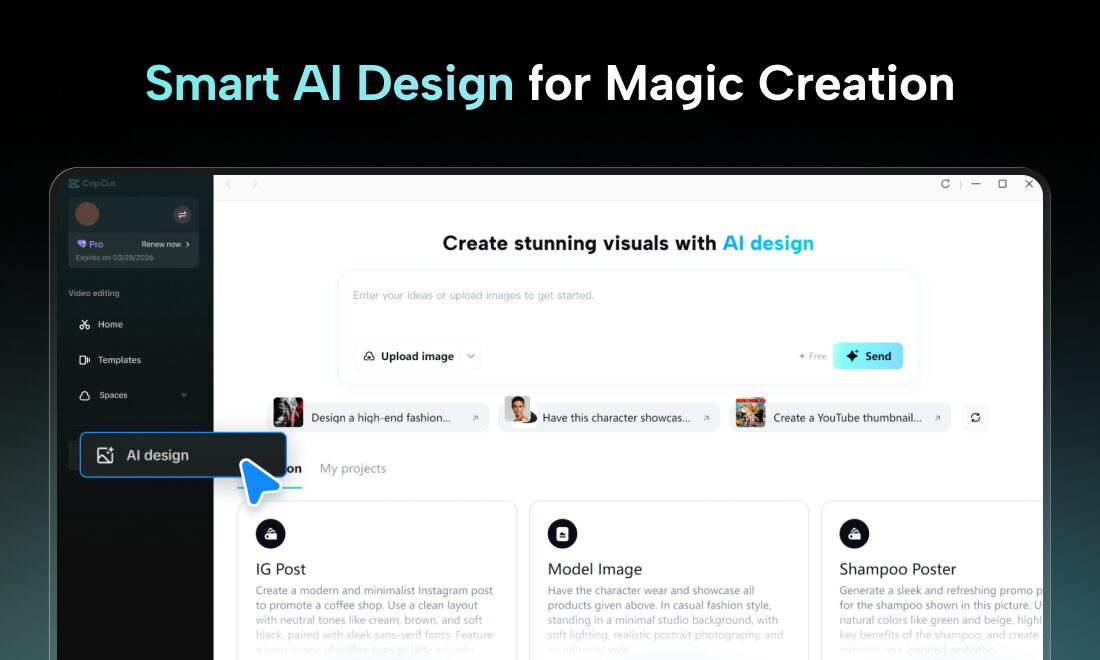
AI Design Agent Through Conversational Chat: Simply describe the design you want through natural conversational prompts in chat-like interface. The AI agent interprets your description, understands design intent, and generates custom visuals matching your specifications—making design process conversational and intuitive rather than requiring technical design knowledge or software expertise.
Dual High-Quality AI Model Architecture: Built on impressive combination of Seedream 4.0 (ByteDance’s advanced multimodal image generation model) and Nano Banana (specialized image generation model), ensuring generated designs deliver high-resolution, coherent, and creatively compelling visual output with exceptional prompt adherence and aesthetic quality.
Generous Free Daily Quota: CapCut provides 10 free design generations every day even without paid subscription, enabling consistent experimentation, iteration, and creative exploration without initial investment or requiring payment for casual usage exploring platform capabilities.
Direct CapCut Studio Integration: Seamlessly move generated designs into CapCut Studio for immediate video incorporation. Add text overlays, apply effects, integrate designs into video projects, or combine multiple designs into cohesive video assets without context-switching to separate tools—design and video editing in unified workflow.
Product Scene Generation and Batch Replacement: Upload single product photo and automatically generate multiple realistic lifestyle scenes featuring product in different environments. Batch replacement feature enables swapping products across same backgrounds with single click—dramatically accelerating e-commerce content creation and product photography requirements without hiring photographers.
Multi-Platform Resizing and Export: Automatically resize generated designs for different social media platforms (Instagram, TikTok, YouTube, Facebook, LinkedIn, etc.) in single operation. Export optimized for each platform’s specifications ensuring consistent branding across channels without manual resizing.
Design Style Customization: Choose from various visual styles (photorealistic, illustration, digital art, minimalist, 3D, etc.) enabling stylistic consistency with brand identity or specific aesthetic requirements without requiring design expertise to articulate style preferences.
AI-Powered Advanced Editing: Post-generation editing capabilities include auto-cutout for clean product images, one-click background removal, color changing, element removal, and other refinement operations enabling design polish without separate editing software.
Conversational Fine-Tuning and Iterative Refinement: Describe design modifications conversationally and AI regenerates designs matching refined specifications. Iterative prompt refinement without requiring technical understanding of what changed or why—natural conversation flow for design iteration.
Available on Desktop and Web: Access AI Design through CapCut Desktop (Windows and Mac) or CapCut Web browser-based interface, providing flexibility across devices and workflows without installation requirements or device dependency.
Logo Generation with Brand Consistency: Generate logos matching brand requirements and visual identity. Support for various creative formats (minimal, illustration, modern, classic) enabling rapid logo exploration and concept iteration.
Event and Promotional Material Automation: Generate event previews, promotional invitations, holiday greetings, and registration materials at scale with conversational prompts enabling fast creation of complex event materials traditionally requiring hours of manual design work.
Pricing
CapCut AI Design operates on freemium model with transparent usage-based quotas enabling all users to access core functionality without payment.
Free Daily Quota: 10 free design generations per day (all users, no subscription required) enabling consistent creative exploration and production use without payment for moderate-to-light usage.
Free Tier Account: Completely free account creation and access to all core AI Design features with daily quota limit. No credit card required for basic functionality.
CapCut Pro Subscription: Paid tier (pricing varies by region, typically \$4.99-9.99/month) provides significantly higher daily quotas, priority processing speed, enhanced model access, and removal of watermarks or usage limits.
Premium Model Access: Some advanced or specialized models may require additional credits or premium subscription tier enabling access to cutting-edge or specialized generation capabilities.
Note: Specific pricing for premium tiers and exact daily quotas for paid plans require direct inquiry through CapCut platform as pricing structure varies by region and evolves with platform updates. Organizations should verify current pricing, quota structures, and available features through CapCut’s official pricing page.
How It Works
CapCut AI Design’s operational workflow emphasizes simplicity and seamless video integration through three core phases: Describe, Generate, Integrate.
Users access AI Design feature by opening CapCut Desktop application or CapCut Web platform and clicking “Design Agent” or “AI Design” from primary dashboard menu.
Description phase: Users describe their desired design through natural conversational prompts in chat-like interface. Prompts can be simple (“create a YouTube thumbnail”) or highly detailed (“create a professional product mockup showing organic coffee beans in 3D scene with warm golden lighting, modern minimalist aesthetic, premium packaging”).
AI processing: CapCut’s AI agents analyze text description, understand design intent, consider platform-specific requirements (dimensions, aesthetics, purpose), and generate initial design concepts matching specification using Seedream 4.0 or Nano Banana models.
Review and refinement: Users preview generated design, provide conversational feedback requesting modifications (“make it brighter,” “add more emphasis,” “change to blue color scheme”), and AI regenerates design matching refined specifications. Iterative refinement continues until design perfectly matches requirements.
Optional editing enhancement: Users can apply post-generation editing enhancements (background removal, color adjustments, element removal) without leaving CapCut interface ensuring final design polish.
Integration and export: Users download generated design directly to device, OR seamlessly open design in CapCut Studio for immediate video integration. Designs ready for social sharing, video incorporation, or further editing.
Multi-format optimization: Single design automatically resized for different platforms (Instagram, TikTok, YouTube, Facebook, etc.) with platform-specific optimizations ensuring consistent visual experience across channels.
The entire workflow from design description through production-ready asset typically completes in minutes versus traditional design software requiring hours of learning curve or hiring professional designers for custom work.
Use Cases
CapCut AI Design serves diverse creative scenarios where rapid visual generation, design-video integration, and professional quality without design expertise drive exceptional value.
Social Media and Marketing Asset Production: Quickly generate unique visuals for Instagram posts, TikTok videos, Facebook ads, LinkedIn articles, YouTube thumbnails, and other marketing materials capturing audience attention. Generate multiple variations exploring different aesthetics rapidly enabling data-driven content decisions based on audience response.
Creative Content Production for Creators: Bloggers, podcasters, musicians, artists, and content creators generate custom cover art, promotional images, album artwork, podcast cover art, and other creative assets in seconds. Rapid iteration enables exploring multiple aesthetic directions without hiring design professionals.
Fast Generative Design Cycles for Teams: Design agencies and marketing teams use AI Design to brainstorm and rapidly iterate on visual concepts exploring different styles, compositions, and approaches without manual design effort. Generate mockups, concepts, and variations at unprecedented velocity enabling fast creative feedback loops.
E-Commerce and Product Visualization: Sellers generate realistic product mockups, lifestyle scene variations, promotional visuals, and product photography alternatives without professional photography or extensive photoshoot requirements. Batch replacement enables consistent product presentation across marketing channels.
Event Promotion and Organizational Materials: Organizations generate event previews, promotional invitations, holiday greetings, registration materials, and internal communications at scale with conversational specifications enabling fast professional-quality materials.
YouTube Content Creation: Rapidly generate eye-catching YouTube thumbnails, channel art, video cover images, and promotional graphics for video projects. Seamless CapCut Studio integration enables thumbnail creation, then immediate incorporation into video editing workflow.
Personal Branding and Portfolio Development: Entrepreneurs, freelancers, and professionals create personal branding materials, portfolio images, professional headshots, and promotional assets building professional image without design expertise or expense.
Small Business Marketing: Small business owners create professional marketing materials (flyers, business cards, promotional graphics, social media assets) competing with larger enterprises on visual polish without design budget or expertise.
Pros and Cons
Understanding both advantages and limitations provides clarity for evaluating CapCut AI Design’s fit for design needs and creative workflows.
Advantages
Fast and Creative Output: Automated design generation delivers impressive creative results with minimal effort. Processing typically takes seconds delivering designs that would require hours of manual work or professional designer engagement, dramatically accelerating content production velocity.
Generous Free Daily Quota: 10 free daily uses make platform highly accessible for casual users, small businesses, freelancers, and creators on limited budgets enabling consistent experimentation without payment commitment or financial barrier to exploration.
Seamless CapCut Integration: Designs generated within AI Design flow directly into CapCut Studio for video editing enabling unified workflow. Video creators never leave familiar CapCut environment from design generation through final video export, eliminating tool-switching friction and reducing learning curve.
Immediate Video Incorporation: Unique capability of instantly integrating generated designs into video projects represents significant advantage for content creators building video assets. Unlike standalone design tools requiring export and import steps, CapCut AI Design closes feedback loop within single application ecosystem.
No Design Expertise Required: Natural language conversational interface eliminates design software learning curve or specialized design knowledge requirements enabling anyone to generate professional-quality designs regardless of artistic skill or design experience.
Professional Quality Output: Generated designs genuinely appear professional and production-ready without obvious AI artifacts or limitations characteristic of earlier generation AI design tools, satisfying professional-grade quality expectations.
Disadvantages
CapCut Account Required: Requires active CapCut account to access features—potential barrier for non-CapCut users requiring account creation before accessing design capabilities versus standalone tools requiring no prerequisites.
Limited Granular Control: While excellent for rapid generation, platform lacks granular design controls available in professional graphic design software (Figma, Adobe Illustrator). Advanced designers requiring precise control over typography, spacing, color values, or custom layout may find limitations constraining.
New Platform with Evolving Feature Set: Launched November 2025 means limited production deployment history, undiscovered edge cases, evolving model quality, and features subject to change as platform matures. Early adopters accepting some platform instability and refinement in exchange for access to emerging capabilities.
Dependency on AI Model Quality: Generated design quality depends entirely on underlying AI models (Seedream 4.0, Nano Banana) performance which varies with model updates, prompt specificity, and may occasionally produce unexpected or lower-quality outputs requiring regeneration or refinement.
Potential Watermarking on Free Tier: Free daily quota may include watermarking or branding on exported designs requiring upgrade to Pro tier for watermark removal—important consideration for professional or commercial applications.
Limited Design Philosophy Iteration: While design style customization exists, platform may lack depth for designers seeking complete creative control or exploration of fundamentally different aesthetic directions requiring architectural design thinking impossible through conversational prompts.
Free Quota Rollover Uncertainty: Daily quota generation (10 free uses per day) may reset daily or operate on rolling basis with unclear accumulation rules—users needing burst capacity may face limitations requiring pro subscription.
How Does It Compare?
The AI-powered design generation landscape features diverse solutions ranging from template-based platforms to specialized AI image generators to comprehensive creative suites. Understanding CapCut AI Design’s positioning requires examining specific alternatives across different approaches and integration models.
Canva
Canva provides all-in-one design platform emphasizing template-first approach combined with AI-powered enhancements through comprehensive “Magic Suite” including Magic Design (AI generates complete designs), Magic Edit (AI-powered image editing), Magic Eraser (intelligent object removal), Magic Write (context-aware copy generation), and Magic Expand (image upscaling). Canva also launched proprietary foundational design model generating editable layered designs rather than flat images. Free tier available; Pro \$13/month; Teams \$100/year per person minimum 2 people. Serves teams and individuals across design-focused workflows.
Canva and CapCut AI Design serve complementary but different creative priorities. Canva emphasizes template foundation with AI enhancements, enabling non-designers to leverage professional templates then apply AI modifications. CapCut AI Design emphasizes pure AI generation without template dependency, creating designs from natural language descriptions. Canva stronger for team collaboration, brand kit management, and structured design process. CapCut AI Design superior for video creators seeking integrated video-design workflow. Canva targets general designers; CapCut AI Design targets video creators and content teams.
Canva’s mature ecosystem with extensive template library and team collaboration features outperforms CapCut AI Design for full-featured design platform needs. CapCut AI Design’s video editor integration represents genuine advantage for creators prioritizing video production over standalone design.
Adobe Express
Adobe Express provides cloud-based design tool powered by Adobe Firefly AI featuring Text to Image (DALL-E quality image generation), Generative Fill (add/remove elements), Text Effects (artistic text styling), Text to Template (generate custom templates), and generative fill. Free tier available with usage caps; Premium tier varies by region. Integrated with Adobe Creative Cloud ecosystem enabling handoff to Photoshop, Illustrator for advanced editing.
Adobe Express and CapCut AI Design overlap in AI generation capabilities but differentiate through integration philosophy. Adobe Express integrates into Adobe ecosystem connecting to professional Creative Cloud applications. CapCut AI Design integrates into video editing workflow. Adobe Express emphasizes broad design capabilities beyond video; CapCut AI Design specializes in design-for-video. Adobe Express stronger for professionals requiring deep creative control and professional tool integration; CapCut AI Design superior for video-first workflows.
Microsoft Designer
Microsoft Designer integrates into Microsoft Copilot ecosystem providing DALL-E-powered image generation with emphasis on prompt-driven creation and co-creation workflows. Integrated with Microsoft 365, OneDrive, and SharePoint enabling seamless enterprise collaboration for organizations standardized on Microsoft infrastructure. Free tier available; Copilot Pro \$20/month provides enhanced capabilities.
Microsoft Designer and CapCut AI Design represent different organizational contexts and integration approaches. Designer optimized for Microsoft 365-standardized organizations; CapCut AI Design optimized for video creator workflows. Designer emphasizes prompt-driven enterprise collaboration; CapCut AI Design emphasizes content creation within unified video production environment. Organizations using Microsoft 365 benefit from Designer’s ecosystem integration; video creators benefit from CapCut AI Design’s video editing convergence.
Fotor
Fotor provides all-in-one photo editing and design platform available on web, Windows, Mac, iOS, Android combining photo editing, design templates, and AI image generation. Features include AI background removal, object removal, photo enhancement, and design generation. Free tier available; Fotor Pro \$9.99/month. Emphasizes ease-of-use and cross-platform availability.
Fotor and CapCut AI Design serve different editing paradigms. Fotor emphasizes photo editing and refinement of existing images through AI enhancement. CapCut AI Design emphasizes pure design generation from text prompts. Fotor stronger for photographers and image-centric workflows; CapCut AI Design stronger for design-from-scratch and video integration. Non-overlapping primary use cases despite both featuring AI capabilities.
Designify
Designify specializes in background removal, object removal, and intelligent background replacement for e-commerce and product photography. Purpose-built for improving product images and creating lifestyle mockups. Free tier available; Pro tier pricing available. Targets e-commerce businesses and product photographers.
Designify and CapCut AI Design address overlapping but distinct needs. Designify focuses narrowly on product image enhancement and background manipulation. CapCut AI Design generates complete designs including product visualization. Designify superior for existing product photo enhancement; CapCut AI Design superior for generating complete design assets from scratch. Complementary tools serving different workflow stages.
Simplified
Simplified provides browser-based design tool combining templates, AI image generation, and AI-powered design automation. Features include design suggestions, auto-resize, and multi-format export. Free tier available; Pro tier varies. Emphasizes speed and simplicity.
Simplified and CapCut AI Design both emphasize fast design creation but through different approaches. Simplified emphasizes template-based workflows with AI assistance. CapCut AI Design emphasizes prompt-driven pure AI generation. Both target speed-conscious users but serve different design philosophies.
Direct Image Generation (DALL-E, Midjourney)
Standalone image generators like DALL-E, Midjourney, and Stable Diffusion specialize purely in AI image generation from text prompts without design framework. Require separate download/export workflow and lack integration with design or video tools. Pricing varies by model and usage tier.
Standalone generators and CapCut AI Design serve different scopes. Standalone generators provide maximum AI image generation flexibility and quality but require separate tool for design integration. CapCut AI Design trades some generation flexibility for integrated video editing workflow enabling designs immediately incorporate into videos. Standalone generators superior for pure image generation; CapCut AI Design superior for video creators seeking integrated design-video creation.
Key Differentiators
CapCut AI Design’s unique positioning centers on several distinctive capabilities. Seamless video editor integration represents genuine differentiation enabling designs flow directly into video projects without export-import cycles, context-switching, or tool multiplication—addressing specific pain point for content creators building video assets.
AI generation without template dependency enables pure creative freedom through natural language descriptions without constraint to predefined template structures. This represents philosophical difference from Canva’s template-first approach enabling more customized outcomes.
Generous free daily quota (10 uses) compared to competitors’ limited free generations democratizes platform access and enables consistent creative experimentation without financial commitment or upgrade pressure.
Video creator specialization differentiates from general-purpose design platforms attempting to serve all design needs. Deep CapCut ecosystem integration creates lock-in effect benefiting existing CapCut users disproportionately.
For design professionals requiring maximum creative control, advanced editing capabilities, or comprehensive team collaboration, Canva or Adobe Express provide superior feature sets. For organizations standardized on Microsoft infrastructure, Microsoft Designer provides ecosystem integration advantages. For pure image generation quality and flexibility, standalone generators like Midjourney provide superior outputs.
However, for video creators, content producers, and small teams seeking rapid professional design asset generation integrated directly into video editing workflow, CapCut AI Design presents compelling specialized solution. The combination of conversational AI generation, generous free quota, seamless video integration, and focus on creator workflows creates genuine value proposition for target audience.
Final Thoughts
CapCut AI Design represents strategic and compelling extension of CapCut platform addressing genuine creator pain point: rapid generation of professional visual assets for video content without maintaining separate design tool expertise or workflows. By bringing AI design capabilities directly into familiar CapCut environment and enabling instant video integration, it dramatically reduces friction between design conception and final video production.
The November 2025 launch positions CapCut AI Design strategically within rapidly maturing landscape of AI design tools. While established platforms like Canva and Adobe Express provide comprehensive design ecosystems, they optimize for general-purpose design workflows. CapCut AI Design optimizes specifically for video creator workflows addressing the particular tension between design asset needs and video production efficiency.
Critical advantages include seamless video integration eliminating tool-switching, generous free daily quota democratizing platform access, natural language interface requiring no design expertise, professional quality output meeting production expectations, and specialized focus on video creator workflows creating genuine differentiation.
Legitimate considerations include limited granular design control compared to professional design software, dependence on underlying AI model quality, platform newness with evolving feature set, account requirement creating small adoption friction, and potential watermarking on free tier.
For video content creators, YouTubers, social media managers, small business owners, podcasters, and creative teams seeking to accelerate visual asset generation specifically for video or social content, CapCut AI Design delivers compelling value through specialized positioning addressing genuine workflow gaps. The integration of design and video creation within single environment represents meaningful productivity improvement over traditional tool-switching approaches.
The generous free daily quota enables risk-free comprehensive evaluation without financial commitment. For video-first creative teams ready to integrate AI design generation into production workflows, prioritizing speed and integration over maximum design flexibility, CapCut AI Design absolutely warrants serious evaluation as innovative solution specifically engineered for creator workflows typically fragmented across separate design and video tools. As video content remains highest-growth content format and design asset generation represents recurring bottleneck, specialized tools addressing this specific junction of design and video production represent genuinely valuable productivity investment.