Table of Contents
Overview
In today’s fast-paced work environment, meetings can often feel like a whirlwind of ideas, decisions, and action items that are easily lost once the call ends. SuperIntern is an always-on AI meeting copilot designed to solve this exact problem. It captures live conversations through your computer’s audio system and intelligently transforms them into tangible, organized output, ensuring that no critical detail ever slips through the cracks. By turning talk into action, SuperIntern aims to make every meeting more productive and impactful.
Key Features
SuperIntern is packed with powerful features designed to streamline your workflow and enhance team collaboration. Here’s what makes it stand out:
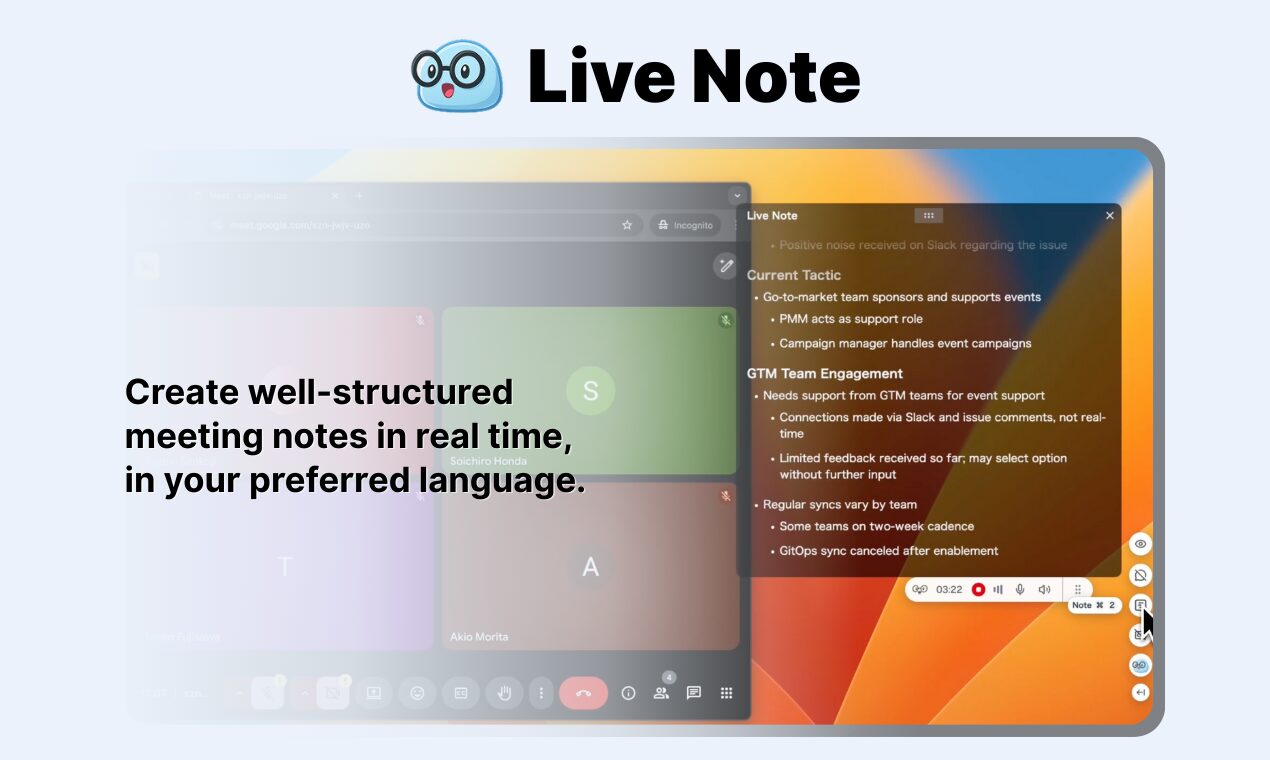
- Real-time Structured Notes: During your meeting, SuperIntern actively listens and structures key points into organized notes as the conversation unfolds, helping keep discussions on track and empowering your team to confirm decisions without delay.
- Live Transcription \& Translation: The tool provides real-time transcripts of meetings and can display bilingual subtitles, supporting over 50 languages to break down communication barriers for global teams.
- Invisible Mode: When activated, SuperIntern’s interface remains hidden during screen sharing or screenshots, keeping your display clean and professional while still capturing everything.
- In-Meeting AI Chat: Participants can ask questions about the dialogue, receive suggested responses, look up specific terms, and get web-backed insights in real time without disrupting meeting flow.
- Custom Vocabulary Recognition: The system can learn your team’s specific jargon, names, and domain terms, leading to more accurate and relevant summaries over time.
- Post-Meeting Refinement: After the meeting concludes, SuperIntern generates polished minutes with action items, a clickable transcript for navigation, and downloadable notes.
How It Works
The process of using SuperIntern is remarkably simple and intuitive. It runs as a desktop application on your computer (currently macOS with Windows in development) and captures audio from your microphone and speakers. When your meeting starts, SuperIntern detects it automatically and appears on your screen. Simply click to begin, or launch it anytime from the desktop app.
As your team discusses projects and plans, the AI identifies key topics, decisions, and action items. It then provides live transcripts and structured notes that update in real time. The system works across all major meeting platforms including Zoom, Google Meet, Microsoft Teams, Slack Huddle, and Webex. Since it captures system audio rather than joining as a bot participant, SuperIntern remains invisible to other attendees, reducing social friction and eliminating the need to invite an AI bot to your calls.
Use Cases
This tool is versatile enough to add value to a wide range of meeting types. Here are scenarios where SuperIntern truly excels:
- Project Management Meetings: Keep track of every task, deadline, and dependency discussed. SuperIntern ensures all action items are captured and assigned, preventing miscommunication and keeping projects moving forward.
- Cross-functional Team Syncs: When teams from different departments collaborate, it’s crucial that everyone leaves with a shared understanding. SuperIntern creates a single source of truth, summarizing key takeaways for all stakeholders.
- Foreign Language Meetings: Non-native speakers can follow along with real-time translation and bilingual subtitles, while the system can generate English notes even when the meeting is conducted in another language.
- Sales Calls and Client Meetings: Capture detailed notes without distracting from client interactions, with the ability to query discussion points in real time and receive instant clarification on complex topics.
- One-on-One Meetings: The invisible, bot-free approach makes it ideal for sensitive conversations where adding an AI participant would be awkward or inappropriate.
Pros \& Cons
No tool is perfect. Here is a balanced look at what SuperIntern offers and what you should keep in mind.
Advantages
- Bot-Free Design: Captures audio locally without joining meetings as a participant, making it socially seamless and professional for all meeting types.
- Real-Time Productivity: Structured notes appear during the meeting, not after, allowing teams to confirm decisions and action items on the spot.
- Comprehensive Language Support: With over 50 languages supported, it serves global teams and multilingual environments effectively.
- Cross-Platform Compatibility: Works with any meeting platform that outputs audio through your computer, plus in-person meetings.
Disadvantages
- Limited Operating System Support: Currently only available for macOS (Apple Silicon recommended), with Windows version still in development.
- Privacy Considerations: As with any tool that processes conversation data locally and in the cloud, teams should review data handling policies, especially for highly sensitive discussions.
- Resource Usage: Running real-time AI processing on your local machine may impact performance on older computers.
- Early Stage Product: Launched in April 2025 with limited user reviews and market validation compared to established competitors.
How Does It Compare?
The AI meeting assistant space includes established tools like Otter.ai and Fireflies.ai. Here is how SuperIntern stacks up against each competitor across key dimensions.
Otter.ai
Core Approach: Cloud-based meeting bot that joins calls vs. SuperIntern’s local audio capture
Real-Time Capabilities:
- Otter.ai offers real-time transcription with live captions for Zoom and Google Meet
- Otter AI Chat allows querying transcripts during meetings for real-time answers
- SuperIntern provides similar real-time transcription plus structured notes that organize as the meeting progresses, not just raw transcript
Language Support:
- Otter.ai primarily optimizes for English with limited multi-language support
- SuperIntern supports 50+ languages with real-time translation and bilingual subtitles
Meeting Integration:
- Otter.ai joins as a visible bot participant requiring calendar integration
- SuperIntern captures system audio locally without joining calls, making it invisible to other participants
Platform Availability:
- Otter.ai offers web, iOS, Android apps
- SuperIntern currently macOS-only (Apple Silicon) with Windows in development
Pricing:
- Otter.ai uses per-user pricing with limited free tier
- SuperIntern offers \$20/month Plus plan with 30-50 hours, or \$0.04/minute on-demand
Fireflies.ai
Core Approach: Cloud-based bot with “Fred” AI assistant vs. SuperIntern’s local capture
Real-Time Capabilities:
- Fireflies.ai launched Real-Time Meeting Notes in January 2025 with live bullet points and action items
- “Ask Fred” provides in-meeting AI assistance similar to SuperIntern’s AI chat
- Fireflies sends action items to meeting chat 5 minutes before call ends
- SuperIntern emphasizes invisible operation and structured note organization during the meeting
Transcription Quality:
- Fireflies.ai supports 60+ languages compared to SuperIntern’s 50+
- Both offer real-time processing, though Fireflies has longer market presence and refinement
User Experience:
- Fireflies’ visible bot “Fred” may be distracting for some users
- SuperIntern’s bot-free approach eliminates this social friction entirely
Platform Support:
- Fireflies offers web, desktop app, mobile app, and Chrome extension
- SuperIntern currently limited to macOS desktop app
Integrations:
- Fireflies integrates with 90+ tools including major CRMs
- SuperIntern has fewer integrations but focuses on core meeting experience
Key Differentiators for SuperIntern
- Invisible Operation: Only tool that captures audio locally without joining calls as a bot
- Real-Time Structure: Organizes notes hierarchically during the meeting, not just transcript
- Language Flexibility: Can generate English notes from non-English meetings
- Privacy Model: Local audio capture reduces cloud exposure of sensitive conversations
Final Thoughts
SuperIntern presents a compelling alternative in the AI meeting assistant market with its innovative bot-free approach and emphasis on real-time structured notes. The invisible mode and local audio capture solve genuine social and professional concerns about AI bots participating in sensitive meetings.
However, prospective users should weigh several considerations. The macOS-only limitation restricts accessibility for Windows users, though the promised Windows version may address this soon. As a product launched in April 2025 with limited user reviews, it lacks the extensive market validation and refinement of competitors like Otter.ai and Fireflies.ai, which have processed millions of meetings and iterated based on broad user feedback.
Teams should also realistically assess their real-time needs. While SuperIntern excels at in-meeting support, many organizations may find post-meeting summaries sufficient for their workflows. The pricing model—\$20/month for 30-50 hours or per-minute charges—may become costly for heavy users compared to unlimited transcription plans offered elsewhere.
For global teams, multilingual teams, or organizations where meeting bot presence creates social barriers, SuperIntern offers unique value. For those prioritizing platform availability, extensive integrations, or proven accuracy across diverse accents, established alternatives may be more suitable. As with any AI tool, we recommend testing the free 60-minute trial across your actual meeting scenarios before committing, as real-world accuracy and utility may vary based on audio quality, speaker accents, and meeting complexity.