
Table of Contents
Overview
Developed as an open-source bridge for the modern AI stack, Bridge4Simulator enables popular tools like Cursor, Claude Code, and Claude Desktop to “drive” the iPhone simulator natively. Unlike previous methods that relied on heavy visual processing and “screenshot spamming,” which quickly exhausted API token quotas, this tool utilizes high-efficiency UI extraction and OCR fallbacks. This ensures that the AI can perceive the app’s internal structure and perform precise gestures (taps, swipes, and text inputs) with minimal latency and cost.
The system is designed for a seamless developer experience on macOS, integrating directly into an IDE’s workflow. By exposing native iOS simulator commands as AI-executable tools, Bridge4Simulator transforms the simulator from a passive preview window into an active testing ground where AI agents can execute complex end-to-end tasks, such as navigating a multi-page checkout flow or verifying specific UI states after a code change.
Key Features
- Native Gesture Execution: Provides AI with a toolset to perform
tap,swipe, andtype_textcommands directly inside the iOS environment. - Token-Efficient UI Extraction: Uses hierarchy detection and instant OCR to describe the screen to the AI, drastically reducing the number of image tokens consumed compared to pure Vision-based approaches.
- MCP-Native Architecture: Built on the Model Context Protocol, ensuring day-zero compatibility with any AI client that supports the MCP standard.
- Application Lifecycle Management: Allows the AI to autonomously install, launch, and terminate apps, enabling fully automated testing cycles.
- Screenshot & Video Recording: Includes built-in tools for the AI to capture its own progress or record specific bugs for documentation.
- Deep Link Navigation: Supports
open_urlcommands, allowing AI agents to test deep links and specific app routing paths instantly. - Privacy-Centric Local Execution: The bridge runs locally on the user’s Mac, ensuring that private app data and interaction logic remain on the local machine.
- Simple Brew Installation: Accessible via a standard Homebrew tap (
AppGram/tap), making it easy to incorporate into existing developer environments.
How It Works
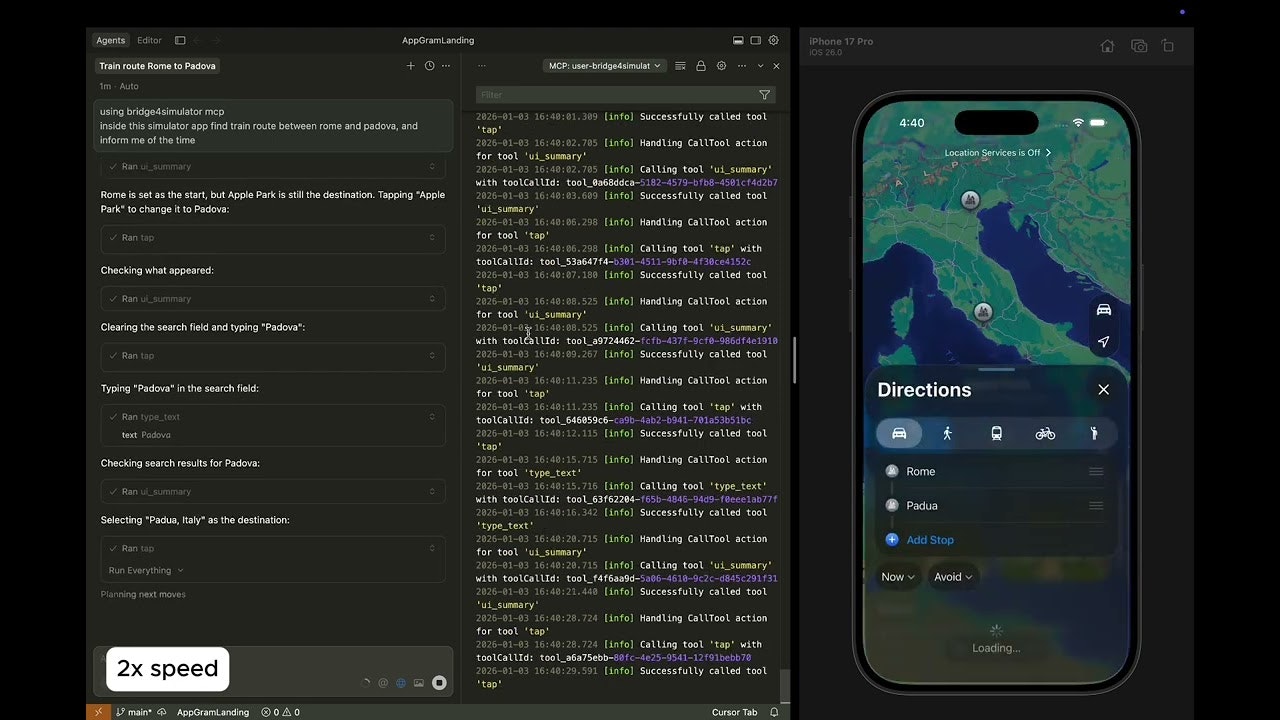
Bridge4Simulator functions as an intermediary “server” running on your Mac. After installation, you run the bridge4simulator mcp command, which establishes an interface for AI clients to connect. When you ask an AI assistant like Cursor to “Find the settings menu in the running app,” the AI sends a request to the Bridge4Simulator server. The server analyzes the current simulator state using hierarchy detection, tells the AI where the elements are located, and executes the necessary click commands when the AI decides to interact. This interactive loop allows the AI to “feel” its way through the app’s interface in real-time.
Use Cases
- AI-Driven UI Testing: Developers can instruct an AI to “Perform a smoke test of the login flow” and watch it navigate the simulator while reporting any crashes or UI glitches.
- Autonomous Feature Verification: After a code update, use the AI to verify that a new button or label appears correctly in the simulator without manual clicking.
- Complex Navigation Tasks: Ask the AI to find specific data inside a deeply nested app menu (e.g., “Find the train route from Rome to Padova in the Maps app”).
- Automated Bug Reproduction: Paste a bug report into your AI assistant and have it “Drive” the simulator to reproduce the issue and suggest a fix based on the logs.
Pros and Cons
- Pros: Significant reduction in API costs due to optimized UI data processing. Native control allows for high precision in gesture execution. Open-source core provides transparency for security-conscious teams.
- Cons: Limited to macOS environments as it requires Xcode and the iOS Simulator. Currently requires a certain level of technical setup via CLI.
Pricing
- Open Source / Free: The core MCP server and CLI are available for free under an open-source license on GitHub.
- Commercial Inquiries: For teams interested in the proprietary bridge engine powering the CLI for large-scale enterprise use, the developers offer custom commercial licensing.
How Does It Compare?
Maestro / Appium
– Core Difference: Traditional automation frameworks like Maestro or Appium require humans to write “scripts” (e.g., “click button X”). Bridge4Simulator allows an AI to decide where to click based on its own reasoning and the app’s live context.
Fastlane
– Core Difference: Fastlane focuses on the “plumbing” of app deployment (screenshots for the App Store, build distribution). Bridge4Simulator is focused on the “active intelligence” layer of using the app itself.
Computer Use (Anthropic API)
– Core Difference: Anthropic’s generic “Computer Use” relies on continuous screenshots of the entire Mac screen. Bridge4Simulator is a specialized “narrow” agent tool that is much faster and cheaper because it only looks at the Simulator’s internal hierarchy.
LobeHub MCP / simtheory.ai
– Core Difference: These are platforms that host or catalog MCP servers. Bridge4Simulator is the actual technical implementation of the server that provides the iOS-specific capabilities.
Final Thoughts
Bridge4Simulator MCP is a foundational tool for the “AI Software Engineer” (AISE) era. By giving AI assistants the ability to not just write code but also to “experience” the resulting mobile app, it closes the loop of the development lifecycle. While it is currently a specialized tool for iOS developers, the efficiency gains in token usage and the intuitive “human-like” interaction it provides make it a superior alternative to generic vision-based automation. For teams using Cursor or Claude to build mobile apps in 2026, this bridge is an essential component for achieving true autonomous development.