Table of Contents
Overview
In today’s data-driven world, accessing information from websites is crucial for countless tasks, from market research to content aggregation. However, many platforms lack official APIs, forcing users to rely on tedious manual processes or complex coding solutions. Enter Browser Use Skills, a revolutionary feature within the Browser Use ecosystem designed to democratize web data access. Launched on Product Hunt December 6, 2025 (achieving 359 upvotes and ranking #5 for the day), Browser Use Skills addresses a fundamental automation challenge: websites providing valuable data or functionality without official APIs forcing developers to choose between fragile web scraping requiring constant maintenance or abandoning automation altogether.
This innovative platform empowers you to transform virtually any website into powerful, reusable API, even when no official API exists—through conversational prompts or single demonstrations. Unlike traditional browser automation requiring extensive code writing in tools like Puppeteer or Selenium, Browser Use Skills uses AI agents to “reverse-engineer the HTTP calls into a clean API,” effectively creating robust callable endpoints from websites in under 5 minutes. The system observes browser network traffic during demonstrations, identifies precise HTTP requests powering website functionality, and packages them into production-ready API endpoints you can call repeatedly. Get ready to unlock new level of efficiency and automation—recording workflows once and calling them forever without constantly maintaining brittle scraping scripts.
Key Features
- Turns Any Website into Callable APIs in Minutes: Effortlessly convert any website into functional API endpoint opening up world of programmatic access previously impossible without official APIs. Browser Use Skills generates production-ready endpoints from plain text descriptions or demonstrations completing transformations in under 5 minutes versus days/weeks building equivalent custom scrapers. The “record once, call forever” paradigm eliminates ongoing maintenance burden inherent in traditional web scraping where minor website changes break entire scripts requiring developer intervention.
- Reverse-Engineers HTTP Calls with AI Intelligence: Browser Use Skills intelligently analyzes website interactions identifying and replicating underlying HTTP requests making them accessible via your new API. The system observes browser network traffic during task demonstrations extracting precise API calls (GET/POST requests, authentication headers, payload structures, cookie requirements) websites use internally. This reverse-engineering approach creates more reliable integrations than DOM-based scraping because HTTP calls represent actual data exchange mechanisms rather than fragile HTML selectors breaking with layout changes.
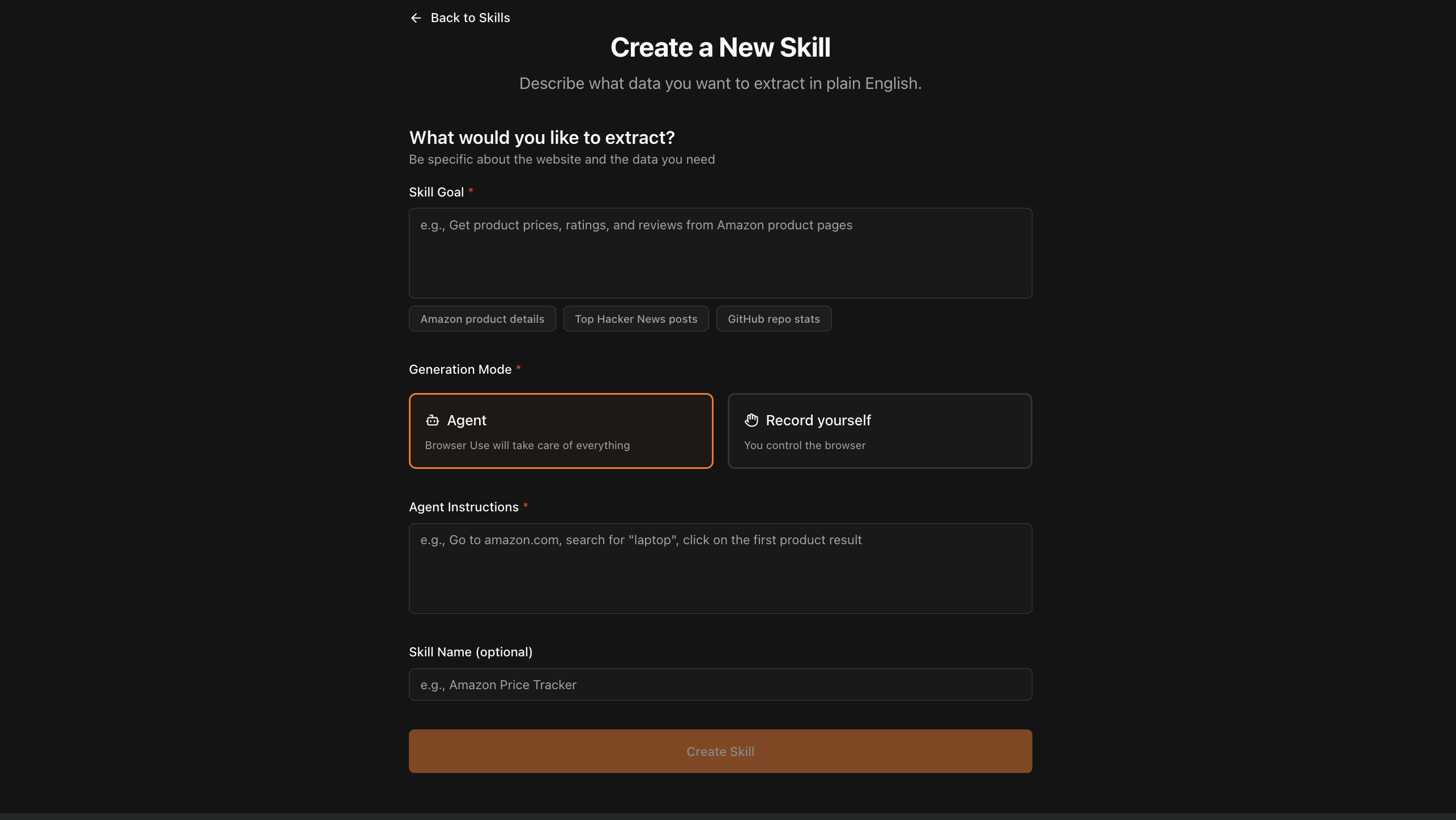
- One-Shot Prompt or Demo Setup Requiring Minimal Configuration: Get started quickly with either simple natural language prompt describing desired outcome (“Get price and reviews for any Amazon product,” “Download songs from Suno,” “Create leads in Salesforce”) or brief demonstration performing action you want automate. The AI agent watches your demonstration understanding workflow steps, identifying reusable patterns, and generalizing actions into parameterized API endpoints accepting dynamic inputs. This low-code/no-code approach makes powerful automation accessible to non-technical users while providing customization depth for developers.
- Handles Complex Multi-Step Tasks and Real-World Applications: From downloading specific content like songs and videos to scraping thousands of social media posts in seconds, or automating actions within platforms like Suno and Salesforce, Browser Use Skills is built for robust real-world applications. The system manages complex scenarios including: multi-page navigation sequences, authentication and session management, form filling with dynamic data, infinite scrolling and pagination, JavaScript-heavy single-page applications, and CAPTCHA bypass (in cloud version with stealth features). These capabilities transform theoretical automation into production-ready solutions handling edge cases and website complexity.
- Deterministic Fast Execution Replacing Slow Browser Agents: Skills fix fundamental problems plaguing browser agents: slowness (30+ seconds navigating UIs), non-determinism (unpredictable AI decisions), and cost (expensive LLM calls per interaction). By capturing HTTP-level communications, Browser Use Skills execute in under 1 second versus 30+ seconds for UI-based browser agents—achieving 30x-60x speed improvements. The deterministic nature ensures consistent behavior without AI variability, while direct API calls cost pennies versus dollars for equivalent browser agent interactions.
- Integration with Browser Use Ecosystem: Browser Use Skills integrates seamlessly with broader Browser Use platform—the world’s most-loved browser-automation library with 1.3+ million monthly downloads and largest open-source community. The ecosystem includes: open-source Python/TypeScript library for self-hosted automation, Browser Use Cloud for managed infrastructure with auto-scaling, MCP (Model Context Protocol) server enabling integration with AI-powered tools, and Skills marketplace (coming) for sharing/monetizing created APIs. This comprehensive ecosystem provides flexibility choosing between self-hosted open-source or fully managed cloud solutions.
- Production-Ready Infrastructure with Enterprise Features: Browser Use Skills (especially cloud version) provides production-grade capabilities: unlimited concurrent executions scaling to handle massive workloads, session management maintaining authentication across calls, proxy support with 195+ countries and residential rotation, CAPTCHA/anti-bot bypass automatically handling protections, file handling with automatic downloads accessible via API, and full autocomplete with native Python/TypeScript support. These features transform proof-of-concept automations into reliable production systems.
- Clean Typed API with Structured Schemas: Generated APIs include auto-generated parameter schemas defining required inputs and output schemas documenting returned data structures. The structured typing enables IDE autocompletion, compile-time error detection, and self-documenting code eliminating guesswork about endpoint usage. Example response format:
{"status": "success", "data": {"price": "$29.99", "rating": 4.5, "title": "Wireless Headphones"}, "metadata": {"latency": "840ms"}}provides consistent structured data ready for downstream processing. - Skills Dashboard and API Creation Tools: Create skills via web-based dashboard or programmatically through API enabling both manual workflow recording and automated skill generation workflows. The dashboard provides intuitive interface for non-technical users while API enables developers building skill creation into larger automation pipelines. Full documentation supports both creation approaches with examples and best practices.
How It Works
The magic behind Browser Use Skills lies in its intuitive AI-powered approach combining browser observation with HTTP traffic analysis:
Step 1: Skill Creation via Prompt or Demonstration
You begin by either describing what you want to achieve through natural language prompt (“extract product pricing from Amazon,” “download videos from YouTube,” “create leads in Salesforce CRM”) or demonstrating the task by manually performing workflow in browser while Browser Use observes. The demonstration-based approach works like recording macro—navigate pages, click buttons, fill forms, extract data—while system watches understanding your intent and generalizing actions into reusable patterns.
Step 2: Browser Network Traffic Analysis
Browser Use Skills meticulously observes and analyzes browser’s network traffic during demonstration or prompt execution. Modern browsers expose complete visibility into HTTP/HTTPS requests sent/received enabling detailed inspection of API calls, headers, authentication tokens, request payloads, response formats, and cookie requirements. The system logs all network activity identifying which requests represent actual data exchange versus ancillary assets (images, CSS, tracking pixels) distinguishing signal from noise.
Step 3: HTTP Request Pattern Identification
The AI engine identifies precise HTTP requests and responses making website function by analyzing captured network traffic for patterns: authentication mechanisms (API keys, Bearer tokens, session cookies, OAuth flows), request structures (URL parameters, POST bodies, header requirements), pagination patterns (offset/limit, cursor-based, page number schemes), rate limiting constraints, and error handling requirements. This pattern recognition extracts minimal reproducible request sequence replicating website functionality without unnecessary overhead.
Step 4: API Endpoint Generation and Packaging
Once HTTP patterns are understood, Browser Use Skills packages them into clean, well-defined, reusable API endpoint ready for integration into workflows. The generated API abstracts away complexity: parameterizes dynamic values (product IDs, search terms, pagination offsets) enabling flexible reuse, handles authentication automatically managing tokens/cookies/sessions, implements retry logic and error handling for reliability, provides typed schemas documenting inputs/outputs, and exposes simple REST interface callable from any language/platform. The result is production-ready endpoint requiring zero maintenance as long as website’s underlying API structure remains stable.
Step 5: Skill Testing and Refinement
Created skills undergo testing ensuring reliability before production deployment. The system validates successful execution across sample inputs, verifies output schemas match expectations, tests edge cases (missing data, timeouts, errors), and benchmarks performance measuring latency/throughput. Users can iteratively refine skills through additional demonstrations or prompt adjustments until behavior matches requirements.
Step 6: Production Deployment and Monitoring
Deployed skills become callable via standard REST API integrated into applications, scheduled jobs, data pipelines, or other automation workflows. The Browser Use Cloud provides monitoring dashboards tracking execution metrics (success rates, latencies, error patterns), usage analytics (call volume, cost tracking), and alerting when skills fail enabling proactive maintenance. Self-hosted users access similar capabilities through open-source library’s built-in telemetry.
Use Cases
Given its specialized website-to-API transformation capabilities, Browser Use Skills addresses various scenarios where missing APIs create automation barriers:
Data Scraping and Content Aggregation at Scale:
- Efficiently gather information from social media feeds (Instagram posts, TikTok videos, Reddit threads, Twitter/X timelines) lacking generous public APIs
- Scrape blog posts, news articles, research publications, and web content for content aggregation, competitive intelligence, or training data
- Extract product catalogs, pricing data, reviews, and specifications from e-commerce sites for price monitoring, market research, or affiliate marketing
- Pull financial data, real estate listings, job postings, or other structured information from specialized vertical platforms
- Handle thousands of pages in seconds through optimized HTTP-level access versus slow UI-based browser automation
Automating Non-API Platforms and Legacy Systems:
- Interact with services lacking public APIs such as generating songs on Suno music platform, downloading content from closed platforms, or accessing proprietary SaaS tools
- Automate tasks within enterprise systems like Salesforce, Oracle, SAP, or legacy internal tools built before API-first era
- Bridge gaps between modern applications and older platforms requiring manual data entry or export
- Create unofficial API layers for tools actively preventing automation through terms-of-service restrictions (use cautiously respecting ToS)
Content Downloading and Media Extraction:
- Easily download specific files, videos, music, images, or other media directly from websites including YouTube, Instagram, TikTok, SoundCloud, and specialized content platforms
- Batch process downloads across multiple URLs extracting media files at scale
- Archive content for offline access, preservation, or analysis purposes
- Extract embedded media from complex web applications where simple URL downloads fail
Workflow Automation and Business Process Integration:
- Streamline repetitive tasks integrating web data seamlessly into existing business processes eliminating manual copy-paste workflows
- Populate CRM systems with lead data extracted from LinkedIn, industry directories, or company websites
- Sync data between incompatible systems lacking direct integrations using Browser Use Skills as middleware
- Automate report generation pulling data from multiple web sources consolidating information
- Schedule recurring data collection jobs updating databases, spreadsheets, or dashboards automatically
Competitive Intelligence and Market Research:
- Monitor competitor websites tracking pricing changes, product launches, feature updates, or marketing campaigns
- Aggregate review data across platforms analyzing sentiment, identifying trends, and benchmarking against competition
- Track industry news, regulatory changes, or market developments from specialized sources
- Build comprehensive datasets for analysis combining information from dozens of disparate sources
Personal Productivity and Life Automation:
- Automate personal tasks like tracking package deliveries, monitoring flight prices, scraping recipes, or downloading educational content
- Build personal data lakes aggregating information about your interests, hobbies, or research topics
- Create custom notifications based on website changes without relying on built-in alert systems
- Simplify digital life through programmatic access to services you use regularly
Pros \& Cons
Advantages
- Bypasses API Limitations Unlocking Inaccessible Data: Overcome hurdles of websites lacking official APIs granting access to valuable data previously unavailable for programmatic use. This capability opens entire categories of automation impossible with traditional approaches addressing fundamental constraint in modern data-driven workflows.
- Massive Time-Saver for Scrapers and Automation Engineers: Significantly reduces manual effort and development time required for web scraping projects. Traditional scraping requires writing selectors, handling JavaScript rendering, managing sessions, implementing retry logic, dealing with rate limiting—tasks consuming days/weeks per site. Browser Use Skills compresses this into minutes through AI-powered workflow capture and HTTP reverse-engineering.
- No Official API Needed—Primary Breakthrough Benefit: Works precisely where traditional API integrations are impossible creating programmatic interfaces for any website regardless of vendor cooperation. This democratizes data access removing gatekeeping by platforms controlling who accesses their information through API restrictions.
- 30x-60x Speed Improvements Over UI Browser Agents: Direct HTTP calls execute in under 1 second versus 30+ seconds for UI-based browser automation navigating pages, clicking elements, and waiting for renders. This performance breakthrough enables real-time applications, high-volume data processing, and cost-effective scaling impossible with slow browser agents.
- Deterministic Reliable Execution Without AI Variability: Once created, skills execute consistently without unpredictable AI decisions causing failures. Traditional browser agents using LLMs make runtime decisions that sometimes fail inexplicably; Browser Use Skills’ HTTP-level approach eliminates this non-determinism providing production reliability.
- Integration with Largest Open-Source Browser Automation Library: Leverage 1.3+ million monthly downloads community, extensive documentation, active development, and proven reliability of Browser Use platform. The ecosystem provides confidence in long-term viability versus abandoned projects or proprietary lock-in.
- Flexible Deployment Options (Self-Hosted vs. Cloud): Choose between open-source self-hosted deployment maintaining complete control or fully managed Browser Use Cloud eliminating infrastructure overhead. This flexibility accommodates diverse requirements from hobbyists experimenting locally to enterprises needing compliance and SLAs.
- Production-Ready with Enterprise Features: Browser Use Cloud provides unlimited concurrency, session management, proxy rotation (195+ countries), CAPTCHA bypass, file handling, monitoring dashboards, and SLA guarantees transforming experimental automation into reliable production systems.
Disadvantages
- Potential Terms of Service Violations Requiring Legal Review: Automated access might be restricted by target websites’ Terms of Service creating legal risks. Many platforms explicitly prohibit scraping, bot access, or automated data collection in ToS agreements. Users must carefully review applicable terms, obtain permission where required, and accept risks of account termination, legal action, or technical countermeasures. Browser Use Skills provides capability but users bear responsibility for compliant usage.
- API Maintenance Required When Site Structure Changes: If website undergoes significant structural changes (URL patterns, authentication mechanisms, request formats, response schemas), generated API might require updates to remain functional. While HTTP-level APIs are more resilient than DOM-based scraping, they’re not immune to breaking changes. Major platform redesigns, API versioning, or security enhancements may necessitate recreating skills. However, this maintenance burden is dramatically lower than traditional scraping requiring constant selector updates with every minor layout change.
- Learning Curve Despite Simplified Interface: While simpler than coding Puppeteer/Selenium scripts, Browser Use Skills still requires understanding concepts like HTTP requests, API authentication, JSON responses, and debugging network traffic for complex scenarios. Non-technical users can handle simple workflows through demonstrations, but sophisticated automation may require technical knowledge. The abstraction simplifies but doesn’t eliminate complexity entirely.
- Cloud Version Pricing Not Publicly Disclosed: Browser Use Cloud pricing structure, usage limits, and cost models remain unclear creating budget uncertainty for production deployments. Self-hosted open-source version is free but requires infrastructure and maintenance effort. Users cannot accurately forecast expenses or compare cost-effectiveness against alternatives without transparent pricing information.
- Dependence on Website HTTP APIs Remaining Stable: Browser Use Skills’ effectiveness depends on websites exposing stable HTTP APIs Browser Use observes. Platforms deliberately obfuscating API calls, frequently rotating endpoints, implementing sophisticated bot detection, or moving functionality server-side may resist skill creation. Highly dynamic single-page applications using WebSockets, GraphQL with complex schemas, or proprietary protocols may prove challenging.
- Ethical and Security Considerations: Automating access to websites raises ethical questions about data ownership, privacy implications, server load impact, and competitive fairness. Aggressive scraping can strain target servers, violate user privacy expectations, or undermine business models dependent on manual access. Users must implement responsible rate limiting, respect robots.txt, consider data privacy regulations (GDPR, CCPA), and evaluate broader ethical implications beyond mere technical feasibility.
- Limited Differentiation from Browser Use Core Library: Browser Use Skills represents evolution of Browser Use platform rather than entirely distinct product. Users already proficient with Browser Use library may find Skills primarily offers convenience layer atop capabilities achievable through manual coding. The value proposition is strongest for non-developers or time-constrained teams versus experienced automation engineers comfortable coding browser interactions directly.
How Does It Compare?
Browser Use Skills vs. Puppeteer (Node.js Browser Automation)
Puppeteer is Google’s Node.js library providing high-level API controlling Chrome/Chromium browsers, widely used for web scraping, testing, and automation.
Approach:
- Browser Use Skills: AI-driven workflow capture and HTTP reverse-engineering creating reusable API endpoints from demonstrations or prompts
- Puppeteer: Code-based browser control requiring developers writing JavaScript scripts defining every action (navigate, click, extract)
Setup Complexity:
- Browser Use Skills: Minutes via demonstration or natural language prompt; no coding required for basic tasks
- Puppeteer: Requires Node.js environment, writing JavaScript code, understanding async/await, managing browser lifecycle, handling errors
Performance:
- Browser Use Skills: Sub-second execution via direct HTTP calls; 30x-60x faster than UI automation
- Puppeteer: Seconds to minutes depending on page load, rendering, and interaction complexity; inherently slower due to full browser overhead
Maintenance:
- Browser Use Skills: Minimal maintenance as long as website HTTP APIs remain stable; changes require recreating skills
- Puppeteer: Constant maintenance updating selectors when website layouts change; every visual redesign breaks scripts
Use Case:
- Browser Use Skills: Extracting data or automating workflows transforming websites into callable APIs for repeated use
- Puppeteer: Complex browser automation, screenshot generation, PDF creation, advanced testing scenarios, custom JavaScript execution
When to Choose Browser Use Skills: For rapid API creation without coding, when HTTP-level speed matters, or when maintaining scraping scripts is prohibitive.
When to Choose Puppeteer: For advanced browser control needing custom JavaScript, screenshot/PDF generation, testing requiring full browser context, or when you need fine-grained control over every interaction.
Browser Use Skills vs. Selenium (Cross-Browser Web Automation)
Selenium is mature open-source framework automating web browsers across multiple languages (Python, Java, C#, Ruby, JavaScript) primarily for testing.
Maturity and Ecosystem:
- Browser Use Skills: Recently launched (December 2025); early-stage product with growing ecosystem
- Selenium: Established since 2004; massive community, extensive documentation, enterprise adoption, proven reliability
Primary Purpose:
- Browser Use Skills: Creating reusable APIs from websites for data extraction and workflow automation
- Selenium: Automated testing of web applications simulating user interactions across browsers
Language Support:
- Browser Use Skills: Python and TypeScript with native support
- Selenium: Python, Java, C#, Ruby, JavaScript, Kotlin enabling polyglot teams using preferred languages
Browser Compatibility:
- Browser Use Skills: Built on Playwright supporting Chromium, Firefox, WebKit
- Selenium: Supports all major browsers (Chrome, Firefox, Safari, Edge, IE) with official WebDriver implementations
Learning Curve:
- Browser Use Skills: Lower barrier to entry through AI-driven demonstrations; accessible to non-developers
- Selenium: Steeper learning curve requiring understanding WebDriver architecture, locators, waits, and browser-specific quirks
Performance:
- Browser Use Skills: Sub-second HTTP-level execution for created skills
- Selenium: Slower UI-based automation with full browser rendering overhead
When to Choose Browser Use Skills: For rapid website-to-API transformation, when speed is critical, or when avoiding coding complexity.
When to Choose Selenium: For comprehensive cross-browser testing, when mature ecosystem and enterprise support matter, or when polyglot language support is required.
Browser Use Skills vs. Playwright (Modern Browser Automation Framework)
Playwright is Microsoft’s open-source framework for reliable end-to-end testing across Chromium, Firefox, and WebKit with modern API design.
Foundation:
- Browser Use Skills: Built on top of Playwright leveraging its browser automation capabilities
- Playwright: Core browser automation framework providing primitive operations Browser Use Skills extends
Abstraction Level:
- Browser Use Skills: Higher-level abstraction converting workflows into callable APIs through AI assistance
- Playwright: Mid-level abstraction providing programming API for browser control with better ergonomics than Selenium
Code Required:
- Browser Use Skills: Minimal or zero code for basic workflows using demonstrations or prompts
- Playwright: Requires writing TypeScript/JavaScript/Python/Java/.NET code defining test scenarios or automation logic
Auto-Wait and Reliability:
- Browser Use Skills: Inherits Playwright’s auto-wait capabilities plus adds HTTP-level reliability
- Playwright: Industry-leading auto-wait mechanisms eliminating flaky tests by waiting for elements to be actionable
Primary Use Case:
- Browser Use Skills: Creating reusable APIs from websites for repeated programmatic access
- Playwright: End-to-end testing, browser automation, web scraping requiring full control
Performance:
- Browser Use Skills: Optimized for speed through HTTP reverse-engineering achieving sub-second execution
- Playwright: Fast compared to Selenium/Puppeteer but still slower than direct HTTP due to browser overhead
When to Choose Browser Use Skills: For converting websites into APIs rapidly, when developer time is constrained, or when HTTP-level speed is paramount.
When to Choose Playwright: For comprehensive testing suites, when you need maximum control over browser interactions, or when building custom automation requiring low-level access.
Browser Use Skills vs. Traditional API Wrappers/Web Scrapers
Traditional approaches involve developers manually coding custom scrapers using libraries like BeautifulSoup (Python), Cheerio (Node.js), or building API wrappers around reverse-engineered endpoints.
Development Time:
- Browser Use Skills: Minutes via AI-powered demonstration capture and automatic HTTP analysis
- Traditional: Days to weeks coding, testing, debugging custom scraping logic per website
Maintenance:
- Browser Use Skills: Minimal maintenance recreating skills only when websites’ underlying HTTP APIs change significantly
- Traditional: Constant maintenance updating selectors, handling layout changes, fixing broken scripts after every website update
Technical Expertise:
- Browser Use Skills: Accessible to non-developers through demonstrations; developers gain productivity multiplier
- Traditional: Requires programming knowledge, understanding HTML/CSS/JavaScript, debugging skills, network traffic analysis
Reliability:
- Browser Use Skills: More reliable than DOM scraping because HTTP APIs represent actual data exchange mechanisms less likely to change
- Traditional: DOM-based scrapers fragile breaking with layout changes; manual HTTP reverse-engineering time-consuming and error-prone
Scalability:
- Browser Use Skills: Built-in scalability through Browser Use Cloud with unlimited concurrency and managed infrastructure
- Traditional: Scalability requires manually implementing queuing, rate limiting, proxy rotation, error handling, monitoring
Cost:
- Browser Use Skills: Developer time savings offset any platform costs; reduces scraping project timelines 90%+
- Traditional: Lower direct costs (open-source libraries) but massive indirect costs through developer time and ongoing maintenance
When to Choose Browser Use Skills: For rapid prototyping, when maintaining scrapers is prohibitive, or when time-to-market matters more than total control.
When to Choose Traditional: For maximum customization, when you have specialized requirements Browser Use Skills can’t handle, or when avoiding third-party dependencies is critical.
Final Thoughts
Browser Use Skills represents meaningful innovation in web automation and data access by addressing persistent friction between websites’ valuable data/functionality and lack of official APIs enabling programmatic access. The December 6, 2025 Product Hunt launch (359 upvotes, #5 ranking) introduces genuinely novel capability: AI-powered workflow capture and HTTP reverse-engineering creating production-ready API endpoints in minutes versus days/weeks coding equivalent custom scrapers. For developers, automation engineers, data scientists, and businesses requiring web data or workflow automation but facing missing APIs, Browser Use Skills provides practical solution dramatically reducing development time, maintenance burden, and technical barriers previously making automation prohibitive.
The integration within broader Browser Use ecosystem creates synergistic value beyond standalone capability. Browser Use already provides world’s most-loved browser-automation library (1.3+ million monthly downloads) with open-source community trust and proven reliability. Browser Use Skills extends this foundation adding “prompt-to-API” interface democratizing automation for non-technical users while providing power users with unprecedented productivity gains. The 30x-60x speed improvements over UI-based browser agents transform previously impractical automation scenarios into real-time-capable production systems opening new application categories.
The platform particularly excels for:
- Data teams requiring web data for analytics, ML models, or competitive intelligence where official APIs are unavailable, rate-limited, or prohibitively expensive
- Automation engineers maintaining dozens of scrapers where constant breakage from website changes consumes disproportionate development time
- Startups and small businesses lacking engineering resources to build sophisticated web automation but needing data access or workflow integration
- Developers prototyping new products requiring rapid validation of data availability before investing in production infrastructure
- Enterprise organizations requiring programmatic access to partner platforms, vendors, or internal tools lacking modern APIs
For comprehensive cross-browser testing with mature ecosystem and polyglot language support, Selenium’s 20+ year track record justifies adoption despite steeper learning curve. For maximum control over browser interactions with modern API design, Playwright provides foundation Browser Use Skills builds upon offering fine-grained customization. For developers comfortable coding and requiring specialized functionality Browser Use Skills doesn’t address, traditional approaches using Puppeteer, Playwright, or custom scrapers deliver unlimited flexibility.
But for specific intersection of “rapid website-to-API transformation,” “minimal maintenance burden,” and “accessible to non-developers through AI assistance,” Browser Use Skills addresses capabilities no standalone alternative currently combines. The platform’s primary limitations—potential ToS violations requiring legal review, maintenance needs when websites change significantly, cloud pricing uncertainty, early-stage product status, and ethical considerations around responsible scraping—reflect expected constraints of powerful automation technology requiring thoughtful deployment rather than fundamental design flaws.
The critical value proposition centers on developer productivity and accessibility: if maintaining web scrapers consumes disproportionate engineering time, if missing APIs block valuable automation scenarios, if technical barriers prevent non-developers from automating workflows, or if rapid prototyping requires validating data access quickly—Browser Use Skills provides compelling solution. The “record once, call forever” paradigm transforms fragile scripts requiring constant attention into stable API endpoints surviving website evolution.
If your organization struggles with missing APIs preventing automation, if web scraper maintenance consumes excessive developer hours, if valuable data remains inaccessible due to technical barriers, or if rapid experimentation requires quick API creation—Browser Use Skills merits evaluation. The open-source Browser Use library enables risk-free local experimentation determining whether AI-powered workflow capture delivers promised productivity gains before committing to cloud infrastructure.
For early adopters accepting recently-launched product tradeoffs (limited track record, potential ToS concerns, maintenance needs for breaking changes), Browser Use Skills delivers on promise of democratizing web automation—transforming any website into callable API through AI assistance making programmatic access universally available rather than privilege of organizations affording custom development. This fundamental shift from “only websites with official APIs are automatable” to “any website is potentially automatable” represents meaningful progress toward truly programmable web.