Table of Contents
- Overview
- Key Features
- How It Works
- Use Cases
- Pros \& Cons
- How Does It Compare?
- BrowserBook vs Selenium (Industry-Standard Browser Automation Framework)
- BrowserBook vs Playwright (Microsoft’s Modern Browser Automation)
- BrowserBook vs Browserbase (Cloud Browser Infrastructure Platform)
- BrowserBook vs Apify (Web Scraping and Automation Platform)
- BrowserBook vs Puppeteer (Google’s Node.js Browser Automation)
- Final Thoughts
Overview
BrowserBook is an AI-powered integrated development environment for building deterministic browser automations launched December 8, 2025 on Product Hunt achieving 159 upvotes and 30 comments. Founded by Y Combinator F24-backed founders Chris, Jorrie, and Evan, BrowserBook addresses fundamental browser automation challenges: traditional scripting frameworks (Selenium, Playwright) require tedious debugging cycles constantly rerunning entire scripts to test small changes, browser agents offer flexibility but suffer from unreliability and prompt injection vulnerabilities costing 10x more per execution, and fragmented tooling forces developers context-switching between code editors, separate browser windows, profiling tools, and deployment infrastructure slowing iteration velocity.
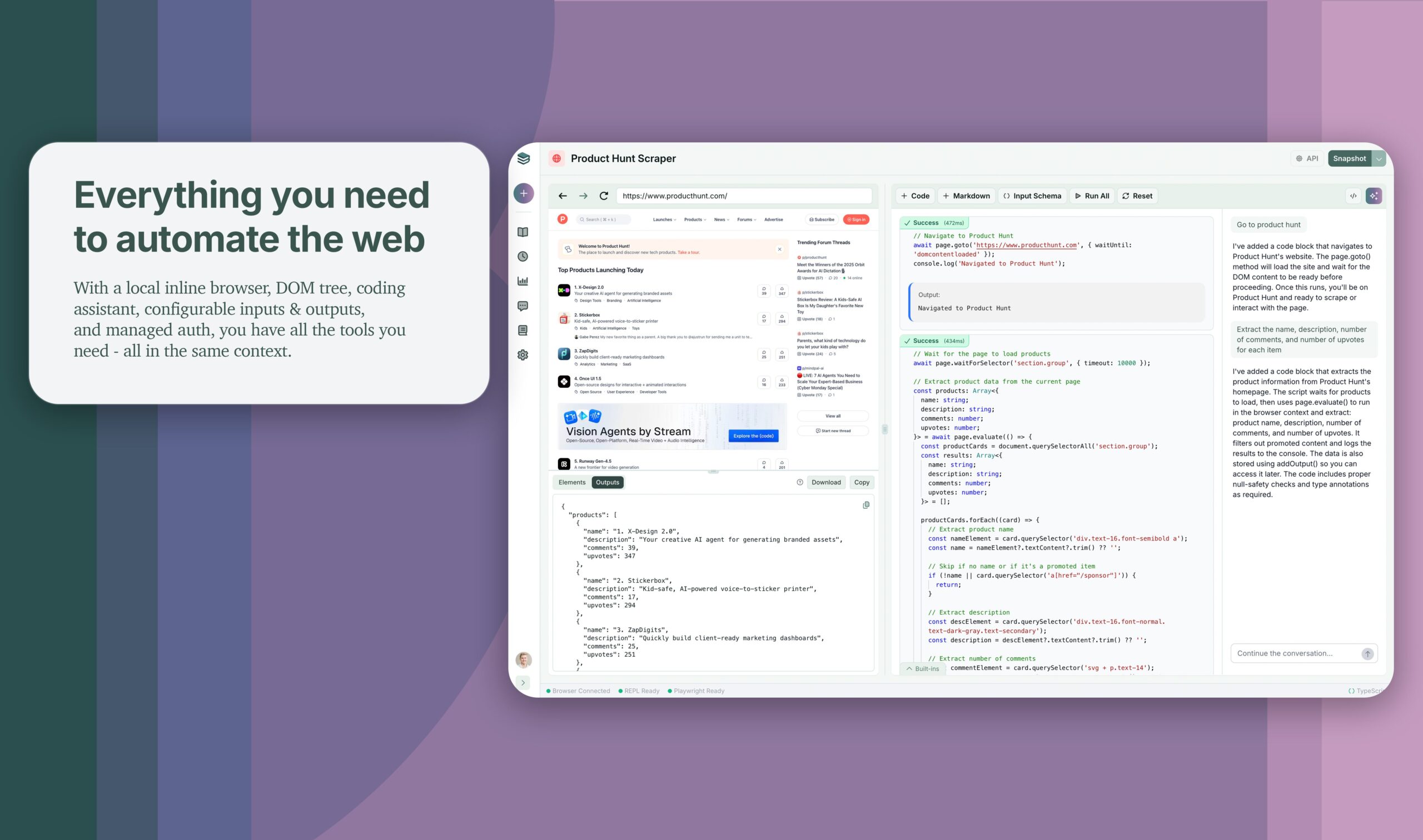
BrowserBook unifies the complete automation workflow within single desktop application combining Jupyter-style notebook environment enabling cell-by-cell script execution, inline browser window displaying automation progress without context-switching, context-aware AI coding assistant analyzing DOM structure generating selectors and Playwright TypeScript snippets, managed authentication handling username/password flows and TOTP 2FA, API deployment infrastructure turning completed notebooks into callable endpoints, and version control with branching supporting reproducible automation development. Available as Electron desktop application for macOS with hosted cloud execution through Kernel infrastructure for scalable production deployments.
The platform targets developers building web scrapers extracting data from complex websites, QA engineers automating browser-based testing workflows, AI application builders connecting agents to web portals and legacy systems, data operations teams automating repetitive browser tasks, and anyone requiring reliable deterministic browser automation without agent unpredictability or traditional scripting friction. By emphasizing deterministic execution versus probabilistic agent behavior, BrowserBook positions 10x cost reduction claims and rapid iteration through notebook-style development as core value propositions differentiating from both traditional frameworks and emerging browser agent solutions.
Key Features
Jupyter-Style Notebook Environment: BrowserBook structures automation scripts as runnable code cells enabling developers executing portions of workflows individually testing specific steps without rerunning entire automation sequences. This cell-based approach accelerates debugging—change navigation logic in cell 3, rerun cells 3-5 validating modifications instantly versus traditional scripts requiring full execution from beginning. Developers manually reset browser state between cells experimenting with different approaches rapidly iterating toward working solutions. The notebook interface supports TypeScript with Playwright-style APIs providing familiar syntax for developers experienced with browser automation frameworks while adding interactive development benefits characteristic of Jupyter computational notebooks.
Inline Browser Window: Fully interactive Chrome browser instance embedded directly within IDE displays automation execution in real-time eliminating context-switching between code editor and separate browser windows. Developers observe click actions, form filling, navigation changes, and data extraction happening visually as code executes providing immediate feedback validating automation behavior matches intent. This inline visualization simplifies debugging—see exactly where scripts fail, inspect element states during automation, manually interact with pages understanding structure before codifying interactions. The integrated browser leverages Chrome’s DevTools enabling DOM inspection, network monitoring, JavaScript console access, and performance profiling without leaving development environment creating unified workspace for automation creation.
Context-Aware AI Coding Assistant: Built-in AI agent accesses current page DOM structure generating automation code and element selectors grounded in actual page content. Rather than generic code suggestions, the assistant analyzes visible elements, form fields, buttons, and data structures proposing specific Playwright commands targeting correct selectors. Developers describe intent (“extract all product prices,” “click the login button,” “fill the search form”) and AI generates corresponding TypeScript code with accurate CSS selectors or XPath expressions eliminating manual DOM inspection and trial-and-error selector refinement. The context awareness reduces selector brittleness—AI understands element relationships suggesting robust locators surviving minor UI changes. This intelligent assistance accelerates routine tasks particularly element identification which traditionally consumes significant automation development time.
Managed Authentication Framework: Secure credential storage and automated authentication handling for workflows requiring login. BrowserBook manages username/password flows including form detection, credential injection, submission automation, and session persistence eliminating manual authentication implementation for protected sites. The system handles TOTP-style two-factor authentication (2FA) out-of-box supporting time-based one-time password schemes without custom code. This authentication management proves critical for automating internal business applications, partner portals, SaaS platforms, and any authenticated workflow where manual login interrupts automation execution. Credentials store encrypted with security best practices enabling team sharing without credential exposure in code.
API Deployment and Snapshots: Transform completed notebooks into HTTP API endpoints callable programmatically from external applications or AI agent workflows. Once automation stabilizes through iterative development, snapshot working notebook state deploying as versioned API. External systems trigger automations via simple HTTP requests passing parameters (URLs, search terms, form data) receiving structured extraction results, screenshots, or completion status. This deployment model enables integrating browser automations into larger systems—AI agents calling web interaction APIs, data pipelines scheduled triggering scraping endpoints, webhook-driven automation responding to external events. The snapshot versioning supports safe updates testing new automation versions before replacing production endpoints maintaining reliability during iteration.
Hosted Browser Sessions via Kernel Infrastructure: Cloud-based browser execution for production automations eliminating local browser management and enabling concurrent scale. BrowserBook partners with Kernel providing managed Chromium instances with bot detection countermeasures (stealth mode, residential proxies, fingerprint randomization). Developers author automations locally via Electron app but execute API-triggered runs on hosted infrastructure benefiting from Kernel’s anti-detection capabilities critical for production scraping or automation targeting bot-protected sites. The hosted execution supports concurrency spinning thousands of browser instances handling parallel automation workloads without provisioning infrastructure or managing browser fleets. Sessions include full observability—logs, network traces, console output, screenshots—accessible post-execution for debugging and compliance auditing.
Version Control and Branching: Built-in notebook versioning enables tracking changes, creating branches experimenting with alternative approaches, and rolling back problematic modifications without losing work. This version control prevents common automation development frustrations—accidentally breaking working scripts during refactoring, losing previous implementation details, inability reproducing earlier automation states. Branching supports parallel development trying different element selectors, navigation strategies, or extraction logic without contaminating main automation codebase. Teams collaborate on shared automations leveraging version history understanding evolution and attributing changes. The reproducibility ensures automations remain auditable and maintainable over time as websites evolve requiring script updates.
Helper Functions for Common Tasks: Pre-built utilities simplifying repetitive automation patterns including screenshot capture (full page, specific elements, multiple viewports), structured data extraction (tables, lists, repeated elements), wait conditions (element visibility, network idle, custom predicates), and error handling. These helpers reduce boilerplate code accelerating development through reusable abstractions. The screenshot functionality supports visual validation capturing evidence of automation execution, debugging unexpected behavior through visual inspection, or archiving states for compliance. Data extraction helpers parse common web structures into structured formats (JSON, CSV) eliminating custom parsing logic for typical scraping scenarios.
SOC 2 and HIPAA Compliance Available: Enterprise compliance certifications for organizations requiring security attestations including SOC 2 Type 1 and HIPAA Business Associate Agreements (BAA) for healthcare use cases. This compliance positioning signals BrowserBook targeting enterprise deployments where automation handles sensitive data (PII, PHI, financial information) requiring documented security controls and audit trails. The compliance availability differentiates BrowserBook from developer-focused automation tools lacking formal certifications enabling adoption in regulated industries with stringent data governance requirements.
Self-Healing Automations (Roadmap): Future capability enabling automations adapting to UI changes and automatically repairing broken scripts. The self-healing vision leverages AI detecting element locator failures, suggesting updated selectors based on page changes, and potentially auto-updating scripts reducing maintenance burden characteristic of brittle browser automations. This feature addresses fundamental web automation challenge—scripts break as websites evolve requiring constant maintenance effort. Self-healing approaches promise reduced downtime and lower maintenance costs though implementation complexity and reliability remain proven through future development.
Flexible Scheduling: Recurring automation execution with cron-style scheduling supporting time-based triggering (daily scrapes, hourly monitoring, weekly reports). Scheduling enables unattended operation transforming interactive automations into production data pipelines or monitoring systems running without manual intervention. Combined with API deployment, scheduling provides comprehensive automation lifecycle management from development through production operation.
How It Works
BrowserBook operates through sophisticated integration combining Electron desktop application, TypeScript REPL, embedded Chrome, AI assistance, and cloud execution infrastructure:
Step 1: Local Development Environment Setup
Developers download BrowserBook desktop application (currently macOS only) installing Electron-based IDE. Upon launch, BrowserBook initializes embedded Chrome instance and TypeScript execution environment providing immediate readiness without complex configuration or dependency management typical of traditional Playwright/Selenium setups.
Step 2: Notebook Creation and Cell-Based Development
Create new notebook defining automation workflow through sequential code cells. Each cell contains TypeScript code using Playwright-style browser APIs (navigate, click, fill, extract). Execute individual cells observing results in inline browser window—cell 1 navigates target URL, cell 2 handles authentication, cell 3 performs data extraction. This granular execution enables rapid iteration testing small workflow segments without full automation runs dramatically accelerating debugging cycles versus traditional scripts requiring complete execution.
Step 3: AI-Assisted Code Generation
Invoke AI coding assistant providing natural language descriptions of desired actions. The assistant analyzes current page DOM visible in inline browser proposing TypeScript code with specific selectors targeting actual elements. For example, “extract product prices from search results” generates code identifying price elements, extracting text content, structuring into array. The AI suggestions serve as starting points—developers refine generated code, adjust selectors, add error handling iterating toward robust implementations. The context-awareness proves valuable particularly for complex pages where manual selector identification proves tedious.
Step 4: Authentication and Session Management
Configure managed authentication for workflows requiring login. Provide credentials through secure interface; BrowserBook handles form detection and submission storing session cookies enabling authenticated automation without exposing credentials in code. For 2FA-protected workflows, configure TOTP secrets; authentication framework generates time-based codes automatically completing login flows. This authentication abstraction eliminates custom login implementation enabling focus on core automation logic.
Step 5: Testing and Debugging with Inline Browser
Continuously test automation logic observing execution in inline browser window. Pause execution at specific cells, manually interact with browser understanding page structure, inspect elements using DevTools, then codify interactions into subsequent cells. This visual feedback loop simplifies debugging—see exactly where scripts fail, validate extracted data correctness, ensure navigation reaches intended destinations. The inline browser provides immediate validation versus headless execution requiring separate debugging approaches.
Step 6: Version Control and Collaboration
Commit working notebook states creating version snapshots. Branch notebooks experimenting with alternative implementations (different selectors, navigation paths, extraction strategies) without risking main automation. Roll back problematic changes restoring previous working versions. Teams share notebooks collaborating on automation development with version history providing change attribution and evolution tracking maintaining automation maintainability over time.
Step 7: API Deployment for Production Execution
Snapshot stable notebooks deploying as HTTP API endpoints. Configure parameters (target URLs, search terms, credentials), error handling, retry logic, and timeout policies. Deployed APIs execute on hosted Kernel infrastructure providing scalable cloud browsers with anti-detection capabilities. External systems trigger automations via HTTP requests receiving structured results (extracted data, screenshots, execution logs). Monitor execution through observability dashboard inspecting session recordings, network traces, console output debugging production issues.
Step 8: Scheduled Execution and Monitoring
Configure recurring schedules for unattended automation execution. Set cron-style timing (hourly, daily, weekly), notification preferences (completion alerts, failure warnings), and data delivery destinations (databases, storage buckets, webhooks). Scheduled automations run reliably on cloud infrastructure transforming interactive notebooks into production data pipelines operating without manual intervention providing continuous monitoring or data collection capabilities.
Use Cases
Given specialized focus on deterministic browser automation development, BrowserBook addresses scenarios where script reliability, rapid iteration, and API-driven execution provide value:
Web Scraping and Data Extraction:
Data engineers build scrapers extracting product catalogs, pricing information, competitor intelligence, or market research data from websites lacking APIs. BrowserBook’s notebook interface accelerates scraper development testing extraction logic cell-by-cell refining selectors until data captures correctly. The inline browser visualizes extraction validating coverage before production deployment. API deployment enables scheduled execution feeding extracted data into analytics pipelines, databases, or business intelligence systems supporting data-driven decision making.
QA Automation and Browser Testing:
QA engineers automate regression testing validating web application functionality across releases. Notebook structure organizes test scenarios as sequential cells (login, navigate features, validate outputs) supporting modular test development. Version control maintains test evolution as applications change. Hosted execution enables concurrent testing across browser configurations (different viewports, network conditions, geographies) validating application behavior matching diverse user contexts. Screenshot capture provides visual regression evidence documenting UI changes requiring review.
AI Agent Web Access:
AI application developers connect language models to web interfaces enabling agents performing web-based tasks (research, form filling, information retrieval). BrowserBook APIs provide deterministic browser access agents invoke completing multi-step workflows combining creativity (LLM planning) with reliability (scripted execution). This hybrid approach addresses browser agent reliability challenges—agents determine high-level strategies while BrowserBook handles low-level browser interaction ensuring consistent execution reducing prompt injection vulnerabilities and execution costs versus pure agent approaches.
Data Operations and Business Process Automation:
Operations teams automate repetitive browser tasks (data entry into web portals, report generation from dashboards, monitoring website changes, validating system deployments). Notebook development democratizes automation creation enabling non-specialists building workflows through AI assistance and cell-based testing without deep programming expertise. Scheduled execution transforms manual processes into automated workflows freeing staff for higher-value activities while ensuring consistency and reducing human error in repetitive tasks.
Partner Integration and Legacy System Access:
Enterprise developers automate interactions with partner portals, vendor systems, or internal applications lacking APIs. BrowserBook provides programmatic web access where direct integration proves impossible enabling data synchronization, order processing, or system monitoring through browser automation. Managed authentication handles secure credential management for multiple systems. Compliance certifications enable handling sensitive data meeting organizational security requirements for production automation deployments.
Pros \& Cons
Advantages
Drastically Faster Debugging Through Notebook Interface: Cell-by-cell execution with inline browser visualization accelerates automation development enabling testing small workflow segments without full script reruns. This iteration velocity proves transformative versus traditional Selenium/Playwright development requiring complete execution cycles for every change dramatically reducing time from automation concept to working implementation.
Context-Aware AI Reduces Selector Brittleness: AI assistant analyzing actual page DOM generates specific selectors grounded in current page structure eliminating manual element inspection and trial-and-error selector refinement. This intelligent assistance particularly benefits complex websites with dynamic elements where manual selector creation proves tedious and error-prone accelerating routine automation tasks.
Unified Development Environment Eliminating Context-Switching: Integrated code editor, browser, AI assistant, authentication management, version control, and deployment infrastructure within single application reduces friction characteristic of fragmented traditional workflows juggling separate tools. This consolidation improves developer experience maintaining focus on automation logic rather than tool orchestration.
Deterministic Execution Providing Cost and Reliability Benefits: Script-based approach versus browser agents delivers 10x cost reduction (claimed) through efficient execution without LLM inference overhead and improved reliability through predictable deterministic behavior avoiding agent hallucinations, prompt injection vulnerabilities, or unpredictable failures characteristic of probabilistic AI systems.
Managed Authentication Simplifying Protected Workflows: Built-in credential storage and 2FA handling eliminates custom authentication implementation enabling rapid automation development for authenticated sites. This abstraction proves valuable for enterprise scenarios automating internal systems, partner portals, or SaaS platforms requiring secure credential management without code exposure.
API Deployment and Hosted Execution Enabling Production Scale: Transform notebooks into HTTP endpoints with cloud execution infrastructure supporting concurrent automation workloads. This deployment model integrates browser automations into larger systems enabling AI agents, data pipelines, or event-driven architectures leveraging web automation capabilities without managing browser infrastructure.
Enterprise Compliance Supporting Regulated Industries: SOC 2 and HIPAA certifications enable adoption in healthcare, finance, or other regulated sectors requiring formal security attestations. This compliance positioning differentiates BrowserBook from developer-focused tools lacking enterprise-grade security documentation enabling production deployments handling sensitive data.
Playwright-Compatible TypeScript Maintaining Portability: Using standard Playwright APIs rather than proprietary automation framework ensures code portability. Developers leverage existing Playwright knowledge and community resources while benefiting from BrowserBook’s integrated development experience. Migration paths exist moving automations to/from traditional Playwright deployments avoiding complete vendor lock-in.
Disadvantages
Early Alpha Stage with Limited Production Track Record: Launched December 2025, BrowserBook represents very new product lacking extensive user reviews, proven reliability over extended periods, or demonstrated scalability under diverse production workloads. Early adopters face potential undiscovered bugs, incomplete features, breaking changes, or service stability issues typical of nascent alpha-stage products creating adoption risk for production-critical automations.
macOS-Only Desktop Application Limiting Accessibility: Electron app currently supports only macOS excluding Windows and Linux developers from local development workflows. This platform restriction fragments potential user base and creates collaboration challenges in mixed-OS development teams. While cloud execution remains platform-agnostic, the development experience limitation reduces BrowserBook’s addressable market versus cross-platform alternatives.
Hosted Execution Usage Limits and Cost Structure: Cloud browser infrastructure through Kernel incurs variable costs based on execution time, session count, and concurrency. Free tier limitations and planned Pro pricing (\$29-\$99/month quoted though not officially published) create cost considerations for high-volume automation workloads. Users must forecast execution costs potentially discovering BrowserBook economically unviable compared to self-hosted Playwright/Selenium for specific use cases.
Dependency on Third-Party Kernel Infrastructure: Hosted execution relies on Kernel platform for cloud browsers creating external dependency where Kernel service interruptions, pricing changes, or feature limitations directly impact BrowserBook capabilities. This reliance introduces risk where neither BrowserBook nor users control core infrastructure potentially affecting production automation reliability or economics.
AI Assistant Quality and Context Limitations: While context-aware AI provides value, generated code quality depends on DOM complexity, page structure ambiguity, and AI model capabilities. Complex automations requiring nuanced logic, error handling, or edge case management likely exceed AI assistant capabilities necessitating manual implementation. Over-reliance on AI suggestions without understanding generated code creates maintenance challenges when automations break requiring debugging without deep comprehension.
Pricing Transparency and Long-Term Sustainability Uncertain: Current alpha stage offers free access but long-term pricing model remains incompletely specified beyond estimated Pro tier ranges. Users cannot accurately forecast production costs or evaluate value propositions against alternatives without transparent pricing documentation. Additionally, early-stage startup sustainability questions exist whether BrowserBook achieves viable business model supporting ongoing development and infrastructure costs.
Scripting Still Inherently Brittle Despite Tooling Improvements: Deterministic automations remain vulnerable to website changes—UI restructuring, element identifier modifications, workflow alterations break scripts regardless of development environment quality. While BrowserBook promises future self-healing capabilities, current reality requires ongoing maintenance effort as target websites evolve. The tooling improves development velocity but doesn’t eliminate fundamental brittleness characteristic of all scraping/automation against environments developers don’t control.
Limited Multi-User Collaboration Features: Version control provides basic change tracking but lacks advanced collaboration capabilities (code review workflows, approval processes, role-based access controls, team analytics) typical of enterprise development platforms. Teams requiring sophisticated governance, compliance auditing, or complex collaboration patterns may find BrowserBook’s collaboration features insufficient for organizational policies necessitating supplementary processes.
How Does It Compare?
BrowserBook vs Selenium (Industry-Standard Browser Automation Framework)
Selenium is mature open-source browser automation framework supporting Chromium, Firefox, Edge, Safari across Windows, macOS, Linux with language bindings for Java, Python, C#, JavaScript, Ruby serving millions of developers since 2004.
Development Experience:
- BrowserBook: Integrated IDE with Jupyter-style notebooks, inline browser, AI assistant enabling rapid cell-by-cell iteration
- Selenium: Code editor agnostic requiring separate browser windows, manual element inspection, complete script reruns for testing changes
AI Assistance:
- BrowserBook: Context-aware AI analyzing page DOM generating selectors and automation code
- Selenium: No built-in AI; developers rely on IDE extensions (GitHub Copilot, TabNine) providing generic code completion without browser context
Deployment Model:
- BrowserBook: API endpoints with hosted cloud execution via Kernel infrastructure
- Selenium: Self-hosted execution requiring infrastructure provisioning, browser management, scaling architecture
Authentication Management:
- BrowserBook: Managed credential storage with automatic 2FA handling
- Selenium: Manual authentication implementation in test code requiring custom credential management
Maturity and Reliability:
- BrowserBook: Alpha stage launched December 2025; limited production track record
- Selenium: 20+ year ecosystem with proven production reliability, extensive community knowledge, comprehensive documentation
Platform Support:
- BrowserBook: macOS desktop app only; cloud execution cross-platform
- Selenium: Cross-platform (Windows, Linux, macOS) with broad browser support (Chromium, Firefox, Edge, Safari, mobile browsers)
When to Choose BrowserBook: For rapid automation development prioritizing iteration velocity, AI-assisted coding, integrated environment, or API-first deployment without infrastructure management.
When to Choose Selenium: For established reliable framework, cross-platform requirements, broad browser coverage, extensive community resources, or avoiding early-stage product risks.
BrowserBook vs Playwright (Microsoft’s Modern Browser Automation)
Playwright is Microsoft-developed open-source automation library supporting Chromium, Firefox, WebKit with JavaScript, TypeScript, Python, Java, C# bindings emphasizing reliability, modern web APIs, and developer experience launched 2020.
Development Workflow:
- BrowserBook: Notebook-style cell execution with inline browser and AI code generation
- Playwright: Traditional script development with Codegen tool recording interactions generating test code; Test Runner providing parallel execution, retries, traces
Auto-Waiting and Reliability:
- BrowserBook: Inherits Playwright APIs including auto-waiting for elements; emphasizes deterministic execution
- Playwright: Built-in auto-waiting, actionability checks, network idle detection reducing flakiness versus Selenium
AI Capabilities:
- BrowserBook: Integrated context-aware AI assistant suggesting code based on page DOM
- Playwright: No native AI; developers use external IDE assistants (Copilot, Cursor) without browser context
Hosted Execution:
- BrowserBook: Managed cloud browsers via Kernel with anti-detection, concurrency, observability
- Playwright: Self-hosted execution; users provision infrastructure or use third-party services (BrowserStack, Sauce Labs)
Testing Features:
- BrowserBook: Automation-focused with API deployment; limited dedicated testing features
- Playwright: Comprehensive Test Runner with parallelization, fixtures, reporting, trace viewer, UI mode, screenshot comparison
Language and Platform:
- BrowserBook: TypeScript notebooks; macOS desktop app; cloud execution
- Playwright: Multi-language (JavaScript, TypeScript, Python, Java, C#); cross-platform (Windows, Linux, macOS)
When to Choose BrowserBook: For faster development through notebooks and AI assistance, API deployment priorities, or avoiding infrastructure management accepting early-stage risks.
When to Choose Playwright: For comprehensive testing framework, multi-language support, cross-platform requirements, proven reliability, or leveraging Microsoft ecosystem integration.
BrowserBook vs Browserbase (Cloud Browser Infrastructure Platform)
Browserbase is Y Combinator-backed cloud-hosted headless browser platform providing serverless Chromium instances via API with stealth mode, CAPTCHA handling, session management, MCP integration for AI agents, and developer SDKs launched 2024.
Product Focus:
- BrowserBook: Complete IDE for automation development with notebook interface, AI assistant, version control, deployment
- Browserbase: Infrastructure platform providing managed browsers; developers use own tools (Playwright, Puppeteer, Selenium) connecting to Browserbase browsers
Development Experience:
- BrowserBook: Unified desktop application with integrated editor, browser, AI creating opinionated development workflow
- Browserbase: Headless infrastructure accessed via APIs/SDKs; developers choose their preferred IDEs and frameworks
AI Integration:
- BrowserBook: Built-in AI coding assistant analyzing page DOM suggesting automation code within IDE
- Browserbase: MCP server enabling AI agents (Claude, GPT-4) calling browser functions; Stagehand SDK for natural language orchestration
Deployment Model:
- BrowserBook: Notebook snapshots become API endpoints; hosted execution via Kernel (third-party) infrastructure
- Browserbase: Direct API access to serverless browser fleet; developers deploy own orchestration logic
Anti-Detection Capabilities:
- BrowserBook: Leverages Kernel stealth mode, proxies, fingerprint randomization for hosted execution
- Browserbase: Native stealth mode, CAPTCHA solving, residential proxies, anti-bot detection built into platform
Target Users:
- BrowserBook: Developers wanting integrated development environment simplifying automation creation and iteration
- Browserbase: Infrastructure engineers, AI application builders, scraping teams needing scalable browser access with own tooling
When to Choose BrowserBook: For integrated development experience with AI assistance, notebook-based workflows, or simpler path from idea to deployed automation.
When to Choose Browserbase: For maximum flexibility choosing own tools, AI agent integration priorities, infrastructure-first approach, or avoiding opinionated IDEs.
BrowserBook vs Apify (Web Scraping and Automation Platform)
Apify is established web scraping and automation platform providing actor-based architecture, pre-built scrapers, proxy management, data storage, scheduling, API access serving thousands of users since 2015.
Platform Model:
- BrowserBook: IDE for custom automation development; deploy notebooks as APIs; hosted execution
- Apify: Marketplace with pre-built scrapers (actors) plus custom actor development; comprehensive platform with storage, proxies, scheduling
Pre-Built Solutions:
- BrowserBook: No pre-built automations; developers build custom notebooks from scratch
- Apify: Extensive actor marketplace with ready-made scrapers for popular sites (Amazon, Instagram, LinkedIn, Google) enabling immediate use
Development Approach:
- BrowserBook: Notebook-style TypeScript development with inline browser and AI assistance
- Apify: Actor framework (JavaScript, TypeScript, Python) with SDK; local development then cloud deployment; no integrated IDE
Data Management:
- BrowserBook: Automation returns results via API; users handle storage externally
- Apify: Built-in datasets, key-value storage, request queues providing data infrastructure integrated with automation execution
Proxy and Anti-Detection:
- BrowserBook: Kernel infrastructure proxies and stealth for hosted execution
- Apify: Extensive proxy pool (datacenter, residential), CAPTCHA solving, fingerprint management built into platform
Pricing Model:
- BrowserBook: Free alpha; planned \$29-\$99/month Pro tiers (unofficial)
- Apify: Free tier; paid plans \$49-\$499+/month based on compute units, storage, proxy usage; marketplace actors priced individually
When to Choose BrowserBook: For custom automation development with integrated IDE, AI coding assistance, notebook workflows, or simpler entry without platform complexity.
When to Choose Apify: For pre-built scrapers addressing common sites, comprehensive data infrastructure, extensive proxy networks, mature platform reliability, or marketplace ecosystem.
BrowserBook vs Puppeteer (Google’s Node.js Browser Automation)
Puppeteer is Google-developed Node.js library providing high-level API controlling Chrome/Chromium programmatically enabling automation, scraping, testing, screenshot generation launched 2017.
Language and Ecosystem:
- BrowserBook: TypeScript notebooks; desktop IDE application; AI-assisted development
- Puppeteer: Node.js JavaScript/TypeScript library; code editor agnostic; developer provides own tooling
Development Interface:
- BrowserBook: Interactive notebook cells with inline browser visualization enabling granular testing
- Puppeteer: Traditional script development requiring complete execution cycles; headless by default; separate debugging
AI Features:
- BrowserBook: Integrated context-aware AI generating code and selectors from page DOM
- Puppeteer: No built-in AI; developers rely on external IDE assistants without browser context
Deployment:
- BrowserBook: API endpoints with managed cloud execution via Kernel
- Puppeteer: Self-hosted scripts running on developer infrastructure; users handle scaling, reliability, browser management
Browser Support:
- BrowserBook: Chromium via Kernel infrastructure
- Puppeteer: Chromium and Chrome; experimental Firefox support; optimized for Google browsers
Authentication and Stealth:
- BrowserBook: Managed authentication with 2FA handling; Kernel anti-detection for hosted execution
- Puppeteer: Manual authentication implementation; community plugins (puppeteer-extra-plugin-stealth) for bot detection avoidance
When to Choose BrowserBook: For integrated development experience, AI assistance, API deployment, managed cloud execution, or avoiding infrastructure complexity.
When to Choose Puppeteer: For lightweight Node.js library, full programmatic control, self-hosted execution, Google ecosystem integration, or avoiding IDE/platform dependencies.
Final Thoughts
BrowserBook represents compelling response to browser automation development friction: traditional Selenium/Playwright workflows require tedious complete script reruns testing small changes slowing iteration velocity, manual element inspection and selector refinement proves time-consuming particularly for complex pages, and fragmented tooling forces context-switching between editors, browsers, deployment infrastructure. The December 2025 launch demonstrates viability of unified IDE approaches combining notebook-style development, inline browser visualization, and AI-assisted coding accelerating automation creation through workflow consolidation and intelligent assistance.
The Jupyter-style cell execution with inline browser proves transformative for debugging enabling granular testing without full automation reruns dramatically reducing iteration cycles. Context-aware AI analyzing actual page DOM generates specific selectors eliminating manual inspection tedium particularly valuable for complex modern web applications. The unified development environment integrating code editor, browser, AI assistant, authentication management, version control, and API deployment reduces friction consolidating fragmented traditional workflows into cohesive experience maintaining developer focus on automation logic rather than tool orchestration.
The platform particularly excels for developers building web scrapers requiring rapid iteration refining extraction logic, QA engineers automating regression tests benefiting from notebook organization and version control, AI application builders connecting agents to web interfaces leveraging deterministic execution reliability, data operations teams automating repetitive browser tasks through AI-assisted development democratizing automation creation, and enterprise teams requiring managed authentication and compliance certifications for production deployments.
For users requiring proven production reliability, Selenium provides 20+ year ecosystem with extensive community knowledge and broad browser/platform support. For comprehensive testing framework with multi-language support, Playwright offers Microsoft-backed modern automation with Test Runner, trace viewer, and cross-platform capabilities. For maximum infrastructure flexibility choosing own tools, Browserbase provides serverless browser platform with native stealth and AI agent integration. For pre-built scrapers and comprehensive data infrastructure, Apify delivers mature platform with marketplace actors and integrated storage. For lightweight Node.js library control, Puppeteer provides minimalist API without platform dependencies.
But for the specific intersection of rapid notebook-based development, AI-assisted coding with browser context, integrated inline visualization, and API-first deployment with managed cloud execution, BrowserBook addresses workflow innovation no established alternative combines comprehensively. The platform’s primary limitations—alpha stage maturity lacking production track record, macOS-only desktop application excluding Windows/Linux developers, hosted execution costs and usage limits through Kernel dependency, AI assistant quality variations, pricing transparency gaps, fundamental script brittleness despite tooling improvements, and limited collaboration features—reflect expected constraints of ambitious early-stage development tools pioneering novel automation workflows.
The critical value proposition centers on iteration velocity and development experience: if traditional Selenium/Playwright debugging cycles waste time through full script reruns; if manual element inspection and selector refinement slows automation development; if fragmented tools create context-switching friction; if AI-assisted coding would accelerate routine automation tasks; or if API deployment with managed cloud execution simplifies production infrastructure—BrowserBook provides compelling solution worth evaluation despite early-stage risks and current limitations.
The Y Combinator F24 backing signals investor confidence and provides resources accelerating platform development, but browser automation tooling represents competitive landscape with established frameworks (Selenium, Playwright), infrastructure platforms (Browserbase), and comprehensive solutions (Apify) creating adoption challenges. BrowserBook’s success depends on converting developers from familiar workflows, demonstrating sustained value justifying potential switching costs, achieving product maturity and reliability meeting production requirements, and building sustainable business supporting ongoing development without prohibitive pricing alienating target users.
For early adopters accepting nascent platform trade-offs (limited features, potential service instability, uncertain pricing, platform constraints), BrowserBook delivers on promise: transforming browser automation development from tedious iterative scripting toward rapid notebook-based workflows with AI assistance and integrated visualization—creating 10x iteration velocity improvements (subjective but plausible) positioning deterministic browser automation as viable alternative to unreliable expensive browser agents while maintaining development velocity advantages over traditional framework fragmentation.