Overview
Video editing remains one of the most time-intensive bottlenecks in content production. Creators spend hours scrubbing through raw footage, identifying usable moments, sequencing clips, trimming segments, and refining transitions—tasks consuming 70-80% of total production time while contributing minimally to creative storytelling. Traditional video editing software (Premiere Pro, Final Cut, DaVinci Resolve) requires technical expertise navigating complex timelines, learning keyboard shortcuts, and mastering multi-track editing paradigms. Even simplified tools (iMovie, CapCut) demand manual clip selection, drag-and-drop assembly, and iterative refinement.
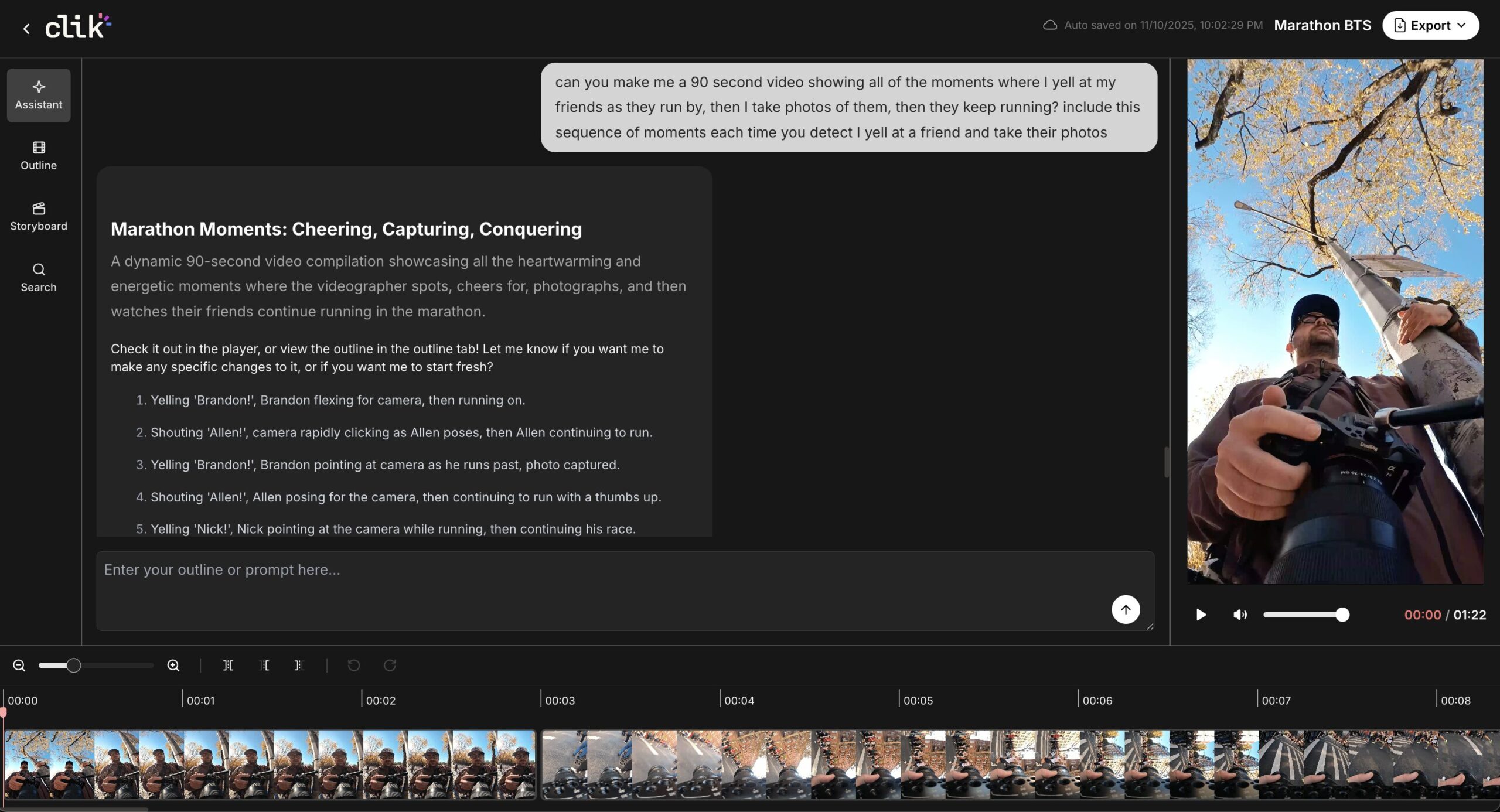
Clik addresses this through conversational video editing powered by AI scene understanding. Rather than manually scrubbing footage, creators upload raw clips, describe the story they want to tell in natural language (“Create a 60-second product demo highlighting key features with upbeat pacing”), and receive an AI-generated rough cut in seconds. The platform positions itself as “Cursor for Video”—referencing Cursor, the AI coding assistant that enables developers to build software through conversation. Similarly, Clik aims to enable creators to edit video through dialogue rather than timeline manipulation.
Currently free during beta, Clik targets content creators, social media managers, YouTube producers, and video professionals seeking to reclaim time spent on tedious editing tasks and redirect it toward creative strategy, storytelling, and high-value production decisions.
Key Features
Clik delivers conversational video editing capabilities combining AI automation with traditional editing control:
- Conversational First-Cut Generation: Upload raw footage and describe desired narrative through text chat (“Create a cooking tutorial showing the recipe preparation with smooth transitions between steps”). Clik’s AI analyzes uploaded clips, identifies relevant scenes matching description, sequences them logically, and generates an initial edit within seconds—eliminating hours of manual clip review and assembly.
- AI-Powered Storyline Detection: Upon footage upload, Clik’s AI automatically analyzes content identifying distinct scenes, detecting key moments, recognizing dialogue segments, and categorizing visual content. This automated scene understanding enables intelligent clip selection and sequencing aligned with user narrative descriptions.
- Dual Editing Interface: Refine AI-generated edits through two complementary pathways: conversational editing (continue chatting with AI to request specific changes: “Make the intro shorter,” “Add a transition between scenes 2 and 3”) or traditional timeline editing (manual trimming, rearranging clips, adjusting transitions with familiar video editing controls). This hybrid approach serves both non-technical users preferring conversation and experienced editors wanting precision control.
- AI Storyboard Visualization: Clik generates visual storyboards displaying edit structure, scene sequencing, and pacing decisions AI made during generation. Creators review storyboard to understand narrative flow, identify areas needing adjustment, and communicate refinements conversationally (“Swap scenes 4 and 5”) or manually via timeline.
- Intelligent Footage Search: Search through hours of uploaded footage using natural language queries or visual cues. Find specific moments (“locate all shots where product appears on screen”), dialogue segments (“find mentions of pricing”), or visual elements (“show me close-up shots”) without manual scrubbing—dramatically accelerating asset location for iterative edits.
- Real-Time Preview: See edits materialize instantly as AI processes instructions. Conversational refinements apply in real-time, enabling rapid iteration cycles and immediate feedback on narrative adjustments without waiting for rendering or export.
- Cloud-Based Workflow: Upload footage to Clik’s cloud infrastructure for processing, storage, and collaboration. Access projects from any device with internet connection, eliminating local storage constraints and enabling distributed team collaboration.
- Multi-Format Optimization: Platform designed for various video formats including short-form social content, cooking videos, daily vlogs, product demonstrations, tutorial content, and dialogue-driven talking head videos. AI adapts editing approach based on content type.
- Export Flexibility: Download edited videos for further refinement in professional tools or direct publishing to social platforms.
How It Works
Clik transforms video editing from technical timeline manipulation to conversational storytelling through AI-driven automation.
Workflow begins with footage upload. Creators drag raw video files (individual clips or complete recording sessions) into Clik’s cloud platform. Upon upload, AI immediately begins analyzing content—identifying distinct scenes based on visual changes, detecting audio/dialogue segments, recognizing shot compositions, and categorizing content types (close-ups, wide shots, action sequences).
With footage analyzed, creators describe desired narrative through natural language chat: “Create a 90-second highlight reel from this skateboarding session showing the best tricks with energetic pacing” or “Edit this product unboxing into a 60-second TikTok format emphasizing first impressions and key features.” Clik’s AI interprets description, maps it against analyzed footage, selects relevant clips matching narrative requirements, sequences them logically based on story structure, and generates an initial edited video within seconds.
The AI-generated rough cut appears in two views: traditional timeline showing clip sequence, transitions, and duration; and AI storyboard visualizing narrative flow, scene structure, and pacing decisions. Creators review this initial edit through instant preview functionality.
Refinement proceeds through conversational iteration or manual editing. For conversational refinement, creators chat with AI providing feedback: “The intro feels too long, trim it to 10 seconds,” “Add a slow-motion effect during the trick at 0:45,” “The pacing drags in the middle, make it snappier.” AI processes each instruction, applies changes, and updates edit in real-time.
Alternatively, creators switch to timeline view for manual control—trimming clips precisely, rearranging sequences, adjusting transition timing, or applying effects through traditional video editing interface. This hybrid approach enables starting with AI rough cut speed then refining with human creative judgment.
Throughout editing, AI search functionality assists locating specific moments for inclusion or replacement. Rather than scrubbing through hours of footage, creators search (“find all shots with product visible,” “locate closeups of hands,” “show moments with laughter”) and AI surfaces matching clips instantly.
Once satisfied, creators export final edit as standard video file for publishing, further enhancement in professional tools, or archival.
Use Cases
Clik’s conversational editing capabilities address specific video production scenarios where editing speed creates bottlenecks:
- High-Volume Social Content Production: Social media managers producing daily content for Instagram, TikTok, YouTube Shorts use Clik to transform raw footage into polished posts rapidly. Upload day’s recording, describe desired story (“energetic 30-second recap of today’s highlights”), receive edit in seconds—maintaining consistent posting cadence without hours of daily editing.
- YouTube Creator Workflow Acceleration: YouTubers recording long-form content (vlogs, tutorials, podcasts) leverage Clik for initial rough cuts. Upload multi-hour raw footage, describe episode structure conversationally, receive rough cut identifying key moments and removing dead space—reducing 8-hour editing sessions to 2-hour refinement processes.
- Product Demo and Marketing Videos: Marketing teams creating product demonstration videos, explainer content, or promotional clips use Clik to rapidly iterate concepts. Generate multiple narrative variations from same footage through different prompts exploring diverse storytelling approaches without manual re-editing labor.
- Remote Team Collaboration: Distributed content teams upload shared footage to Clik’s cloud platform, collaboratively refine edits through conversational instructions visible to all team members, and iterate collectively—eliminating file transfer friction and version control complexity typical of traditional editing collaboration.
- Cooking and Tutorial Content: Recipe creators, DIY instructors, and how-to video producers benefit from Clik’s optimization for visual process documentation. Platform excels at identifying key steps, sequencing instructional moments, and creating clear narrative flow from raw process footage—particularly valuable for content types following predictable structure.
- Event Highlight Reels: Videographers capturing weddings, conferences, sports events, or performances use Clik for rapid highlight creation. Upload hours of event footage, describe desired highlights (“create 3-minute wedding ceremony recap emphasizing emotional moments”), receive rough cut identifying peak moments—accelerating delivery timelines clients value.
Advantages
- Eliminates Manual Scrubbing: Conversational editing dramatically reduces time spent reviewing raw footage frame-by-frame. Describe desired story; AI locates relevant moments—reclaiming hours previously lost to timeline navigation.
- Accessible to Non-Editors: Natural language interface removes technical editing knowledge barriers. Content creators lacking Premiere Pro expertise or timeline editing experience can produce polished videos through conversation—democratizing video production beyond specialist editors.
- Rapid Iteration Velocity: Generate multiple edit variations from same footage through different prompts exploring narrative approaches. Test pacing options, structural variations, or thematic focuses in minutes rather than hours—enabling creative experimentation constrained by traditional editing timelines.
- Hybrid Control Model: Conversational automation for speed combined with traditional timeline for precision serves diverse user needs. Beginners rely primarily on AI; experienced editors leverage AI rough cuts then refine manually—flexibility absent from purely automated or purely manual tools.
- Cloud Collaboration Infrastructure: Upload once, access anywhere, collaborate with distributed teams without file transfers or local storage constraints. Particularly valuable for remote teams, agencies with multiple editors, or creators working across devices.
- Free Beta Access: Current free availability during beta enables risk-free testing with real projects, experimenting with workflows, and evaluating fit before potential future pricing—lowering adoption barriers for individual creators and small teams.
Considerations
- AI Edit Quality Variability: While Clik generates functional rough cuts rapidly, output quality varies by footage complexity and description clarity. Reviews report occasional awkward jump cuts, imperfect pacing decisions, or caption inaccuracies requiring manual correction—AI serves as starting point requiring human refinement rather than publish-ready automation.
- Content Usage Rights Concerns: Platform terms reportedly grant broad usage rights over uploaded content, raising privacy and ownership concerns. Creators uploading client work, proprietary footage, or sensitive material should review terms carefully and consider intellectual property implications before upload.
- Cloud Infrastructure Dependency: Requires consistent internet connectivity and cloud account for operation. Teams needing offline editing capability, working with air-gapped systems, or facing data sovereignty requirements cannot leverage cloud-only architecture.
- Early-Stage Platform Maturity: As beta product, users should anticipate feature limitations, evolving capabilities, and potential reliability issues common in early releases. Teams requiring production-critical stability may prefer established editing platforms until Clik reaches stable release.
- Optimal Content Type Specificity: Platform performs best with visual-driven content (cooking, vlogs, demonstrations) or dialogue-focused videos (interviews, talking heads) following predictable structures. Abstract narratives, highly stylized content, or experimental editing approaches may challenge AI’s current capabilities.
- Manual Refinement Requirement: Conversational editing accelerates rough cut generation but rarely produces publish-ready final edits. Creators should budget time for reviewing AI output, refining pacing, correcting mistakes, and applying creative polish—tool reduces but doesn’t eliminate editing time investment.
How It Compare
Clik operates in the AI video editing landscape positioned distinctly from both generative video tools and traditional editing platforms enhanced with AI features:
AI Video Generation Platforms (Runway, Pika Labs): Runway leads AI video generation through Gen-3 Alpha, Gen-3 Turbo, and Gen-4 models creating video from text descriptions or images, plus Aleph for in-context video editing (object addition/removal, angle generation, relighting). Pika specializes in text-to-video with camera controls and stylization. These platforms excel at generating new video content from scratch or transforming existing footage through AI effects. Clik differs fundamentally: rather than generating or transforming video, Clik edits existing footage—selecting clips, sequencing content, and assembling narratives from raw material creators provide. The comparison: Runway generates what you imagine; Clik edits what you filmed.
Text-Based Video Editors (Descript): Descript pioneered text-based video editing where users edit video by editing transcripts—delete words in transcript, corresponding video segments vanish; rearrange text, video clips reorder accordingly. Descript’s Overdub feature enables voice correction through typing; filler word removal happens automatically; multitrack timeline provides precision control. Descript excels when video editing parallels document editing—particularly for interview content, podcasts, or dialogue-heavy videos. Clik takes different approach: rather than editing via transcript manipulation, Clik edits via story description. Descript asks “what words do you want to change?”; Clik asks “what story do you want to tell?” This narrative-first vs transcript-first distinction creates different workflows serving overlapping but distinct use cases.
AI-Enhanced Traditional Editors (Canva Video, CapCut): Canva Video integrates AI features (Magic Design auto-editing with music, Highlights identifying best moments, Auto-trim removing silence, Beat Sync matching music) into drag-and-drop visual editor with templates, stock footage, and social media optimization. CapCut similarly combines AI tools (auto captions, background removal, effects) with timeline editing, templates, and TikTok-optimized features. Both enhance traditional editing workflows with AI acceleration but maintain timeline-centric interaction. Clik inverts this: conversation is primary interface with timeline as optional refinement tool—AI generates edits from descriptions rather than assisting manual editing.
AI Clipping and Repurposing Tools (Opus Clip, Vizard, Riverside AI Producer): Opus Clip analyzes long-form video and auto-generates viral clips with captions, b-roll, and transitions optimized for social platforms. Vizard similarly creates social-ready clips from webinars, podcasts, or presentations with automatic speaker detection and scene changes. Riverside’s AI Producer offers Magic Clips finding engaging moments, Auto-trim removing silence, and Smart Scenes multi-camera editing. These tools specialize in extracting short clips from long content. Clik offers broader editing scope—not just clip extraction but full narrative assembly from any footage type through conversational direction.
Professional Editing Software with AI (Adobe Premiere Pro, Final Cut Pro, DaVinci Resolve): Industry-standard tools increasingly integrate AI features—auto-reframe for social formats, speech-to-text for captioning, scene detection for organization. These remain technical platforms requiring expertise in timeline editing, effects, color grading, and audio mixing. Clik targets opposite end of spectrum: accessibility over capability, conversation over precision, speed over control—serving creators prioritizing rapid output over technical mastery.
Clik’s competitive differentiation centers on conversational-first editing philosophy: describe narrative intent in natural language, receive AI-generated rough cut in seconds, refine through continued conversation or manual timeline adjustments. For creators producing high-volume content (daily social posts, frequent YouTube uploads), visual/dialogue-driven formats (cooking, vlogs, interviews), or teams lacking editing expertise—Clik delivers speed and accessibility traditional tools don’t offer. For projects requiring creative effects, precise color grading, complex compositing, or publish-ready output without human refinement—established editing platforms remain superior. Clik occupies middle ground: better than manual editing for routine content; less capable than professional tools for creative excellence.
Final Thoughts
Video editing’s time burden creates production bottleneck: creators spend disproportionate hours on mechanical tasks (scrubbing footage, trimming clips, sequencing shots) relative to creative tasks (storytelling, messaging, aesthetic decisions). This imbalance limits content velocity, constrains experimentation, and diverts energy from strategic creative work. Clik addresses this through conversational editing reducing rough cut generation from hours to seconds—AI handles mechanical assembly while creators focus on narrative refinement.
For high-volume content producers, social media managers, YouTube creators, or teams prioritizing speed over technical perfection, Clik’s beta offering (currently free) provides low-risk experimentation opportunity. The platform delivers greatest value when: footage quality is good but requires narrative assembly; content follows predictable structures (tutorials, vlogs, demonstrations); creators lack advanced editing expertise; production velocity matters more than creative effects; rough cuts need human refinement before publishing.
Clik serves less effectively when: content requires complex effects, color grading, or compositing; projects demand publish-ready output without human review; footage contains sensitive/proprietary material raising usage rights concerns; offline editing capability is necessary; creative experimentation exceeds AI’s current narrative understanding.
As conversational AI matures and video understanding improves, tools like Clik represent workflow transformation: editing becoming conversation rather than technical manipulation, AI handling assembly while humans provide creative judgment, production velocity increasing without proportional expertise requirements. For creators willing to accept beta-stage limitations and manual refinement needs, Clik offers glimpse of this future—one where describing your story generates its initial edit, and editing time redirects from mechanical tasks toward creative decisions that actually impact final outcomes.