Table of Contents
Clippy, but on Steroids
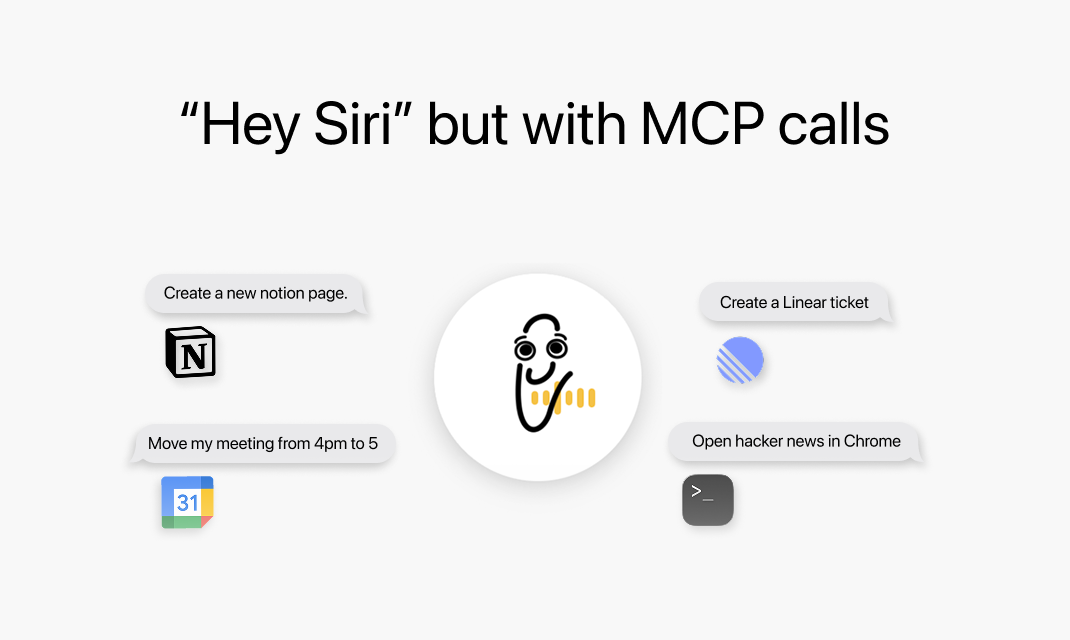
Clippy transforms voice productivity on Mac by enabling GPT-powered editing and content creation directly within any application through voice commands or text input, eliminating the need to switch contexts or copy-paste to external AI tools.
What It Does
Clippy functions as an always-available AI assistant that appears as a popup overlay when needed and disappears when not in use. Rather than forcing users to navigate away from their work to interact with AI, Clippy brings AI assistance directly into the current text field or application. This context-aware approach allows users to dictate content, request edits, or trigger AI transformations without disrupting their workflow.
The tool emphasizes aesthetic design and seamless integration, positioning itself as a productivity enhancement that feels native to macOS rather than an external utility. Users can invoke Clippy through voice activation or keyboard shortcuts, receive AI-generated responses, and have results inserted directly where they’re working.
Core Features
Voice-First Interaction: Speak naturally to create, edit, or transform text in any application. The system processes voice input and returns results without requiring manual transcription or copy-paste workflows.
GPT Integration: Leverages GPT models to handle editing requests, content generation, and text transformations. Users can request rewrites, expansions, summaries, or style changes through conversational commands.
Context-Aware Popup Interface: Appears when summoned and disappears when dismissed, maintaining focus on the user’s primary work. The overlay design ensures AI assistance remains accessible without cluttering screen space.
Direct Text Insertion: Results paste automatically into the active text field, eliminating the multi-step process of generating content in one app and manually transferring it to another.
Universal Application Support: Works across any macOS application that accepts text input, from email clients and document editors to code IDEs and messaging apps.
How It Works
Invoke Clippy through a keyboard shortcut or voice command while working in any text field. Speak or type your request, such as asking for content edits, generating new text, or transforming existing selections. Clippy processes the request using GPT models and returns the result as a popup. Review the output and accept it to have Clippy automatically insert the text at your cursor position.
The workflow maintains continuity with your primary task. There is no need to open separate applications, manage browser tabs, or perform manual copy-paste operations. Clippy handles the interaction cycle and returns you to your work with the requested output ready to use.
Ideal Use Cases
Drafting and editing emails through voice dictation without leaving your email client. Rewriting sentences or paragraphs for clarity, tone, or length while working in documents. Generating code comments, documentation, or boilerplate directly in your IDE. Creating social media posts, messages, or responses with AI assistance without switching apps. Summarizing or expanding text selections on demand within any application.
Strengths and Considerations
Strengths: Voice-first design enables hands-free content creation and editing. Popup interface eliminates context switching and application fragmentation. Universal text field support means one tool works everywhere. Direct insertion removes manual copy-paste steps that slow down workflows. Clean, aesthetic interface prioritizes user experience alongside functionality.
Considerations: macOS-only availability limits platform flexibility. Requires internet connectivity for GPT model access. Voice recognition accuracy depends on microphone quality and ambient noise. No native integration with project management tools like Linear or calendar applications has been officially confirmed, despite mentions in community discussions. Best suited for text-focused productivity rather than complex multi-step automations.
Pricing
Free to download and use on macOS. No subscription tiers or premium features have been announced. Compatible with Apple Silicon and Intel-based Macs.
How Does It Compare?
Microsoft Copilot (2026): Enterprise-focused AI assistant integrated across Microsoft 365 applications. Features Work IQ persistent memory, autonomous Agent Mode for Word, Excel, and PowerPoint, and enterprise-grade voice integration. Includes GPT-5.2 model, Claude Agent access, and People Agent for organizational context. AI capabilities become standard in M365 subscriptions starting July 2026 with global price increases. Best for organizations already invested in Microsoft ecosystem requiring cross-application intelligence and enterprise security.
Raycast (with AI): Mac productivity launcher combining application launching, file search, clipboard management, and AI capabilities. Pro plan at $8/month includes Raycast AI with cloud sync, custom themes, and unlimited clipboard history. Pro + Advanced AI at $16.50/month adds access to GPT-4, Claude 3.7 Sonnet, and Gemini 2.0 Pro with weekly usage caps. Emphasizes keyboard-first workflows and extensive extension ecosystem with over 1,000 available extensions. Best for power users wanting unified launcher, workflow automation, and AI in a single tool.
ChatGPT Mac App: OpenAI’s native macOS application with Advanced Voice Mode for natural spoken conversations, though voice features are being retired from macOS on January 15, 2026 for platform unification. Features “Work with Apps” functionality allowing ChatGPT to read content from coding applications for contextual assistance. Includes conversation search, model picker with GPT-4o and o1 access, and Apple Handoff between iOS and macOS. Plus subscribers at $20/month get priority access to new models and features. Best for users wanting full-featured ChatGPT experience with deep conversational capabilities and reasoning models.
Windsurf Editor: AI-native code editor built specifically for software development with Cascade for project-wide understanding and Supercomplete for advanced code prediction. Free tier available with premium features for professional developers. Focuses on keeping developers in flow state with minimal context switching. Best for engineers prioritizing coding workflows over general productivity.
Talon Voice: Advanced voice control system for computers enabling hands-free operation beyond just text input. Supports custom voice commands for application control, navigation, and complex automation. Requires significant setup and learning curve but offers unmatched flexibility for accessibility and power users. Best for users needing comprehensive voice-driven computer control rather than AI-assisted text generation.
Clippy differentiates itself through radical simplicity and aesthetic design for voice-powered text productivity. While Microsoft Copilot provides enterprise intelligence and Raycast offers comprehensive launcher capabilities, Clippy focuses narrowly on making AI text assistance feel native and effortless within any Mac application. This specialization makes it particularly valuable for users who want AI writing assistance without learning complex tools or managing multiple productivity applications.
Final Thoughts
Clippy addresses a specific friction point in AI-assisted productivity: the constant context switching required to leverage AI tools. By bringing GPT capabilities directly into the active text field through voice or keyboard commands, it eliminates the workflow disruption that makes many users abandon AI tools despite their potential value. The free, aesthetically designed approach lowers barriers to adoption, making it accessible for individual users exploring voice-first productivity. However, users seeking confirmed integrations with project management tools, calendar systems, or local LLM privacy should verify current feature availability, as community discussions mention capabilities not yet reflected in official documentation. Clippy works best for Mac users who prioritize elegant, focused tools that excel at one thing rather than comprehensive platforms attempting to cover every productivity scenario.