Table of Contents
Overview
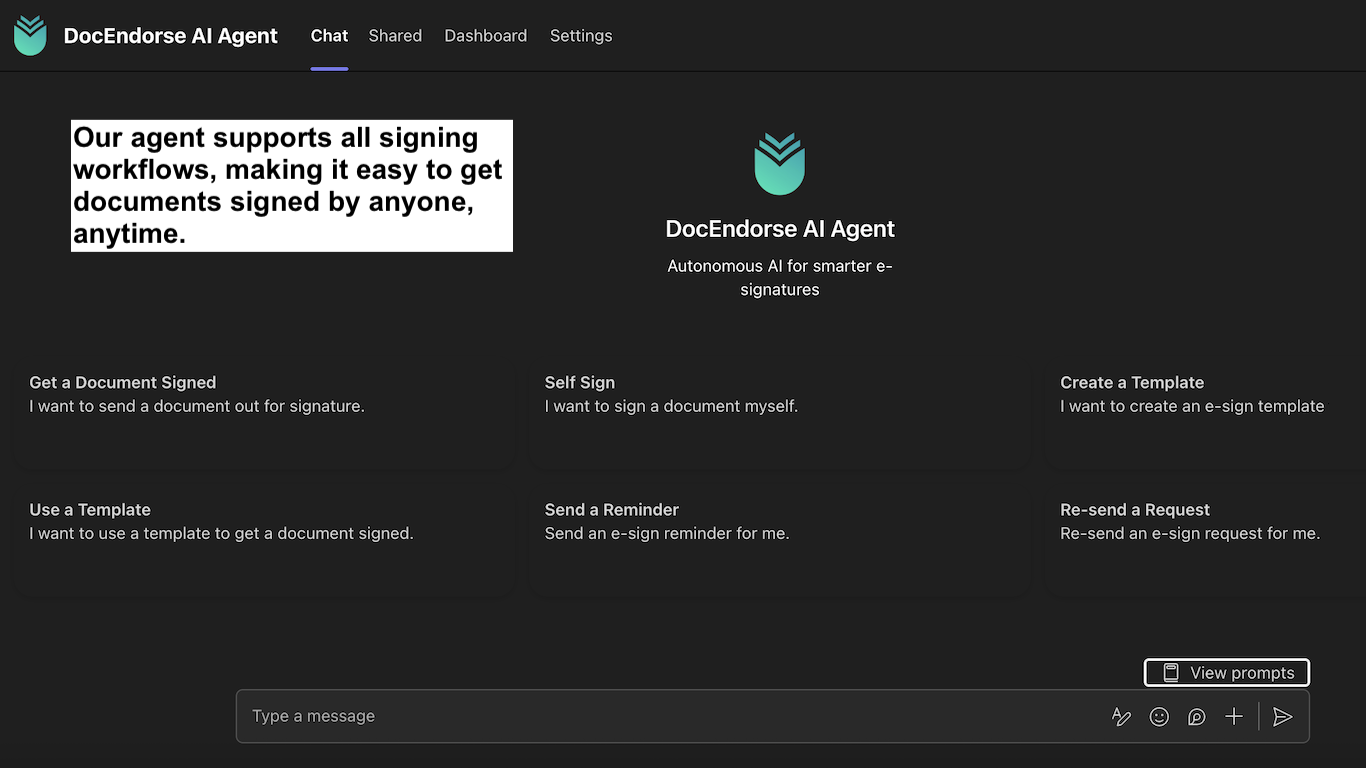
DocEndorse is an AI-powered e-signature assistant built specifically for Microsoft Teams that streamlines document signing workflows through conversational interaction. Instead of manually preparing documents, configuring signature fields, and chasing signers, users chat with the assistant to handle document setup, signer role detection, sending, reminders, and follow-ups automatically. The platform integrates natively with OneDrive, SharePoint, and Outlook contacts, providing real-time status updates within Teams and includes a free plan for immediate evaluation.
Key Features
- Chat-Based Document Setup: Natural language interface for preparing documents and requesting signatures without leaving Teams
- AI-Driven Field Detection: Automatic identification of signature fields and assignment of signer roles based on document content
- Multi-Channel Delivery: Sends signature requests via email, SMS, and WhatsApp (where available) with automatic message generation
- Real-Time Status Updates: Live notifications delivered directly in Teams chat as signers view and complete documents
- Microsoft 365 Integration: Seamless connection with OneDrive, SharePoint, Outlook contacts, and Teams meeting attendees
- Automated Reminders: Intelligent follow-up messages with tone and timing adjusted based on document progress
- Template Management: Create and reuse templates for frequently used documents to accelerate recurring workflows
- Bulk Sending: Send signature requests to up to 300 recipients in a single operation
- Team Collaboration: Multiple teams can share templates, contacts, and documents with role-based permissions
How It Works
Users install the DocEndorse AI Agent from the Microsoft Teams app store and create or sign in to a DocEndorse account within the app. To send a document, users start a conversation with the bot or use the compose extension, then provide natural language instructions. The assistant fetches documents from OneDrive or SharePoint, suggests signing fields, proposes signer roles, and assigns recipients from Outlook contacts or Teams meeting attendees. After confirmation, it sends signature requests via the user’s preferred channel. Real-time status updates appear in chat, and a dashboard tab provides centralized visibility into all e-signature activity. The AI generates follow-up messages automatically and adjusts timing based on document urgency and signer behavior.
Use Cases
- Legal Document Workflows: Attorneys and paralegals streamline contract reviews, NDAs, and client agreements with automated field detection and role assignment
- HR Onboarding: HR teams accelerate employee onboarding with template-based offer letters, policy acknowledgments, and benefit enrollment forms
- Sales Contract Management: Sales representatives close deals faster by sending proposals and agreements directly from Teams conversations
- Administrative Approvals: Operations teams manage purchase orders, expense approvals, and internal compliance documents within existing Teams channels
- Procurement Processes: Procurement departments handle vendor contracts, SOWs, and procurement approvals with full audit trails
Pros \& Cons
Advantages
- Seamless Teams Integration: Operates entirely within Microsoft Teams, eliminating context switching and reducing learning curve
- Conversational Interface: Natural language commands simplify complex e-signature workflows for non-technical users
- Automated Workflows: AI handles document preparation, field detection, and follow-up tasks, saving significant manual effort
- Microsoft 365 Ecosystem: Deep integration with OneDrive, SharePoint, and Outlook keeps documents within existing security boundaries
- Free Plan Available: Immediate access to core features without upfront investment
- Multi-Channel Delivery: SMS and WhatsApp options increase signer response rates
Disadvantages
- Limited to MS Ecosystem: Full functionality requires Microsoft 365; organizations outside this ecosystem cannot leverage integrations
- Feature Transparency: Limited public information on advanced capabilities and enterprise pricing requires contacting vendor
- Automatic Detection Limitations: AI field detection may need manual review for complex documents with non-standard layouts
- Platform Dependency: Relies on Microsoft Teams availability; Teams outages affect DocEndorse accessibility
- Learning Curve: Users must adapt to conversational workflow paradigm, which may require training for some teams
How Does It Compare?
DocuSign
- Key Features: 7 million customers, 1+ billion users, 900+ integrations, advanced solutions for governance, delegated signing, enterprise reporting, AI data extraction, 100+ envelope annual quota per user
- Strengths: Market leader with mature ecosystem, extensive API capabilities, robust compliance certifications, global operations support, advanced workflow automation, strong enterprise features
- Limitations: Higher cost (\$40-60/user/month), complex pricing with envelope quotas and metered add-ons, limited Microsoft Teams native integration, requires separate application switching
- Differentiation: DocuSign is a standalone platform with broad ecosystem integration; DocEndorse is Teams-native with conversational AI interface
Adobe Sign
- Key Features: Integration with Adobe Document Cloud and Creative Cloud, AI-powered document analysis via Adobe Sensei, web forms, payment collection, Acrobat integration
- Strengths: Superior integration with Adobe tools, faster document preparation for PDF-centric workflows, strong creative industry adoption, conditional logic capabilities
- Limitations: Less extensive third-party integrations than DocuSign, primarily focused on Adobe ecosystem, limited native Teams integration, fewer enterprise governance features
- Differentiation: Adobe Sign excels in document productivity suites; DocEndorse specializes in Teams-centric workflows with AI automation
Blueink
- Key Features: E-signature solution at 50% of DocuSign cost, bulk send capabilities, templates, customer service focus
- Strengths: Cost-effective alternative, competitive feature set, strong customer support reputation
- Limitations: Smaller market presence, fewer integrations, less brand recognition, limited AI capabilities
- Differentiation: Blueink competes on price; DocEndorse competes on AI automation and Teams integration
PandaDoc
- Key Features: All-in-one document automation with e-signatures, contract management, CPQ, payment collection, analytics
- Strengths: Comprehensive document lifecycle management, strong analytics, integrated CPQ, good for sales teams
- Limitations: More expensive for pure e-signature needs, steeper learning curve, may be overkill for simple signing workflows
- Differentiation: PandaDoc offers full contract lifecycle management; DocEndorse focuses on streamlined e-signature within Teams
Final Thoughts
DocEndorse AI Agent successfully addresses a genuine pain point for Microsoft Teams users by eliminating friction from e-signature workflows. The conversational interface and deep Microsoft 365 integration create a compelling value proposition for organizations already invested in the Microsoft ecosystem. The platform’s strength lies in reducing manual document preparation and follow-up tasks, enabling teams to close agreements faster.
The free plan provides adequate opportunity to evaluate core functionality, though heavy users will quickly require paid upgrades. While the platform’s reliance on Microsoft Teams limits its addressable market, this focus enables superior integration and user experience within that ecosystem.
For sales, HR, legal, and operations teams seeking to streamline signature workflows without adding another standalone application, DocEndorse offers an attractive solution. The AI-driven automation and multi-channel delivery capabilities justify the investment for organizations processing moderate to high document volumes. As Microsoft continues enhancing Teams with AI capabilities, DocEndorse is well-positioned to leverage these platform improvements for expanded functionality.
https://marketplace.microsoft.com/en-in/product/WA200009703