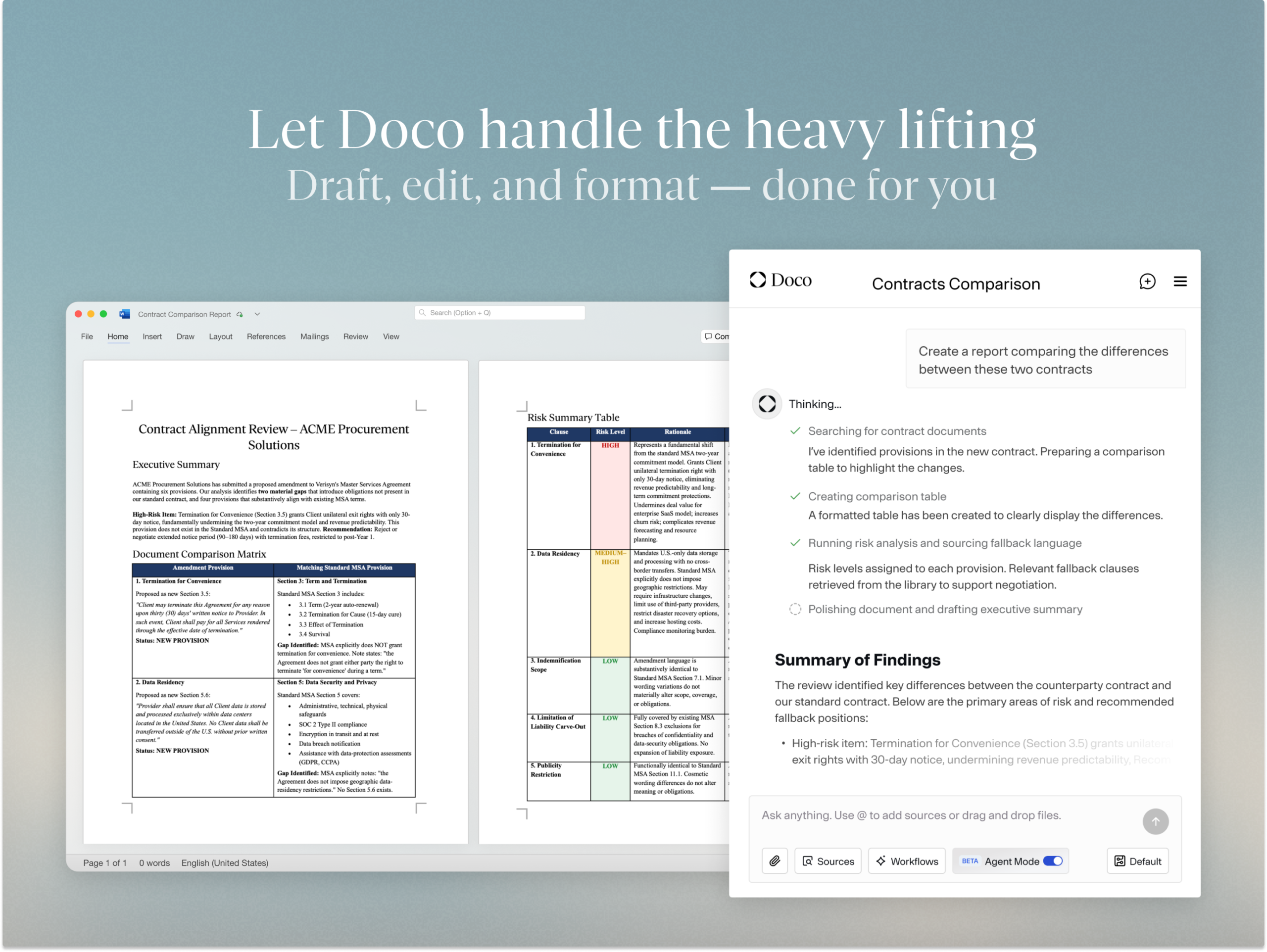
Overview
Transform your Microsoft Word document workflow with an AI teammate that moves beyond basic assistance. Doco Agent Mode represents a fundamentally different approach to document automation—an autonomous AI system that independently executes complex, multi-step editing tasks directly within Word while maintaining full transparency through track changes. Rather than offering suggestions or corrections, Doco decomposes your high-level instructions into sequential workflows, handling everything from document restructuring and tone refinement to comprehensive formatting and style standardization, all while preserving your ultimate editorial control through reviewable change tracking.
Key Features
Doco Agent Mode delivers enterprise-grade document automation with security architecture designed for regulated industries.
- Autonomous Agent Mode for complex workflows: Assign sophisticated multi-step tasks—such as “restructure this report, tighten the tone for professional audiences, and apply company formatting standards”—and Doco decomposes and executes these operations sequentially as a true autonomous agent.
- Track Changes integration with full edit visibility: All AI-generated modifications apply through Microsoft Word’s native track changes system, enabling complete review, acceptance, or rejection of every proposed modification without losing version control or audit trails.
-
End-to-end document lifecycle support: From initial drafting through iterative revisions to final formatting and standardization, Doco manages comprehensive document workflows within Word’s familiar interface.
-
Enterprise-grade security infrastructure: Architected on single-tenant AWS infrastructure meeting FedRAMP Moderate baseline requirements, with SOC 2 Type II certification, encryption in transit and at rest, zero-trust architecture, and guaranteed non-use of customer data for model training.
-
Secure on-shore infrastructure: All processing occurs on segregated, single-tenant infrastructure within the United States, meeting the most stringent data residency and security requirements.
-
Proprietary data protection: Doco guarantees that your organizational documents, proprietary information, and customer data are never used to train shared AI models, maintaining strict confidentiality and compliance with data protection regulations.
-
Contextualized editing with knowledge base integration: Doco leverages your organizational knowledge bases, approved templates, and document libraries to ensure AI-generated content aligns with company standards, compliance requirements, and established best practices.
-
Adaptive learning from editing patterns: The system learns from your document history and editing preferences, building personalized automation templates that reduce manual intervention by up to 72% for frequently handled document types.
How It Works
Doco Agent Mode operates through a sophisticated workflow that combines language understanding with document automation. Users begin by connecting Doco directly to their Microsoft Word installation through a straightforward integration. Once connected, you assign high-level tasks using natural language—for example, “restructure this analysis by priority, standardize all citations to APA format, and apply our brand style guide to headers and footers.” Doco’s AI processes this instruction, breaking it into component operations: structural reorganization, citation formatting, and style application. The agent then executes these operations sequentially within your open document, applying changes through Microsoft Word’s native track changes system. Each modification appears as a tracked change, allowing you to review the specific transformations before accepting or rejecting them individually. Throughout this process, Doco operates on secure, single-tenant infrastructure with strict access controls, ensuring your proprietary information is processed in complete isolation and never incorporated into shared model training datasets. When your review is complete, you approve the accumulated changes, and the document reflects your automated workflow.
Use Cases
Doco Agent Mode serves organizations where document creation, consistency, and security intersect with high-value knowledge work.
- Legal and Consulting Firms: Automate the creation, review, and standardization of lengthy contracts, briefs, proposals, and complex analysis documents while maintaining strict confidentiality and audit trails for regulated practice.
-
Financial Services and Compliance: Standardize financial reports, compliance documentation, and client communications across entire organizations, ensuring consistent formatting, appropriate tone, and regulatory adherence without manual review of every document.
-
Enterprise Policy and Governance: Efficiently update organizational policies, procedure manuals, governance frameworks, and compliance documentation at scale while maintaining consistency across hundreds of related documents.
-
Proposal and RFP Response Workflows: Streamline the creation of customized proposals and RFP responses by automatically adapting templates to specific client contexts, standardizing formatting, and ensuring consistent brand presentation across complex multi-section documents.
-
Document Standardization and Brand Compliance: Audit and standardize existing document libraries to enforce brand guidelines, visual consistency, and regulatory compliance requirements across large-scale document repositories.
-
Reducing Draft-to-Delivery Timeline: Significantly compress the time required for knowledge workers to move documents from initial draft through multiple revision cycles to final, publishable versions ready for external delivery or official records.
Pros & Cons
Advantages
- Deep, native Microsoft Word integration: Operates seamlessly within Word using native track changes, ensuring compatibility with existing workflows, compliance systems, and enterprise document management infrastructure without requiring workarounds or export/import cycles.
-
True autonomous workflow execution: Unlike suggestion-based writing assistants, Doco executes complete, multi-step workflows independently, reducing the cognitive load and manual steps required to move documents through complex transformation processes.
-
Enterprise-grade security and compliance: Single-tenant infrastructure, SOC 2 Type II certification, FedRAMP Moderate baseline alignment, and guaranteed non-use of proprietary data for model training provide security positioning suitable for regulated industries and sensitive document handling.
-
Substantial time savings across document lifecycle: Reduces hours spent on document formatting, style standardization, revision cycles, and consistency checking, enabling knowledge workers to focus on strategic content development rather than mechanical document processing.
-
Organizational context and knowledge integration: Leverages company knowledge bases, templates, and style standards to ensure AI-generated modifications align with organizational requirements, compliance frameworks, and established best practices.
-
Comprehensive edit visibility and control: Track changes integration preserves complete visibility into what changed and why, maintaining human editorial control and creating audit trails required for regulated document workflows.
Disadvantages
-
Microsoft Word-exclusive functionality: Doco’s capabilities are available only within Microsoft Word, limiting utility for teams using Google Docs, open-source tools, or alternative document platforms and creating deployment constraints in heterogeneous environments.
-
Direct competition from Microsoft Copilot Agent Mode: Microsoft’s native Agent Mode (launched September 2025) provides similar autonomous workflow capabilities directly within Word at no additional cost for M365 subscribers, creating significant pricing and convenience advantages for the built-in solution.
-
Enterprise-oriented pricing model: Commercial pricing and deployment are designed for enterprise teams and organizations, potentially exceeding budgets for smaller teams, individual freelancers, or cost-sensitive deployments compared to free or low-cost alternatives.
-
Requires organizational change management: Implementing autonomous document workflows necessitates organizational adoption, user training, and potentially adjusted processes around document review and approval cycles.
-
Limited ecosystem integration: While Doco operates within Word, integration with adjacent systems (project management, CMS, knowledge management platforms) may require additional configuration or custom workflows.
-
Depends on access controls and permissions management: Optimal security requires careful attention to Word-level permissions, document access controls, and organizational information governance policies to ensure proprietary data remains properly protected.
How Does It Compare?
Doco Agent Mode enters a document automation market with multiple competitors operating at different strategic levels—from general-purpose writing assistants to enterprise-focused autonomous agents to native platform capabilities. Understanding Doco’s positioning requires recognizing these distinct product categories:
Microsoft Copilot Agent Mode (Native Word Integration)
Microsoft introduced Agent Mode in Word in September 2025, providing autonomous multi-step workflow execution directly within Word through the native Copilot interface. Agent Mode allows users to assign complex tasks (“update this report, integrate Excel data, standardize formatting”) and Copilot executes these workflows with track changes integration similar to Doco. Critically, Agent Mode is included with existing Microsoft 365 subscriptions (M365 Copilot add-on required during Frontier preview phase), providing zero incremental cost to existing enterprise users. Agent Mode currently reaches Frontier users on web-first, with desktop support planned. While offering comparable autonomous capabilities, Copilot’s security model differs—it operates on shared cloud infrastructure rather than single-tenant dedicated infrastructure. For organizations where multi-tenant architecture presents compliance concerns, Doco’s single-tenant FedRAMP-aligned infrastructure provides stronger data isolation guarantees. However, for most enterprises, native Copilot integration within Word represents a formidable competitive pressure, particularly as Microsoft continuously enhances these capabilities.
Grammarly Business
Grammarly positions itself as an AI-powered writing assistant focused on grammar, style, clarity, and tone optimization. Available as a Word add-in, Grammarly provides real-time suggestions for improving written communication through rule-based checks and contextual suggestions. Grammarly analyzes your writing and recommends changes—rewording for clarity, tone adjustment, formality calibration. However, Grammarly operates as a suggestion engine rather than an autonomous agent. Users manually review and apply each suggestion; Grammarly does not independently execute multi-step workflow automation. Grammarly Business targets writing quality improvement and consistency checking rather than document lifecycle automation. Best suited for teams prioritizing communication polish and grammatical accuracy, Grammarly complements rather than directly competes with autonomous workflow automation platforms like Doco. Pricing is typically $15-40 per user monthly.
Jasper for Docs (Google Docs Integration)
Jasper provides an AI content generation and editing platform with integration to Google Docs and Microsoft Word (via add-in). Jasper’s strength lies in content generation—drafting sections, brainstorming headlines, rewriting copy for different tones—rather than autonomous workflow automation. Users interact with Jasper through prompts, generating specific content segments that they then manually integrate into documents. Like Grammarly, Jasper operates as a writing assistant and content generator rather than an autonomous agent executing multi-step workflows. Jasper Docs is better positioned for content creation workflows than document standardization or complex restructuring tasks. While Jasper generates content efficiently, it doesn’t decompose multi-step instructions into sequential workflow execution with track changes integration. Pricing starts around $39-125 monthly depending on usage tier.
Wordtune (Rewriting and Tone Adjustment)
Wordtune specializes in sentence-level rewriting, tone adjustment (formal/casual/friendly variants), and content shortening/expansion. Available as Word add-in, Wordtune offers multi-option rewrites for individual sentences or paragraphs, helping users find clearer or more impactful phrasings while preserving meaning. Wordtune’s focus is granular writing refinement—improving sentence clarity, adjusting tone, fixing repetitive structures—rather than document-level automation. Users select text segments and get rewrite options; Wordtune doesn’t execute independent multi-step workflows. While valuable for writing quality improvement, Wordtune addresses a different problem: sentence-level polish rather than end-to-end document workflow automation. Pricing is typically $9.99-19.99 monthly.
Google Docs Duet AI and Similar Native Solutions
Google Workspace offers Duet AI (renamed Gemini) for collaborative document editing, providing writing suggestions, content generation, and summarization directly in Google Docs. Like Microsoft Copilot, Duet AI represents native platform integration with AI capabilities. However, if your organization uses Google Workspace rather than Microsoft 365, Duet AI provides comparable autonomous document capabilities without additional cost. The competitive dynamic differs substantially based on document platform choice—organizations already invested in Microsoft Word/365 face different calculations than Google Workspace-centric organizations.
Doco’s Distinct Positioning
Doco occupies a specialized niche within the broader document automation landscape:
Single-tenant security architecture: Unlike Microsoft Copilot and Google Duet AI (which operate on shared cloud infrastructure), Doco’s single-tenant AWS infrastructure with FedRAMP Moderate alignment provides stronger data isolation for regulated industries, government contractors, and organizations with strict data sovereignty requirements.
Autonomous workflow execution within Word: While Microsoft Agent Mode offers similar capabilities, Doco arrived first with this autonomous agent model (Product Hunt launch August 2025, before Copilot Agent Mode’s September rollout). For organizations evaluating options before Microsoft’s broader rollout, Doco provides proven autonomous capabilities in a dedicated platform.
Purpose-built for complex document workflows: Unlike writing assistants (Grammarly, Wordtune) or content generators (Jasper) focused on isolated improvements, Doco targets end-to-end document lifecycle automation, particularly valuable for legal, compliance, and consulting workflows requiring comprehensive standardization and formatting consistency.
No shared model training on customer data: Doco guarantees organizational data never trains shared models, whereas Microsoft’s Copilot may use interactions for model improvement (customizable through enterprise settings). Organizations with highly proprietary or confidential document content may prefer Doco’s guarantee.
Enterprise-grade audit and compliance: Track changes integration combined with single-tenant infrastructure creates comprehensive audit trails required for regulated industries, whereas general-purpose AI assistants often lack equivalent documentation.
For organizations prioritizing autonomous document workflow automation with single-tenant security architecture, Doco provides a specialized solution differentiated from both writing assistants and native platform integrations. However, as Microsoft’s Copilot capabilities mature and expand beyond preview status, the competitive dynamics continue evolving—organizations should evaluate current feature parity, security requirements, and total cost of ownership (native M365 integration vs. additional Doco licensing).
Final Thoughts
Doco Agent Mode represents a significant evolution in document automation, positioning autonomous AI agents as core productivity infrastructure for knowledge-intensive organizations. The combination of independent workflow execution, comprehensive track changes integration, and single-tenant security architecture creates genuine value for legal, consulting, compliance, and enterprise teams handling sensitive documentation. While Microsoft’s recent introduction of comparable capabilities through native Copilot Agent Mode creates competitive pressure, Doco’s specialized focus on single-tenant infrastructure, guaranteed data privacy, and purpose-built document automation preserves distinct value for organizations where security isolation and compliance assurance justify dedicated platform investment. For knowledge workers who spend substantial time restructuring, formatting, and standardizing complex documents, the time savings and consistency benefits from autonomous agent execution offer compelling returns. However, organizations already fully committed to Microsoft 365 should carefully evaluate Doco’s incremental value against native Copilot Agent Mode capabilities, which offer similar autonomous features within the existing platform at no additional cost. For teams prioritizing stringent data isolation, regulated industry compliance, or complex document workflows requiring comprehensive audit trails, Doco merits serious exploration as a transformative productivity platform. For cost-conscious deployments or organizations satisfied with Microsoft’s native capabilities, the value proposition warrants careful evaluation against Copilot’s expanding feature set.
https://www.trydoco.com/