Table of Contents
Overview
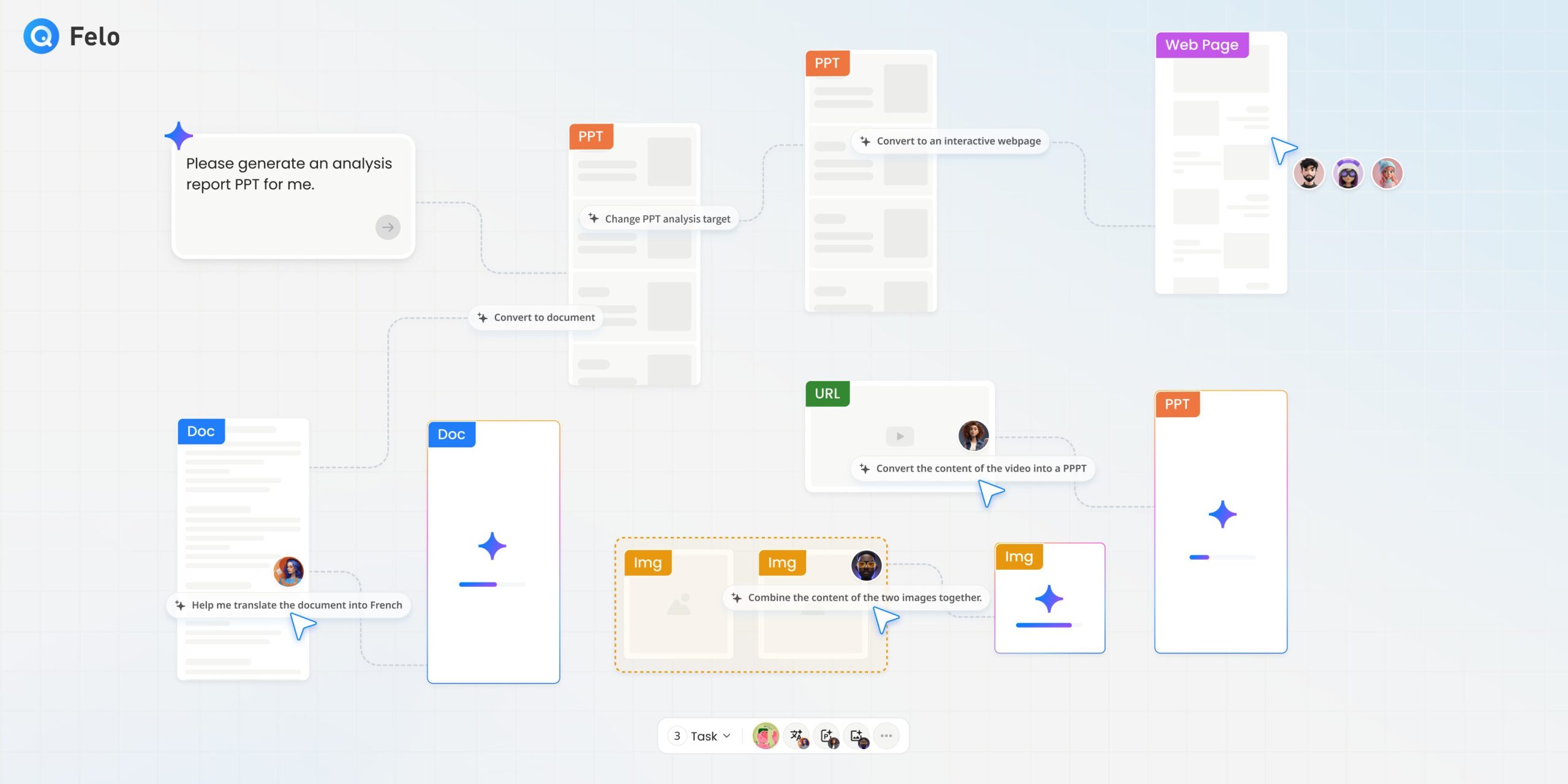
Felo is a Tokyo-based AI search engine and productivity platform developed by Sparticle Inc., which launched on Product Hunt in August 2024 and quickly gained global attention by ranking first on its debut day. While Felo started as a multilingual AI-powered search engine, it has evolved into a comprehensive workspace with its flagship feature: LiveDoc. LiveDoc transforms the traditional document experience by providing an infinite canvas where humans and specialized AI agents collaborate in real-time. Instead of working on static pages, users can create, research, and refine projects on a single intelligent workspace where context is never lost and AI assistance is always available.
Key Features
LiveDoc differentiates itself through its visual collaboration approach and multi-agent AI architecture. Here are the core features that define the platform:
- Infinite Canvas Workspace: The heart of LiveDoc is an unlimited digital canvas where all project elements exist together. Users can pan, zoom, and organize content spatially, creating visual relationships between documents, presentations, images, and research materials.
- Multi-Agent AI Collaboration: LiveDoc deploys specialized AI agents for different tasks. Research agents gather web information, writing agents help draft content, design agents enhance presentations, and translation agents convert materials into multiple languages. These agents work simultaneously and maintain full context of everything on your canvas.
- Multi-Format Integration: The platform accepts diverse file types including PDFs, Word documents, PowerPoint presentations, CSV files, web links, and YouTube videos. All formats can coexist and interact on the same canvas, eliminating the need to switch between tools.
- Ask Canvas Feature: Users can have natural language conversations with their entire workspace. By selecting one or multiple resources, you can ask the AI to summarize, compare, extract insights, or synthesize information across all your materials.
- AI Task Automation: Complex multi-step workflows can be delegated to AI agents. For example, you can instruct the AI to take three research papers and create a five-slide executive summary, and the system handles analysis, extraction, structuring, and presentation generation automatically.
- Real-Time Team Collaboration: Multiple team members can work on the same canvas simultaneously. The system shows who is editing what, when AI tasks are running, and when new content appears. Comments, feedback, and version history keep everyone synchronized.
How It Works
Getting started with LiveDoc follows an intuitive workflow designed to integrate AI assistance naturally.
First, you create a new canvas or access an existing workspace. You can upload existing documents, presentations, and data files, or paste web links and YouTube URLs directly onto the canvas. The drag-and-drop interface allows spatial organization of all resources.
Next, you interact with your content using AI agents. Double-click any document to open it in the integrated editor, where AI writing assistance is available through text selection. Use the Ask Canvas feature to query your materials, request summaries, or ask the AI to identify connections across documents.
For deliverables, you can assign AI Tasks that span multiple steps. The AI agents analyze your source materials, extract relevant information, and generate outputs like presentations, research reports, or web pages. Throughout the process, the AI maintains full context awareness of everything on your canvas.
Finally, team collaboration happens naturally on the same canvas. Multiple users can edit concurrently while AI agents continue working alongside human team members. The platform automatically manages versions and maintains project history.
Use Cases
LiveDoc serves professionals and teams who manage complex, iterative projects. The platform is particularly effective for:
- Knowledge Workers and Teams: Product managers coordinating specifications, HR professionals creating training materials, marketing teams developing campaigns, and project managers maintaining documentation can centralize their workflows on a single canvas.
- Research and Report Generation: Academics, analysts, and consultants can gather research materials, have AI agents synthesize findings, and generate comprehensive reports with proper sourcing and structure.
- Presentation Creation: The integrated AI Slides feature transforms research and documents into professional presentations. Users can generate slide decks from multiple source files, translate presentations into different languages, and enhance designs automatically.
- Content Creators: Bloggers, YouTubers, and digital content producers can research topics, generate drafts, create accompanying visuals, and manage their content pipeline within one workspace.
Pros and Cons
LiveDoc offers significant advantages but also has limitations worth considering.
Advantages
- Eliminates tool-switching by consolidating research, writing, design, and collaboration in one workspace.
- AI agents maintain full context across all documents, preventing the need to re-explain project details repeatedly.
- Multi-user real-time collaboration allows teams and AI agents to work concurrently on the same canvas.
- Supports diverse file formats including PDFs, documents, presentations, spreadsheets, images, web links, and videos.
- Visual canvas organization helps users see project evolution and maintain clear relationships between materials.
- Multilingual capabilities with built-in translation support for over 16 languages.
Disadvantages
- Steeper learning curve compared to traditional document tools like Google Docs due to the canvas paradigm and multiple AI features.
- Credit-based pricing for advanced features may require careful usage management for heavy users.
- AI output quality depends on the clarity of instructions and the quality of source materials provided.
- Relatively new platform with infinite canvas launched in October 2025, meaning some features may still be evolving.
- Best suited for complex multi-document workflows; may be overkill for simple document editing needs.
- Enterprise data governance and compliance features may require evaluation for regulated industries.
How Does It Compare?
LiveDoc enters a competitive landscape of AI-enhanced workspace tools. Here is how it compares to relevant alternatives in 2025:
Felo LiveDoc vs Notion AI
Notion AI adds AI features to an established block-based workspace with strong database and wiki capabilities. LiveDoc differentiates through its infinite canvas spatial organization and multi-agent architecture where specialized AI agents work simultaneously. Notion excels at structured knowledge management while LiveDoc focuses on visual, project-centric collaboration with deeper AI integration.
Felo LiveDoc vs Coda AI
Coda offers doc-as-app functionality with powerful automation through Packs and formulas. Coda Brain 2.0 provides natural language queries across 800+ integrated services. LiveDoc focuses more on visual canvas collaboration and AI-driven content generation rather than database automation. Coda suits teams needing sophisticated data workflows while LiveDoc targets multi-format project collaboration.
Felo LiveDoc vs Gamma
Gamma specializes in AI-powered presentation creation with strong design aesthetics and templates. LiveDoc offers broader functionality spanning research, documents, slides, and web page generation within one canvas. Gamma excels for standalone presentation needs while LiveDoc provides an end-to-end workspace from research to deliverable.
Felo LiveDoc vs Google Docs with Gemini
Google Docs with Gemini AI adds writing assistance to the familiar document interface with strong real-time collaboration. LiveDoc provides a fundamentally different canvas-based paradigm with multiple specialized AI agents and multi-format support. Google Docs remains ideal for straightforward collaborative writing while LiveDoc suits complex multi-document projects.
Felo LiveDoc vs Microsoft Copilot in Word
Microsoft Copilot integrates AI across the Microsoft 365 suite with enterprise-grade security and meeting transcription integration. LiveDoc offers a more visual, canvas-centric approach with specialized agents for different tasks. Organizations already invested in Microsoft 365 may prefer Copilot for seamless integration while LiveDoc appeals to teams seeking a unified visual workspace.
Felo LiveDoc vs Miro AI
Miro is a visual collaboration whiteboard with AI features for diagramming, brainstorming, and workshop facilitation. LiveDoc combines canvas visualization with deeper document processing and multi-agent AI generation capabilities. Miro excels at visual thinking and workshops while LiveDoc focuses on document-centric project completion.
Felo LiveDoc vs Canva Docs
Canva Docs provides beautiful document creation with Magic Write AI and seamless integration with Canva’s design ecosystem. LiveDoc offers more sophisticated multi-document AI analysis and research capabilities. Canva suits design-focused documents while LiveDoc targets comprehensive research-to-deliverable workflows.
Pricing
Felo offers a tiered pricing structure with both free and paid options:
Standard Plan (Free)
- Unlimited AI search queries
- 5 professional searches per day
- 1 Research report per day
- 3 Playground Pro model runs per day
- 200 daily credits for AI features (reset daily, no rollover)
Pro Plan
- Monthly: \$14.99/month (¥2,099/month)
- Annual: \$12.50/month when billed yearly
- 300 professional searches per day
- 15,000 credits per billing cycle
- Access to advanced AI models including GPT-4o, GPT-5, Claude 4 Sonnet, DeepSeek R1, and Gemini 3.0 Pro
- Full AI Slides generation capabilities
- Research report generation
- Priority support
Note: Felo transitioned to a unified credit system in July 2025, where different features consume varying credit amounts. Pro users can continue using 300 Pro searches daily even after credits are exhausted.
Platform Availability
Felo LiveDoc is accessible across multiple platforms:
- Web application at felo.ai/livedoc
- iOS mobile application
- Android mobile application
- Browser extensions available
What is Coming Next
Based on the development roadmap and recent updates, Felo continues to enhance LiveDoc with:
- Enhanced AI image generation with Nano Banana Pro integration
- Expanded collaboration permission controls
- Additional AI model integrations
- Improved enterprise features including SSO and IP access restrictions
- Advanced credit consumption analytics
Final Thoughts
Felo LiveDoc represents an ambitious vision for the future of knowledge work, positioning itself as a hybrid workspace where human creativity directs AI agents to execute complex tasks. The platform successfully addresses common pain points of tool-switching, context loss, and repetitive AI prompting by providing a unified visual canvas where everything from research to final deliverables can be managed.
For teams dealing with complex, multi-document projects that span research, writing, design, and presentation, LiveDoc offers a compelling alternative to juggling multiple specialized tools. The October 2025 launch of the infinite canvas and November 2025 introduction of multi-user collaboration show rapid feature development from this Tokyo-based team.
However, the platform requires investment in learning the canvas paradigm and understanding how to effectively direct multiple AI agents. Teams with simpler document needs may find traditional tools more straightforward. Organizations should also evaluate the credit-based pricing model against their expected usage patterns.
For forward-thinking teams ready to embrace a new model of human-AI collaboration and willing to invest time in mastering the platform, Felo LiveDoc offers a powerful glimpse into how document work may evolve. The free tier provides ample opportunity to explore whether the canvas-based, multi-agent approach fits your workflow before committing to a paid subscription.