Table of Contents
Fix Ugly PowerPoint by CubeOne
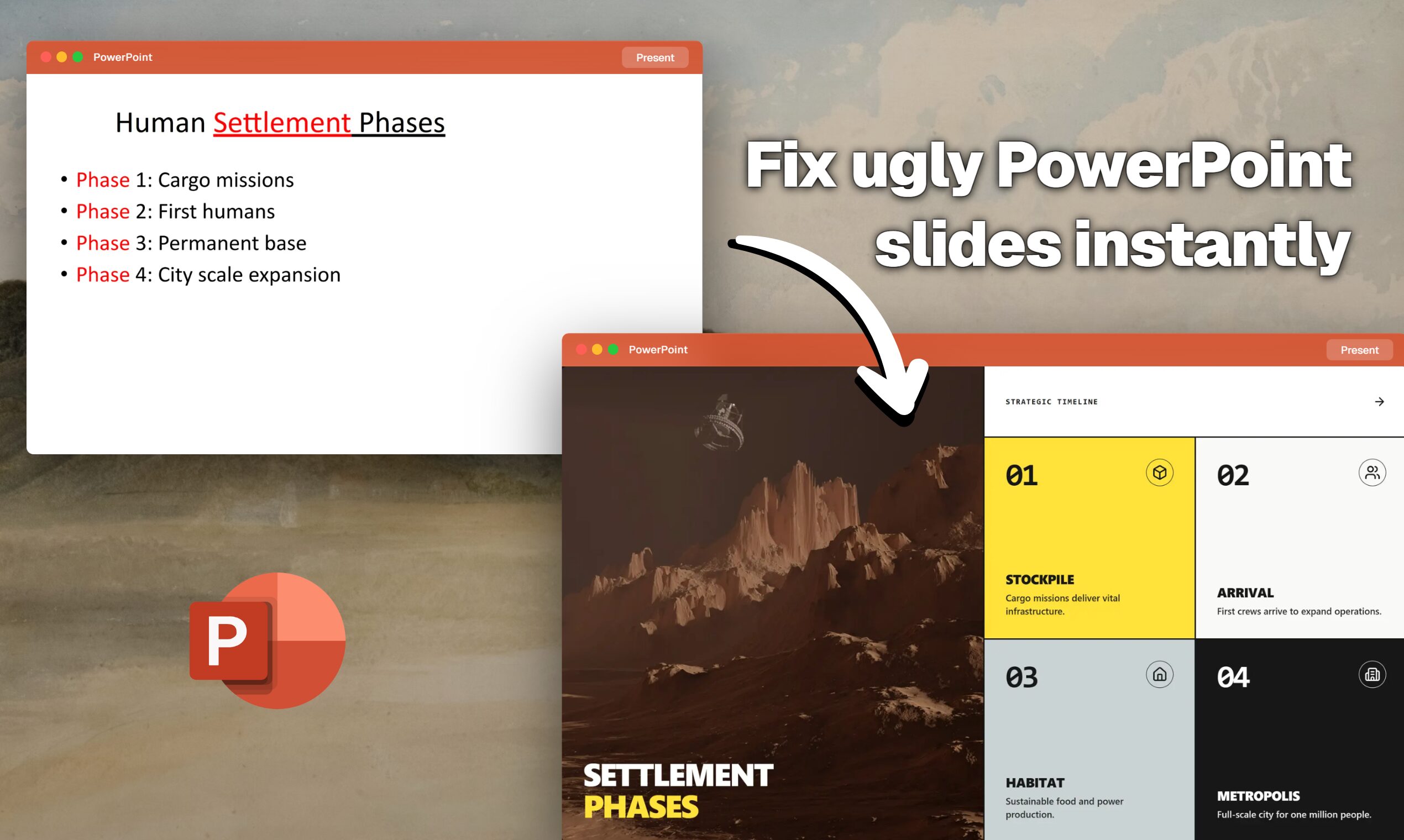
Fix Ugly PowerPoint is a specialized AI “mini-app” from the CubeOne platform designed specifically to redesign existing presentation decks. Unlike generative tools that build decks from scratch, this tool takes your messy, content-heavy PowerPoint files and instantly restyles them with professional layouts, animations, and typography while preserving your original text and data. The final output is fully editable, allowing for seamless use across Microsoft PowerPoint, Google Slides, and Apple Keynote.
- Automatic Slide Beautification: Instantly restyles fonts, colors, and alignment across the entire deck
- Design Enhancement: Upgrades visual hierarchy and adds professional polish to raw content
- Layout Optimization: Intelligently rearranges text and images into readable, aesthetic compositions
- Visual Improvement: Replaces generic bullet points with modern diagrams and iconography
- Full Editability: Exports as standard .pptx files that remain fully editable in any presentation software
How It Works
Upload your existing PowerPoint file (.pptx), and the AI analyzes the content on every slide. It then applies professional design principles to restructure the layout, fix formatting inconsistencies, and add visual engagement. You then download the improved file, which retains all original data but with a completely new, professional look.
- Business Presentations: Polishing internal updates or strategy decks before meetings
- Sales Decks: upgrading client-facing materials to look agency-designed
- Educational Slides: Making lecture notes more visually engaging for students
- Quick Makeovers: Fixing formatting disasters minutes before a deadline
Pros:
– Solves the specific problem of fixing bad slides rather than just generating generic new ones
– Delivers a fully editable file, not a static PDF or proprietary format
– Preserves the original narrative and data points accurately
Cons:
– Limited creative control compared to building from scratch
– Heavily dependent on the quality of the input content (garbage in, polished garbage out)
– “Mini-app” scope means it lacks the full editing suite of larger platforms
Pricing
Free / Pay-per-use (Mini-app model)
How Does It Compare?
vs. Gamma
- Fix Ugly PowerPoint: Best for redesigning existing files. You upload a finished (but ugly) deck, and it beautifies it without changing the content.
- Gamma: Best for creating from scratch. Gamma excels at generating new decks from text prompts or notes but is less effective at strictly preserving the layout and content of an existing PPTX upload.
vs. Canva (Magic Design)
- Fix Ugly PowerPoint: Focuses on corporate/professional aesthetics and exporting native PPTX files. It keeps the workflow inside PowerPoint.
- Canva: Focuses on creative/marketing aesthetics. While it can import PPT files, it often converts them into Canva’s proprietary format, making it difficult to export back to a fully editable, native PowerPoint experience.
vs. Beautiful.ai
- Fix Ugly PowerPoint: Offers unrestricted editability. The output is a standard PowerPoint file you can edit anywhere.
- Beautiful.ai: Offers smart templates. It forces your content into rigid (though beautiful) layouts that can break if you try to edit them outside of the Beautiful.ai ecosystem.
vs. Microsoft Copilot (in PowerPoint)
- Fix Ugly PowerPoint: A one-click full deck makeover. It processes the entire file at once to apply a consistent theme.
- Copilot: A slide-by-slide assistant. Copilot is better for iterative changes (e.g., “rephrase this bullet point,” “add an image here”) rather than automatically redesigning a whole 50-slide deck in one go.
Final Thoughts
Fix Ugly PowerPoint by CubeOne fills a crucial gap in the market: the “makeover” tool. Most AI presentation tools today focus on generation—creating something from nothing—which is often useless for professionals who already have their content but lack design skills. By focusing purely on the redesign process and ensuring 100% editability in the final export, it serves as a powerful utility for consultants, sales teams, and executives who live in PowerPoint but hate formatting slides. It is not a creative suite, but rather a finishing tool for business professionals.