
Table of Contents
Overview
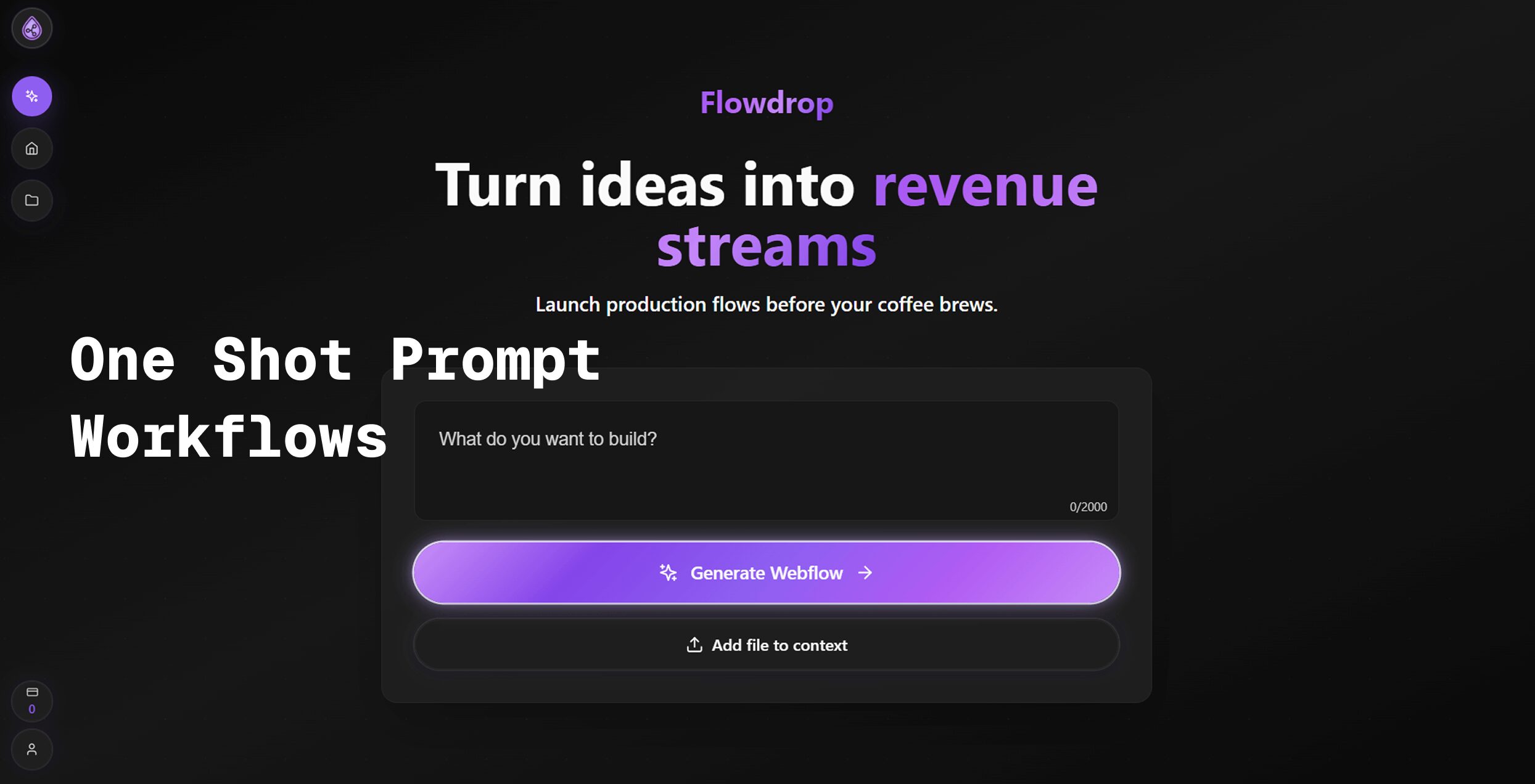
Flowdrop turns chat into automation. Just tell us what you want. Our AI builds it for you. Connect Gmail, Slack, Sheets, Telegram, X, LinkedIn, and 50+ other apps with zero code required. Launched on Product Hunt in October 2025 and updated to V1.1 in December 2025, Flowdrop introduces groundbreaking features including human-in-the-loop approval forms that let you review and approve steps before they run, real-time workflow visualization so you can see changes live and keep what works, YouTube video-to-text transcription, Apify web scraping actors, and real-time error checking that keeps you in control. Stop doing the same tasks twice. Build workflows in seconds, not hours. Try us free at flowdrop.ai with no credit card required.
Key Features
One-Prompt AI Workflow Generation: Describe your desired workflow in plain English through chat, and Flowdrop’s AI engine uses a sophisticated Planner → Navigator → Validator pipeline to automatically design, execute, and verify your automation. The system interprets natural language requests, maps them to concrete workflow steps, and generates production-ready automations without requiring technical knowledge or manual node configuration.
Human-in-the-Loop Approval Forms: New in V1.1, critical workflow steps can pause for user approval before execution. Customizable approval forms are delivered via email or Slack, allowing you to review AI-suggested actions, modify parameters in real-time, or halt processes through a live dashboard. This feature ensures AI-generated automations align with business logic and compliance requirements before committing changes to production systems.
Multi-Tab Workflows for Complex Tasks: Build sophisticated automations that span multiple browser tabs and applications simultaneously. Perfect for price comparison across e-commerce sites, academic research extraction from dozens of sources, competitive analysis requiring parallel data collection, and form-filling workflows that aggregate information from multiple systems.
Real-Time Workflow Visualization: Watch your automation execute transparently in the browser with live feedback on each step. The visual execution pipeline shows exactly what’s happening, making it easy to identify bottlenecks, debug issues, and understand how data flows through your workflow. See changes apply instantly and keep only the components that work, streamlining the refinement process.
YouTube Video-to-Text Transcription: Extract spoken content from YouTube videos automatically and convert it into searchable, editable text. This feature enables content creators to generate video summaries, researchers to analyze video datasets, and marketers to repurpose video content into blog posts, social media clips, and documentation.
Apify Actor Integration: Leverage Apify’s pre-built web scraping actors to extract structured data from websites without writing scraper code. Automate data collection from e-commerce platforms, social media networks, job boards, real estate listings, and thousands of other data sources. Combine scraping with downstream workflow steps like spreadsheet population, email notifications, or database updates.
Advanced AI Node Editing: Fine-tune AI-powered workflow nodes with precision controls for complex logic. Add custom JavaScript or Python snippets when needed, configure conditional branches, implement error handling, and create sophisticated data transformations. Visual editors provide drag-and-drop customization while still allowing developers to extend functionality with code when required.
Comprehensive App Integrations: Single-window control for 50+ popular business tools including Google Workspace (Gmail, Sheets, Docs, Drive, Calendar), Microsoft 365 (Outlook, Excel, Word), communication platforms (Slack, Discord, Telegram), social media (X, LinkedIn), and productivity apps (Notion, GitHub). OAuth 2.0 authentication ensures secure API connections with encrypted data transmission.
Real-Time Error Validation: Flowdrop scans workflows before execution to detect configuration conflicts, authentication failures, API rate limits, data type mismatches, and logic errors. This proactive validation prevents broken automations from deploying to production, saving debugging time and reducing failed task runs.
Contextual Memory: The AI engine recalls past workflows to suggest optimizations based on your usage patterns. When you describe similar tasks, Flowdrop automatically recommends improvements, shortcuts, and best practices learned from your previous automations, accelerating workflow development over time.
How It Works
Describe your desired workflow in natural language through Flowdrop’s chat interface. For example, “When I receive Gmail messages with invoice PDFs, extract the data and add it to Google Sheets, then send a Slack notification to my finance team.” Flowdrop’s NLP engine, likely powered by transformer-based models such as GPT-4, interprets your request, identifies the required applications and data transformations, and automatically generates workflow nodes.
The Planner component breaks down your request into discrete steps, mapping each action to specific API calls and data operations. The Navigator executes these steps either visibly in your browser or through backend integrations, depending on the workflow type. Throughout execution, the Validator continuously checks for errors, verifies data integrity, and ensures each step completes successfully before proceeding.
When human-in-the-loop approval is configured, the workflow pauses at designated checkpoints and sends approval forms via your preferred channel. Review the proposed actions, make adjustments if needed, and approve or reject before execution continues. A live dashboard provides real-time monitoring of running workflows, allowing you to observe data flow, inspect intermediate results, and intervene when necessary.
Once satisfied with workflow performance, save the automation to run on schedules, triggers, or manual execution. Flowdrop maintains audit logs tracking all workflow runs, changes, and approvals for compliance and debugging purposes.
Use Cases
E-Commerce Price Comparison and Monitoring: Automatically scan multiple online retailers in parallel tabs to compare product pricing, availability, and specifications. Aggregate results into Google Sheets for analysis, trigger price drop alerts via email or Slack, and build competitive intelligence dashboards that update continuously.
Academic Research Data Extraction: Extract information from dozens of research papers, academic databases, and online sources simultaneously. Compile bibliographies, pull key findings into structured formats, generate literature review summaries, and organize references automatically without manual copy-paste workflows.
Operational Busywork Automation: Pull metrics from business dashboards, format them appropriately, populate Google Sheets with updated data, and email summary reports to stakeholders on schedules. Eliminate repetitive data entry, reduce human error in manual transfers, and free teams to focus on analysis rather than data collection.
Social Media Scheduling and Content Automation: Cross-post content to X, LinkedIn, and other platforms with platform-specific formatting. Extract YouTube video transcripts, generate social media captions with AI, schedule posts for optimal engagement times, and track performance metrics across channels from a unified interface.
Lead Generation and CRM Updates: Monitor LinkedIn for potential prospects matching specific criteria, extract contact information, enrich data with additional sources, add leads to CRM systems automatically, and trigger personalized outreach sequences without manual intervention.
Invoice and Document Processing: Extract structured data from PDF invoices, receipts, and forms using AI-powered parsing. Route documents for approval, populate accounting systems, flag discrepancies for review, and maintain audit trails of all processing activities.
Customer Support Automation: Monitor support channels for common inquiries, automatically generate draft responses using AI, route complex issues to appropriate team members, track resolution times, and compile satisfaction metrics without constant manual oversight.
Pros and Cons
Advantages
Simple Natural-Language Interface Eliminates Coding: Unlike traditional automation platforms requiring workflow mapping and technical configuration, Flowdrop allows anyone to create complex automations by describing them conversationally. This democratizes automation access for non-technical users including marketers, operations teams, sales professionals, and executives.
Transparent Execution Pipeline Builds Trust: Real-time visualization of workflow execution provides unprecedented visibility into automation behavior. Users can watch data flow through each step, verify accuracy before committing changes, and quickly identify where problems occur. This transparency contrasts sharply with “black box” automation tools where failures happen silently.
Human-in-the-Loop Approval Prevents Errors: The ability to pause automations for manual review before executing critical actions significantly reduces risk. Finance teams can verify transactions before processing, content teams can approve social media posts before publishing, and operations teams can validate data changes before committing to production systems.
Comprehensive Integration Ecosystem: Support for 50+ popular business applications means users can connect their existing tool stacks without migration or API development work. Google Workspace, Microsoft 365, Slack, and other mainstream platforms integrate natively with pre-configured authentication.
Competitive Pricing: Starting at \$9 per month, Flowdrop undercuts major competitors while offering comparable or superior features. This pricing accessibility enables small businesses, startups, and individual professionals to access enterprise-grade automation previously limited to organizations with larger budgets.
Rapid Deployment Speed: Flowdrop advertises workflow deployment in under five minutes, dramatically faster than traditional automation platforms requiring hours of configuration. This speed advantage compounds over time, allowing teams to automate more processes within constrained time budgets.
Disadvantages
Pricing Details Beyond Base Tier Not Fully Specified: While Flowdrop advertises starting at \$9 per month with a free plan available, comprehensive pricing information for higher tiers with increased usage limits, additional features, or team collaboration capabilities is not prominently displayed on the homepage. Organizations planning scaled deployments should contact sales for detailed pricing breakdowns.
Newer Product with Smaller Integration Library: Launched in October 2025, Flowdrop offers significantly fewer pre-built integrations than mature competitors like Zapier (7,000+ apps) and Make (2,000+ apps). While 50+ integrations cover popular business tools, niche applications and industry-specific software may not yet have native connectors. This limitation requires organizations to assess whether their specific tool stack is fully supported.
Limited Track Record for Enterprise Reliability: As a recently launched platform, Flowdrop lacks the established uptime history, incident response documentation, and enterprise customer references that inform risk assessments for mission-critical automation deployments. Organizations with strict SLA requirements should evaluate production stability before migrating critical workflows.
Potential Execution Limits on Free/Lower Tiers: While specific execution caps are not detailed on the homepage, most automation platforms impose monthly task or workflow run limits at lower pricing tiers. Organizations with high-volume automation needs should clarify these limits before committing to Flowdrop to avoid unexpected scaling costs.
AI Generation Quality Depends on Prompt Clarity: The effectiveness of AI-generated workflows correlates directly with how clearly users describe their needs. Ambiguous requests may produce workflows requiring significant manual refinement, potentially negating the speed advantages for users unfamiliar with optimal prompt engineering techniques.
Pricing
Free Plan: Available permanently with no credit card required. Includes core workflow building capabilities, AI-powered generation via chat, visual workflow editor, and access to standard integrations. Specific feature limitations and execution caps should be verified directly through the platform during signup.
Paid Plans: Start at \$9 per month with tiered pricing based on workflow complexity, execution volume, and team collaboration requirements. Detailed pricing for higher tiers is available by contacting Flowdrop sales or exploring the pricing page at flowdrop.ai.
No API Key Management: Unlike competitors requiring users to obtain, configure, and manage individual API keys for each integration, Flowdrop handles authentication through its platform. This significantly reduces setup complexity and ongoing maintenance burden for non-technical users.
How Does It Compare?
Flowdrop positions itself as an AI-first workflow builder emphasizing natural language generation and transparent execution. Here’s how it compares to major competitors in the 2025 automation landscape:
vs. Zapier
Pricing: Zapier’s Professional plan costs \$29.99 per month when billed monthly, or \$19.99 per month when billed annually, starting with 750 tasks per month. Flowdrop starts at \$9 per month, representing 53-70% cost savings at entry tiers. However, Zapier’s pricing scales with task volume using incremental task-based pricing, while Flowdrop’s scaling structure requires clarification.
Workflow Creation: Zapier requires users to manually configure “Zaps” by selecting triggers, actions, and connecting apps through a node-based interface. Flowdrop uses AI to generate complete workflows from natural language descriptions, dramatically reducing configuration time. For users comfortable with traditional automation, Zapier provides more granular control; for non-technical users, Flowdrop’s chat interface is significantly more accessible.
Integrations: Zapier supports 7,000+ applications, dwarfing Flowdrop’s 50+ integrations. Organizations using mainstream business tools will find sufficient coverage in both platforms, but Zapdier offers far broader reach for niche or industry-specific applications.
Execution Visibility: Flowdrop provides real-time, transparent execution showing exactly what the automation is doing at each step. Zapier executes workflows in the background with post-execution logs available for review. Flowdrop’s live visualization is particularly valuable during development and debugging.
Human-in-the-Loop: Flowdrop’s native approval checkpoints allow workflows to pause for human review before critical actions. Zapier can implement similar functionality through filters and paths but requires manual configuration. Flowdrop’s built-in approval forms are more user-friendly for non-technical teams.
Best For: Flowdrop excels for teams prioritizing speed, simplicity, and AI assistance without deep technical expertise. Zapier remains superior for organizations requiring the broadest possible integration coverage, established enterprise reliability, and fine-grained workflow control.
vs. Make (formerly Integromat)
Pricing: Make’s free tier includes 1,000 operations per month. Paid plans start at \$9 per month for 10,000 operations. Flowdrop starts at \$9 per month, though exact operation/execution limits require clarification. Both platforms offer competitive entry-level pricing.
Workflow Design: Make provides a visual, flowchart-style interface where users drag modules and draw connections between them. This offers more visual intuition than Zapier’s linear approach but still requires manual configuration. Flowdrop’s AI generation eliminates most manual design work.
Power User Features: Make excels for complex, multi-branch workflows with advanced logic, iterations, and error handling. Technical users appreciate Make’s granular control over data transformations and conditional logic. Flowdrop offers AI node editing and custom JavaScript/Python support but is optimized for rapid deployment rather than maximum customization.
Best For: Make suits technical users and developers building sophisticated, branching workflows with complex data manipulations. Flowdrop targets business users prioritizing deployment speed and natural language interfaces over maximum configurability.
vs. n8n
Pricing: n8n offers a free self-hosted Community Edition with unlimited executions and workflows. Cloud hosting starts at \$24 per month when billed monthly, or \$20 per month annually, for 2,500 executions and 5 active workflows. Pro tier costs \$60 monthly or \$50 annually for 10,000 executions and 15 workflows. Flowdrop starts at \$9 per month, offering better pricing for cloud-hosted solutions.
Deployment: n8n provides both self-hosted (free) and managed cloud options. Self-hosting appeals to developers wanting complete infrastructure control, data sovereignty, and unlimited executions without recurring costs. Flowdrop operates exclusively as managed SaaS, eliminating infrastructure management but requiring trust in Flowdrop’s security and uptime.
Technical Depth: n8n is developer-focused, supporting JavaScript and Python code within workflow nodes, custom API integrations, and extensive data transformation capabilities. Flowdrop offers similar code extensibility but emphasizes no-code AI generation as the primary interface. Technical teams preferring code-first approaches may find n8n more comfortable.
Execution Model: n8n charges per execution, where each workflow step counts as an execution. A 5-step workflow running once consumes 5 executions. This can lead to unexpectedly high costs for complex workflows. Flowdrop’s pricing model should be clarified to understand how it handles multi-step workflow billing.
Best For: n8n suits technically proficient teams comfortable with self-hosting and workflow-as-code approaches, especially organizations requiring on-premises deployment for compliance. Flowdrop targets business users wanting managed cloud services with AI assistance and minimal technical overhead.
vs. Microsoft Power Automate
Pricing: Power Automate is included with Microsoft 365 business licenses for basic flows. Standalone plans start at \$15 per user per month. Premium connectors and advanced features require higher tiers. Flowdrop’s \$9 per month starting price is competitive, though feature parity requires detailed comparison.
Ecosystem: Power Automate integrates deeply with Microsoft’s ecosystem including SharePoint, Teams, Dynamics 365, and Azure services. Organizations heavily invested in Microsoft infrastructure benefit from native integrations and single sign-on. Flowdrop provides Microsoft 365 connectors but lacks the same depth of integration with Microsoft’s enterprise platforms.
AI Capabilities: Power Automate leverages Microsoft Copilot for AI-assisted automation building, similar to Flowdrop’s natural language generation. Both platforms use AI to reduce manual configuration, though implementation details and ease of use may differ.
Best For: Power Automate is optimal for Microsoft-centric enterprises requiring deep integration with Office 365, SharePoint, and Azure. Flowdrop suits organizations using diverse tool stacks beyond Microsoft or seeking simpler, chat-based automation building.
vs. UiPath and Automation Anywhere (RPA Platforms)
Focus: UiPath and Automation Anywhere specialize in Robotic Process Automation (RPA), automating legacy desktop applications through screen scraping, mouse movements, and keyboard inputs. Flowdrop focuses on API-based integrations between modern cloud applications. RPA excels where APIs don’t exist; Flowdrop excels where APIs do.
Pricing: Enterprise RPA platforms typically cost thousands to tens of thousands of dollars annually with complex licensing models. Flowdrop’s \$9 per month entry point is dramatically more affordable but serves fundamentally different use cases.
Best For: RPA platforms suit enterprises automating legacy desktop applications without APIs. Flowdrop targets teams automating modern cloud applications like Google Workspace, Slack, and CRM systems.
vs. Lindy and Activepieces
Lindy: Positions itself as AI agents for automating personal and business workflows with natural language interfaces. Pricing and feature details are less publicly available. Both Lindy and Flowdrop emphasize AI-first approaches, making them comparable alternatives worth direct evaluation.
Activepieces: Open-source automation platform offering self-hosted and cloud options with unlimited task pricing starting around \$30 per month. Activepieces removes task limits entirely, charging by connections or users rather than executions. This can provide cost predictability for high-volume automations. Flowdrop’s AI generation may offer faster deployment, while Activepieces provides more transparent, unlimited execution pricing.
Best For: Lindy suits users wanting AI agent-style automation with conversational interfaces. Activepieces appeals to organizations wanting predictable, unlimited automation costs without per-task metering. Flowdrop balances AI assistance with traditional workflow building and competitive entry pricing.
Key Differentiators
Flowdrop distinguishes itself through exceptional ease-of-use via natural language workflow generation, transparent real-time execution visualization, built-in human-in-the-loop approval workflows, and aggressive pricing starting at \$9 per month. It targets non-technical business users who need reliable automation quickly without learning complex workflow configuration interfaces or managing API keys.
The platform’s youth means fewer integrations and shorter enterprise track record compared to Zapier or Make, but for teams using mainstream business tools and prioritizing deployment speed over maximum customization, Flowdrop represents a compelling modern alternative in the rapidly evolving 2025 automation landscape.
Final Thoughts
Flowdrop represents the emerging wave of AI-native automation platforms that prioritize natural language interfaces and intelligent assistance over manual workflow configuration. Launched in October 2025 and rapidly iterating with V1.1 updates including human-in-the-loop approvals and advanced AI capabilities, the platform demonstrates strong momentum in addressing long-standing pain points in business process automation.
The core value proposition—turning conversational descriptions into working automations within minutes—directly challenges the traditional automation learning curve that has kept these tools primarily in the hands of technical users. By eliminating API key management, complex node configuration, and the need to understand trigger-action logic, Flowdrop lowers barriers for marketing teams, operations staff, sales professionals, and executives to automate repetitive tasks themselves.
The \$9 per month starting price significantly undercuts established competitors while delivering comparable core functionality. For small businesses, startups, and individual professionals, this pricing accessibility transforms automation from a luxury reserved for well-funded teams into a standard productivity tool accessible to anyone.
However, potential users should consider important caveats. As a platform launched in October 2025, Flowdrop lacks the multi-year uptime history and extensive customer references that inform enterprise risk assessments. Organizations with mission-critical automation requirements should evaluate production stability through pilot programs before full deployment. The 50+ integration library, while covering mainstream business tools, falls short of Zapier’s 7,000+ apps or Make’s 2,000+ connectors—organizations using niche or industry-specific software should verify their stack is supported.
Pricing transparency beyond the \$9 per month entry point requires improvement. While the free tier and base paid plan are clearly advertised, detailed information about higher tiers, execution limits, team collaboration pricing, and volume-based scaling is not prominently available. Organizations planning to scale automation usage significantly should engage Flowdrop sales early to understand total cost of ownership at production volumes.
The platform’s AI-first approach delivers exceptional value for straightforward automation scenarios but may require refinement for highly complex, multi-branched workflows with intricate business logic. Users comfortable describing processes clearly in natural language will achieve the best results; those requiring pixel-perfect control over every conditional branch may still prefer traditional node-based configuration in tools like Make or n8n.
For non-technical teams tired of spending hours configuring Zapier workflows, frustrated by API key management overhead, or seeking real-time visibility into automation execution, Flowdrop merits serious evaluation. The human-in-the-loop approval feature alone provides significant risk mitigation for automations touching critical data, financial transactions, or customer-facing communications.
As Flowdrop continues expanding its integration library, refining AI generation quality, and building enterprise features, it has strong potential to capture meaningful market share from incumbent automation platforms—particularly among growth-stage companies and SMBs seeking modern, accessible automation tools in 2026 and beyond.
Major Corrections Summary
- Product Hunt launch date added: October 25, 2025 with 104 upvotes
- Zapier pricing corrected: \$29.99/month monthly OR \$19.99/month annually (not flat “\$20”)
- n8n pricing clarified: \$24/month monthly OR \$20/month annually for Starter; \$60/month monthly OR \$50/month annually for Pro
- Integration count expanded: 50+ apps specified (not just 6 listed apps)
- Additional integrations added: Google Workspace, Microsoft 365, Discord, GitHub, Notion, and more
- Added missing competitors: Make, Microsoft Power Automate, UiPath, Automation Anywhere, Lindy, Activepieces
- Competitive comparison restructured: Organized by specific competitor with detailed feature, pricing, and use-case comparisons
- Added context about Factorial FlowDrop: Separate Drupal module product to avoid confusion
- Enhanced use case descriptions: Provided concrete examples for each scenario
- Clarified limitations: New product status, integration gaps, pricing transparency issues