
Table of Contents
Fluent (macOS)
Fluent is a native macOS application that serves as a system-wide AI writing assistant. Its latest update introduces two major technical enhancements: MCP (Model Context Protocol) support and a Native RAG (Retrieval-Augmented Generation) engine. These features allow the app to be “context-aware” by accessing data from other apps (like Finder or Calendar) and to replicate specific writing styles by referencing a user’s past documents. Unlike cloud-only web apps, Fluent is designed to operate locally on the user’s machine, supporting offline models for privacy-conscious users while also connecting to major API providers like OpenAI and Anthropic.
Key Features
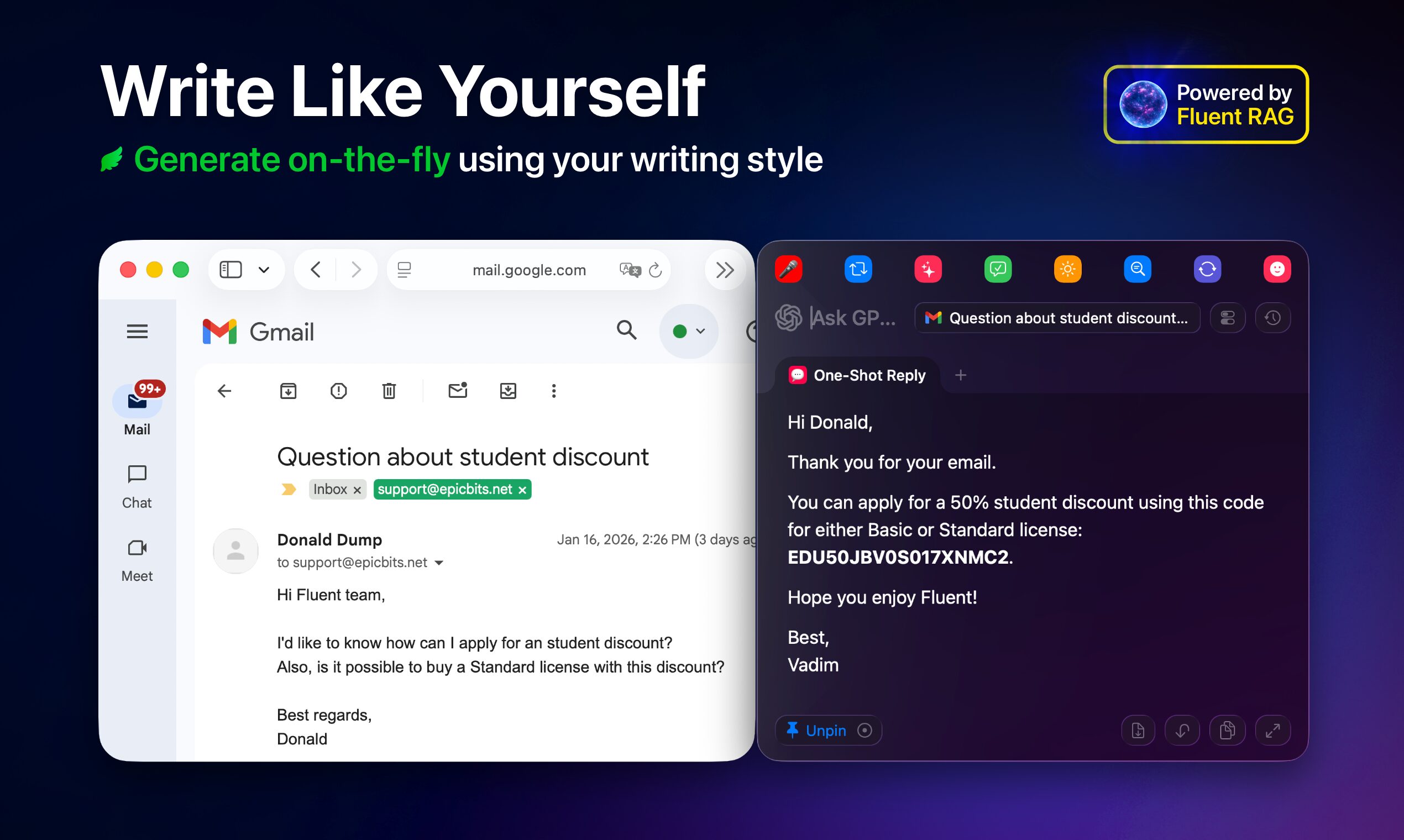
- Native RAG Engine (Memory): A local retrieval system that indexes your documents and writing samples. This allows the AI to “mimic” specific voices (e.g., “write like Jack London” or “write like my marketing manager”) by retrieving relevant stylistic patterns from your stored data before generating text.
- Model Context Protocol (MCP): Implements the open standard for connecting AI assistants to data sources. This enables Fluent to pull live context from other macOS apps—such as reading a calendar event to draft an email invite—without manual copying and pasting.
- System-Wide “Smart Panel”: Activated via a keyboard shortcut (similar to Spotlight), this overlay works over any active application. It can capture selected text, screen content, or clipboard data to perform instant actions like summarizing, translating, or rewriting.
- Model Agnostic & Offline Capable: Supports 500+ cloud models (via keys for OpenAI, Anthropic, Google) and fully offline local models (via Ollama or MLX), ensuring it works without an internet connection if needed.
- Customizable Actions: Users can create their own workflows (e.g., “Fix Grammar,” “Make it Professional,” “Reply to Email”) and map them to specific hotkeys.
Primary Use Cases
- Style-Consistent Ghostwriting: Generating content that strictly adheres to a personal or brand voice by referencing a database of previous writings (RAG), avoiding the generic “AI slop” tone.
- Contextual Automation: drafting responses or documents that require specific information from local files or other running apps (via MCP).
- Privacy-First Drafting: Writing sensitive emails or legal documents using local LLMs (like Llama 3 running on device) to ensure no data leaves the Mac.
Pros & Cons
- Pros: runs natively on macOS (fast, buttery smooth UI compared to Electron/web apps); “Bring Your Own Key” model means you pay only for what you use (or $0 if using local models); high degree of privacy; effectively solves the “generic AI voice” problem via local RAG.
- Cons: macOS exclusive (not available for Windows or mobile); requires some technical setup to get the best results (configuring API keys or downloading local models); RAG effectiveness depends heavily on the quality and quantity of the “memory” data the user inputs.
Pricing
- Free Trial: 7-day free trial available.
- Paid License: One-time purchase of ~$30 (Basic license for 1 Mac). No monthly subscription for the app itself, though users must pay their own API fees if they choose to use cloud models (OpenAI/Anthropic) instead of free local ones.
How Does It Compare?
- Jasper: An enterprise-grade marketing platform. Comparison: Jasper is a subscription-based web platform ($39+/mo) focused on large marketing teams with built-in templates and cloud storage. Fluent is a local utility ($30 one-time) for individuals who want AI inside their existing apps (Word, Mail, Slack) rather than a separate browser tab.
- Copy.ai: Similar to Jasper, focusing on high-volume marketing copy. Comparison: Copy.ai is “quantity-first” for generating hundreds of blog posts or social captions. Fluent is “workflow-first,” designed to help you write one specific email or document you are currently working on, with higher stylistic precision via RAG.
- Hemingway Editor (Plus): A web-based editor for simplifying text. Comparison: Hemingway focuses on editing (shortening sentences, fixing passive voice). Fluent can do this too, but it generates new text and rewrites entire sections based on external context, making it a writer rather than just a polisher.
- MacGPT / BoltAI: Other native macOS AI wrappers. Comparison: Fluent distinguishes itself from these competitors with its MCP integration and Native RAG. While MacGPT is great for quick chat, Fluent is better architected for “context-aware” tasks where the AI needs to know about your local files and specific writing style.
Final Thoughts
Fluent represents the next generation of “AI wrappers”—moving beyond simple chatbots to become deeply integrated system tools. By combining local RAG (for style) with MCP (for data), it solves two of the biggest complaints about AI: “It sounds like a robot” and “It doesn’t know what I’m working on.” For Mac power users who want a privacy-focused, subscription-free alternative to tools like Jasper, Fluent is a compelling “buy once, use forever” utility.