Table of Contents
Overview
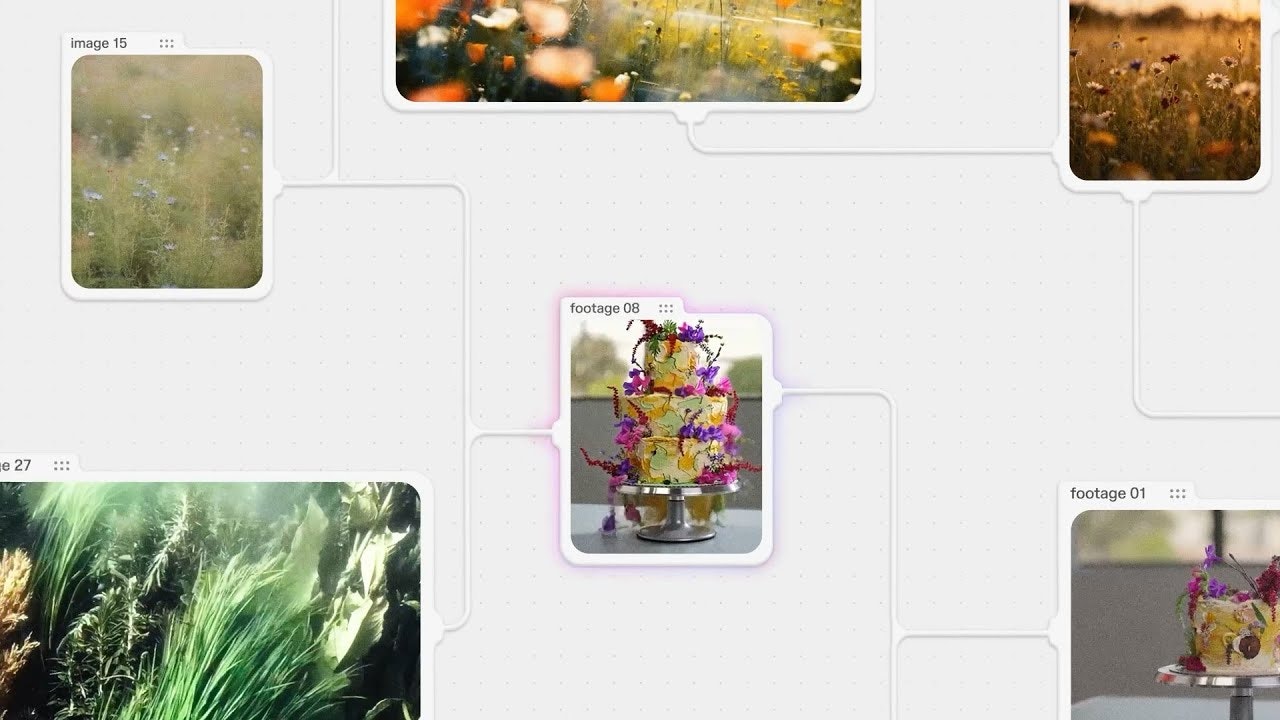
In the modern creative workflow, professionals frequently juggle multiple specialized AI platforms—image generators for visual concepts, text models for copywriting, video tools for motion content, audio platforms for sound design—resulting in fragmented processes, repeated manual handoffs, and constant context-switching that disrupts creative momentum. Fuser reimagines this fragmented landscape by providing a unified, node-based creative canvas where diverse AI models and media types converge into seamless workflows. Launched publicly in 2025, Fuser integrates access to 150+ specialized AI models and 300+ large language models (including Midjourney, Claude, GPT-5, and others) within a single collaborative environment. Rather than toggling between disconnected tools, creators design visual workflows where outputs from one model flow directly into another—text becomes images, images inform videos, and complex multimodal projects consolidate into single unified canvases orchestrating end-to-end creative production.
Key Features
Fuser combines sophisticated workflow orchestration with creative-specific optimization:
- Visual Node-Based Workflow Canvas: Drag-and-drop AI models, APIs, and content sources onto an infinite canvas, visually connecting them to define data flow. This familiar interface from 3D/VFX software enables intuitive orchestration of complex creative pipelines without coding.
- Multimodal Model Integration: Connect 150+ specialized AI models and 300+ LLMs supporting text, images, video, audio, and 3D assets within single workflows. Seamlessly route outputs between different modalities—Claude text output feeds directly into Midjourney for visualization, video generation models receive text specifications.
- Model Swapping and Orchestration: Exchange models within existing workflows without rebuilding pipelines. Test different image generators, text models, or video synthesis tools against the same workflow, enabling rapid experimentation and optimization.
- Real-Time Collaborative Editing: Multiple team members work simultaneously on shared canvases with live updates, enabling concurrent ideation, feedback, and iteration. Maintain shared creative context across distributed teams without version conflicts.
- Pre-built Workflow Templates: Gallery of production-ready templates for common creative tasks—”Sketch to Render,” “Brand Identity Kit,” “Campaign Generation,” “Concept to 3D”—accelerating setup and enabling team standardization.
- Multiformat Data Conversion: Automatically convert between media types as workflows execute. Audio can become text transcripts, images can feed into video generation, documents can become visual presentations within continuous workflows.
- Custom API Integration: Connect proprietary models, internal APIs, or specialized tools into Fuser workflows, enabling integration of custom machine learning infrastructure with commercial AI services.
- Version Control and Asset Export: Track workflow iterations and variations with built-in version control. Export final creations in formats optimized for professional use across social media, print, broadcast, and archival.
How It Works
Fuser operates through an integrated creative workflow:
Design Your Workflow Visually: Drag AI models, content sources, and processing nodes onto your canvas. Each node represents a distinct step—text generation, image synthesis, video editing, audio processing. Connect nodes to define how data and creative output flows between stages.
Specify Input and Parameters: Define what each model receives—initial prompts, content briefs, reference images, or outputs from previous nodes. Adjust model parameters, temperature, seed values, and other controls to fine-tune behavior for each stage.
Execute and Preview in Real-Time: Run your workflow and observe results instantly within your canvas. Video previews show generation progress, intermediate outputs visualize at each stage, and final assets display within context.
Iterate Dynamically: Modify any node—swap a model, adjust parameters, add new stages—and watch changes propagate through your entire workflow. See immediate impact of variations without rebuilding or rerunning unchanged stages.
Collaborate Simultaneously: Invite team members to join your canvas. Everyone sees live updates, can suggest modifications, and contribute feedback in real-time, consolidating creative feedback into single collaborative space.
Export Production Assets: Once satisfied, export final creations in formats optimized for their intended use—web resolution for social, print-ready for advertising, broadcast format for video production.
Use Cases
Fuser serves sophisticated creative production scenarios:
- Marketing Campaign Acceleration: Generate comprehensive campaign assets—from concept visualization through final copywriting, social media variations, and email templates—within unified workflows, compressing weeks of creative production into days.
- Product Design and Iteration: Designers translate sketches and product concepts into photorealistic renderings, generate multiple design variations simultaneously, and create complete product presentation materials through chained AI workflows.
- Content Production at Scale: Agencies and content studios produce high-volume content for multiple brands, channels, and formats by establishing reusable template workflows that maintain brand consistency while scaling output dramatically.
- Creative Experimentation and Prototyping: Rapidly test conceptual directions by running identical workflows through different models, comparing outputs side-by-side, and selecting winning approaches before committing to production.
- Collaborative Creative Direction: Creative teams, art directors, and clients work within shared canvases, providing feedback directly on workflows rather than on static deliverables, enabling iterative collaborative refinement.
- AI Model Evaluation and Benchmarking: Test how different models perform within your specific creative requirements by running identical inputs through alternative models, comparing quality and style directly within your workflow context.
- Production Automation: Broadcasting and media organizations automate routine asset production—thumbnail generation, promotional graphics, social clips—freeing creative professionals for higher-value conceptual work.
Pros & Cons
Advantages
- Centralized Creative Workspace: Consolidates fragmented AI tools into unified canvas, eliminating context-switching and manual asset handoffs that disrupt creative flow.
- Visual Workflow Clarity: Node-based design provides clear, graphical understanding of creative pipelines, making complex orchestration intuitive for creatives unfamiliar with traditional development workflows.
- Rapid Experimentation: Instant real-time feedback on workflow modifications enables quick testing of variations, model comparisons, and creative directions without lengthy re-rendering or regeneration cycles.
- Multimodal Integration: Seamless handling of text, images, video, audio, and 3D within single workflows enables complex cross-media projects that would otherwise require managing separate specialized tools.
- No GPU or Infrastructure Requirements: Cloud-first architecture eliminates expensive local hardware requirements, enabling sophisticated AI workflows on standard computers.
- Team Collaboration: Real-time collaborative editing and shared creative canvases consolidate feedback loops and enable distributed teams to work synchronously.
Disadvantages
- Learning Curve for Non-Technical Creatives: While visual, node-based workflows require understanding of data flow concepts and sequential logic that may be unfamiliar to creatives without development experience.
- Credit-Based Pricing Model: Performance depends on credit consumption; heavy usage of compute-intensive models (video generation, high-resolution image synthesis) can result in significant costs despite pay-as-you-go structure.
- Emerging Platform Status: As a newly launched platform (2025), edge-case handling and feature completeness continue evolving; some advanced production requirements may require workarounds or custom solutions.
- Not a Replacement for Traditional Creative Tools: Fuser doesn’t replace specialized design software (Photoshop, After Effects) for fine-grained control and complex post-production; it optimizes for AI-assisted generation and orchestration rather than manual refinement.
- Model Quality Dependency: Output quality depends on underlying AI model capabilities—Fuser orchestrates but doesn’t generate superior results to the models it connects.
How Does It Compare?
Fuser operates in a fundamentally different category than traditional workflow automation, representing a specialized platform optimized for creative rather than business process automation.
Zapier provides enterprise-scale workflow automation connecting 8,000+ business applications through triggers and actions. Zapier excels at integrating CRMs, email, spreadsheets, and operational tools into cohesive business processes. However, Zapier optimizes for data-centric business automation (lead routing, notification systems, data synchronization) rather than creative asset generation. Zapier runs in the background automating routine tasks; Fuser runs in the foreground orchestrating creative output. Zapier serves operations teams; Fuser serves creative professionals.
n8n functions as an open-source, self-hostable workflow automation platform emphasizing developer control and extensibility. n8n excels for technical teams building custom integrations, data pipelines, and API orchestration. Like Zapier, n8n optimizes for data transformation and business process automation. n8n doesn’t provide models, visual creative tools, or multimodal support. n8n serves developers; Fuser serves creatives. n8n controls infrastructure; Fuser abstracts infrastructure.
Make (formerly Integromat) offers no-code workflow automation with visual scenario building for connecting business applications and automating routine tasks. Make provides accessibility for non-technical business users but, like Zapier and n8n, focuses on business process automation rather than creative generation. Make automates your business; Fuser orchestrates your creativity.
GitHub Copilot and Traditional AI Tools operate at individual tool level—generating code, images, or text within their specific domain. While powerful, these tools remain isolated; their outputs don’t integrate into unified creative workflows. Each tool operates independently requiring manual coordination between stages.
Fuser’s distinctive positioning emerges through: creative-specific optimization (designed for artistic and marketing workflows rather than business process automation), visual-first multimodal orchestration (combining text, image, video, audio, and 3D within unified workflows), cloud-native infrastructure abstraction (enabling sophisticated AI workflows without local GPU investment), and collaborative creative environment (built for team ideation and iteration rather than background automation). While business automation platforms excel at integrating business systems, Fuser specializes in integrating creative AI models into collaborative creative production environments.
Final Thoughts
Fuser represents a meaningful evolution in creative AI tools by shifting from isolated model access toward integrated workflow orchestration. Its combination of visual node-based design, multimodal model integration, real-time collaboration, and cloud infrastructure democratizes sophisticated creative automation accessible to agencies, studios, and individual creators.
For creative professionals managing complex multimodal projects—marketing campaigns requiring coordinated visual, textual, and video assets; product teams generating multiple design variations; content studios producing high-volume branded content—Fuser delivers genuine efficiency improvements by consolidating fragmented tools into unified creative canvases.
However, teams with existing specialized tool investments (After Effects for video, Photoshop for image refinement, traditional copywriting workflows) should evaluate whether Fuser’s strength in orchestration justifies restructuring established processes. Fuser optimizes for AI-powered generation and workflow orchestration rather than replacing specialized post-production tools.