Table of Contents
Overview
Gamelabs Studio is a specialized text-to-asset platform engineered specifically for game developers to generate production-ready 2D game assets including static artwork, animations, and spritesheets through AI-powered workflows. Launched on Product Hunt on December 3, 2025 (specific vote count not publicly available at time of research), Gamelabs addresses a fundamental bottleneck in indie and small-studio game development: the prohibitively expensive and time-consuming process of creating consistent visual assets across multiple angles, animation states, and character variations that traditionally requires specialized artistic talent or costly outsourcing to freelancers consuming weeks per asset set.
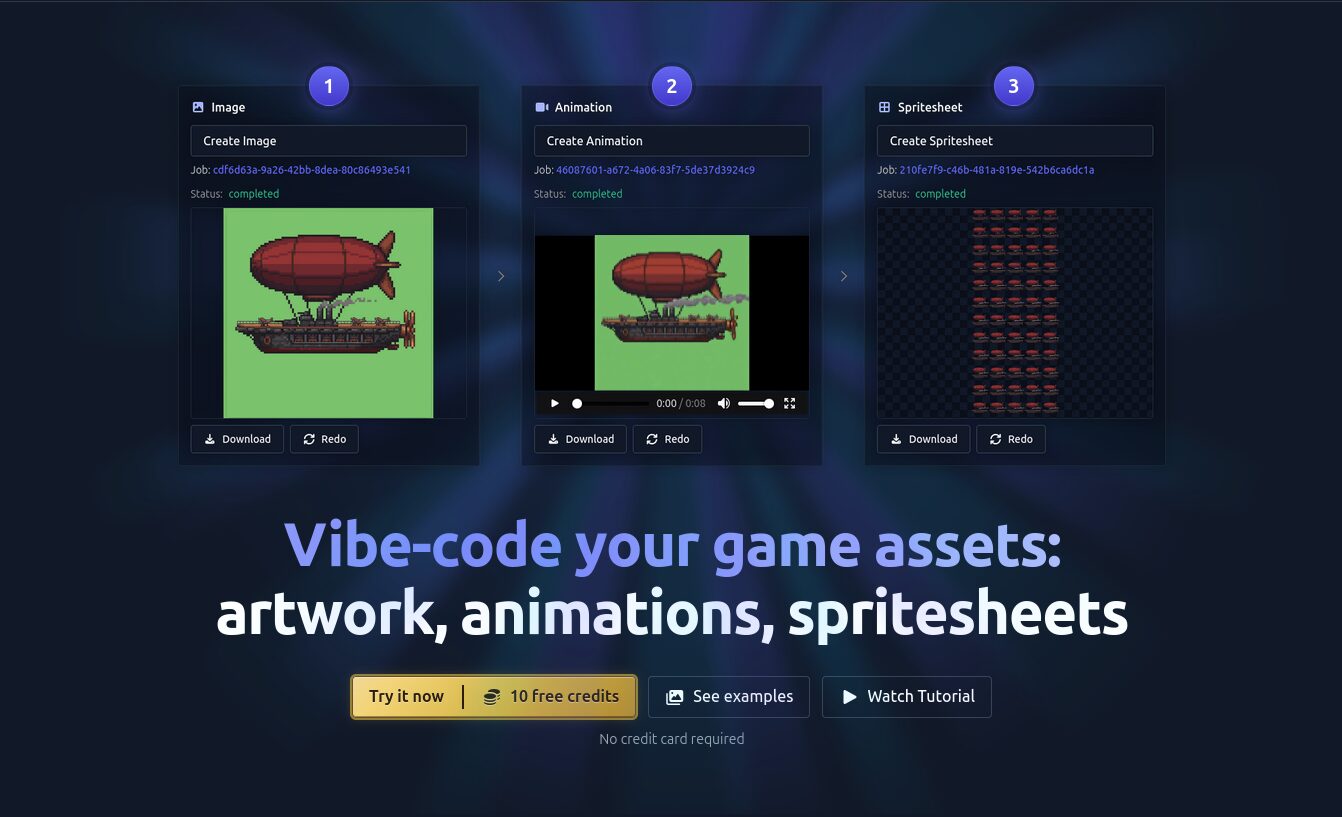
The platform offers both a web-based Studio interface for browser-based asset creation and direct integration with development environments through VSCode MCP (Model Context Protocol) compatibility, allowing developers to generate and insert game assets directly within their code editors without workflow disruption. Users describe desired assets through text prompts (e.g., “pixel art wizard casting spell” or “isometric medieval knight with blue armor”) or upload reference images to guide style consistency, and the AI generates sprites, multi-frame animations, and engine-ready spritesheets with configurable parameters including FPS timing, grid dimensions, transparency settings, and hitbox alignment.
Gamelabs Studio specifically targets 2D game production workflows requiring consistent multi-angle perspectives essential for top-down RPGs, isometric strategy games, platformers, and any genre demanding large asset libraries with visual coherence. The platform has been production-proven through shipped titles including Age of Steam Tower Defence, which utilized Gamelabs for all visual assets, demonstrating 10x acceleration of asset pipelines compared to traditional manual workflows. The free tier provides 10 credits enabling evaluation without financial commitment, while paid plans (Indie \$15/month, Pro \$49/month) unlock higher generation volumes and advanced features for sustained production use.
Key Features
Gamelabs Studio is packed with powerful features designed to eliminate artistic skill barriers and accelerate 2D game asset production:
- Text-to-Spritesheet Generation with Animation Sequencing: Users input descriptive text prompts to create static sprites and multi-frame animation sequences that Gamelabs automatically packages into production-grade spritesheets. The system generates base artwork from text descriptions, then applies action-specific prompts (e.g., “walking cycle,” “attack sequence,” “idle animation”) to produce frame-by-frame sequences maintaining character integrity and visual consistency across all frames. Spritesheets export with configurable grid dimensions, frame padding, transparency channels, and FPS controls matching requirements for Unity, Godot, Phaser, and other major 2D game engines. This eliminates the tedious manual sprite packing labor that typically consumes 4-8 hours per character set, enabling developers to progress from concept to implementation in minutes rather than days.
- VSCode MCP Integration for In-Editor Asset Generation: Gamelabs provides Model Context Protocol server compatibility enabling direct integration with VSCode, Cursor, and other MCP-supported development environments. Developers generate game assets through natural language commands within their code editor, with generated sprites automatically inserted into project folder structures without switching between applications. This “vibe-coding” workflow maintains developer flow state by eliminating the context-switching penalty associated with external asset creation tools—a 15-20 minute disruption per asset switch that compounds into hours of lost productivity across multi-asset projects. The MCP integration represents unique differentiation over web-only competitors, positioning Gamelabs as the only game asset generator offering native IDE integration for seamless development workflows.
- Animation Sequence Creation with Style Consistency: The platform enables generation of loopable animations by first creating base character artwork, then applying motion descriptions to produce frame sequences with consistent styling across all frames. The AI-driven style transfer technology maintains character proportions, color palettes, shading techniques, and line weights throughout animation cycles, preventing the visual inconsistencies that plague multi-artist collaborations or iterative manual edits. Users can seed animations with custom reference images ensuring generated frames match existing art direction, or generate entirely from text prompts for rapid prototyping. Adjustable timing parameters and motion dynamics provide precise control over movement speed, ease curves, and action emphasis enabling nuanced animation polish without frame-by-frame manual editing.
- “Vibe-Coding” for Asset Creation Through Natural Language: Gamelabs employs conversational AI interfaces enabling developers to describe desired assets using natural language rather than technical art terminology or precise specification documents. Prompts like “retro 16-bit platformer hero with jetpack” or “cute fantasy potion bottles in various colors” translate directly into visual outputs without requiring knowledge of artistic principles, color theory, or design software operation. This democratizes asset creation for programmer-artists and solo developers lacking formal art training, removing the \$50-150/hour freelancer costs or months-long learning curves associated with traditional digital art mastery. The system interprets intent from informal descriptions, generating reasonable interpretations that developers iteratively refine through prompt adjustments rather than starting from blank canvases requiring foundational artistic skills.
- Consistent Style Generation Across Multi-Angle Assets: The platform maintains visual coherence when generating the same character, object, or environment from multiple camera angles essential for 2D games requiring rotational perspectives (top-down RPGs, isometric strategy games). Developers specify desired angles (front, back, side, 3/4 views) and Gamelabs generates matching sprites preserving character proportions, costume details, color schemes, and shading styles across all perspectives. This solves the consistency challenge that traditionally requires professional artists manually redrawing characters from each angle with pixel-perfect alignment—a process consuming 8-12 hours per multi-angle character set and prone to subtle variations degrading visual polish. The AI-driven approach generates complete rotational sprite sets in minutes with consistent styling eliminating manual alignment tedium.
- Reference Image-Guided Generation for Art Direction Control: Users upload existing artwork, concept sketches, or screenshots from their game to guide generation toward specific styles, preventing generic outputs misaligned with established art direction. The reference-guided mode analyzes input images to extract artistic elements including line weights, color palettes, shading techniques, level of detail, and stylistic flourishes, then applies these parameters to new generated assets ensuring visual continuity across asset libraries. This enables teams to expand existing asset sets without recruiting original artists or maintain consistent branding when generating hundreds of enemy types, environmental props, or UI elements that must cohesively integrate with hand-crafted hero assets. The approach combines AI efficiency with human artistic vision, positioning generated content as production-ready supplements rather than replacements for foundational art direction.
- Engine-Ready Export with Configurable Technical Specifications: Gamelabs automatically formats outputs as production-grade spritesheets with developer-configurable parameters including grid dimensions, transparent backgrounds with proper alpha channel preservation, frame arrangement (single row, multi-row, square packing), and embedded metadata for animation timing. The export system handles complex sprite organization tasks including hitbox alignment guides, collision boundary suggestions, and pivot point recommendations that traditionally require manual configuration in external sprite packing tools. Files export in formats optimized for major game engines—PNG sequences for Unity, JSON metadata for Phaser, GMS2-compatible spritesheets for GameMaker—eliminating post-processing requirements and ensuring technical compatibility with common development pipelines.
- Multi-Style Support from Pixel Art to Modern Illustrations: The platform supports diverse art styles ranging from 8-bit pixel art and 16-bit retro aesthetics to modern vector illustrations, hand-painted watercolor effects, and cel-shaded anime styles. Developers specify style preferences through prompt keywords (“pixel art,” “hand-drawn,” “low-poly”) or reference images demonstrating desired aesthetics, and the generation engine adapts outputs to match stylistic targets. This versatility enables teams to experiment with visual directions during pre-production without committing to artistic hiring decisions, test market reception across style variations, or maintain multiple games with distinct aesthetics using a single asset generation platform—flexibility impossible with specialized human artists trained in narrow stylistic niches.
- Rapid Iteration and Variation Generation for A/B Testing: The platform excels at generating dozens of variations on core concepts enabling rapid iteration cycles and player feedback testing. Developers generate 10-20 variations of character designs, enemy types, or environmental elements within minutes, export all versions for playtesting, and identify most engaging options through player data rather than subjective internal debates. This data-driven approach to asset selection reduces costly art revision cycles where teams invest weeks developing assets only to discover through player testing that alternatives would perform better—mistakes costing \$5,000-15,000 in wasted artist time and schedule delays for indie studios operating on tight budgets and milestone-driven funding.
How It Works
Gamelabs Studio operates through a sophisticated AI-powered pipeline optimized for game asset production:
Stage 1: Input Specification via Text Prompts or Reference Images
Developers access the Gamelabs platform through either the web-based Studio interface or integrated VSCode MCP commands. They describe desired assets using natural language prompts specifying subject matter, artistic style, viewing angle, action states, and technical requirements. Example prompts: “pixel art wizard character with purple robe and staff, front-facing view, idle animation”; “isometric medieval stone tower with flag, 45-degree angle, day lighting”; “cute fantasy health potion icon, transparent background, 64×64 pixels.” Alternatively, users upload reference images demonstrating desired art styles, and the system analyzes visual characteristics to guide generation toward matching aesthetics. The prompt interface accepts informal descriptions rather than technical specifications, lowering barriers for non-artists unfamiliar with artistic terminology.
Stage 2: AI Image Generation with Style Transfer
The platform’s generative AI engine processes input prompts through specialized models trained on game asset datasets emphasizing technical requirements unique to interactive media—transparency handling, consistent multi-angle perspectives, animation-ready poses, and style coherence across variations. The system generates initial sprite outputs applying style transfer algorithms ensuring visual consistency when creating related assets or animation frames. For reference-guided workflows, the engine extracts artistic parameters from uploaded images including color palettes (exact RGB values), line weights, shading techniques (cel-shaded vs. soft gradients), level of detail, and stylistic flourishes, then applies these extracted characteristics to new generated content. This produces outputs visually integrated with existing art direction rather than generic stock images requiring extensive post-processing.
Stage 3: Animation Frame Sequence Generation
For animation requests, the platform first generates base character artwork in neutral pose, then applies motion-specific prompts to produce frame-by-frame sequences depicting requested actions. The AI analyzes anatomical movement patterns, anticipation poses, follow-through motions, and timing principles to create believable animation cycles without manual frame crafting. Proprietary style consistency algorithms ensure all frames maintain identical character proportions, costume details, and visual styling preventing the flickering inconsistencies common in AI-generated sequences. Users adjust frame counts, motion speeds, and ease curves through simple parameter controls rather than frame-by-frame editing, enabling quick iteration until achieving desired motion quality.
Stage 4: Multi-Angle Generation for Rotational Sprite Sets
When developers request multi-angle perspectives, the system generates the same subject from multiple viewpoints while preserving character identity across angles. The engine maintains consistent proportions, costume elements, color schemes, and design details when rotating characters from front to side to back perspectives, solving the alignment challenges that require professional artists hours of manual pixel-perfect adjustments. This capability proves essential for top-down RPGs showing character rotation during gameplay, isometric games requiring 8-directional sprites, or any title needing complete rotational coverage. The automated multi-angle generation reduces character production time from days to minutes while eliminating inconsistencies between angles that degrade visual polish.
Stage 5: Spritesheet Packaging and Technical Optimization
Generated frames are automatically assembled into production-grade spritesheets with configurable technical parameters. Developers specify grid dimensions matching their game engine’s requirements, frame arrangement preferences (horizontal strips, vertical columns, square packing), transparency settings with proper alpha channel preservation, and FPS timing metadata for animation playback. The system handles sprite atlas optimization including padding to prevent texture bleeding, power-of-two texture dimensions for GPU efficiency, and collision boundary suggestions based on sprite geometry. For VSCode MCP workflows, packaged spritesheets auto-insert into designated project folders with naming conventions matching existing asset organization, enabling immediate testing in game engines without manual file management.
Stage 6: Export and Engine Integration
Final assets export in formats optimized for target game engines—PNG sequences with transparency for Unity, JSON metadata files for Phaser framework integration, GMS2-compatible spritesheets for GameMaker Studio, or universal PNG sprite atlases for custom engine pipelines. The export system includes technical metadata specifying frame dimensions, animation loop points, recommended pivot positions, and hitbox guidelines accelerating implementation in game code. For web Studio users, assets download as zip packages containing all necessary files; VSCode MCP users receive automatic insertion into project directories with optional git commits documenting asset additions. This seamless engine integration eliminates the post-processing tedium of format conversion, sprite packing, and metadata creation that traditionally consumes 30-60 minutes per asset set.
Stage 7: Iteration and Refinement Workflow
Developers review generated assets and iteratively refine through prompt adjustments, parameter modifications, or additional reference image uploads. The platform’s rapid iteration capability enables testing 5-10 variations within minutes, exporting all options for in-game playtesting to identify most effective designs through player data rather than subjective opinions. This feedback-driven refinement process replaces traditional revision cycles where artists spend days incorporating feedback, followed by management reviews, followed by additional revisions—workflows consuming weeks per character design in professional studios. The AI-powered approach compresses revision cycles from weeks to hours, enabling data-driven asset selection that optimizes player engagement metrics rather than internal aesthetic preferences.
Use Cases
Given its specialized capabilities, Gamelabs Studio addresses various scenarios where 2D game asset creation presents bottlenecks:
Indie Game Developers Needing Quick Assets:
- Solo developers and small indie teams lacking dedicated artists generate complete visual asset libraries for prototypes, vertical slices, or full commercial releases without \$20,000-50,000 freelancer budgets typical for indie games requiring 200-500 unique assets
- Rapidly create enemy variations, environmental props, UI elements, and character sprites enabling gameplay implementation to proceed without artistic bottlenecks that delay programming milestones
- Test multiple art styles during pre-production by generating sample asset sets in pixel art, hand-drawn, and modern illustration styles, then selecting direction based on player feedback before committing to expensive artist contracts
Prototyping Game Mechanics Without Placeholder Art:
- Replace programmer art (colored boxes, stick figures) with visually appealing generated assets enabling meaningful playtesting where testers respond to actual game aesthetics rather than ignoring placeholder graphics
- Generate functional but temporary assets allowing gameplay refinement before investing in final production art, preventing costly scenarios where expensive custom artwork must be discarded due to post-art gameplay changes
- Create complete visual prototypes for publisher pitches, crowdfunding campaigns, or investor presentations where placeholder graphics undermine perceived project quality and funding prospects
Creating Consistent Multi-Angle Sprite Sets for 2D Games:
- Generate complete rotational character sets for top-down RPGs requiring 4-directional or 8-directional sprites showing characters from front, back, left, right, and diagonal angles with consistent visual styling
- Produce isometric asset libraries for strategy games needing structures, units, and environmental elements rendered from 45-degree angles with matching lighting and perspective across hundreds of objects
- Maintain visual coherence across large asset libraries (50+ enemy types with multiple angles) that would require months of manual artist work or suffer consistency degradation across multiple freelancer contributions
Solo Developers with Limited Art Skills:
- Empower programmer-focused developers to create professional-quality visuals without years of art training or expensive design software mastery that presents insurmountable barriers for technically skilled but artistically challenged creators
- Enable hobbyist game developers to produce commercial-grade assets for passion projects, game jams, or learning exercises without recruiting artist collaborators or compromising visual quality
- Democratize game development by removing artistic skill as prerequisite, allowing diverse creators to bring interactive experiences to market based solely on game design and programming merit rather than illustration talent
Rapid Variation Generation for Roguelikes and Procedural Games:
- Generate hundreds of enemy sprite variations for roguelike games requiring visual diversity across procedurally generated encounters, preventing repetitive enemy appearances that undermine procedural generation value
- Create environmental tile variations for procedural level generators ensuring visually distinct biomes, room types, and traversal paths despite algorithmic construction
- Produce randomized loot items, equipment variations, and collectible sprites for games where player progression depends on discovering unique items requiring distinct visual identities
Pros \& Cons
Every powerful tool comes with its unique set of advantages and potential limitations:
Advantages
- Massive Time Saver for 2D Asset Production: Gamelabs compresses asset creation workflows from days/weeks to minutes, enabling 10x acceleration of production pipelines as demonstrated through shipped titles like Age of Steam Tower Defence. This efficiency gain proves especially valuable for indie studios operating on tight schedules and milestone-driven funding where asset bottlenecks delay deliverables and jeopardize financial runway.
- VSCode MCP Integration Maintains Developer Flow: The unique IDE integration eliminates context-switching penalties associated with external asset tools, keeping developers in coding environments rather than forcing 15-20 minute disruptions per asset creation cycle. This flow state preservation compounds into hours of productivity savings across projects requiring hundreds of assets, differentiating Gamelabs from web-only competitors lacking native development environment integration.
- Democratizes Asset Creation for Non-Artists: The natural language interface and automated styling removes artistic skill as barrier to game development, empowering programmer-focused creators to produce professional visuals without years of training, expensive software mastery, or costly freelancer dependencies. This accessibility enables diverse creators to bring games to market based on design merit rather than illustration talent.
- Consistent Multi-Angle Generation Solves Rotational Sprite Challenges: Automated generation of matching perspectives from multiple angles eliminates the pixel-perfect manual alignment work consuming 8-12 hours per character set, while maintaining visual consistency impossible for solo developers creating all angles independently across weeks-long timelines causing style drift.
- Production-Proven Through Shipped Titles: Real-world validation through completed commercial games like Age of Steam Tower Defence demonstrates Gamelabs generates not just prototype placeholders but production-ready assets meeting quality bars for published titles, de-risking adoption for developers concerned about AI art quality thresholds.
- Affordable Entry Point with Free Trial: The 10-credit free tier enables risk-free evaluation without financial commitment, while Indie (\$15/month) and Pro (\$49/month) pricing remains accessible for indie budgets compared to \$50-150/hour freelancer rates or \$3,000-8,000 monthly full-time artist salaries.
Disadvantages
- AI Art May Lack “Soul” of Hand-Drawn Assets: Generated content can feel generic or lack the personality, intentional imperfections, and emotional resonance characteristic of human-crafted artwork where artists inject character through subtle stylistic choices. Players and critics sensitive to AI-generated content may perceive visual libraries as derivative or soulless despite technical adequacy, potentially impacting critical reception or commercial performance in markets valuing artistic authenticity.
- Consistency Across Complex Characters Can Be Tricky: While the platform maintains consistency across simple sprites and clean character designs, complex subjects featuring intricate costume details, asymmetric designs, or unusual anatomy may exhibit subtle variations between frames or angles requiring manual correction. Multi-layered characters with equipment, accessories, and detailed textures challenge the style consistency algorithms, occasionally producing outputs where fine details shift between perspectives necessitating touch-up work in external editors.
- Limited to 2D Assets Without 3D Model Generation: Gamelabs focuses exclusively on 2D sprite generation without producing 3D models, rigged characters, or volumetric assets required for 3D game projects. Developers working on 3D titles or mixed-dimension games requiring both 2D UI elements and 3D world assets must supplement with separate 3D asset tools, limiting Gamelabs utility to purely 2D production pipelines.
- Output Quality Dependent on Input Prompt Quality: The natural language interface requires effective prompt engineering—users must describe assets with sufficient specificity regarding style, perspective, technical requirements, and artistic details to achieve desired results. Vague or underspecified prompts produce generic outputs requiring multiple iterations to refine, consuming credits and time. Non-artists unfamiliar with visual terminology may struggle articulating precise requirements, necessitating learning curves around effective prompt construction.
- Subscription Model Creates Ongoing Costs: Unlike one-time software purchases (Aseprite \$19.99) or free open-source alternatives, Gamelabs requires recurring monthly subscriptions (\$15-49/month) for sustained production use. Studios producing games sporadically or hobbyists working intermittently face decisions about maintaining subscriptions during inactive development periods or losing access to generation capabilities, whereas perpetual licenses enable asset creation whenever needed without ongoing financial commitments.
- AI Generation Stigma in Gaming Communities: Portions of gaming communities express skepticism or hostility toward AI-generated content, viewing it as replacing human artists, enabling low-effort asset flips, or producing derivative works lacking creative merit. Developers using AI asset tools may face criticism, negative reviews focused on “AI art,” or rejection from platforms/storefronts implementing anti-AI-content policies, creating potential market access risks independent of actual asset quality.
How Does It Compare?
Gamelabs Studio vs. Leonardo.ai
Leonardo.ai is a broad-spectrum AI image generation platform with game asset capabilities but not exclusively focused on game production workflows like Gamelabs.
Core Focus:
- Gamelabs Studio: Specialized game asset generator engineered specifically for 2D sprite production, animations, and spritesheets with game engine integration
- Leonardo.ai: General-purpose AI image generation platform serving multiple creative industries including marketing, concept art, and game development
Game-Specific Features:
- Gamelabs Studio: Spritesheet packaging, animation sequencing, multi-angle consistency, VSCode MCP integration, engine-ready exports with FPS/transparency configuration
- Leonardo.ai: Basic image generation with game asset potential but lacks specialized spritesheet assembly, animation frame sequencing, or native game engine integration
Development Workflow Integration:
- Gamelabs Studio: Native VSCode/Cursor integration through MCP enabling in-editor asset generation without application switching
- Leonardo.ai: Web-only interface requiring manual download and import into development tools; no IDE integration
Animation Capabilities:
- Gamelabs Studio: Dedicated animation sequence generation maintaining style consistency across frames with configurable timing and loop points
- Leonardo.ai: Primarily generates static images; animation requires manual frame assembly in external tools
Pricing:
- Gamelabs Studio: Free (10 credits), Indie (\$15/month), Pro (\$49/month)
- Leonardo.ai: Free tier with daily token limits; paid plans starting approximately \$10-30/month depending on usage volume
Art Style Specialization:
- Gamelabs Studio: Optimized for game-ready pixel art, sprites, and 2D character designs with technical requirements like transparency and grid alignment
- Leonardo.ai: Broader artistic capabilities including photorealistic renders, concept art, and general illustrations beyond game production scope
When to Choose Gamelabs Studio: For 2D game developers prioritizing workflow integration, animation sequences, and production-ready spritesheets requiring minimal post-processing.
When to Choose Leonardo.ai: For creators needing versatile image generation across multiple use cases beyond games, or when photorealistic concept art and marketing materials are priorities alongside game assets.
Gamelabs Studio vs. Scenario
Scenario is an AI-powered game asset generation platform emphasizing custom model training on proprietary art styles for enterprise game studios.
Model Training:
- Gamelabs Studio: Uses pre-trained models with style guidance through prompts and reference images; no custom model training
- Scenario: Enables game studios to train unlimited custom AI models on proprietary art ensuring generated assets match exact art direction and IP requirements
Target Audience:
- Gamelabs Studio: Indie developers, solo creators, small teams seeking accessible asset generation without technical AI expertise
- Scenario: Professional game studios and enterprises requiring brand-consistent assets at scale with custom-trained models reflecting unique IP
Advanced Controls:
- Gamelabs Studio: Prompt-based generation with reference image guidance; parameter adjustments for technical specifications
- Scenario: Advanced features including Composition Control, Pixel-Perfect Inpainting, and granular adjustment of generation parameters for precise artistic control
API Integration:
- Gamelabs Studio: VSCode MCP integration for development environment access; limited API discussion in public documentation
- Scenario: API-first architecture enabling integration into custom studio pipelines, design software (Photoshop, Figma), game engines (Unity), and even player-generated content systems within games
Enterprise Features:
- Gamelabs Studio: Focused on individual developers and small teams with straightforward web/VSCode interfaces
- Scenario: Enterprise-grade capabilities including team collaboration tools, secure proprietary data handling, custom deployment options, and dedicated support for large studios
Pricing:
- Gamelabs Studio: \$15-49/month targeting indie budget constraints
- Scenario: Enterprise pricing with custom quotes; higher investment reflecting professional studio positioning and advanced capabilities
When to Choose Gamelabs Studio: For indie developers and small teams needing quick asset generation without complex setup, custom model training, or enterprise budgets.
When to Choose Scenario: For established studios requiring brand-perfect assets matching proprietary art styles through custom-trained models, or when API integration into complex pipelines is essential.
Gamelabs Studio vs. Aseprite
Aseprite is a traditional (non-AI) animated sprite editor and pixel art tool emphasizing manual creation with professional-grade features for pixel artists.
Creation Approach:
- Gamelabs Studio: AI-generated assets from text prompts; automated creation requiring minimal artistic skill
- Aseprite: Manual pixel-by-pixel drawing; traditional artistic workflow requiring illustration skills and time investment
Artistic Control:
- Gamelabs Studio: Limited to prompt engineering and parameter adjustments; AI determines visual execution
- Aseprite: Complete artistic control over every pixel, color, frame, and stylistic choice enabling distinctive personal artistic expression
Learning Curve:
- Gamelabs Studio: Accessible to non-artists; natural language prompts require no artistic training
- Aseprite: Requires pixel art skills, animation principles understanding, and software proficiency; steeper learning curve for beginners
Animation Workflow:
- Gamelabs Studio: Automated animation sequence generation maintaining style consistency across frames
- Aseprite: Frame-by-frame manual animation with onion skinning, layer management, timeline controls, and professional animation tools
Asset Consistency:
- Gamelabs Studio: AI-driven consistency across multi-angle sprites and animation frames with occasional subtle variations
- Aseprite: Artist-maintained consistency dependent on skill level; professionals achieve pixel-perfect consistency while beginners may struggle
Pricing Model:
- Gamelabs Studio: Subscription (\$15-49/month) with ongoing costs
- Aseprite: One-time purchase \$19.99 for perpetual license; no recurring fees
Output Ownership:
- Gamelabs Studio: AI-generated content with potential copyright ambiguity and community stigma around AI art
- Aseprite: Fully human-created art with clear copyright ownership and artistic authenticity valued by gaming communities
Feature Depth:
- Gamelabs Studio: Specialized for rapid asset generation; limited editing/refinement capabilities
- Aseprite: Comprehensive pixel art toolset including pixel-perfect modes, shading inks, custom brushes, tiled mode, tilemap support, color palette management, command-line automation, Lua scripting
When to Choose Gamelabs Studio: For rapid prototyping, developers lacking artistic skills, time-constrained projects, or large asset libraries where AI efficiency outweighs manual artistic expression.
When to Choose Aseprite: For artists prioritizing creative control, projects requiring distinctive personal artistic vision, teams with pixel art expertise, or when avoiding AI-generated content stigma is important.
Gamelabs Studio vs. PhotoshopAI / CanvasAI / General Image Generators
General AI Image Generators (Midjourney, DALL-E, Stable Diffusion interfaces) produce high-quality images but lack game-specific optimizations.
Game Production Optimization:
- Gamelabs Studio: Engineered specifically for game assets with spritesheet packaging, animation sequencing, transparency handling, and technical specifications
- General Generators: Produce beautiful images but require extensive post-processing for game use including background removal, sprite packing, format conversion, frame assembly
Technical Requirements:
- Gamelabs Studio: Automatically handles transparency, grid alignment, power-of-two dimensions, FPS timing, and engine-compatible formats
- General Generators: Output generic images requiring manual adjustment in external tools for transparency, sizing, format optimization, and metadata creation
Multi-Angle Consistency:
- Gamelabs Studio: Dedicated multi-angle generation maintaining character consistency across rotational perspectives
- General Generators: Treat each angle as separate generation often producing inconsistent designs, proportions, or details between perspectives
Animation Support:
- Gamelabs Studio: Native animation frame sequencing with style-consistent motion
- General Generators: Static image output; animation requires generating individual frames and manual assembly with inconsistency risks
Development Integration:
- Gamelabs Studio: VSCode MCP integration bringing asset generation into development environments
- General Generators: Web interfaces requiring manual download/import workflows disrupting development flow
When to Choose Gamelabs Studio: For actual game production requiring technical compliance, workflow efficiency, and game-specific features beyond pretty pictures.
When to Choose General Generators: For concept art, marketing materials, inspiration gathering, or visual experimentation outside production pipelines.
Final Thoughts
Gamelabs Studio represents a thoughtful solution to a genuine indie game development bottleneck: the prohibitively expensive and time-consuming process of creating consistent 2D visual asset libraries that presents insurmountable barriers for solo developers and small teams lacking specialized artistic talent or freelancer budgets. The December 3, 2025 Product Hunt launch and production validation through shipped titles like Age of Steam Tower Defence position it as a practical tool delivering measurable value (10x asset pipeline acceleration) rather than experimental technology of uncertain production readiness.
What makes Gamelabs particularly compelling is its laser focus on game-specific technical requirements rather than generic image generation. The spritesheet packaging, animation sequencing, multi-angle consistency, and VSCode MCP integration demonstrate deep understanding of 2D game development workflows where assets must satisfy precise technical specifications (transparency, grid alignment, frame timing) and integrate seamlessly into development pipelines without workflow disruption. This specialization creates differentiation that broader AI image platforms cannot easily replicate without similar game development domain expertise.
The VSCode MCP integration specifically deserves emphasis as unique competitive advantage eliminating the context-switching penalty (15-20 minutes per asset cycle) that compounds into hours of lost productivity across projects requiring hundreds of assets. By bringing generation directly into development environments through natural language commands, Gamelabs maintains programmer flow states rather than forcing application switching—a UX innovation absent from web-only competitors regardless of generation quality.
The tool particularly excels for:
- Solo indie developers and small teams lacking dedicated artists but requiring professional visual quality for commercial releases or crowdfunding campaigns
- Rapid prototyping workflows where placeholder art undermines playtesting quality and delays gameplay validation until expensive final art arrives
- 2D games requiring large consistent asset libraries (roguelikes with 100+ enemies, strategy games with diverse units, RPGs with equipment variations) where manual creation costs become prohibitive
- Developer-artists comfortable with programming but lacking illustration training who need accessible tools removing artistic skill as barrier to game creation
- Production-constrained projects where 10x asset acceleration enables hitting critical funding milestones, demo deadlines, or jam competitions impossible with traditional workflows
For projects requiring hand-crafted artistic personality, distinctive visual styles reflecting personal creative vision, or avoiding AI-generated content stigma in communities hostile to AI art, traditional tools like Aseprite (\$19.99 one-time) provide complete artistic control with pixel-perfect precision at lower long-term cost than Gamelabs subscriptions. For enterprise studios requiring brand-perfect assets matching proprietary IP through custom-trained models, Scenario’s advanced features and professional positioning better serve complex requirements despite higher investment.
But for the specific intersection of “2D indie game asset production,” “non-artist-friendly automation,” and “development workflow integration eliminating context switching,” Gamelabs addresses a genuine market need with specialized capabilities competitors don’t replicate. The platform’s primary limitations—occasional consistency challenges with complex characters, limitation to 2D assets, and subscription cost structure—reflect inherent tradeoffs of AI-powered automation rather than tool-specific weaknesses, affecting all AI asset generators to varying degrees.
The critical strategic question isn’t whether AI will impact game asset production (cost/time pressures make automation adoption inevitable), but whether developers will use specialized game-focused tools like Gamelabs or adapt general-purpose generators through extensive post-processing. The specialized approach trades universal applicability for workflow efficiency and technical compliance—reasonable tradeoff for teams prioritizing production speed over maximum creative flexibility.
If you’re an indie developer struggling with asset creation bottlenecks delaying gameplay implementation, if artistic skill barriers prevent you from bringing game concepts to market despite strong design vision, or if you need consistent multi-angle sprite sets without weeks of manual alignment work or \$10,000+ freelancer budgets, Gamelabs provides accessible specialized solution worth evaluating through the 10-credit free trial. The VSCode integration alone justifies consideration for developer-focused teams where maintaining flow states yields compounding productivity benefits across multi-month development cycles.