
Table of Contents
Overview
Geekflare Connect centralizes multi-model AI access through Bring Your Own Key (BYOK) infrastructure, enabling teams to collaborate on prompts, chat with 40+ AI models, and monitor spending from unified dashboard. Launched November 2025 on Product Hunt following months of development, Geekflare Connect addresses organizational challenges of managing multiple AI service subscriptions, fragmented workflows across tools, and lack of visibility into AI usage and costs. Rather than requiring organizations to purchase new API credits or subscribe to multiple AI services, Geekflare Connect lets teams connect existing OpenAI, Google, Anthropic, and other API keys, then provides centralized access enabling entire teams to leverage shared keys without API key duplication or insecure credential sharing. The platform promises cost savings through reduced subscription overhead and improved visibility, while enabling lightweight team collaboration without proprietary lock-in.
Key Features
Geekflare Connect combines multi-provider support with team-focused workflow tools:
- Bring Your Own Key (BYOK) Support: Connect existing API keys from OpenAI, Google Gemini, Anthropic Claude, and other providers. Teams access shared keys securely without duplicating subscriptions or credentials. Pay only to original providers for actual usage—no Geekflare markup or hidden fees.
- 40+ Model Chat: Unified interface accessing ChatGPT, GPT-4, Gemini Pro, Claude 3, Mistral, and other models. Switch between models instantly depending on task requirements—use GPT-4 for complex reasoning, Claude for certain writing tasks, Gemini for speed. Compare responses side-by-side.
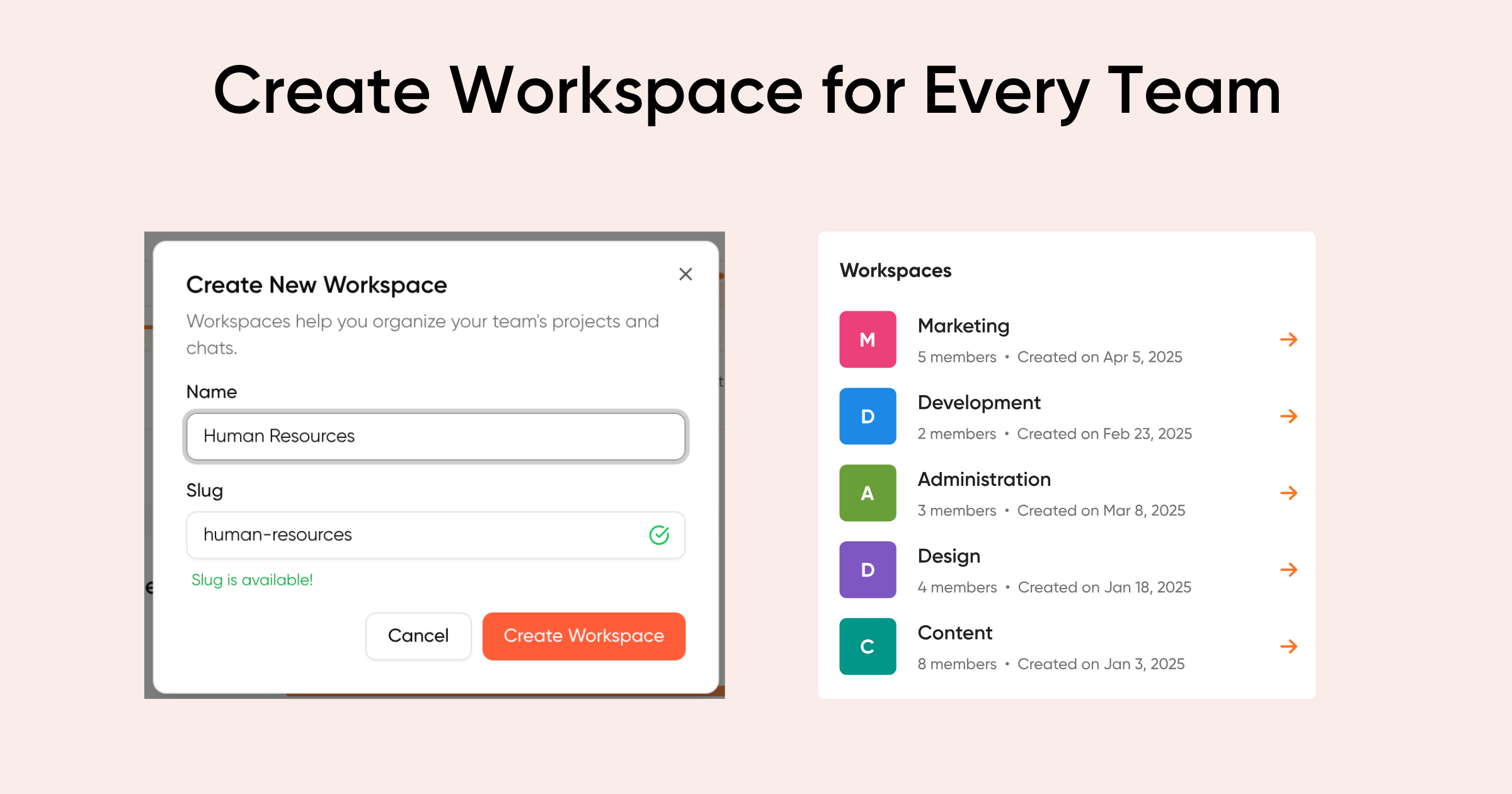
Team Collaboration and Sharing: Invite team members to shared workspaces where everyone accesses same API keys and resources. Share conversations, prompts, and results directly within platform. Role-based permissions control access levels.
Centralized Prompt Management: Build and store prompt library accessible across entire team. Track which prompts perform best, version prompts, and iterate collaboratively. Avoid duplicating successful prompts across team members.
Real-Time Web Search Integration: Access current internet data within conversations. Models use real-time information rather than relying solely on training data cutoffs. Critical for research, current events analysis, and time-sensitive work.
Advanced Format Support: LaTeX support for mathematical equations and formulas, Mermaid diagram generation for flowcharts and system diagrams, and code syntax highlighting enable technical and academic workflows.
Usage and Cost Analytics: Detailed dashboards tracking token consumption, API calls, model usage patterns, and spending by user, model, and date. Identify high-cost queries and optimization opportunities. Compare cost-per-task across models.
Secure Document Upload: Upload documents, PDFs, or custom context files directly into conversations. Models reference uploaded documents alongside API knowledge. Maintain security over sensitive documents.
Freemium and Team Pricing: Free plan for individual users, paid plans starting at $9.99 per user monthly, team pricing $19.99 for five+ users. 14-day free trial available for paid plans.
How It Works
Geekflare Connect operates as transparent proxy layer between teams and AI providers:
Connect Your Existing API Keys: Sign up and add API keys from providers you already use—OpenAI, Google, Anthropic, others. Geekflare securely stores keys and routes requests through platform without exposing keys or intercepting data inappropriately.
Invite Your Team: Add team members to your workspace. Everyone accesses the same connected API keys simultaneously. No need to share credentials or manage multiple subscriptions.
Collaborate on Tasks: Start conversations with any connected model. Share conversations directly with teammates through sharable links. Collaborate on prompts, save effective versions, and iterate together.
Monitor Usage and Costs: Real-time analytics dashboard shows which models are being used most, which team members consume most tokens, and spending patterns across time. Use insights to optimize model selection and identify cost-saving opportunities.
Access Anytime, Anywhere: Web-based interface accessible from any device. All conversations and prompts sync across devices instantly.
Use Cases
Geekflare Connect serves diverse organizational scenarios:
- Distributed Teams Using Multiple AI Models: Teams struggling with fragmented AI workflows—individuals using different tools, paying for separate subscriptions, managing multiple accounts—consolidate into unified workspace with transparent costs.
Research and Analytics Teams: Access real-time information through web search integration. Compare how different models approach same research questions. Share findings and prompts with collaborators without manual copying.
Content Creation and Marketing: Collaborate on copy variants, compare model outputs for quality and tone, maintain brand voice consistency across prompts. Track which prompts perform best for different content types.
Technical and Academic Work: LaTeX support enables mathematical and scientific workflows. Mermaid diagram generation helps visualize concepts. Teams share technical prompts and generate consistent documentation.
Cost-Conscious Organizations: Eliminate redundant API subscriptions and platform fees. See exactly where AI budget goes. Optimize model selection based on task requirements rather than habit.
Customer Support and Service Teams: Create shared prompt library for consistent customer interactions across team. Route conversations to optimal models based on query type. Monitor quality and consistency.
Agencies and Consultants: Manage multiple clients’ AI usage separately through workspaces. Charge back actual API costs with transparency. Scale team access without proportional cost increases.
Pros & Cons
Advantages
- Transparent Pricing with No Markup: Only pay API providers for actual usage. No Geekflare markup or hidden subscription costs. Predictable, visible costs.
Complete Team Access: Everyone accesses same AI resources. Eliminates subscription duplication and credential sharing friction. Easy onboarding of new team members.
Multi-Model Comparison: Switch between models instantly. Compare outputs side-by-side. Optimize model selection per-task rather than committing to single provider.
Unified Interface Reduces Context Switching: Centralized workspace eliminates switching between multiple AI tools and browser tabs. Faster workflow, better focus.
Comprehensive Analytics: Deep visibility into usage patterns, costs, and performance metrics. Identify optimization opportunities and high-cost queries.
Web Search Integration: Real-time information access improves research and time-sensitive tasks. Models use current data rather than training cutoff.
Lightweight Setup: No complex integration required. Connect existing API keys and start immediately. Minimal onboarding friction.
Disadvantages
Requires Existing API Keys: Users must already have accounts with AI providers and API credentials. Organizations new to AI require creating API accounts first.
Limited to Pre-Integrated Providers: Access only to 40+ models Geekflare integrates with. Custom models or unique providers may not be supported.
Model Coverage Varies: While extensive, not every AI model globally available is integrated. Preferred models might not be available.
Team Member Setup: Adding team members requires configuration steps—managing permissions, key access, workspace roles. Not as simple as sharing single account.
Privacy Considerations: Platform sees all conversations and prompts (while routing through proxy). Organizations with extreme security requirements may prefer direct API usage.
BYOK Model Requires Management: While Geekflare reduces overhead, organizations still manage their own API keys and quota limitations.
How Does It Compare?
Geekflare Connect occupies distinct position within AI management landscape, emphasizing team access and cost visibility rather than specialized prompt engineering or general productivity.
PromptLayer specializes in advanced prompt engineering workflows—versioning, A/B testing, evaluation, monitoring, and regression testing. PromptLayer focuses on organizations building production AI applications requiring rigorous prompt optimization. PromptLayer serves developers building deployed AI systems; Geekflare serves teams using AI for various tasks. PromptLayer is engineering-focused; Geekflare is accessibility-focused. PromptLayer provides deep prompt iteration capabilities; Geekflare provides model switching and cost visibility.
Raycast functions as macOS-only productivity launcher offering command palette, custom scripts, snippets, and tool integrations. Raycast includes AI integrations but focuses on general productivity for developers and power users. Raycast is operating system tool; Geekflare is AI management platform. Raycast serves keyboard-driven developers; Geekflare serves AI teams. Raycast is one-machine tool; Geekflare is team/cloud tool.
OpenRouter provides AI model routing and fallback infrastructure, enabling developers to specify model preferences, handle provider outages, and route requests intelligently across providers. OpenRouter focuses on developer API access and reliability. OpenRouter is developer-facing API infrastructure; Geekflare is team-facing management interface. OpenRouter emphasizes routing logic; Geekflare emphasizes team collaboration and cost visibility.
Traditional Multi-Tool Management remains baseline comparison—teams managing multiple separate AI accounts, subscriptions, and interfaces. Geekflare delivers cost and coordination improvements through centralization.
Geekflare Connect’s distinctive positioning emerges through: BYOK approach (no vendor lock-in or markup), unified team interface (everyone accesses shared resources), multi-model access (compare and switch instantly), comprehensive analytics (full cost and usage visibility), and simplicity (minimal setup complexity). While PromptLayer excels at prompt engineering, Raycast excels at general productivity, and OpenRouter excels at developer reliability, Geekflare Connect specifically optimizes for team coordination and cost transparency around AI usage.
Final Thoughts
Geekflare Connect addresses real organizational problem—fragmented AI tool usage, hidden costs, and team coordination challenges. Its combination of BYOK approach (no vendor lock-in), unified team interface, multi-model access, and transparent analytics creates compelling value for teams already investing in multiple AI models.
For teams managing multiple AI subscriptions, distributed teams collaborating on AI-driven work, or organizations seeking visibility into AI spending, Geekflare Connect delivers practical efficiency improvements through centralization and transparency.
However, teams focused on sophisticated prompt engineering (PromptLayer), those requiring specialized model routing reliability (OpenRouter), or those with extreme security requirements should evaluate complementary approaches. Geekflare Connect optimizes specifically for team access and cost visibility rather than advanced prompt engineering or specialized reliability.