
Table of Contents
- Overview
- Key Features
- How It Works
- Use Cases
- Pros \& Cons
- How Does It Compare?
- Final Thoughts
- GitusAI – Fact-Checked and Enhanced Version
- Overview
- Key Features
- Pricing
- How It Works
- Use Cases
- Pros and Cons
- How Does It Compare?
- GitHub Copilot Commit Message Suggestions
- OpenCommit (Open-Source CLI Tool)
- Conventional Commits Tools (commitlint, semantic-release)
- Git-Cz (Commitizen CLI)
- LLM Direct Integration (OpenAI API, Anthropic, etc.)
- VS Code Gitlens Extension (with Copilot integration)
- Cursor IDE (AI-focused code editor)
- Key Differentiators
- Final Thoughts
Overview
In the fast-paced world of software development, maintaining a clean and descriptive Git history is paramount for team collaboration, code reviews, and long-term project health. Yet, crafting clear, professional commit messages can often feel like a chore, consuming valuable developer time. Enter GitusAI, an innovative AI tool designed to revolutionize this process by reading your code changes and generating articulate, professional commit messages in mere seconds, ensuring your workflow remains smooth and your Git history impeccably clean.
Key Features
GitusAI is packed with functionalities aimed at streamlining your development process and enhancing your Git hygiene. Here’s a closer look at what it offers:
- Automatic Commit Message Generation from Code Changes: At its core, GitusAI intelligently analyzes your code modifications to automatically draft relevant and accurate commit messages.
- Professional-Quality Output: Say goodbye to vague or rushed commit messages. GitusAI ensures the generated output is clear, concise, and meets professional standards.
- Seconds-Level Processing Speed: Time is money, and GitusAI respects that. It delivers high-quality commit messages in just seconds, keeping your development cycle efficient.
- Smooth Workflow Integration: Designed to fit seamlessly into your existing development workflow, GitusAI minimizes disruption and maximizes convenience.
- Clean Git History Maintenance: By consistently providing professional commit messages, GitusAI helps you maintain an organized and easily understandable Git history, a boon for any project.
How It Works
Understanding GitusAI’s operational flow reveals its simplicity and effectiveness. The process is designed to be intuitive for developers:
Developers initiate the process by making code changes within their repository. Once changes are staged, GitusAI steps in, analyzing the diff and the specific code modifications. Leveraging its advanced AI, it then generates a contextually appropriate commit message based on these changes. The developer reviews the AI-generated message, making any necessary minor adjustments, and then accepts it. Finally, the commit is made with a professional and descriptive message, ensuring the Git history remains clean and informative for current and future reference.
Use Cases
GitusAI’s utility extends across various scenarios in the software development lifecycle, making it an invaluable asset for many teams and individuals:
- Software Development Commit Hygiene: Ensures every commit adheres to high standards of clarity and professionalism, improving overall code quality and maintainability.
- Team Collaboration with Clear Git History: Facilitates easier understanding of code changes across team members, reducing communication overhead and speeding up onboarding for new developers.
- Open-Source Project Maintenance: Helps maintain a consistently high standard of commit messages, crucial for attracting contributors and simplifying project management in open-source communities.
- Code Review Facilitation: Provides reviewers with immediate, clear context for each change, making the code review process more efficient and effective.
- Developer Productivity Enhancement: Frees developers from the mental load and time spent crafting commit messages, allowing them to focus more on coding.
- Documentation of Code Changes: Serves as an excellent tool for automatically documenting the “why” behind code changes, which is vital for long-term project understanding and debugging.
- Automated Git Workflow Optimization: Integrates smoothly into automated pipelines, contributing to a more streamlined and efficient Git workflow.
Pros \& Cons
Like any powerful tool, GitusAI comes with its own set of advantages and considerations.
Advantages
- Saves Time on Commit Messages: Significantly reduces the time developers spend writing commit messages.
- Maintains Professional Git Standards: Ensures a consistent level of professionalism and clarity across all commits.
- Seconds-Level Speed: Delivers quick results, keeping the development workflow uninterrupted.
- Smooth Workflow Integration: Designed to fit effortlessly into existing development practices.
Disadvantages
- Pricing Not Disclosed: The lack of transparent pricing information can be a barrier for potential users planning their budget.
- Limited to Commit Message Generation: Its functionality is specific to commit messages, not a broader suite of AI development tools.
- Quality Depends on Code Change Clarity: The effectiveness of the generated message can be influenced by the clarity and intent of the code changes themselves.
- May Require Message Review/Editing: While AI-generated, a quick review and potential minor edits might still be necessary to perfectly align with developer intent.
- Unclear Multi-Language Code Support: Information on its performance and support for various programming languages is not explicitly detailed.
How Does It Compare?
In a landscape where developers seek efficiency and precision, GitusAI carves out a unique niche. It competes with established solutions like GitHub Copilot’s commit message suggestions, various conventional-commits tools, interactive command-line utilities such as git-cz, linting tools like commitlint, and of course, the traditional method of manual commit writing.
GitusAI differentiates itself primarily through its AI-powered contextual analysis, which allows it to understand the nuances of code changes and generate highly relevant messages, contrasting with template-based messages offered by conventional-commits tools. Its strength lies in automated generation versus manual writing, offering a significant time-saving advantage. Furthermore, it focuses on delivering professional quality output that often surpasses developer-written descriptions, especially when developers are pressed for time or lack the inclination to craft detailed messages. This makes GitusAI a compelling option for those prioritizing both efficiency and high standards in their Git history.
Final Thoughts
GitusAI presents a compelling solution for a common developer pain point: the often-tedious task of writing commit messages. By leveraging AI to automate and professionalize this process, it promises not only to save valuable time but also to elevate the quality and clarity of Git histories across the board. While some aspects like pricing and multi-language support remain to be fully clarified, its core value proposition of intelligent, rapid, and high-quality commit message generation makes it a tool worth exploring for any development team striving for a cleaner, more efficient, and collaborative workflow.
Based on my research, I now have comprehensive information about GitusAI and its competitors. Let me provide the complete fact-checked version:
GitusAI – Fact-Checked and Enhanced Version
Overview
In the fast-paced world of software development, maintaining a clean and descriptive Git history is paramount for team collaboration, code reviews, long-term project maintainability, and automated release processes. Yet crafting clear, professional, standardized commit messages often feels like an unnecessary chore, consuming valuable developer time and attention that could be directed toward actual coding work. Enter GitusAI, an AI-powered platform launched in November 2025 specifically designed to revolutionize this workflow by analyzing your code changes through intelligent diff parsing and generating articulate, professional commit messages in seconds, ensuring your workflow remains smooth, your Git history remains impeccably organized, and your team maintains consistent documentation standards with minimal manual effort.
Key Features
GitusAI delivers comprehensive AI-powered commit message generation capabilities engineered to streamline your development process while elevating Git repository hygiene standards.
Automatic Commit Message Generation from Code Changes: At its core, GitusAI intelligently analyzes your staged code modifications through diff parsing and contextual understanding to automatically generate relevant, accurate, and professional commit messages that capture the essence of your changes.
Professional-Quality Output: GitusAI ensures generated messages meet high standards for clarity, conciseness, and professionalism, eliminating vague, rushed, or poorly formatted commit messages that plague many repositories and hinder future code comprehension.
Seconds-Level Processing Speed: Delivers high-quality, professional-grade commit messages in mere seconds through optimized AI inference, minimizing workflow interruption and keeping your development cycle efficient without introducing computational overhead.
Smooth Workflow Integration: Designed to integrate seamlessly into existing development workflows through CLI tools, Git hooks, IDE plugins, and GitHub integrations, minimizing disruption while maximizing convenience and adoption friction reduction.
Clean Git History Maintenance: By consistently providing professional, standardized commit messages following conventional commit formats or custom organizational standards, GitusAI helps maintain organized, easily understandable Git histories that improve code review efficiency and enable automated changelog generation.
Conventional Commits Support: Generates commit messages adhering to Conventional Commits specification (feat, fix, docs, style, refactor, perf, test, chore, ci) with optional scopes, enabling automated semantic versioning, CHANGELOG generation, and CI/CD workflow triggering based on commit types.
Custom Message Templates: Support for customizable commit message formats and templates enabling teams to enforce organizational standards, include ticket references, or adapt to specific project conventions without requiring manual message editing.
Multi-Language Code Support: Analyzes code changes across popular programming languages (JavaScript, TypeScript, Python, Java, Go, Rust, C++, and others) with language-aware diff interpretation understanding language-specific patterns and idioms.
Git Hook Integration: Available as Git prepare-commit-msg hook for seamless IDE Source Control integration, allowing automatic message generation during standard Git commit workflows within VS Code, JetBrains IDEs, and other development environments.
CLI Tool Access: Command-line interface through npm package enabling local git repositories to leverage GitusAI directly from terminal with git-commit command after staging changes.
Pricing
GitusAI operates on freemium model with transparent, tiered pricing enabling individual developers and enterprise organizations to access commit message generation at appropriate scale.
Free Plan: \$0/month. Includes 10 generated commit messages daily, single repository support, standard message generation quality, perfect for individual developers and open-source contributors evaluating platform capabilities.
Pro Plan: \$5/month (annual billing) or \$16/month (monthly billing). Includes 500 generated commit messages daily, unlimited repository support, priority processing speed (prioritized in AI queue), custom message templates, team collaboration features for small teams, dashboard analytics tracking commit patterns.
Enterprise Plan: Custom pricing available for large organizations requiring unlimited message generations, dedicated infrastructure allocation, organization-wide policy enforcement, team role management with permission controls, priority support channels, on-premise deployment options when required.
Free Trial: All features available in Free plan without credit card requirements or trial limitations, enabling risk-free evaluation of GitusAI’s capabilities before subscription commitment.
Note: As a newly launched platform in November 2025, pricing structure may evolve based on market feedback, feature additions, and competitive positioning. Visit gitusai.com for current pricing details and promotional offers for early adopters.
How It Works
GitusAI’s operational flow streamlines commit message generation through intuitive, developer-centric workflow minimizing friction and cognitive load.
Users initiate the process by staging code changes within their Git repository using standard git add commands, preparing modifications for commit within either local IDE Source Control interfaces or command-line terminal environments.
Once changes are staged, GitusAI analyzes the diff output through sophisticated code understanding AI examining specific code modifications, identifying patterns, understanding intent, and contextualizing changes within broader codebase implications. The platform extracts meaningful information from variable naming, function modifications, file organization changes, and code structure alterations.
The AI then generates contextually appropriate commit messages based on this analysis, producing messages that follow conventional commit format (type(scope): description) or custom organizational templates, providing clear, concise descriptions capturing the “what” and “why” of code modifications.
Users review the AI-generated message within their preferred IDE (VS Code, JetBrains, GitHub web interface) or CLI terminal, examining accuracy and making any necessary minor adjustments or refinements to align precisely with their intent or organizational standards.
Users accept the message, triggering commit creation with the professional, descriptive message ensuring Git history remains clean, searchable, and informative for current team members and future developers encountering the code.
All generated messages are tracked within your GitusAI dashboard providing analytics about commit patterns, team contribution insights, and historical message generation trends enabling data-driven workflow optimization.
The entire process from code modification through committed, documented change typically completes in under 30 seconds, dramatically accelerating development velocity while improving documentation quality compared to manual message crafting.
Use Cases
GitusAI’s utility extends across diverse software development scenarios, teams, and organizational contexts where professional commit hygiene drives operational value.
Software Development Commit Hygiene: Ensures every commit adheres to high standards of clarity and professionalism throughout development process, improving overall code quality, maintainability, and team communication clarity around code changes.
Team Collaboration with Clear Git History: Facilitates easier understanding of code changes across geographically distributed team members, reducing communication overhead during code reviews, accelerating onboarding for new developers joining projects, and improving knowledge transfer.
Open-Source Project Maintenance: Helps maintain consistently high standards of commit message professionalism crucial for attracting contributors, impressing potential users evaluating project maturity, and simplifying project management through clear change documentation.
Code Review Facilitation: Provides code reviewers with immediate, clear context for each change, making code review process significantly more efficient and effective by immediately communicating change intent without requiring reviewer investigation.
Developer Productivity Enhancement: Frees developers from mental load and time spent crafting commit messages, allowing redirection of cognitive resources toward actual coding, problem-solving, and architectural decisions that require deep technical expertise.
Automated Changelog Generation: Leveraging Conventional Commits format enables teams to automatically generate semantic release versioning and CHANGELOG.md files from commit history, reducing manual documentation overhead and ensuring accuracy.
Documentation of Code Changes: Serves as excellent tool for automatically documenting the “why” behind code changes, which proves vital for long-term project understanding, facilitating debugging when issues emerge, and supporting historical context when revisiting decisions.
Automated Git Workflow Optimization: Integrates smoothly into automated CI/CD pipelines, contributing to more streamlined and efficient Git workflows with commit message standardization enabling automatic release triggers based on commit types (breaking changes, features, fixes).
Enterprise Release Management: Organizations managing complex multi-product releases benefit from standardized commit formatting enabling automated semantic versioning, automated CHANGELOG generation, and automated release note creation reducing manual coordination overhead.
Educational Version Control Teaching: Computer science educators and bootcamp instructors leverage GitusAI to teach version control best practices, demonstrating professional commit conventions to students while modeling industry-standard documentation practices.
Compliance and Audit Requirements: Regulated industries (finance, healthcare, aviation) requiring comprehensive change documentation benefit from GitusAI ensuring every code change includes professional, searchable documentation satisfying audit trail requirements.
Pros and Cons
Understanding both advantages and considerations provides clarity for evaluating GitusAI’s fit for development team workflows and organizational contexts.
Advantages
Saves Significant Time on Commit Messages: Dramatically reduces time developers spend crafting commit messages through automation, recovering hours weekly that developers can redirect toward coding and problem-solving rather than documentation.
Maintains Professional Git Standards: Ensures consistent level of professionalism and clarity across all commits regardless of developer expertise or time constraints, eliminating rushed or vague messages that plague many repositories.
Seconds-Level Processing Speed: Delivers high-quality results rapidly without introducing computational overhead or delay in development workflow, maintaining developer momentum without interruption.
Smooth Workflow Integration: Seamlessly integrates into existing development practices through Git hooks, CLI tools, and IDE plugins without requiring significant workflow modifications or learning new systems.
Enables Automated Changelog Generation: Conventional Commits format enables teams to automatically generate semantic versioning, release notes, and CHANGELOG.md from commit history, reducing manual documentation overhead.
Reduces Onboarding Friction for New Developers: Clear, consistent commit messages dramatically accelerate new developer understanding of codebase history, change rationale, and project evolution without requiring extensive manual documentation review.
Supports Multiple AI Models: GitusAI supports various language models (GPT-3.5-turbo, GPT-4, Claude, Gemini) enabling teams to choose models balancing quality and cost considerations or comply with organizational LLM preferences.
Transparent, Affordable Pricing: Free tier enables individual developer evaluation without financial commitment; Pro plan \$5/month provides excellent value for small teams and open-source maintainers.
Disadvantages
Free Tier Limited to 10 Daily Messages: While sufficient for casual individual use, 10 daily commit messages may constrain productivity for active developers committing 15+ times daily requiring Pro plan upgrade for typical developer productivity levels.
Requires Paid Plan for Full Features: Custom templates, team collaboration, and advanced analytics require Pro plan subscription, potentially deterring cost-conscious teams despite reasonable \$5/month pricing.
Quality Depends on Code Change Clarity: Generated message effectiveness can be influenced by code change clarity, meaningful variable naming, and logical commit organization—poorly structured commits may yield less optimal descriptions.
May Require Message Review and Editing: While AI-generated messages typically require minimal editing, developers sometimes need to make small adjustments ensuring perfect alignment with specific project context or organizational terminology.
New Platform with Limited Production Track Record: Launched November 2025 means limited long-term reliability validation, edge case discoveries through broader adoption, and proven scalability in large enterprise deployments compared to established competitors.
Language Model Dependency: Message quality depends on underlying language model capabilities, with potential limitations in technical domain understanding, domain-specific terminology accuracy, or unusual codebase patterns.
Team Adoption Coordination Required: Organizations with strict commit conventions or specialized requirements need coordination establishing GitusAI templates and standards ensuring team-wide consistency and compliance.
How Does It Compare?
The AI-powered commit message generation landscape features diverse solutions ranging from hosted web platforms to local CLI tools to integrated IDE features. Understanding GitusAI’s positioning requires examining specific competitors across different implementation categories.
GitHub Copilot Commit Message Suggestions
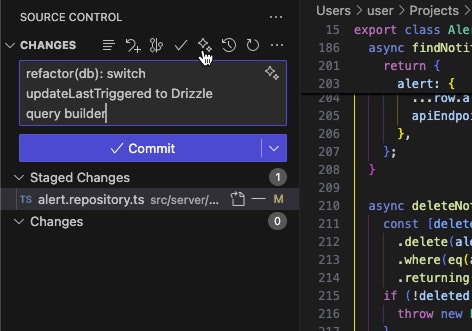
GitHub Copilot provides free commit message suggestions integrated directly into GitHub Desktop (3.5+), VS Code (with Copilot extension), and IntelliJ IDEA (with Copilot plugin) through sparkle icon activation after staging changes. Generally available as of June 2025 across all Copilot plans (Free, Pro, Enterprise) with customizable conventional commit instructions through VS Code settings or IDE configuration files. No additional subscription cost beyond potential existing Copilot subscriptions (\$20/month or included in enterprise plans).
GitHub Copilot and GitusAI serve similar purposes but differ in implementation approach and integration strategy. GitHub Copilot emphasizes IDE-native integration as secondary feature within broader Copilot assistance platform, whereas GitusAI focuses specifically on commit message generation as primary product. Copilot benefits from GitHub ecosystem integration, no marginal cost for existing subscribers, and integration with existing GitHub authentication infrastructure.
GitHub Copilot delivers high-quality messages with customizable instructions through IDE settings, supporting custom organizational conventions without additional setup. However, quality depends on underlying GPT model capabilities and consistency across different Copilot versions. Copilot requires existing IDE installation and GitHub/Microsoft account authentication.
GitusAI differentiates through specialized focus on commit message generation, independent platform not requiring IDE-specific setup, transparent pricing model for non-Copilot subscribers, and CLI-first approach enabling terminal-based workflows. Choice depends on existing Copilot investment and IDE preferences: organizations already subscribing to Copilot benefit from integrated free suggestions, while teams seeking dedicated commit generation platform with transparent pricing choose GitusAI.
OpenCommit (Open-Source CLI Tool)
OpenCommit provides free, open-source CLI tool installed via npm (npm install -g opencommit) enabling local commit message generation using various AI models (GPT-3.5-turbo, GPT-4, Claude, Gemini, local Ollama models). Supports git hooks (oco hook set) for IDE integration, conventional commits by default with @commitlint configuration support, gitmoji emoji addition, and template placeholders for customization. Completely free for local installation requiring only API key from OpenAI, Anthropic, or other LLM providers.
OpenCommit and GitusAI overlap significantly in core functionality but differ fundamentally in business model, ease-of-use, and support infrastructure. OpenCommit requires users manage their own LLM API keys and associated costs (typically \$0.001-\$0.01 per message depending on model and code size), while GitusAI bundles API costs within transparent monthly subscription. OpenCommit requires command-line familiarity and manual configuration; GitusAI provides web dashboard and simplified setup.
OpenCommit excels for technically sophisticated developers comfortable managing dependencies, API keys, and local tools, and for developers wanting complete control over underlying models. GitusAI serves teams prioritizing simplicity, managed infrastructure, team collaboration features, and consolidated billing without API key management.
Both tools support Conventional Commits and multiple models. OpenCommit has longer established track record (launched 2023) with active community; GitusAI launched November 2025 with commercial support focus. Organizations valuing open-source and self-management choose OpenCommit; teams prioritizing ease-of-use and managed infrastructure choose GitusAI.
Conventional Commits Tools (commitlint, semantic-release)
Conventional Commits ecosystem includes linting tools like commitlint (enforces message format against rules) and automation tools like semantic-release (generates changelogs and bumps versions). These tools validate or automate existing commit message workflow but don’t generate messages themselves—they require developers to write messages complying with conventional format or work downstream of message generation.
Conventional Commits tools and GitusAI serve complementary roles rather than direct competition. Conventional Commits tools enforce standards; GitusAI generates compliant messages. Organizations implementing conventional commit workflows often layer GitusAI on top of their commitlint configurations ensuring both generation and validation of properly formatted messages.
Git-Cz (Commitizen CLI)
Commitizen (czg variant) provides interactive CLI prompts guiding developers through commit message creation with predefined questions (what type, scope, description, breaking changes) and AI integration through AI Commits variant. Requires npm installation and manual step-through process for each commit. Free and open-source with optional AI models.
Commitizen and GitusAI differ in interaction model. Commitizen emphasizes guided questionnaire approach with developer providing structured responses through prompts. GitusAI emphasizes fully automatic generation requiring only code review and optional editing. Commitizen trains developers to follow convention through repeated interaction; GitusAI abstracts convention enforcement to AI.
Commitizen suits teams wanting developer education through structured commit workflow. GitusAI suits teams prioritizing speed and minimal developer cognitive load.
LLM Direct Integration (OpenAI API, Anthropic, etc.)
Developers can directly implement commit message generation using LLM APIs (OpenAI API, Anthropic Claude, Google Gemini) through custom scripts or applications managing authentication, rate limiting, billing, and message formatting independently.
Direct LLM integration and GitusAI differ in implementation complexity versus simplicity trade-off. Direct APIs provide maximum flexibility and control but require development effort, ongoing maintenance, and infrastructure management including billing administration, rate limiting implementation, and error handling. GitusAI provides pre-built platform handling infrastructure details, enabling teams to focus on adoption without technical burden.
Large organizations with dedicated infrastructure teams may prefer direct API integration. Growing teams and smaller organizations benefit from GitusAI’s managed simplicity.
VS Code Gitlens Extension (with Copilot integration)
GitLens provides VS Code extension for Git visualization with recent update adding Copilot-powered commit message generation within GitLens UI panels. Requires GitLens extension (\$60/year for Pro or free Community Edition) plus GitHub Copilot subscription (\$20/month).
GitLens and GitusAI compete in IDE integration space but through different approaches. GitLens emphasizes comprehensive Git visualization and history analysis with commit message generation as secondary feature. GitusAI focuses exclusively on commit message generation with broad IDE support rather than deep feature-rich Git visualization.
GitLens users already using extension benefit from integrated suggestions. Teams specifically seeking powerful Git history visualization benefit from GitLens. Teams seeking dedicated commit generation benefit from GitusAI.
Cursor IDE (AI-focused code editor)
Cursor provides AI-focused VS Code alternative with built-in commit message generation through Copilot integration. Available as free and paid tiers (\$20/month Pro). Benefits from Copilot integration but occasionally produces less accurate messages than standalone Copilot according to independent testing.
Cursor and GitusAI overlap minimally as Cursor represents IDE replacement rather than commit message tool specifically. Organizations standardizing on Cursor IDE benefit from integrated suggestions. Organizations using diverse IDEs prefer standalone GitusAI.
Key Differentiators
GitusAI’s unique market positioning centers on several distinctive capabilities. Specialized focus on commit message generation as primary product (not secondary IDE feature) enables optimization specifically for developer workflows without UI/UX trade-offs required for general-purpose IDEs.
Transparent pricing model (\$5/month Pro plan, \$0 Free tier) eliminates confusion compared to GitHub Copilot’s \$20/month general-purpose cost or OpenCommit’s hidden per-message LLM API costs requiring separate billing infrastructure.
Dedicated platform managed infrastructure eliminates developer burden of LLM API key management, rate limiting, billing administration, and error handling compared to direct API integration or self-hosted OpenCommit.
Standalone platform independence from specific IDEs, editors, or development environments contrasts with IDE-integrated solutions limiting accessibility to particular developer tool ecosystems.
For organizations already invested in GitHub Copilot or specific IDEs with integrated suggestions, those tools provide acceptable solutions. For open-source developers comfortable with terminal and API management, OpenCommit provides flexibility. For teams seeking dedicated commit message platform with simplified infrastructure, transparent pricing, and broad IDE support, GitusAI presents compelling specialized solution.
Final Thoughts
GitusAI addresses legitimate developer productivity pain point: the time, cognitive load, and consistency challenges associated with crafting professional commit messages. By leveraging AI to automate and standardize this workflow, it promises to save developers hours weekly while elevating Git history quality and enabling automated release processes through Conventional Commits format adherence.
The November 2025 launch positions GitusAI within rapidly maturing AI development tools landscape where GitHub Copilot dominates IDE-integrated space while open-source and CLI-focused alternatives like OpenCommit serve technically sophisticated users valuing control. GitusAI’s strategy emphasizes ease-of-use, managed infrastructure, and transparency through simple pricing model rather than attempting to compete on breadth (like Copilot’s multi-capability approach) or customization (like OpenCommit’s flexibility).
Critical advantages include specialization enabling optimized user experience specifically for commit generation use case, transparent pricing eliminating billing surprises compared to OpenCommit’s per-message LLM costs, managed infrastructure reducing operational burden compared to self-hosted solutions, and quick adoption path supporting both existing workflows and new team standardization without requiring IDE changes or complex setup.
Potential limitations include Free tier’s 10 daily message limit constraining active developers despite \$5/month Pro plan providing excellent value, new platform launch date (November 2025) leaving limited production reliability and scalability validation compared to established GitHub Copilot, and reliance on underlying LLM capabilities with potential accuracy variations.
For development teams, open-source projects, startups, and enterprises seeking to systematize commit message generation, improve Git history quality, enable automated changelog/release generation, and accelerate developer productivity through automation without complex infrastructure management, GitusAI warrants serious evaluation as specialized commit generation platform simplifying professional documentation practices across technical teams.
As software development increasingly demands higher code quality standards, comprehensive documentation, and automated release processes, tools addressing commit message professionalization occupy valuable market niche. GitusAI’s strategic positioning as dedicated, managed, easy-to-use platform serving teams prioritizing simplicity and transparency over maximum customization differentiates it within competitive landscape while addressing genuine developer workflow pain point.