Table of Contents
Overview
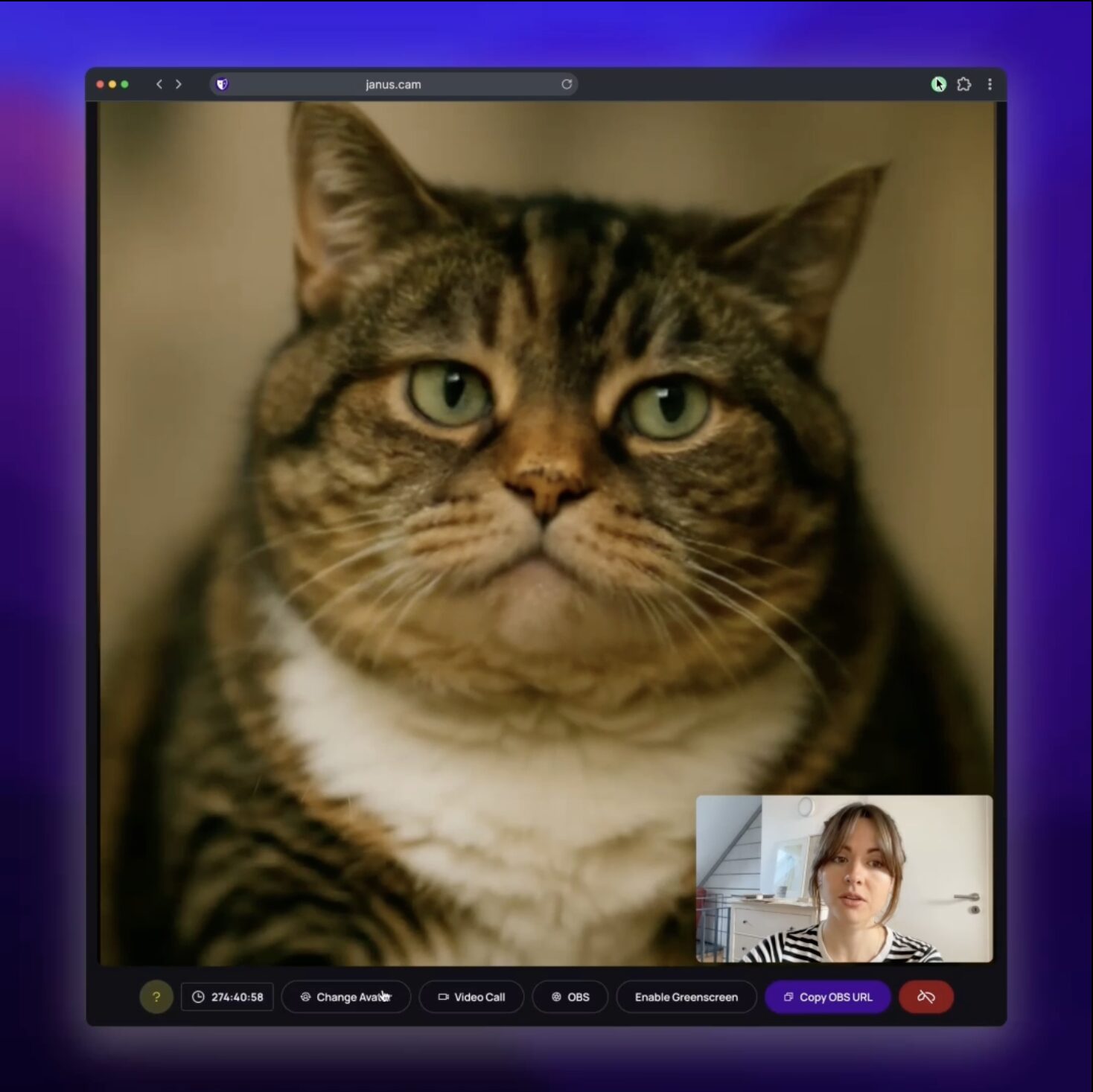
Unlike traditional VTubing software that requires complex rigging or specialized hardware, Janus operates directly in the browser, making real-time facial animation accessible to casual users and professional creators alike. The platform employs a high-efficiency AI model to map a user’s facial expressions and head movements onto a chosen character, effectively “patching” the webcam output before it reaches the target communication app.
As of early 2026, Janus has positioned itself as a cost-effective alternative in the virtual identity market, offering a “one-click” setup that bypasses the friction of manual configuration. It caters to a wide range of needs, from anonymous streaming and creative content production to adding an element of playfulness to corporate meetings.
Key Features
- Real-Time Expression Mapping: Uses low-latency AI to synchronize the movements of an avatar with the user’s real-world facial expressions.
- Unified Chrome Extension: Patches browser-based video feeds (Discord, Google Meet, Zoom) directly, eliminating the need for complex virtual camera drivers.
- AI Character Builder: Allows users to create custom avatars from a single prompt or image, or select from an extensive pre-built library of creatures and characters.
- OBS Studio Native Support: Provides a clean output for streamers to incorporate their AI persona into professional broadcast layouts.
- Cross-Platform Compatibility: Works seamlessly across any platform that accepts standard webcam input through its browser-native patching technology.
- Instant Webcam Activation: Requires no pre-training or specialized depth sensors, making it functional with standard laptop cameras.
- High-Resolution Face Swapping: Delivers sharp, detailed textures even in real-time, maintaining visual consistency across various lighting conditions.
How It Works
The Janus process begins by selecting or generating a character within the web dashboard. Once chosen, the user activates the Janus Chrome extension, which intercepts the computer’s camera signal. The AI engine processes the video in the background, identifying key facial landmarks to animate the avatar’s eyes, mouth, and posture. This “AI-augmented” feed is then piped into communication apps as the primary camera source. For more advanced setups, streamers can use OBS to capture the character window, allowing for professional overlays and transitions.
Use Cases
- Anonymous VTubing: Creators can stream to YouTube or Twitch as a consistent character without revealing their physical identity.
- Creative Meetings: Professionals can use stylized avatars in Google Meet or Zoom to reduce “camera fatigue” or host themed presentations.
- Social Interaction on Discord: Friends can hang out in video channels as animated characters, enhancing the immersive nature of social gaming.
- Fast Prototyping for Animation: Rapidly visualize character movements for digital stories or games without waiting for traditional 3D rendering.
Pros and Cons
- Pros: Extremely easy to set up with no hardware barrier to entry. Lowest cost compared to high-end mo-cap solutions. Works on almost any browser-based communication tool.
- Cons: Real-time AI processing can cause moderate CPU/GPU load on older laptops. High-resolution streaming and unlimited character creation are locked behind paid tiers.
Pricing
- Starter Plan: Free. Includes access to a basic set of avatars and standard definition streaming for individual use.
- Pro Tier: Approximately $15/month. Unlocks high-definition output, unlimited custom avatar creation using AI, and priority processing.
- Creator/Studio Plan: Custom Pricing. Designed for professional teams and studios requiring enterprise-grade security and advanced character modeling features.
How Does It Compare?
- Animaze / Facerig: These are powerful standalone desktop apps with deep customization. Janus is more accessible because it lives in the browser and uses an extension to “patch” your existing calls instantly.
- Snap Camera: While Snap Camera was the pioneer of webcam filters, it has since been discontinued as a standalone desktop app. Janus serves as its modern, AI-driven spiritual successor.
- DeepFaceLive: A highly technical tool for realistic face swapping. Janus focuses on “characters” and “avatars” rather than just swapping one human face for another, making it more creative and less focused on hyper-realism.
- Hyper Online: Focused on mobile-first VTubing and social ecosystems. Janus is superior for desktop-based work environments like Zoom meetings and professional streaming setups.
Final Thoughts
Janus represents a major step toward the normalization of virtual identities in 2026. By removing the technical hurdles of rigging and mo-cap, it allows “virtual identity” to be as simple as changing a profile picture. As digital communication becomes increasingly decoupled from physical appearance, tools like Janus provide the necessary infrastructure for users to control their digital self-representation safely and creatively. While privacy and authenticity concerns remain in the broader AI space, Janus’s focus on fictional characters and creative avatars makes it a positive addition to the productivity and social toolkits of the modern web.