Table of Contents
Overview
In modern business operations, repetitive administrative tasks consume disproportionate organizational energy—manual data entry, cross-tool synchronization, notification routing, status updates, report generation—all performed by skilled professionals despite representing low-value work. Traditional workflow automation requires either technical expertise (coding) or extensive configuration time (block-by-block workflow design), creating adoption barriers for non-technical teams. Kadabra reimagines this through “vibe automation”—an AI agent that converts natural language descriptions into fully functional, tested, production-ready workflows. Rather than spending weeks designing workflows through visual interfaces or hiring developers for automation tasks, teams describe desired outcomes in plain text, Kadabra’s AI generates complete multi-step workflows with integrated testing and error handling, and one-click deployment activates production automations. The platform connects across 40+ pre-built integrations (Slack, Notion, Google Sheets, Gmail, WhatsApp, webhooks) while supporting unlimited API connections, enabling comprehensive workflow automation without technical barriers.
Key Features
Kadabra combines AI-driven workflow generation with production-ready deployment:
- Natural Language Workflow Design: Describe desired outcomes in plain text—”send Slack updates when forms submit” or “sync Gmail attachments to Notion”—and the AI agent generates complete multi-step workflows with conditional logic, error handling, and data transformations automatically.
- Automated Workflow Testing: Before deployment, Kadabra runs comprehensive testing with historical data, detecting authentication failures, missing permissions, data format mismatches, and edge cases. The system validates entire workflows end-to-end and surfaces issues requiring human decision-making.
40+ Native Integrations: Pre-built connectors for communication tools (Slack, WhatsApp), productivity platforms (Google Workspace, Notion), databases (Airtable, Postgres), and CRMs eliminate API key management and authentication overhead.
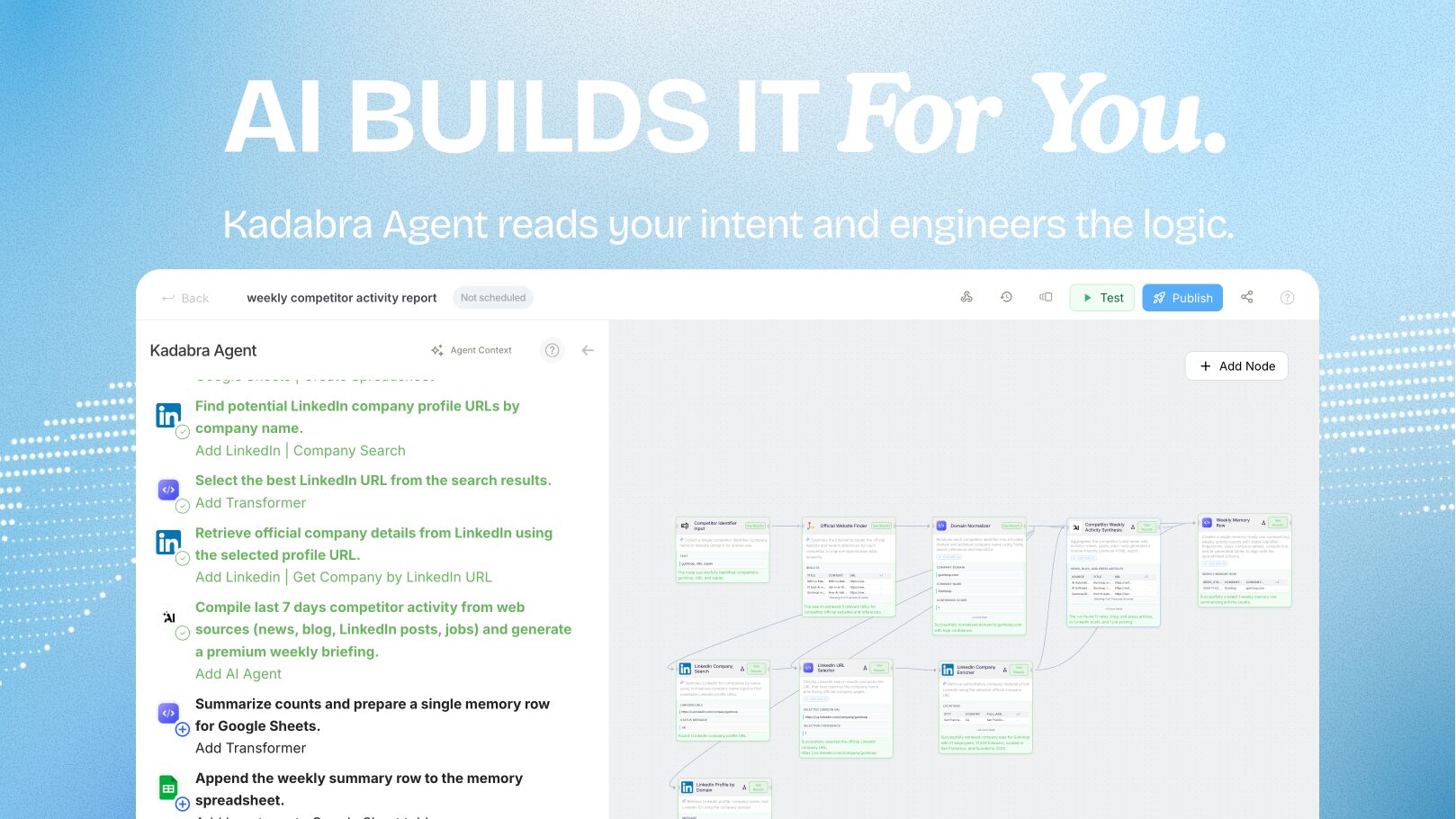
Visual Approval and Modification: Workflows display as editable node-based canvases before deployment. Review each step, modify logic, add conditions, or insert custom Python code. Users maintain complete oversight and can adjust automations without requiring AI regeneration.
One-Click Deployment to Production: Approved workflows deploy instantly with automatic trigger configuration (scheduled execution or event-based). Kadabra handles server provisioning, monitoring, error handling, and retry logic automatically.
Real-Time Execution Monitoring: Watch active automations execute with real-time visibility into each step’s status, data flowing between stages, and any errors encountered. Activity logs enable complete audit trails and step-by-step rollback capabilities.
Advanced Error Handling: Automatic API call retries with exponential backoff, confidence-based decision escalation to humans when AI decision confidence falls below thresholds, and Slack alerts for unresolved failures ensure reliability without manual intervention.
Sharable Automation Templates: Package deployed automations as white-labeled web apps with custom input forms, enabling team distribution of internal tools without development overhead or requiring team members to understand underlying workflow logic.
Custom Python Integration and API Support: Extend automations beyond pre-built connectors by embedding Python code directly into workflow nodes or configuring direct REST API connections to any service with API documentation.
How It Works
Kadabra operates through an intelligent automation lifecycle:
Describe Your Goal: Use plain language to specify desired automation outcomes. The more concrete the description (including specific tool names, data fields, and expected behaviors), the more precisely Kadabra generates workflows.
AI Generates Complete Workflow: Kadabra’s agent translates your description into a full multi-step workflow including trigger configuration, data transformations, conditional logic for different scenarios, and error handling. The generated workflow appears as an editable visual canvas with each step clearly displayed.
System Tests Automatically: Before you approve, Kadabra validates the entire workflow by running test executions with sample data. It simulates authentication, checks API connectivity, validates data types between stages, and surfaces any issues requiring resolution.
Review and Refine: Examine the generated workflow visually. Add additional steps, adjust decision logic, insert custom Python code, or modify parameter values directly. Every change is reflected immediately in the canvas.
Approve and Deploy: Once satisfied, click deploy. Kadabra automatically configures triggers (time-based or event-based), provisions execution infrastructure, establishes monitoring, and activates the workflow. No additional setup required.
Monitor and Adjust: Watch real-time execution dashboards showing each active automation’s status. Logs capture complete execution history for auditing and troubleshooting. Modify workflows on-the-fly or disable automations that no longer serve their purpose.
Use Cases
Kadabra serves diverse automation scenarios across departments:
- Growth Operations: Automatically route new leads to CRM with enrichment from company data, trigger follow-up emails after predefined intervals, and update lead scores based on engagement signals—all coordinated across multiple platforms without manual workflow management.
Marketing Automation: Publish blog posts to social media simultaneously, extract analytics from platforms daily and compile into reports automatically, manage email campaign sequences triggered by user behaviors, and maintain content calendars synchronized across teams.
Sales Operations: Sync CRM updates to shared spreadsheets automatically, generate proposal documents from CRM templates, schedule follow-up tasks based on email response patterns, and route escalations to appropriate teams based on opportunity value.
Customer Support: Triage incoming support messages from Slack, Reddit, or email into appropriate channels, route messages to specialists based on topic classification, automatically create tickets with context from initial inquiries, and escalate to humans when confidence thresholds fall.
Data Synchronization: Maintain database synchronization across platforms (Notion ↔ Airtable ↔ Postgres) automatically, consolidate duplicate records across systems, and ensure data consistency when records update across multiple sources simultaneously.
Administrative Automation: Generate expense reports from receipts automatically, process employee timesheet approvals, manage meeting scheduling and reminder systems, and handle routine document approvals and status routing.
Product Operations: Collect customer feedback automatically from surveys and route to product team, generate release notes from Git commits and deploy to communication channels, track feature request voting and route high-priority items to product planning.
Pros & Cons
Advantages
- Dramatically Accelerates Automation Deployment: Reducing time from weeks of manual workflow design to minutes of natural language description and deployment enables rapid iteration and quick wins for process improvement.
Eliminates Technical Barriers: Non-technical teams can independently design and deploy production automations without requiring engineering resources or learning complex automation platforms.
Built-in Reliability: Automatic testing before deployment, comprehensive error handling, retry logic, and confidence-based escalation ensure automations run reliably without constant human monitoring.
Complete Transparency and Control: Visual workflow examination, approval checkpoints before deployment, real-time execution monitoring, and activity logs enable non-technical users to maintain oversight and troubleshoot issues independently.
Broad Integration Coverage: 40+ pre-built connectors plus unlimited REST API support enable connecting virtually any business tool or service without API key management overhead.
Production-Ready Quality: Generated workflows include conditional logic, data transformation, error handling, and retry mechanisms—typical quality standards usually requiring significant development effort.
Disadvantages
Complex Workflow Limitations: Highly complex business logic, sophisticated data processing, or deeply custom integrations may exceed the platform’s capabilities and require traditional development approaches.
Vendor-Specific Orchestration: While providing flexibility, workflows use Kadabra-specific patterns and orchestration. Exporting workflows to other platforms or migrating away would require rebuilding automations.
Confidence-Based Decision Escalation: For certain automations, the system escalates to humans when AI decision confidence falls below thresholds, potentially creating bottlenecks for automations designed to be fully autonomous.
Emerging Platform Maturity: As a newer platform, integration depth, advanced feature availability, and reliability track record are still evolving. Teams with mission-critical processes should validate stability before full production reliance.
How Does It Compare?
Kadabra approaches workflow automation from a fundamentally distinct architectural angle than established platforms, emphasizing natural language generation and production-ready deployment rather than visual workflow design.
Zapier provides the most extensive integration ecosystem (8,000+ apps) through a visual “Zap” builder where users define trigger-action pairs through block-by-block interface construction. Zapier excels at connecting diverse business tools and rapid scenario creation for simple automations. However, building complex multi-step workflows with conditional logic requires extensive configuration. Zapier recently introduced AI-assisted workflow building, but the foundational model remains block-by-block construction rather than natural language generation. Zapier serves users comfortable with visual workflow design; Kadabra serves users preferring natural language descriptions.
n8n functions as an open-source workflow automation platform with 1,000+ integrations emphasizing flexibility and self-hosting. n8n enables developers and technical users to build sophisticated automations through visual nodes while supporting custom JavaScript or Python code directly within workflows. n8n excels for organizations requiring data sovereignty through self-hosting or those with complex technical requirements. However, n8n’s learning curve remains steep for non-technical users, and workflow construction requires understanding node-based architecture concepts. n8n serves developers and technical teams; Kadabra serves non-technical teams.
Make (formerly Integromat) provides visual workflow building with 400+ integrations through a “Scenario” interface using modules to represent apps and connections. Make’s pricing model charges per operation count, creating potential cost scaling with workflow complexity. Make offers good general-purpose automation but maintains the visual-interface-first design approach shared by Zapier. Make serves users comfortable with visual scenarios; Kadabra serves users preferring natural language.
Retool specializes in rapid internal tool development through visual application builders, enabling non-technical teams to create databases, dashboards, and admin panels. While Retool includes automation capabilities (workflows), its primary focus remains internal tool construction rather than workflow-first automation. Retool serves teams building internal applications; Kadabra serves teams automating business processes.
Kadabra’s distinctive positioning emerges through: natural language workflow generation (describing goals rather than building block-by-block), production-ready deployment (including testing, error handling, monitoring pre-configured), approval-based safety gates (ensuring human oversight before deployment), and complete non-technical accessibility (no block-by-block interface learning required). While platforms like Zapier excel at breadth of integrations and n8n excels at technical flexibility, Kadabra uniquely optimizes for speed from idea to production deployment for non-technical teams.
Final Thoughts
Kadabra represents a meaningful evolution in workflow automation by shifting from interface-first to outcome-first automation. Its combination of natural language generation, automated testing, production-ready deployment, and complete transparency creates genuine friction reduction for non-technical teams seeking to automate repetitive work.
For growth, operations, marketing, sales, and product teams managing repetitive tasks without dedicated automation engineering resources, Kadabra delivers practical efficiency improvements. The ability to deploy production automations in minutes rather than weeks enables rapid iteration and immediate productivity gains.
However, teams with highly complex technical requirements, those preferring comprehensive integration ecosystems (Zapier’s 8,000+ apps), or those requiring self-hosting and complete data sovereignty (n8n) should evaluate platform fit carefully. Kadabra optimizes specifically for non-technical team empowerment and rapid deployment rather than comprehensive technical flexibility or maximum integration breadth.