Table of Contents
Overview
The division between visual design tools and code-based development has long created friction in web development workflows. Designers work in visual interfaces like Figma or Framer, while developers implement in code; designers iterate visually while developers manage version control; design changes often require manual re-implementation rather than flowing directly into working code. Layrr challenges this dichotomy by positioning visual editing and real code development not as separate workflows but as seamlessly integrated parts of the same process. Launched in November 2025, this open-source platform enables developers and designers to edit their actual codebase (React, Vue, Svelte, or HTML) visually in the browser, seeing changes reflected in real-time while maintaining complete control over the repository, version history, and deployment. Unlike visual builders that generate proprietary formats or export workflows, Layrr edits the actual code files in your repository—your code remains yours, deployable anywhere, without vendor lock-in or subscriptions.
Key Features
Layrr delivers comprehensive visual editing capabilities designed for developers managing their own codebases while maintaining design velocity:
- Framer-inspired visual editor: Drag-and-drop interface with intuitive element manipulation (resize, reposition, edit properties) that mirrors design tools like Figma and Framer, but applied directly to your code—not design mockups.
- Direct repository code editing: Connect Layrr to your local development server (supports any web framework), and edits made visually update the actual HTML, CSS, and JavaScript files in your repository—no exports, no migrations, no roundtrip syncs.
- Figma design import and conversion: Upload Figma mockups, design screenshots, or sketches; Layrr’s AI generates production-ready component code in your target framework (React JSX, Vue components, Svelte components, or HTML).
- AI-powered design generation: Describe what you want in plain English—”make the header sticky,” “add a pricing section,” “create a testimonials carousel”—and watch as Layrr’s AI generates and applies working code changes in real-time.
- Multi-mode editing flexibility: Switch seamlessly between visual drag-and-drop design mode, text content editing mode, code editor mode, and AI generation mode based on what the task requires—no context-switching between separate tools.
- Framework-agnostic architecture: Single unified editor handles React, Vue, Svelte, and plain HTML/CSS projects—no relearning for different frameworks.
- In-browser component selection and editing: Click any element on your rendered site to select it, then edit its properties (text, styles, attributes) directly through visual panels or jump into raw code for precision control.
- AI-assisted content updates: Edit text directly in the browser without hunting through component files—click text to edit in place.
- Git integration and version control: All visual changes write to your actual code files, enabling standard Git workflows (commits, branches, pull requests, history tracking).
- Platform-agnostic deployment: Since your code remains yours in your repository, deploy to Vercel, Netlify, GitHub Pages, your own servers, or any hosting—zero platform dependencies.
- Local development server integration: Run Layrr alongside your existing development setup (npm dev, yarn dev, npm run dev, etc.)—Layrr connects to your local server and updates code as you make visual edits.
- Cross-platform support: Works on macOS, Linux, and Windows with simple curl-based installation.
How It Works
Layrr’s workflow integrates visual editing into existing development processes with minimal setup. Developers begin by installing Layrr via a single terminal command (curl -fsSL https://layrr.dev/install.sh | bash). Layrr runs as a local daemon that connects to the development server running alongside your code.
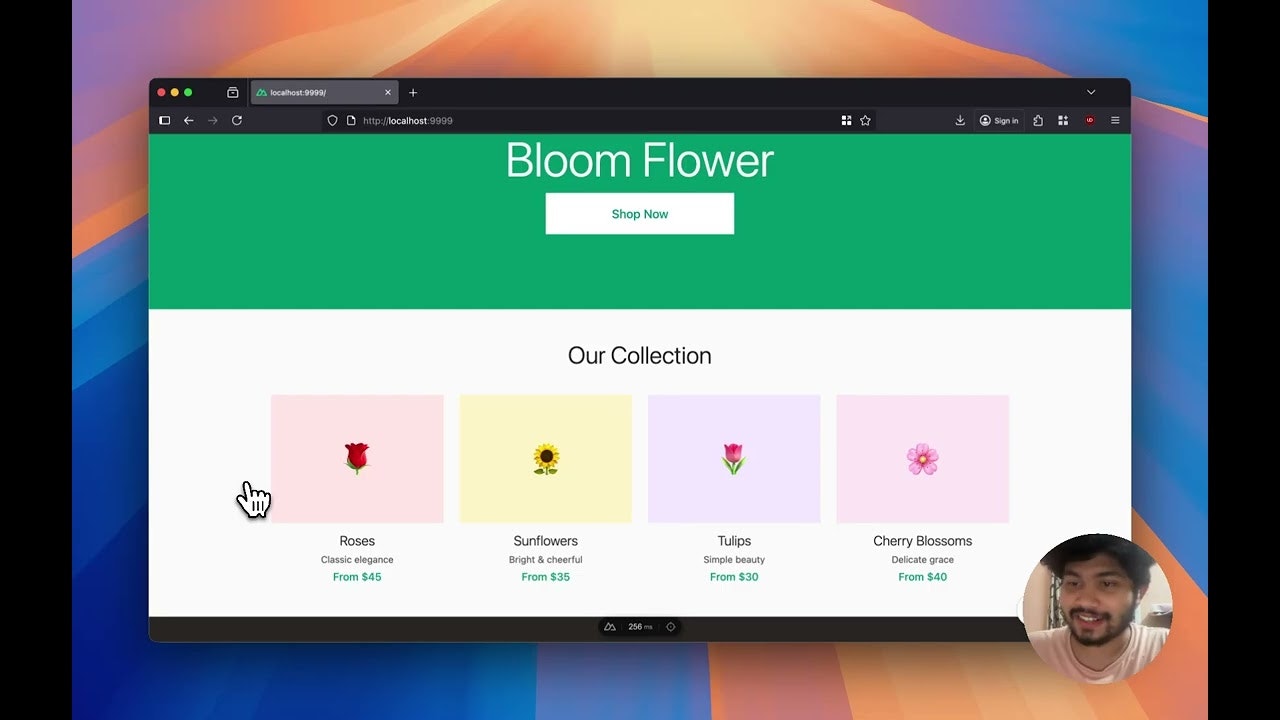
Once installed, developers launch Layrr in the same terminal window where their dev server runs. The platform automatically detects the framework (React, Vue, Svelte, or HTML) and opens a browser-based visual editor displaying the current state of their website or application. The interface resembles Figma or Framer—a canvas showing the rendered site with tools for selecting, dragging, resizing, and editing elements.
When developers select an element on the canvas, Layrr displays property panels for modifying styles, text content, and attributes. Changes made visually are immediately reflected in the code files and instantly previewed in the browser. Developers can switch into code editor mode for precision changes or use AI mode to describe desired changes in natural language.
For Figma imports, developers upload design files or screenshots. Layrr’s AI analyzes the visual design and generates corresponding component code. For AI generation mode, developers describe what they want (“add a contact form,” “make this section responsive”), and the AI generates and applies working code.
All changes write directly to the code files in the repository. Developers commit these changes using standard Git workflows—branches, pull requests, commit history, everything works as expected because the files are real code, not proprietary formats.
The architecture emphasizes developer control: Layrr is strictly a visual editor layer over real code. It doesn’t manage hosting, doesn’t store code in cloud systems, doesn’t lock developers into proprietary platforms. Developers maintain complete Git history, deploy wherever they want, and can switch away from Layrr at any time without data migration concerns.
Use Cases
Layrr’s code-first visual editing serves multiple development scenarios where visual iteration without leaving the codebase proves valuable:
- Designer-developer collaboration: Designers and developers work simultaneously on the same codebase—designers make visual changes through Layrr’s interface while developers review changes through Git, comment on pull requests, and merge when ready.
- Rapid UI iteration and prototyping: Build and test UI variations quickly through visual editing without reloading editors or context-switching—try design directions, commit working versions, revert when needed.
- Design-to-code acceleration: Convert Figma mockups into working components through Layrr’s import process, dramatically reducing manual coding overhead for design implementation.
- AI-assisted development acceleration: Describe features in plain English, let AI generate implementation, then refine through visual editing—compressing development timelines without sacrificing code quality.
- Client request implementation: Implement client change requests visually (repositioning elements, adjusting copy, updating colors) without opening code editors.
- Freelance frontend development: Streamline workflows for independent developers managing both design and development responsibilities—switch between visual and code modes fluidly.
- Website maintenance and updates: Update content, adjust styling, fix layout issues without leaving the browser or opening development environments.
- Learning web development: Students learning frontend development can see visual changes reflected immediately while learning how CSS, component structures, and frameworks work.
- Component library development: Create, maintain, and iterate on design system components with real-time visual feedback while staying in the code context.
Pros \& Cons
Advantages
- True code ownership: Unlike builders generating proprietary formats, your code remains your code—deployable to any platform, reviewable through Git, migrates to any future tool without vendor lock-in concerns.
- Framework flexibility: Works with React, Vue, Svelte, or HTML—single tool across diverse tech stacks without learning different interfaces.
- Genuine open-source: 100% free forever, community-driven, no subscriptions, no usage limits, auditable code, customizable for specific needs.
- Local-first architecture: No cloud dependency, no proprietary data storage, no concerns about design privacy or code sharing with external services.
- Developer-friendly integration: Connects to existing dev workflows without disruption—runs alongside npm dev, maintains Git history naturally, deploys using familiar CI/CD processes.
- No export/import friction: Changes flow directly from visual editor to code files—no roundtrips, no format conversions, no data loss in translation.
- Git-native version control: Complete Git history preserved; branches, pull requests, blame, all work as expected because changes write to actual code files.
- Rapid setup: Single terminal command installation; no account creation, no complex onboarding, immediate productivity.
Disadvantages
- Steep learning curve for visual-first designers: While Framer-inspired, Layrr requires understanding code structure (components, props, CSS frameworks)—pure visual designers may struggle without development knowledge.
- Local development requirement: Requires running local dev server; not suitable for teams without development infrastructure or those preferring cloud-based workflows.
- Framework limitations: Currently supports React, Vue, Svelte, HTML; emerging/niche frameworks may lack full support.
- Early-stage platform maturity: As a newly launched project (November 2025), ecosystem maturity, community size, and long-term stability remain unproven compared to established tools.
- Advanced customization overhead: While visual editing handles common tasks, complex custom styling or framework-specific patterns may require code editing.
- Component library dependency: Visual editing effectiveness depends on well-structured components—monolithic components or poorly organized codebases may be challenging to edit visually.
- Performance with large projects: Unclear how visual editing performs with very large codebases or complex component hierarchies.
How Does It Compare?
The visual web development tool ecosystem encompasses multiple architectural approaches and positioning philosophies:
Framer (\$5-20/month) operates as a design and deployment platform. Framer excels at interactive prototyping, motion design, and visual creation with eventual deployment capabilities. However, Framer is fundamentally design-first—code is generated as a byproduct of design. Teams cannot import existing code into Framer; instead, they design in Framer and export code. Layrr inverts this philosophy: code-first, with visual editing layered on top. For teams with existing codebases wanting visual editing without migration, Layrr’s approach differs fundamentally from Framer’s design-to-deployment flow.
Builder.io (enterprise pricing) functions as a headless CMS with visual building capabilities. Builder stores content and designs in its cloud platform, generating code or JSON that developers integrate into their applications. Builder excels for marketing teams creating landing pages and campaigns without developer intervention. However, Builder operates as an external content system; your site’s code doesn’t live in Builder. Layrr differs by storing code in your repository—you maintain complete version control and ownership.
Plasmic (\$20-500+/month) provides visual building with CMS capabilities for React applications. Plasmic’s strength lies in integration with component libraries and headless data sources. However, Plasmic stores designs and content in its platform (with git sync available as a feature). Layrr’s advantage: code-native storage with visual editing as the interface layer, rather than external platform storage with git sync as an export mechanism.
Puck (open-source, self-hosted) represents a closer conceptual competitor—an open-source visual editor for React. Puck focuses on embeddable content editing within React applications (WYSIWYG editors for content creators). Layrr targets broader code editing beyond content creation, including layout changes, component repositioning, and framework-agnostic editing. Both are open-source and self-hosted; Layrr’s distinguishing features are framework-agnosticism and AI capabilities.
Codux (open-source desktop app) provides visual React component editing integrated with your codebase through a desktop application. Codux emphasizes side-by-side visual and code editing. Layrr uses browser-based visual editing without requiring a separate application installation. Both edit real code in repositories; Layrr’s browser-based approach and AI features represent different implementation philosophies.
Webflow (\$12-312/month) and Wix Studio (\$27+/month) represent the traditional no-code website builder category—fully visual, proprietary hosting, closed ecosystems. Both excel for users building websites without development infrastructure. However, both store sites proprietary platforms; exporting code or moving sites requires significant effort. Layrr positions for developers with existing codebases—a fundamentally different market.
Glass, Onlook, and emerging visual editor projects represent similar open-source initiatives for visual React code editing. These platforms approach the same problem (visual editing of real React code) with varying architectures. Layrr’s focus on framework-agnosticism (not just React), AI generation capabilities, and platform-agnostic deployment differ from React-specific competitors.
Layrr’s distinctive positioning centers on combining code-first architecture (code lives in your repo), visual-first interface (Framer-like drag-and-drop), framework-agnosticism (React, Vue, Svelte, HTML), and zero vendor lock-in (open-source, self-hosted). Few existing tools match this specific combination. Most visual builders either sacrifice code ownership (Framer, Builder.io) or limit framework support (Puck, Codux). For development teams seeking visual editing without platform lock-in, framework flexibility, and code repository primacy, Layrr addresses a genuine positioning gap.
Final Thoughts
Layrr represents a meaningful shift in visual web development tooling—positioning code ownership and developer control as primary values rather than secondary concerns. By running locally, editing real code files in repositories, and supporting multiple frameworks, Layrr enables design and development velocity without the trade-offs that cloud-based visual builders demand. The combination of Framer-inspired visual editing, Figma import capabilities, and AI-assisted generation creates genuine productivity gains for developers who want visual editing without abandoning their development workflows. For teams currently fragmenting between design tools (Figma), visual builders (Framer, Webflow), and code editors (VS Code, WebStorm), Layrr promises consolidation—a single tool for visual editing of real code. While the early-stage platform maturity, local development requirement, and learning curve for visual-first designers represent legitimate considerations, Layrr’s open-source foundation and code-ownership philosophy position it as compelling for development teams prioritizing control, flexibility, and freedom from vendor constraints. As visual editing capabilities mature and AI-assisted development becomes increasingly mainstream, Layrr’s positioning at the intersection of these trends suggests meaningful potential for establishing new category norms in web development tooling.