
Table of Contents
Overview
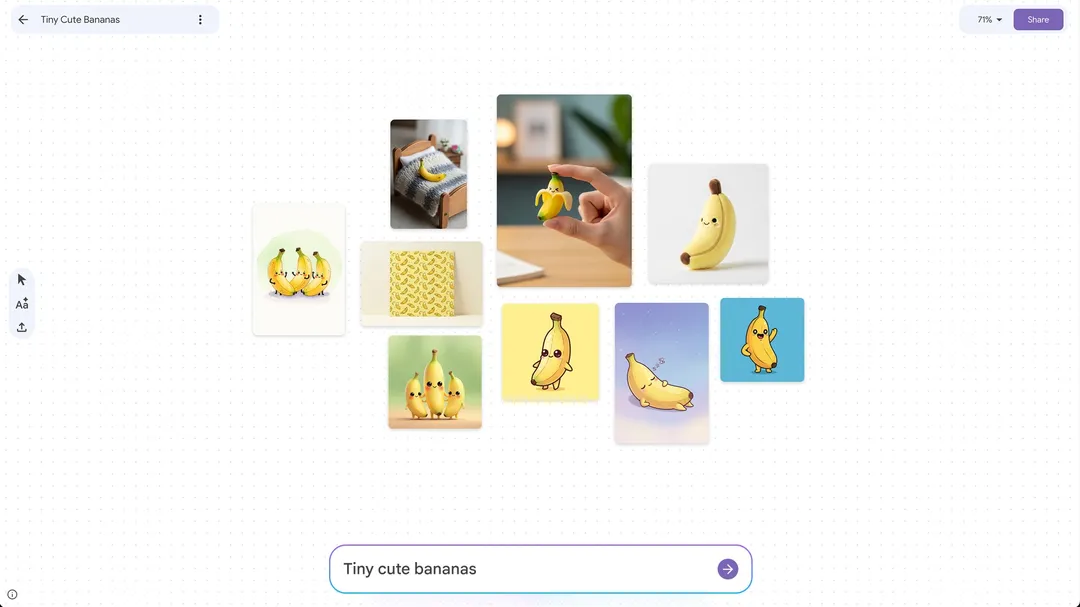
Step into the future of visual brainstorming with Mixboard, an experimental AI-powered concepting board from Google Labs. This innovative tool empowers creators to transform simple text prompts into rich visual ideas, offering an open canvas where imagination meets cutting-edge artificial intelligence. Whether you’re a designer, event planner, or someone exploring ideas visually, Mixboard provides an intuitive platform to generate, edit, and arrange images using natural language, making visual exploration more accessible and engaging than traditional methods.
Key Features
Mixboard offers powerful capabilities designed to streamline your creative process and unlock new possibilities for visual ideation:
Open-ended visual canvas: Provides an expansive digital workspace where you can freely arrange and experiment with visual concepts without constraints, supporting unlimited creative exploration.
AI image generation from text prompts: Create unique images effortlessly by describing your vision using natural language, powered by Google’s advanced image generation technology.
Natural language image editing: Refine and modify generated images with simple text commands through Google’s Nano Banana model, allowing for precise adjustments and creative iterations without complex editing tools.
Upload and remix existing images: Integrate your own visuals seamlessly with AI-generated content, blending personal assets with generated elements to create cohesive mood boards and concept presentations.
Contextual text generation: Enhance your visual boards with AI-generated text that provides relevant context, descriptions, or additional conceptual ideas based on the visual elements present on your canvas.
How It Works
Getting started with Mixboard follows a straightforward and intuitive process designed to accelerate creative workflows. Users begin by entering a text prompt or selecting from pre-designed templates on the digital canvas. The AI, powered by Google’s Gemini 2.5 Flash model, generates a series of contextually relevant images based on your input. These images remain fully editable through natural language commands via the Nano Banana image editing model, allowing for dynamic refinement and combination. This iterative approach enables you to build comprehensive visual concepts, evolving initial ideas into detailed mood boards with minimal technical complexity.
Use Cases
Mixboard’s versatile nature makes it valuable across various creative and professional applications:
Creative professionals brainstorming visual concepts: Ideal for graphic designers, artists, and marketers seeking to rapidly generate and explore diverse visual directions for client projects or creative campaigns.
Designers creating mood boards for projects: Perfect for fashion, interior, or product designers who need to compile visual inspiration and define aesthetic themes for client presentations or team alignment.
Event planners visualizing themes: Enables event organizers to conceptualize and present event aesthetics, decor concepts, and atmospheric elements to clients or planning teams with clear visual references.
Content creators and marketers: Useful for social media managers, content creators, and marketing professionals developing visual concepts for campaigns, brand aesthetics, or content themes.
Pros \& Cons
As an experimental tool from Google Labs, Mixboard offers compelling advantages while presenting certain limitations typical of beta-stage products.
Advantages
Intuitive natural language interface: The conversational approach to image generation and editing makes advanced AI capabilities accessible to users without technical expertise or design software proficiency.
Powerful Nano Banana editing capabilities: Offers sophisticated image modification through simple text commands, providing flexibility that rivals traditional editing software while maintaining ease of use.
Free access during beta phase: Provides an excellent opportunity to experiment with cutting-edge AI visual creation capabilities without financial commitment, making it accessible for individual creators and small teams.
Disadvantages
Early experimental stage limitations: As a Google Labs project under active development, users may encounter occasional bugs, feature changes, or temporary service interruptions typical of experimental platforms.
Geographic availability restrictions: Current limitation to U.S. users restricts international access, potentially limiting global team collaboration and broader user adoption.
Limited production-ready capabilities: While excellent for ideation and concept development, it may lack the precision controls and professional features required for final production work or client deliverables.
How Does It Compare?
Mixboard enters a competitive landscape of visual brainstorming and mood board creation tools, each offering distinct approaches to creative collaboration and visual ideation.
Pinterest remains the established leader for collecting and organizing existing visual content, with its recent Shuffles feature gaining viral popularity among Gen Z users for creating collage-style mood boards. However, Pinterest primarily focuses on curating existing content rather than generating original visuals.
Adobe Firefly Boards integrates AI-powered generative capabilities within Adobe’s ecosystem, combining existing Creative Cloud assets with AI generation. While powerful, it requires familiarity with Adobe’s interface and is part of a paid subscription model.
FigJam by Figma excels in collaborative whiteboarding and structured design workflows, with strong real-time collaboration features and integration with design systems. However, AI functionality remains secondary to its core collaborative design tools.
Canva offers extensive template libraries and some AI features, but focuses more on structured design creation rather than open-ended visual exploration and concept development.
Miro provides comprehensive collaborative whiteboarding with mind mapping and brainstorming templates, though AI integration is less central to the core experience compared to Mixboard’s AI-first approach.
Mixboard differentiates itself through its AI-native design, where generative capabilities form the foundation rather than an add-on feature. The combination of Gemini 2.5 Flash for understanding context and Nano Banana for sophisticated image editing creates a uniquely fluid creative experience that prioritizes experimentation and rapid iteration over structured design workflows.
Final Thoughts
Mixboard represents an innovative approach to AI-powered creative tools, offering a fresh perspective on visual brainstorming and concept development. Its experimental nature from Google Labs provides insight into the future of creative workflows, where AI becomes a true creative partner rather than just a productivity tool.
While currently limited by its beta status and geographic restrictions, Mixboard’s powerful natural language capabilities for both image generation and editing position it as a compelling option for creative professionals, marketers, and anyone seeking to explore visual concepts intuitively. The platform’s strength lies in its ability to transform abstract ideas into visual representations quickly, making it particularly valuable during early creative phases and collaborative brainstorming sessions.
For users in the United States looking to experience next-generation visual concepting tools, Mixboard offers an accessible entry point into AI-assisted creativity. As Google continues developing this experimental platform, it may well influence how future creative tools integrate artificial intelligence into the ideation process.