Table of Contents
Overview
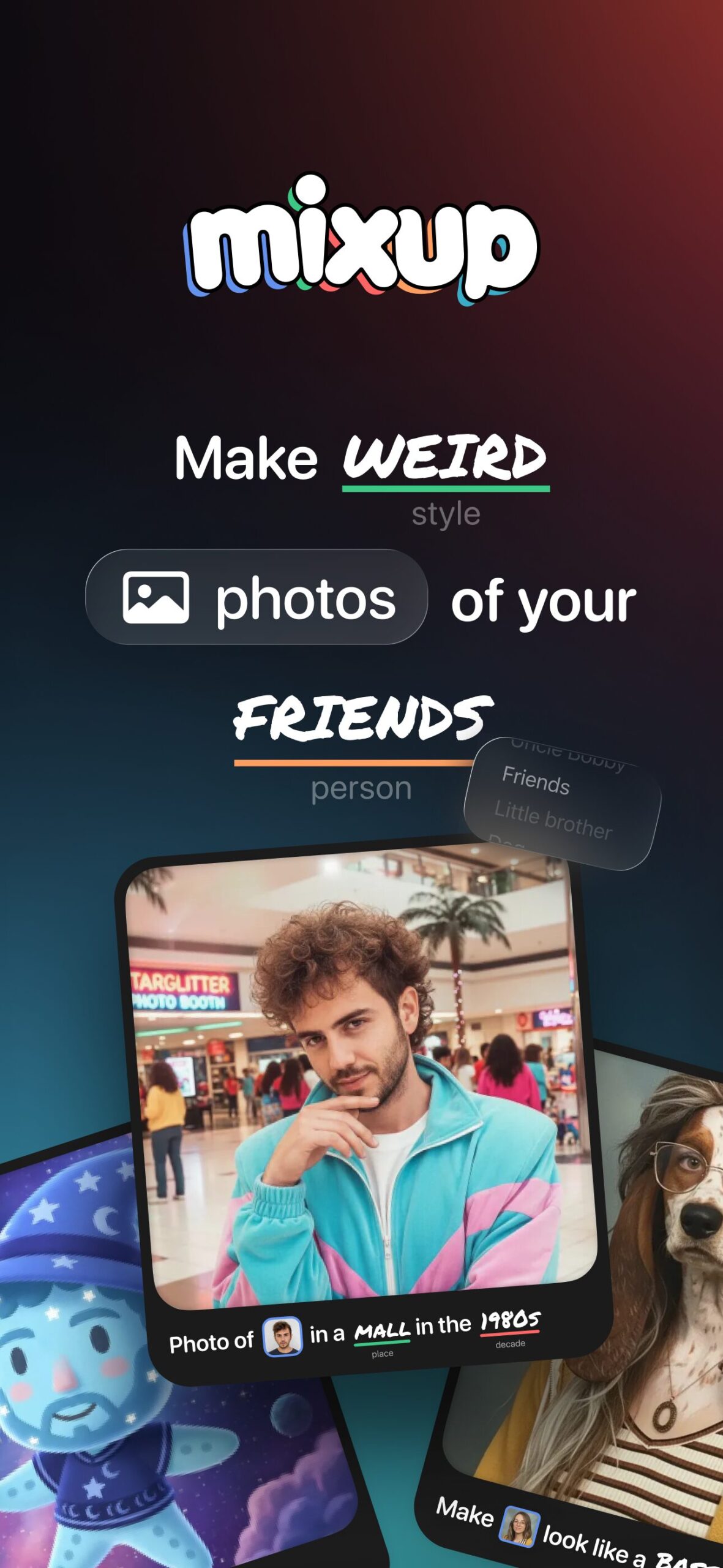
Mixup is a social AI image generation app for iOS that transforms the typically solitary experience of creating AI art into collaborative, community-driven play. Launched on November 20, 2025, by Things, Inc.—the team behind the 3D design app Rooms—Mixup addresses a fundamental friction point in AI creativity: the blank canvas problem. Rather than requiring users to craft sophisticated text prompts from scratch, Mixup provides human-written “recipes” that function as Mad Libs-style templates with placeholders for photos, sketches, and text. Users fill in these blanks with their own content, generating unique AI images in seconds. The platform’s social feed allows anyone to remix published recipes by substituting their own materials, creating an evolving ecosystem of shared creative templates. Built on Google’s Nano Banana image generation model, Mixup emphasizes accessible, playful experimentation while maintaining output quality through consistent image transformation techniques.
The app was developed by a team led by Jason Toff, a former Google and Meta executive with experience building experimental consumer products. Mixup reflects a design philosophy prioritizing human creativity and collaboration over technical mastery, positioning AI as an enabler of social interaction rather than a replacement for artistic skill.
Key Features
Mixup delivers AI image generation through several interconnected features designed for ease of use and social engagement:
Recipe Template System: The core innovation of Mixup is its recipe-based prompt structure. Each recipe consists of a human-written prompt with designated placeholders marked for specific inputs—subject photos, style descriptors, scene elements, or artistic references. Users encounter recipes like “Transform [your photo] into a Renaissance painting” or “Reimagine [your pet] in a [Halloween costume].” By filling these structured blanks rather than writing freeform prompts, users bypass the learning curve associated with prompt engineering. The recipe format provides creative guardrails that guide novices while still allowing personalization through content choices.
Public Social Feed: Mixup features a scrollable feed displaying community-generated images alongside their underlying recipes. This transparency—showing both the output and the template that created it—enables users to understand what results they can expect from a recipe before committing their own content. Each post includes a “Try Recipe” button that allows instant remixing using the viewer’s own photos, text, or sketches. This social discovery mechanism turns browsing into participation, lowering barriers to creation.
Integrated Sketching Tool: A simple drawing interface allows users to create basic doodles directly within the app. These sketches can serve as inputs to recipes calling for visual elements, enabling users without artistic training to contribute rough concepts that the AI interprets and refines. The drawing tool features basic brushes and colors without advanced editing capabilities, maintaining simplicity over power.
Mixables Feature: Users can optionally upload photos of themselves or others to a shared library accessible to their followers. This “Mixables” functionality enables friend groups to playfully reimagine each other in different scenarios using community recipes. For instance, friends might transform each other into Renaissance portraits, anime characters, or surreal artistic interpretations. The feature operates on an opt-in, follower-only basis—users control whether their images are available for remixing and who can access them.
Before/After Toggle: To address the “slot machine anxiety” common in generative AI—where outputs feel unpredictable—Mixup provides before/after comparison views. Users can see the original input photo alongside the AI-generated transformation, building confidence in what the recipe will produce when applied to their own content.
Google Nano Banana Integration: The app leverages Google’s Nano Banana model, a generative AI system optimized for mobile deployment. According to CEO Jason Toff, Nano Banana distinguishes itself through its ability to “maintain your image in a convincing way that wasn’t creepy”—preserving recognizable features of input photos while applying creative transformations. This consistency reduces the uncanny valley effects that plague some AI face transformations.
Content Moderation: Mixup implements dual-layer moderation using OpenAI’s content filtering technology alongside Google Nano Banana’s built-in safety controls. These systems restrict generation of sexual content, violence, and other policy violations. Human moderation supplements automated filtering for edge cases.
How It Works
Mixup’s workflow is designed for immediate engagement without technical setup:
Users begin by downloading the app from the iOS App Store (iOS 18 or later required, optimized for iOS 26). At launch, new users received 100 starter credits valued at approximately \$4, with each generation consuming roughly 4 cents in credits. Account creation is required but streamlined.
Once in the app, users encounter the social feed displaying community creations. Scrolling reveals diverse outputs—pet transformations, historical
reimaginings, stylistic portraits, surreal mashups. Tapping any post reveals both the final image and the recipe that generated it.
To create their first image, users either select an existing recipe from the feed or browse a recipe library. Each recipe displays placeholder instructions indicating what inputs are needed: “Upload a photo of yourself,” “Draw a simple shape,” “Describe a scene,” etc.
Users fill these blanks by uploading photos from their camera roll, using the in-app drawing tool to sketch simple doodles, or typing short text descriptions. The interface guides this input collection with clear visual prompts.
Once all blanks are filled, users tap “Generate.” The app sends the structured prompt—combining the recipe template with user inputs—to the Nano Banana backend. Processing typically completes in seconds, returning a generated image.
Users can then choose to publish the result to the public feed (making the recipe available for others to remix), save it privately to their device, or discard and regenerate with different inputs. Publishing includes optional settings to enable before/after view for other users.
As users follow friends and activate Mixables sharing, their uploaded photos become available for followers’ creative experiments. A friend might select a recipe calling for “a photo of your friend” and choose from available Mixables to generate humorous transformations.
When credits deplete, users can purchase additional credit packs or subscribe to monthly tiers offering 100, 250, or 500 credits per month. The pricing model follows freemium patterns common in generative AI apps.
The app requires internet connectivity for generation, as processing occurs server-side rather than on-device despite Nano Banana’s mobile optimization.
Use Cases
Mixup serves several user segments and creative scenarios:
Casual Social Entertainment: Friend groups use Mixup as a visual conversation game, remixing each other’s photos through humorous or artistic recipes. The Mixables feature enables collaborative play where participants react to their AI-transformed appearances shared within the group. This social dynamic positions Mixup as entertainment rather than productivity tool.
Social Media Content Creation: Influencers and content creators generate eye-catching visuals for Instagram, TikTok, or other platforms using Mixup’s diverse recipes. The app’s outputs provide novelty and visual interest that can boost engagement on social posts. The before/after toggle feature naturally creates shareable transformation content.
Low-Stakes Creative Exploration: Users curious about AI art but intimidated by complex tools like Midjourney or Stable Diffusion find Mixup’s recipe system approachable. The structured templates remove the blank canvas problem while still delivering professional-quality results. This accessibility makes Mixup an entry point for AI creativity.
Rapid Visual Ideation: Designers, marketers, and creative professionals use Mixup for quick concept exploration during early ideation phases. The recipe-guided approach accelerates generation of diverse visual directions without requiring refined prompts. While outputs may not be final-quality, they serve as inspiration and direction-setting references.
Educational Introduction to AI: Teachers or workshop facilitators demonstrate generative AI concepts using Mixup’s transparent recipe system. Seeing how structured prompts with variable inputs produce different outputs helps demystify AI image generation for learners without technical backgrounds.
Gift and Novelty Creation: Users generate personalized images for digital greeting cards, profile pictures, or novelty gifts using transformation recipes applied to photos of recipients. The playful aesthetic suits casual gift-giving contexts.
Pros and Cons
Advantages
Mixup offers several compelling benefits for its target audience:
The recipe-based interface radically lowers the barrier to entry for AI image generation. Users unfamiliar with prompt engineering, model parameters, or artistic terminology can immediately create compelling outputs by simply filling blanks. This accessibility democratizes creative AI tools beyond technical early adopters.
The social remix mechanics create engaging feedback loops that encourage continued use. Discovering interesting recipes in the feed, remixing them with personal content, and publishing results for others to remix generates ongoing participation. This collaborative dynamic differentiates Mixup from isolated creation tools.
The Nano Banana model delivers consistent, recognizable transformations that preserve input photo characteristics while applying creative effects. This reliability reduces frustration from unpredictable outputs common in freeform generative AI, building user confidence in results quality.
The before/after transparency helps users predict outcomes before committing credits, addressing the “slot machine” problem where users waste resources on unsatisfying generations. Seeing example outputs alongside recipes enables informed experimentation.
The Mixables feature creates unique social value unavailable in traditional image generators. Collaborative remixing of friend photos fosters playful group dynamics that extend beyond individual creativity.
The simple sketching tool expands creative inputs beyond text and photos, allowing conceptual visual ideas to influence generation without requiring artistic skill. This multimodal approach offers flexibility in how users express intent.
Disadvantages
Mixup also faces several notable limitations:
The iOS-exclusive availability restricts adoption to Apple device users, excluding the substantial Android market share. While web and Android versions are planned contingent on success, the single-platform approach limits initial growth and network effects.
The credit-based consumption model introduces financial friction absent from unlimited-generation competitors like some implementations of DALL-E 3 or Midjourney during subscription periods. Users must monitor credit balances and consider per-image costs, potentially dampening experimental behavior.
The recipe metaphor, while accessible, constrains creative control compared to freeform prompting tools. Advanced users seeking precise compositional control, specific stylistic parameters, or complex scene descriptions may find recipes limiting. The templates optimize for accessibility at the expense of granularity.
Output quality and capabilities depend entirely on Nano Banana’s underlying model performance. Users cannot switch models, adjust generation parameters, or control aspects like resolution, aspect ratio, or iteration count. This lack of configurability limits power users.
The social feed introduces potential for inappropriate content, copyright concerns, and moderation challenges despite dual-layer filtering. User-generated recipes and images create ongoing moderation burdens that could affect community quality.
The Mixables feature, while novel, presents privacy considerations. Users must trust followers with their uploaded photos and accept that their likeness may be transformed in unexpected ways. While opt-in, the feature could create social pressure or uncomfortable scenarios.
The app’s long-term viability remains uncertain as a newly launched product from a small team competing against well-funded alternatives. Continued development, model improvements, and community growth depend on achieving sustainable user adoption and revenue.
The credit costs at ~4 cents per generation can accumulate quickly for active users, potentially making Mixup more expensive than flat-rate subscription services for high-volume creation.
How Does It Compare?
Mixup enters a crowded AI image generation market but carves a distinctive niche through its social-first, template-based approach. The competitive landscape includes direct text-to-image tools, mobile AI photo editors, and social creation platforms:
Leading AI Image Generators
DALL-E 3 (via ChatGPT): OpenAI’s flagship image generator accessible through ChatGPT Plus (\$20/month) or free with daily limits. DALL-E 3 excels at photorealism, complex prompt adherence, and text integration within images. It offers freeform prompting with conversational refinement but requires users to craft their own prompts. Compared to Mixup, DALL-E 3 provides superior raw generation quality and creative control but lacks the social discovery and remix features central to Mixup’s value proposition. DALL-E 3 suits users prioritizing output fidelity over collaborative play.
Midjourney V7: The premier AI art generator for artistic, stylized imagery with unmatched aesthetic quality. Accessed via Discord or web interface with subscription tiers starting at \$7/month for basic access. Midjourney V7 requires users to personalize the model to their style preferences and craft detailed prompts for best results. The platform features a public gallery but lacks Mixup’s recipe-sharing and remix functionality. Midjourney appeals to serious creators seeking gallery-quality outputs, while Mixup targets casual, social creation.
Stable Diffusion 3: Open-source image generation model available through various interfaces including DreamStudio, local installation, or third-party apps. Offers maximum customizability through model parameters, LoRA weights, and prompt engineering. Requires technical knowledge for optimal results but provides unlimited free generation when run locally. Compared to Mixup, Stable Diffusion represents the power-user end of the spectrum—maximum control and flexibility in exchange for steep learning curves. Mixup prioritizes immediate accessibility over advanced features.
Template-Based and Beginner-Friendly Platforms
Canva Dream Lab: Canva’s AI image generator integrated into its design ecosystem. Provides preset styles, simple text prompts, and direct integration with design projects. Free tier with limitations; Canva Pro subscription (\$13/month) unlocks full access. Canva emphasizes design workflow integration rather than social sharing. Compared to Mixup, Canva offers broader creative suite capabilities but less playful, social-first interaction. Canva suits professional designers incorporating AI into projects; Mixup targets casual social creation.
NightCafe: Community-focused AI art platform with multiple generation algorithms, style presets, and social sharing features. Credit-based pricing similar to Mixup (\$6/month for 100 credits). NightCafe offers more algorithm choices and artistic styles but uses traditional text prompting rather than recipe templates. The platform includes challenges and community voting. Compared to Mixup, NightCafe provides greater technical control and algorithm variety but lacks the Mad Libs-style accessibility and remix mechanics. NightCafe appeals to AI art enthusiasts; Mixup serves mainstream users.
StarryAI: User-friendly mobile AI art app emphasizing simplicity and accessibility. Provides style presets, straightforward prompting, and high-quality outputs. Freemium model with subscription upgrades. StarryAI focuses on individual creation with clean interface design. Compared to Mixup, StarryAI offers similar accessibility goals but lacks the social feed, recipe sharing, and collaborative remix features. StarryAI suits users wanting simple AI art generation; Mixup adds social entertainment layers.
Mobile AI Photo Editors and Transformation Apps
Lensa AI: Popular mobile app specializing in AI avatars and portrait enhancement. Famous for the “Magic Avatars” feature that generates stylized self-portraits in various artistic styles from uploaded selfies. One-time payment for avatar packs. Lensa focuses on polished, shareable profile pictures and portraits. Compared to Mixup, Lensa offers narrower use cases (primarily avatars) with higher production polish but less creative flexibility and no social recipe sharing. Lensa suits users wanting refined avatar outputs; Mixup offers broader creative play.
Remini: AI-powered photo enhancement app specializing in restoration, upscaling, and quality improvement of old or low-resolution photos. Over 100 million photos enhanced. Subscription-based pricing. Remini focuses on photo repair rather than creative generation. Compared to Mixup, Remini serves utility needs (fixing existing photos) rather than creative entertainment. Minimal overlap in use cases—Remini is functional, Mixup is recreational.
Picsart AI: Comprehensive photo editing and design app with integrated AI image generation, effects, and filters. Offers complete creative suite including collage making, video editing, and social sharing. Freemium model with premium subscription. Picsart emphasizes professional-grade editing tools alongside AI features. Compared to Mixup, Picsart provides far broader functionality as an all-purpose creation app but lacks the specialized recipe system and collaborative remix dynamics. Picsart serves creators needing full editing capabilities; Mixup focuses exclusively on AI generation through social templates.
Fotor: Feature-rich design platform combining AI image generation with photo editing, batch processing, and design templates. Supports text-to-image creation alongside traditional editing tools. Freemium pricing with premium features. Fotor targets productivity workflows and bulk operations. Compared to Mixup, Fotor offers utility-focused features for practical tasks rather than playful social creation. Fotor suits users with functional editing needs; Mixup prioritizes entertainment.
Artistic and Experimental Platforms
Artbreeder: Innovative platform allowing users to blend and morph existing images to create hybrid results. Emphasizes creative exploration through image “breeding” rather than text prompting. Free tier with premium upgrades. Artbreeder’s unique blending mechanics create experimental workflows distinct from prompt-based generation. Compared to Mixup, Artbreeder offers more conceptual artistic experimentation but steeper learning curves and less immediate accessibility. Artbreeder appeals to experimental artists; Mixup serves mainstream social users.
Dream by Wombo: Mobile-first AI art generator with vibrant, imaginative aesthetics and user-friendly interface. Provides style presets and straightforward prompting. Freemium model. Dream by Wombo emphasizes ease of use with visually striking outputs. Compared to Mixup, Dream by Wombo uses traditional individual creation workflows without the recipe-sharing and remix social layer. Similar accessibility goals but different social dynamics.
Adobe Firefly: Professional AI image generation tool integrated into Adobe Creative Cloud ecosystem. Focuses on commercial-safe content generation with built-in licensing protections. Subscription-based as part of Creative Cloud or standalone. Firefly targets professional creatives with brand-safe requirements. Compared to Mixup, Firefly serves enterprise and professional use cases with legal protections but lacks playful social features. Firefly suits corporate creatives; Mixup targets consumer entertainment.
Key Differentiators
Mixup distinguishes itself through several unique combinations:
Mad Libs-Style Recipe Templates: The fill-in-the-blank prompt structure is Mixup’s primary innovation, making AI generation accessible without prompt engineering knowledge. While other platforms offer style presets or simplified interfaces, none implement the shareable recipe metaphor that turns prompts into collaborative templates.
Social Remix Ecosystem: The ability to discover recipes in a feed, remix them with personal content, and publish for others to remix creates network effects absent from individual-creation tools. This social layer transforms AI generation from isolated activity into participatory game.
Mixables Feature: Allowing followers to use your uploaded photos for their creations enables group play dynamics unique to Mixup. While other platforms support sharing outputs, Mixup enables sharing inputs for collaborative transformation.
Mobile-First Social Experience: Mixup optimizes for quick, playful mobile interaction rather than desktop power-user workflows. The app feels more like Instagram than Photoshop, prioritizing entertainment over production quality.
Google Nano Banana Integration: Built on Google’s model optimized for maintaining image consistency and avoiding uncanny valley effects, Mixup benefits from specialized technology designed for the transformation use cases the app emphasizes.
However, Mixup trades depth for accessibility—it offers less creative control, fewer model options, no parameter customization, and limited export options compared to professional tools. Users seeking gallery-quality art, precise compositional control, or commercial-safe generation will find Mixup limiting.
The platform succeeds by targeting a distinct audience: casual users wanting playful AI creativity without technical barriers, social groups seeking collaborative entertainment, and beginners exploring generative AI through guided templates. For this audience, Mixup’s simplified approach and social features provide value that technically superior but more complex alternatives cannot match.
Pricing and Availability
Mixup launched on November 20, 2025, exclusively for iOS devices running iOS 18 or later, with optimization for iOS 26. The app is available globally through the Apple App Store, initially requiring invite codes for access during the launch phase.
The pricing model follows a freemium structure based on generation credits. New users received 100 starter credits valued at approximately \$4, providing enough capacity to create roughly 25-30 images (each generation costs approximately 4 cents in credits). Once starter credits are exhausted, users can purchase additional credits through subscription tiers offering 100, 250, or 500 credits per month. Specific pricing for these tiers was not fully disclosed at launch but follows consumption-based models common in generative AI apps.
Android and web versions are planned contingent on iOS success, with no specific release timeline announced. The team indicated these expansions would occur “if it takes off,” suggesting a measured approach to cross-platform development based on initial traction.
The app requires internet connectivity for generation, as processing occurs on cloud servers despite the mobile-optimized Nano Banana model. Storage of created images happens locally on user devices unless published to the social feed.
Final Thoughts
Mixup represents a thoughtful reimagining of how consumers interact with generative AI, prioritizing collaboration and accessibility over technical capability. By transforming prompts into shareable “recipes” that guide rather than constrain creativity, the app successfully lowers barriers that prevent mainstream adoption of AI art tools. The social remix mechanics create compelling reasons for repeated engagement beyond isolated creation, positioning Mixup as entertainment platform rather than productivity tool.
The app is particularly well-suited for social friend groups seeking playful creative activities, casual users curious about AI art without willingness to learn prompt engineering, content creators needing quick, eye-catching social media visuals, and beginners wanting guided introduction to generative AI concepts.
However, several considerations temper enthusiasm. The iOS-exclusive availability severely limits initial addressable market. The credit-based pricing introduces friction and ongoing costs that may deter price-sensitive users or high-volume creators. The constrained creative control and single-model limitation frustrate users seeking precision or advanced capabilities. Most critically, the platform faces intense competition from established AI image generators with superior technology, larger user bases, and sustained development resources.
Mixup’s success hinges on achieving viral growth through social features before larger platforms replicate the recipe concept. The Mixables collaborative photo remixing and viral recipe sharing represent genuine innovations that could drive organic spread. However, the app must overcome the chicken-and-egg problem facing all social platforms: needing critical mass for value creation while lacking existing network to attract initial users.
For users willing to experiment with a fresh approach to AI creativity, Mixup offers delightful, accessible experiences that feel more like social play than technical tool usage. The recipe metaphor successfully demystifies generative AI while maintaining output quality sufficient for casual sharing. As an entry point for AI art exploration or social entertainment with friends, Mixup succeeds admirably.
Whether Mixup establishes lasting presence in the crowded AI image generation market depends on factors beyond product quality: achieving viral growth, sustaining community engagement, expanding platform availability, and competing against well-funded alternatives copying successful features. The template-based, social-first approach represents genuine innovation worth experiencing, even if long-term viability remains uncertain for this newly launched platform from a small team.
https://apps.apple.com/us/app/mixup/id6751865419