Table of Contents
Overview
RightNow AI is the first GPU-native code editor specifically engineered for CUDA development and GPU kernel optimization launched March 7, 2025 on Product Hunt (achieving #1 Product of the Day with 196 upvotes and 16 comments, ranked first in Developer Tools and second in Artificial Intelligence Tools). Founded by Jaber Jaber as member of NVIDIA Inception Program and selected for Vercel Open Source Fall 2025 Cohort, RightNow AI addresses fundamental fragmentation plaguing GPU software development: kernel optimization workflows traditionally require switching between code editors (VS Code, Vim), profiling tools (Nsight Compute, Nsight Systems), remote GPU access, benchmarking scripts, and documentation creating context-switching overhead slowing iteration cycles and limiting productivity.
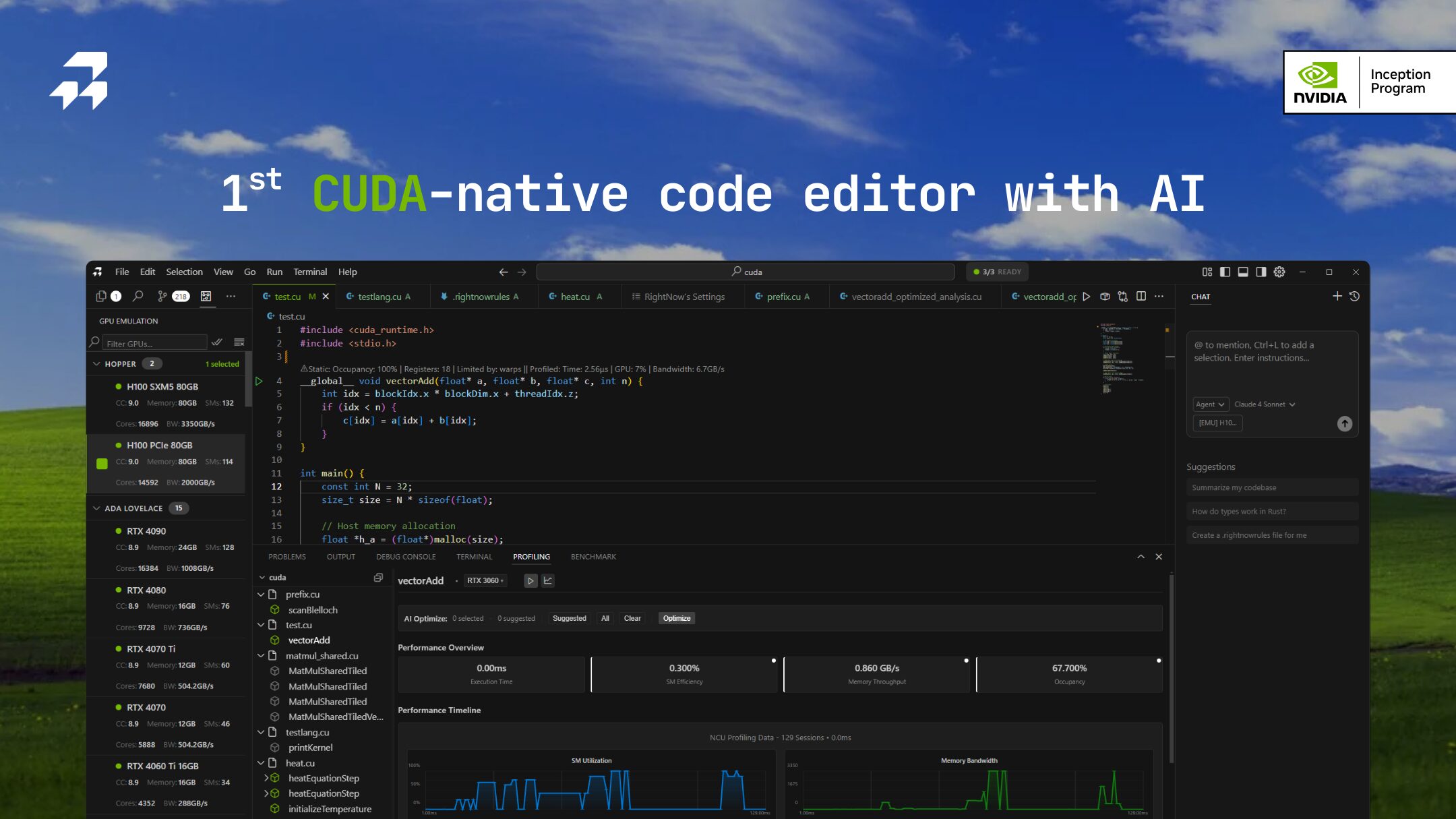
RightNow AI unifies CUDA/Triton/CUTLASS (CUTE)/TileLang editing, agentic hardware-aware AI assistance (Forge), cycle-accurate GPU emulator with 96-98% accuracy across 86+ NVIDIA architectures (Ampere, Hopper, Ada Lovelace, Blackwell), real-time profiling with Nsight Compute integration, line-by-line performance analysis with CodeLens insights displaying GPU metrics inline, automated benchmarking across input sizes and GPU configurations, and remote GPU virtualization within single integrated development environment. This consolidation eliminates tool fragmentation enabling GPU engineers maintaining focus on optimization rather than managing disjointed toolchains.
The platform targets CUDA developers optimizing deep learning kernels, ML engineers building custom operators, hardware AI professionals requiring maximum GPU utilization, computer graphics programmers working on rendering pipelines, scientific computing researchers accelerating simulations, and students learning GPU programming through detailed performance feedback. By combining AI-powered optimization suggestions grounded in actual profiling data with emulation enabling testing across GPU architectures without physical hardware access, RightNow AI democratizes advanced GPU optimization previously requiring deep architecture expertise and expensive hardware fleets.
Key Features
- Agentic Hardware-Aware AI Assistant (Forge): RightNow AI’s Forge AI agent understands GPU architecture specifics automatically detecting target GPU model (RTX 4090, A100, H100) and providing architecture-specific optimization recommendations. Unlike generic AI coding assistants offering superficial suggestions, Forge analyzes Nsight Compute profiling metrics identifying concrete bottlenecks (memory-bound vs compute-bound kernels, bank conflicts, occupancy issues, branch divergence, uncoalesced memory access) and proposes targeted code modifications addressing measured performance limiters. The AI integrates profiling results into context enabling conversational optimization: “Make this memory-bound kernel compute-bound” or “Eliminate shared memory bank conflicts” receiving specific implementation changes referencing GPU hardware constraints. Supports local LLM execution (Ollama, vLLM, LM Studio) enabling privacy-preserving workflows where code remains on-premises without cloud transmission critical for proprietary kernel development.
- Cycle-Accurate GPU Emulator with 96-98% Accuracy: Revolutionary GPU emulator enables profiling CUDA kernels without physical hardware providing cycle-accurate simulation across 86+ NVIDIA GPU architectures including latest datacenter GPUs (H100, H200, A100), consumer gaming cards (RTX 4090, RTX 3090, RTX 2080 Ti), and legacy architectures (GTX 1080, Tesla K80, Pascal, Turing). The emulator achieves 96-98% accuracy versus real hardware through PTX-level execution simulation and roofline model implementation enabling realistic performance estimates. Developers select target architectures through GUI checkboxes receiving estimated TFLOPS, memory bandwidth, kernel execution time, and bottleneck analysis without renting expensive cloud GPUs or maintaining diverse hardware inventory. This capability proves invaluable for testing code compatibility across GPU generations, comparing performance characteristics architectures-side-by-side, developing on Mac/laptops lacking NVIDIA GPUs, or learning CUDA on any computer democratizing GPU development beyond hardware-privileged environments.
- Real-Time Profiling with Nsight Compute Integration: Seamless Nsight Compute integration provides real-time GPU profiling without leaving editor environment. Click “Profile” button executing automatic Nsight Compute analysis displaying comprehensive hardware metrics in integrated profiling terminal: GPU utilization percentages, achieved TFLOPS vs theoretical peak, memory bandwidth utilization, warp occupancy statistics, L1/L2 cache hit rates, shared memory bank conflicts, register usage, and instruction mix breakdowns. Profiling results automatically parse into structured format with AI-powered bottleneck detection categorizing kernels as memory-bound, compute-bound, latency-bound, or balanced. The Smart Profiling Terminal generates optimization suggestions based on detected limiters: “This kernel is memory-bound at 23% peak bandwidth – consider memory coalescing optimizations” or “Low occupancy (35%) due to register pressure – reduce register usage or decrease threads per block.” Unlike standalone Nsight workflows requiring manual result interpretation, RightNow AI translates cryptic hardware metrics into actionable development guidance.
- Line-by-Line Performance Analysis with CodeLens: Inline CodeLens displays show GPU performance metrics directly within source code editor above kernel functions providing instant visibility into performance characteristics without opening separate profiling windows. Metrics include achieved TFLOPS, memory bandwidth GB/s, kernel execution time microseconds, theoretical occupancy percentages, and performance efficiency relative to hardware capabilities. Static kernel analysis engine (sub-100ms) provides instantaneous feedback as code changes enabling rapid iteration without full profiling overhead. Color-coded performance indicators (green for optimal, yellow for moderate, red for poor) highlight problematic code sections drawing attention to optimization opportunities. This real-time feedback loop accelerates optimization workflows compared to traditional profiling requiring explicit measurement runs and result navigation through separate interfaces.
- Automated Benchmarking Across Configurations: Comprehensive benchmarking system automatically tests kernels across multiple input sizes, thread configurations, and GPU architectures validating performance stability and identifying optimal launch parameters. The benchmarking terminal executes parameter sweeps testing various block dimensions (32×32, 64×64, 128×128), grid configurations, shared memory allocations, and input data sizes measuring throughput consistency across workload variations. Results display in tabular format comparing configurations side-by-side enabling data-driven parameter selection replacing manual trial-and-error tuning. Benchmark history tracking enables longitudinal performance monitoring ensuring optimizations don’t regress over development cycles. Export functionality generates CSV data files supporting external analysis or integration into continuous integration pipelines validating GPU code performance automatically.
- Remote GPU Virtualization and SSH Integration: Native remote GPU execution enables coding locally while executing on distant hardware through SSH integration and cloud provider support (RunPod, Google Cloud, AWS, Azure, Paperspace, Vast.ai, Lambda Labs). Configure remote connections through settings panel providing SSH credentials; RightNow AI automatically detects remote GPU models enabling architecture-specific optimization despite local machine lacking NVIDIA hardware. This capability proves critical for Mac users developing CUDA code, laptop-based developers requiring datacenter GPU access (H100, A100), or distributed teams sharing expensive GPU resources. Seamless remote profiling executes Nsight Compute on distant machines transmitting results back to local editor creating unified development experience regardless of execution location. Automatic GPU detection on remote systems eliminates manual architecture specification streamlining multi-environment workflows.
- Assembly Inspection and PTX Analysis: Advanced users inspect compiled PTX (Parallel Thread Execution) assembly and SASS (Streaming Assembly) code directly within editor understanding low-level instruction generation and identifying compiler optimization opportunities. The assembly viewer correlates source lines with generated instructions revealing how high-level CUDA translates into GPU operations. This visibility proves essential for micro-optimizations targeting specific hardware features (tensor cores, warp shuffle instructions, memory coalescing patterns) requiring assembly-level understanding. PTX analysis identifies inefficient instruction patterns (excessive register spilling, suboptimal memory access patterns, branch divergence) guiding manual optimizations beyond what AI suggestions provide.
- Multi-DSL Support for Modern GPU Programming: Beyond vanilla CUDA C/C++, RightNow AI supports emerging GPU DSLs (Domain-Specific Languages) including Triton (OpenAI’s Python-based GPU programming language), CUTLASS templates (CUTE – CUDA Templates for Linear Algebra Subroutines), and TileLang enabling developers working with modern high-level GPU programming abstractions. This multi-DSL support future-proofs development workflows as GPU programming evolves beyond traditional CUDA toward more expressive abstractions. The AI assistant understands DSL-specific idioms providing relevant optimization suggestions matching programming paradigm rather than generic CUDA advice inapplicable to specialized frameworks.
- Roofline Model Analysis for Performance Bounds: Integrated roofline model visualization plots kernel performance against hardware theoretical limits (compute throughput, memory bandwidth) identifying whether workloads achieve hardware maximum or suffer from specific bottlenecks. The roofline chart displays kernels as points relative to architecture’s compute roof (TFLOPS ceiling) and bandwidth roof (memory GB/s ceiling) immediately revealing optimization opportunities. Kernels far below roofs indicate underutilization; kernels hugging compute roof indicate compute-bound optimal performance; kernels along bandwidth roof indicate memory-bound workloads requiring algorithmic changes rather than implementation tweaks. This performance visualization communicates optimization potential more intuitively than raw metric tables enabling strategic optimization prioritization.
- Offline Capability with Local LLM Support: Full offline functionality enables GPU development in air-gapped environments or locations lacking internet connectivity critical for secure corporate environments, classified research, or international travel scenarios. Local LLM support (Ollama, vLLM, LM Studio integration) provides AI assistance without cloud dependencies maintaining code privacy while benefiting from intelligent suggestions. Configuration options enable selecting AI providers (OpenAI, Claude, local models) and controlling context windows balancing suggestion quality against privacy preferences. This flexibility accommodates diverse organizational security policies and personal privacy concerns differentiating RightNow AI from cloud-dependent AI coding assistants requiring constant internet connectivity.
How It Works
RightNow AI operates through sophisticated integration combining code editing, profiling orchestration, emulation, AI analysis, and benchmarking automation:
Step 1: Project Setup and GPU Detection
Upon opening CUDA project (.cu files), RightNow AI automatically detects local GPU hardware through CUDA API queries identifying architecture (Ampere, Hopper, Ada Lovelace), compute capability (7.0+), VRAM capacity, and CUDA driver version. For remote development scenarios, configure SSH connections in settings; the editor connects to remote systems detecting available GPUs similarly. GPU information displays in status bar showing active target architecture (local RTX 4090, remote H100, emulated A100) informing AI optimization suggestions and profiling configurations.
Step 2: Code Editing with Real-Time Static Analysis
As developers write CUDA kernels, the static analysis engine performs instant sub-100ms performance estimation without compilation or execution. The analyzer extracts kernel structure (thread dimensions, memory access patterns, arithmetic operations), estimates computational intensity (FLOP:Byte ratio), predicts occupancy based on resource usage (registers, shared memory), and displays CodeLens metrics above functions. This immediate feedback guides development before investing time in full compilation and profiling cycles catching obvious issues early (excessive register usage limiting occupancy, uncoalesced memory patterns, insufficient arithmetic intensity).
Step 3: Compilation and Initial Profiling
Click “Build” button triggering CUDA compilation with nvcc; RightNow AI displays compilation output including warnings and errors inline within editor. Upon successful compilation, click “Profile” button executing kernel through Nsight Compute profiling integration. The profiling engine launches kernel with instrumentation collecting comprehensive hardware metrics: SM utilization, achieved TFLOPS, memory throughput, cache statistics, warp efficiency, instruction mix, and bottleneck classifications. Profiling results populate Smart Profiling Terminal with structured metric displays, automatic bottleneck detection (“Memory-bound: 23% peak bandwidth”), and initial optimization suggestions from AI analyzing collected data.
Step 4: AI-Powered Optimization Recommendations
Forge AI agent ingests profiling metrics providing conversational optimization interface within chat panel. Developers query: “Why is this kernel slow?”, “How do I improve memory bandwidth?”, or “Optimize this for H100 tensor cores.” The AI responds with specific code modifications grounded in profiling evidence: “Your kernel suffers from uncoalesced memory access (efficiency 45%). Modify memory layout from AoS to SoA structure reducing transactions” accompanied by concrete code snippets implementing suggested changes. Unlike generic LLM suggestions potentially incorrect or inapplicable, Forge’s recommendations directly address measured bottlenecks validated against hardware characteristics ensuring actionable guidance. Developers iterate conversationally refining optimizations through follow-up questions receiving increasingly targeted suggestions.
Step 5: GPU Emulation for Cross-Architecture Testing
Access GPU Emulation panel (circuit board icon) selecting target architectures for testing without physical hardware. Check boxes next to desired GPUs (H100, A100, RTX 4090, V100); click “Build” executing code through cycle-accurate emulator simulating selected architectures. Emulation results display estimated performance metrics (TFLOPS, bandwidth, execution time) with 96-98% accuracy versus real hardware enabling realistic comparisons. Developers test code compatibility across GPU generations identifying architecture-specific issues (occupancy limits on older Pascal GPUs, tensor core underutilization on Ampere) without expensive multi-GPU lab environments. The emulator proves especially valuable for educational contexts enabling CUDA learning on any computer regardless of physical GPU availability.
Step 6: Automated Benchmarking and Parameter Tuning
Open benchmarking terminal configuring sweep parameters: input data sizes (1K-1M elements), thread block dimensions (32-1024 threads), grid configurations, and shared memory allocations. Click “Run Benchmark” executing exhaustive parameter space exploration measuring kernel throughput across configurations. Results table displays performance for each configuration combination identifying optimal launch parameters maximizing hardware utilization. Export benchmark data as CSV enabling external analysis through Python notebooks, spreadsheet software, or integration into documentation. Historical benchmark tracking enables performance regression detection ensuring code changes don’t inadvertently degrade throughput validating optimizations empirically rather than theoretically.
Step 7: Remote Execution for Datacenter GPU Access
For kernels requiring expensive datacenter GPUs (H100, A100), configure remote execution through SSH settings providing host address, credentials, and remote CUDA paths. Select remote GPU as execution target; subsequent “Build” and “Profile” operations execute on distant hardware with results streaming back to local editor. This remote virtualization enables laptop-based development accessing supercomputing resources, team collaboration sharing limited GPU pools, and testing production deployment scenarios matching actual inference hardware. The seamless remote integration maintains local development ergonomics (familiar editor, instant feedback) while leveraging distant computational resources eliminating development bottlenecks from inadequate local hardware.
Step 8: Assembly Inspection for Micro-Optimization
Advanced optimization scenarios require understanding compiled assembly. Click “View Assembly” displaying PTX intermediate representation and SASS machine code generated from source. The assembly viewer correlates source lines with instruction sequences highlighting optimization opportunities (instruction-level parallelism, memory operation scheduling, special function unit utilization). Identify compiler-generated inefficiencies (redundant loads, suboptimal instruction mix, poor register allocation) guiding manual optimizations or compiler flag adjustments. This low-level visibility separates novice from expert GPU optimization enabling extraction of final performance percentages through micro-architectural understanding.
Use Cases
Given its specialized GPU optimization focus, RightNow AI addresses scenarios where kernel performance directly impacts application success:
Deep Learning Framework Kernel Optimization:
- ML engineers developing custom CUDA operators for PyTorch, JAX, or TensorFlow optimize attention mechanisms, convolution variants, normalization layers, or activation functions
- Profile kernels identifying bottlenecks (memory bandwidth limitations, tensor core underutilization, inefficient data layouts)
- AI suggests fusion opportunities combining multiple operations reducing memory traffic
- Benchmark across GPU architectures ensuring performance portability from consumer RTX cards to datacenter H100s supporting diverse deployment scenarios
Computer Graphics and Ray Tracing Development:
- Graphics programmers optimize ray tracing kernels, rasterization pipelines, or physics simulations for game engines or rendering software
- Emulator enables testing across consumer GPU generations (RTX 2080 Ti through RTX 4090) without maintaining expensive hardware inventory
- Real-time profiling identifies shader bottlenecks (texture memory stalls, divergent branches, ALU underutilization)
- Remote GPU access enables testing on professional Quadro/A6000 cards from laptop-based development environments
Scientific Computing and HPC Application Acceleration:
- Computational scientists accelerate numerical simulations (fluid dynamics, molecular dynamics, climate modeling, astrophysics) through custom CUDA kernels
- Roofline analysis identifies whether workloads are compute-bound or memory-bound guiding algorithmic versus implementation optimization strategies
- Automated benchmarking validates performance across input problem sizes ensuring scalability from laptop prototyping to supercomputer production runs
- Assembly inspection enables extracting final FLOPs for publications documenting achieved performance versus theoretical peaks
GPU Startup and Product Development:
- Hardware AI startups building inference accelerators or specialized GPU applications optimize kernels for maximum hardware utilization differentiating products through performance
- Cycle-accurate emulator reduces hardware prototyping costs testing kernel performance across architectures before expensive silicon tape-out or cloud rental
- Team collaboration through remote GPU sharing enables distributed development accessing limited prototype hardware from multiple engineers
- Benchmark history tracking enables objective performance comparison across software iterations supporting data-driven development planning
Educational GPU Programming and Training:
- University courses teaching parallel programming or GPU architecture use RightNow AI providing students immediate performance feedback without institutional GPU lab infrastructure
- Emulator democratizes CUDA learning enabling students with Mac laptops or CPU-only machines understanding GPU programming concepts through realistic simulation
- Visual profiling metrics and AI explanations demystify hardware architecture helping novices understand memory hierarchies, warp scheduling, occupancy concepts beyond abstract theory
- Line-by-line CodeLens metrics gamify optimization encouraging students iterating improving kernel efficiency through immediate quantitative feedback
Kernel Library Development and Open Source Optimization:
- Maintainers of CUDA libraries (cuBLAS alternatives, custom operators, domain-specific kernels) optimize implementations across NVIDIA GPU generations ensuring broad compatibility
- Cross-architecture emulation testing validates performance across consumer, professional, and datacenter GPUs identifying architecture-specific regressions
- Benchmark automation generates performance documentation for library users showing expected throughput across hardware configurations
- AI-suggested optimizations accelerate development proposing implementation improvements based on community best practices and hardware capabilities
Pros \& Cons
Advantages
- Unified GPU Development Environment Eliminating Tool Fragmentation: RightNow AI consolidates editing, profiling, emulation, AI assistance, benchmarking, and remote execution within single application eliminating context-switching overhead characteristic of traditional workflows juggling VS Code, Nsight Compute, SSH terminals, custom scripts, and documentation. This integration accelerates iteration cycles enabling developers maintaining focus on optimization rather than tool orchestration significantly improving productivity.
- Hardware-Aware AI Grounded in Actual Profiling Data: Unlike generic coding assistants providing superficial suggestions potentially incorrect for GPU optimization, Forge AI analyzes real Nsight Compute metrics identifying measured bottlenecks and proposing concrete solutions addressing specific performance limiters. This evidence-based approach ensures recommendations relevantly target actual problems rather than speculative improvements increasing optimization success rates and developer confidence in AI guidance.
- Cycle-Accurate Emulator Democratizing Multi-GPU Testing: The 96-98% accurate GPU emulator across 86+ architectures enables testing code without expensive hardware access proving transformative for students (learning CUDA on any machine), Mac users (developing GPU code on incompatible hardware), startups (avoiding premature hardware investment), and educators (democratizing GPU programming education). This capability reduces barrier to entry for GPU development and lowers optimization costs by eliminating constant cloud GPU rental for cross-architecture testing.
- Real-Time Profiling with Instant Feedback Loops: Nsight Compute integration providing inline profiling results with sub-second turnaround creates tight feedback loops accelerating optimization discovery. Developers test hypothesis (change memory layout), profile immediately, observe metrics, iterate—completing cycles within minutes versus traditional workflows requiring compilation, separate profiling runs, result interpretation through different tools consuming significantly longer periods. This velocity directly impacts optimization productivity enabling exploring broader solution spaces within fixed timeframes.
- Line-by-Line CodeLens Metrics Enhancing Code Readability: Performance metrics displayed inline above functions provide instant visibility into code characteristics without explicit profiling actions. Developers scanning codebases immediately identify performance hotspots, understand execution characteristics, and prioritize optimization efforts based on quantitative data embedded within familiar editing contexts. This seamless integration makes performance first-class concern throughout development rather than afterthought addressed through separate profiling sessions.
- Remote GPU Virtualization Enabling Resource Sharing: SSH integration and cloud provider support enable distributed teams sharing expensive GPU resources, laptop-based developers accessing datacenter hardware, or Mac users executing CUDA code on distant Linux systems. This flexibility reduces hardware acquisition costs, enables resource pooling across organizations, and maintains development velocity regardless of local hardware limitations addressing practical constraints of GPU-accelerated software development.
- Local LLM Support Maintaining Code Privacy: Offline capability with local model execution (Ollama, vLLM, LM Studio) enables AI assistance while maintaining code confidentiality critical for proprietary kernel development, security-sensitive contexts, or organizations prohibiting cloud code transmission. This privacy-preserving architecture differentiates RightNow AI from cloud-dependent coding assistants requiring trust in external providers appealing to corporate environments with strict data governance policies.
- Multi-DSL Support Future-Proofing GPU Development: Beyond traditional CUDA, supporting Triton, CUTLASS (CUTE), and TileLang positions RightNow AI for evolving GPU programming paradigms. As community adopts higher-level abstractions simplifying kernel development, the editor remains relevant supporting modern frameworks rather than obsolescing into CUDA-only legacy tool. This forward compatibility protects development investment as GPU programming landscapes transform.
- Free Download with Accessible Entry Point: Providing free download with basic functionality reduces adoption friction enabling developers evaluating tool without financial commitment. The freemium model democratizes access while sustaining development through pro-tier revenue addressing both accessibility and business sustainability critical for open-source ecosystem health.
Disadvantages
- Niche to GPU/Kernel Developers Limiting Broader Applicability: RightNow AI serves narrow audience—CUDA developers optimizing GPU kernels—excluding general software development, web development, mobile apps, or high-level machine learning practitioners using frameworks without custom operators. The specialized focus while beneficial for target users limits total addressable market compared to general-purpose coding assistants (GitHub Copilot, Cursor) applicable across programming domains.
- Value Depends on Using NVIDIA Hardware and Supported DSLs: The tool exclusively supports NVIDIA CUDA ecosystem excluding AMD ROCm, Intel oneAPI, Apple Metal, or other GPU programming frameworks. Organizations standardized on non-NVIDIA hardware cannot leverage RightNow AI despite similar optimization needs. Additionally, DSL support (CUDA, Triton, CUTLASS, TileLang) excludes other emerging GPU languages (Mojo, Bend, Brook) potentially fragmenting community attention.
- Recently Launched with Limited Production Track Record: Launched March 2025, RightNow AI represents very new product lacking extensive production usage, comprehensive user reviews, or proven reliability across diverse edge cases. Early adopters face potential undiscovered bugs, incomplete documentation, evolving feature completeness, or workflow limitations becoming apparent through broader deployment. The nascent state creates adoption risk for production-critical GPU development requiring stable dependable tooling.
- Emulator Accuracy While High Still Requires Hardware Validation: Despite impressive 96-98% accuracy, emulation remains approximation not perfect replication. Production deployments require final validation on actual target hardware ensuring emulator estimates translate to real performance. Over-reliance on emulation without hardware confirmation risks shipping code performing suboptimally on physical GPUs despite passing emulated benchmarks. This validation requirement limits emulator utility as sole optimization tool necessitating eventual hardware access.
- Learning Curve for Maximizing Advanced Features: While basic usage proves straightforward (write code, profile, optimize), fully leveraging RightNow AI’s depth (assembly inspection, PTX analysis, roofline models, advanced AI prompting, remote GPU configuration, benchmark automation) requires investment learning advanced features and GPU optimization principles. Novice GPU programmers may struggle extracting maximum value without foundational architecture knowledge making steep initial learning curve barrier for beginners despite tool’s educational potential.
- Pro Feature Pricing Transparency Limited: While free tier exists, full pricing structure for pro features (advanced AI credits, extended emulation, enhanced benchmarking, priority support) remains incompletely disclosed as of December 2025. Users cannot accurately forecast long-term costs for production usage or compare value propositions against alternatives without transparent pricing potentially creating budget uncertainty hindering enterprise adoption requiring predictable software expenditures.
- Desktop Application Deployment Model: As downloadable desktop application (Windows, macOS, Linux), RightNow AI requires installation and local execution versus web-based alternatives accessible through browsers without setup. This deployment model creates adoption friction for users preferring cloud-based workflows, organizational IT policies restricting software installations, or scenarios requiring quick experimentation without commitment. However, desktop architecture enables local LLM execution and offline usage compensating with privacy and autonomy benefits.
- NVIDIA Inception Partnership Despite Independence Unclear: While NVIDIA Inception Program membership provides resources, visibility, and partnership, the relationship’s nature remains unclear regarding development independence, strategic direction influence, or potential acquisition considerations. Users seeking truly vendor-neutral GPU optimization tools may question whether NVIDIA affiliation creates biases favoring NVIDIA-specific optimization patterns over broader multi-vendor GPU programming practices.
How Does It Compare?
RightNow AI vs. NVIDIA Nsight Compute (Official Kernel Profiler)
NVIDIA Nsight Compute is NVIDIA’s official interactive CUDA kernel profiler providing detailed performance metrics, API debugging, guided analysis, and source correlation through GUI and command-line interfaces serving as industry-standard GPU profiling tool.
Integration Model:
- RightNow AI: Unified editor environment integrating profiling within code editing workflow; automatic profiling with inline result display
- Nsight Compute: Standalone profiling application or CLI tool requiring separate launch; profiling occurs outside code editor context
AI Assistance:
- RightNow AI: Agentic AI (Forge) analyzes profiling metrics providing conversational optimization guidance and code suggestions
- Nsight Compute: Rule-based guided analysis from NVIDIA engineers offering optimization advice but no AI-generated code modifications
Emulation Capabilities:
- RightNow AI: Built-in cycle-accurate GPU emulator testing across 86+ architectures without hardware
- Nsight Compute: Requires physical GPU hardware; no emulation mode for cross-architecture testing
Workflow Velocity:
- RightNow AI: Tight edit-profile-optimize loops within single application; instant feedback through CodeLens metrics
- Nsight Compute: Separate profiling runs requiring explicit launches, result navigation through different UI, manual metric interpretation
Cost:
- RightNow AI: Free download; pro features available with undisclosed pricing
- Nsight Compute: Free included with CUDA Toolkit; no additional licensing costs
Depth and Accuracy:
- RightNow AI: Integration with Nsight Compute leverages official profiling engine ensuring accuracy; emulator provides estimates
- Nsight Compute: Ground truth profiling on actual hardware; exhaustive metric collection through hardware performance counters
When to Choose RightNow AI: For integrated development environment with AI assistance, emulation-based cross-architecture testing, or streamlined workflows optimizing iteration velocity over exhaustive profiling depth.
When to Choose Nsight Compute: For authoritative hardware profiling requiring maximum metric depth, official NVIDIA support, or established enterprise tooling without third-party dependencies.
RightNow AI vs. Cursor AI (General-Purpose AI Code Editor)
Cursor AI is popular AI-powered code editor built as VS Code fork integrating GPT-4 and Claude providing intelligent code completion, chat-based coding assistance, codebase understanding, and natural language programming across all languages serving 4.8-rated general development tool.
Specialization:
- RightNow AI: Purpose-built GPU/CUDA development with hardware-aware optimization, profiling integration, GPU emulation
- Cursor AI: General-purpose programming across languages (JavaScript, Python, TypeScript, C++, etc.) without specialized GPU capabilities
AI Understanding:
- RightNow AI: GPU architecture knowledge understanding CUDA idioms, memory hierarchies, occupancy, tensor cores grounded in profiling data
- Cursor AI: Broad programming knowledge across languages lacking specialized GPU architecture understanding or profiling integration
Performance Analysis:
- RightNow AI: Real-time GPU profiling, benchmark automation, roofline models, hardware metrics, bottleneck detection
- Cursor AI: No built-in profiling; standard debugging tools without performance analysis capabilities
Hardware Emulation:
- RightNow AI: Cycle-accurate GPU emulator testing across 86+ NVIDIA architectures without physical hardware
- Cursor AI: No hardware emulation; code executes on local machine or configured remote environments
Target Users:
- RightNow AI: CUDA developers, ML engineers building custom operators, hardware AI professionals, GPU researchers
- Cursor AI: General software developers across web, mobile, backend, data science, automation domains
Pricing:
- RightNow AI: Free tier; pro features undisclosed pricing
- Cursor AI: Free tier; \$20/month Pro plan with unlimited AI requests and priority models
When to Choose RightNow AI: For GPU kernel optimization requiring profiling integration, hardware-aware AI, cross-architecture emulation, or specialized CUDA development workflows.
When to Choose Cursor AI: For general software development across languages requiring broad AI coding assistance without GPU-specific needs or performance profiling requirements.
RightNow AI vs. GitHub Copilot (AI Code Completion)
GitHub Copilot is Microsoft’s AI pair programmer leveraging OpenAI Codex providing context-aware code suggestions, function generation, and documentation assistance directly within editors (VS Code, Visual Studio, Neovim, JetBrains) serving millions of developers as leading AI coding tool.
AI Approach:
- RightNow AI: Hardware-aware AI analyzing GPU profiling metrics providing architecture-specific optimization recommendations
- GitHub Copilot: General code generation from training data suggesting implementations based on patterns without hardware awareness
GPU Optimization:
- RightNow AI: Specialized CUDA optimization understanding memory coalescing, occupancy, tensor cores based on actual performance measurements
- GitHub Copilot: Generic CUDA code generation without profiling integration or hardware-specific optimization guidance potentially suggesting suboptimal patterns
Profiling Integration:
- RightNow AI: Native Nsight Compute integration with inline metrics, automated benchmarking, bottleneck detection
- GitHub Copilot: No profiling capabilities; suggestions ungrounded in actual performance characteristics
Cross-Architecture Testing:
- RightNow AI: GPU emulator enabling code testing across architectures validating compatibility and performance
- GitHub Copilot: No hardware emulation; code validation requires physical GPU access or cloud rental
Editor Integration:
- RightNow AI: Standalone desktop application with integrated profiling, emulation, benchmarking
- GitHub Copilot: Plugin for existing editors (VS Code, JetBrains, etc.) integrating into familiar development environments
Pricing:
- RightNow AI: Free tier; pro features pricing undisclosed
- GitHub Copilot: \$10/month individual; \$19/user/month business; free for verified students/educators/open-source maintainers
When to Choose RightNow AI: For GPU kernel optimization requiring profiling, hardware-aware suggestions, emulation-based testing, or specialized CUDA workflows demanding performance focus.
When to Choose GitHub Copilot: For general software development across languages benefiting from broad code completion without GPU-specific optimization needs or performance profiling.
RightNow AI vs. Traditional IDE + GPU Tooling Stack (VS Code + CUDA Tools + Nsight + Scripts)
Traditional GPU Development Stack combines general-purpose code editor (VS Code, Vim, Emacs), CUDA Toolkit (nvcc compiler, libraries), NVIDIA profiling tools (Nsight Systems, Nsight Compute), custom benchmarking scripts, and remote GPU access through SSH requiring manual orchestration across fragmented toolchain.
Tool Integration:
- RightNow AI: Unified application consolidating editing, profiling, emulation, AI assistance, benchmarking within single interface
- Traditional Stack: Fragmented toolchain requiring manual switching between editor, terminal, profiling GUI, documentation, scripts
Workflow Velocity:
- RightNow AI: Tight feedback loops with instant profiling, inline metrics, automated benchmarking accelerating iteration
- Traditional Stack: Slower cycles involving separate profiling launches, result interpretation, manual metric correlation consuming additional time
AI Assistance:
- RightNow AI: Hardware-aware AI analyzing profiling data suggesting concrete optimizations grounded in measurements
- Traditional Stack: Generic coding assistants (GitHub Copilot, Tabnine) lacking GPU architecture understanding or profiling integration
Emulation:
- RightNow AI: Built-in GPU emulator testing across 86+ architectures without hardware
- Traditional Stack: No emulation; cross-architecture testing requires physical GPU access or expensive cloud rental
Learning Curve:
- RightNow AI: Single tool to learn with integrated documentation and AI guidance
- Traditional Stack: Multiple tools each with separate documentation, configuration, usage patterns requiring broader knowledge
Flexibility and Customization:
- RightNow AI: Opinionated integrated workflow optimizing common GPU development patterns
- Traditional Stack: Highly customizable through scripting, custom tooling, workflow personalization matching individual preferences
Cost:
- RightNow AI: Free tier; pro features pricing
- Traditional Stack: Free open-source tools (CUDA Toolkit, Nsight); cloud GPU costs for remote execution
When to Choose RightNow AI: For streamlined integrated workflows prioritizing iteration velocity, AI-assisted optimization, or emulation-based testing without physical hardware fleets.
When to Choose Traditional Stack: For maximum flexibility, customization freedom, organizational inertia with established toolchains, or users preferring modular best-of-breed tool selection over integrated solutions.
Final Thoughts
RightNow AI represents significant advancement in GPU development tooling by directly addressing persistent fragmentation problem: kernel optimization workflows traditionally require juggling code editors, profiling tools, remote GPU access, benchmarking scripts, documentation, and hardware fleets creating context-switching overhead slowing iteration velocity and limiting productivity. The March 2025 launch demonstrates viability of unified GPU-native development environments consolidating essential capabilities within single application accelerating optimization cycles through seamless tool integration.
The combination of hardware-aware AI grounded in actual profiling metrics, cycle-accurate emulation across 86+ NVIDIA architectures, real-time Nsight Compute integration, inline CodeLens performance metrics, and automated benchmarking creates genuinely differentiated value proposition compared to fragmented traditional workflows or general-purpose AI coding assistants lacking GPU specialization. While Nsight Compute provides authoritative profiling and Cursor AI offers broad coding assistance, neither approaches RightNow AI’s specialized GPU optimization focus unifying profiling, AI guidance, emulation, and development within cohesive environment purpose-built for kernel development.
The platform particularly excels for:
CUDA developers optimizing production kernels for deep learning frameworks, computer graphics, scientific computing requiring extracting maximum GPU performance where optimization directly impacts application competitiveness or scientific throughput
ML engineers building custom operators extending PyTorch, JAX, TensorFlow with specialized kernels requiring profiling-driven optimization and cross-architecture validation ensuring broad deployment compatibility
Hardware AI startups and product developers building GPU-accelerated applications where kernel performance differentiates products requiring rapid iteration and emulation-based testing reducing expensive hardware prototyping costs
Students and educators teaching GPU programming democratizing CUDA education through emulation enabling learning on any hardware without expensive GPU labs and providing immediate performance feedback accelerating skill development
Open-source library maintainers optimizing CUDA libraries ensuring broad compatibility and maximum performance across NVIDIA GPU generations through cross-architecture testing and benchmark-driven validation
For users requiring maximum profiling depth with exhaustive metric collection, Nsight Compute’s standalone application provides authoritative ground-truth measurements with official NVIDIA support. For general-purpose programming across diverse languages, Cursor AI or GitHub Copilot offer broader applicability without GPU specialization. For maximum workflow flexibility and tool customization, traditional modular stacks (VS Code + manual tooling) enable personalized best-of-breed configurations matching individual preferences.
But for the specific intersection of “GPU kernel optimization,” “hardware-aware AI assistance,” “unified profiling integration,” and “emulation-based cross-architecture testing,” RightNow AI addresses capabilities no alternative currently combines comprehensively. The platform’s primary limitations—niche focus limiting broader applicability, recent launch with limited production track record, NVIDIA-exclusive support excluding other GPU vendors, emulator accuracy requiring final hardware validation, and pro feature pricing transparency gaps—reflect expected constraints of specialized early-stage technology pioneering new paradigm in GPU development workflows.
The critical value proposition centers on iteration velocity and workflow integration: if GPU kernel optimization currently requires switching between multiple tools consuming time through context switching; if lack of hardware access limits cross-architecture testing requiring expensive cloud rentals; if generic AI assistants provide superficial suggestions lacking GPU architecture understanding; or if profiling interpretation requires manual metric correlation slowing optimization discovery—RightNow AI provides transformative solution worth serious evaluation.
The NVIDIA Inception Program membership and Vercel Open Source cohort selection signal active development, partnership resources, and ecosystem integration accelerating platform maturation. Recent feature additions (remote GPU virtualization, smart profiling terminal, execution-driven emulator) demonstrate rapid iteration responding to user feedback positioning RightNow AI as actively evolving tool rather than stagnant legacy application.
For early adopters accepting recently-launched platform tradeoffs (limited track record, evolving documentation, potential workflow gaps), RightNow AI delivers on revolutionary promise: transforming GPU kernel optimization from fragmented multi-tool juggling into unified streamlined environment where developers maintain focus on performance rather than tool orchestration—democratizing advanced GPU optimization through AI assistance and emulation enabling broader community achieving production-grade kernel performance regardless of hardware access or deep architecture expertise.