Table of Contents
Overview
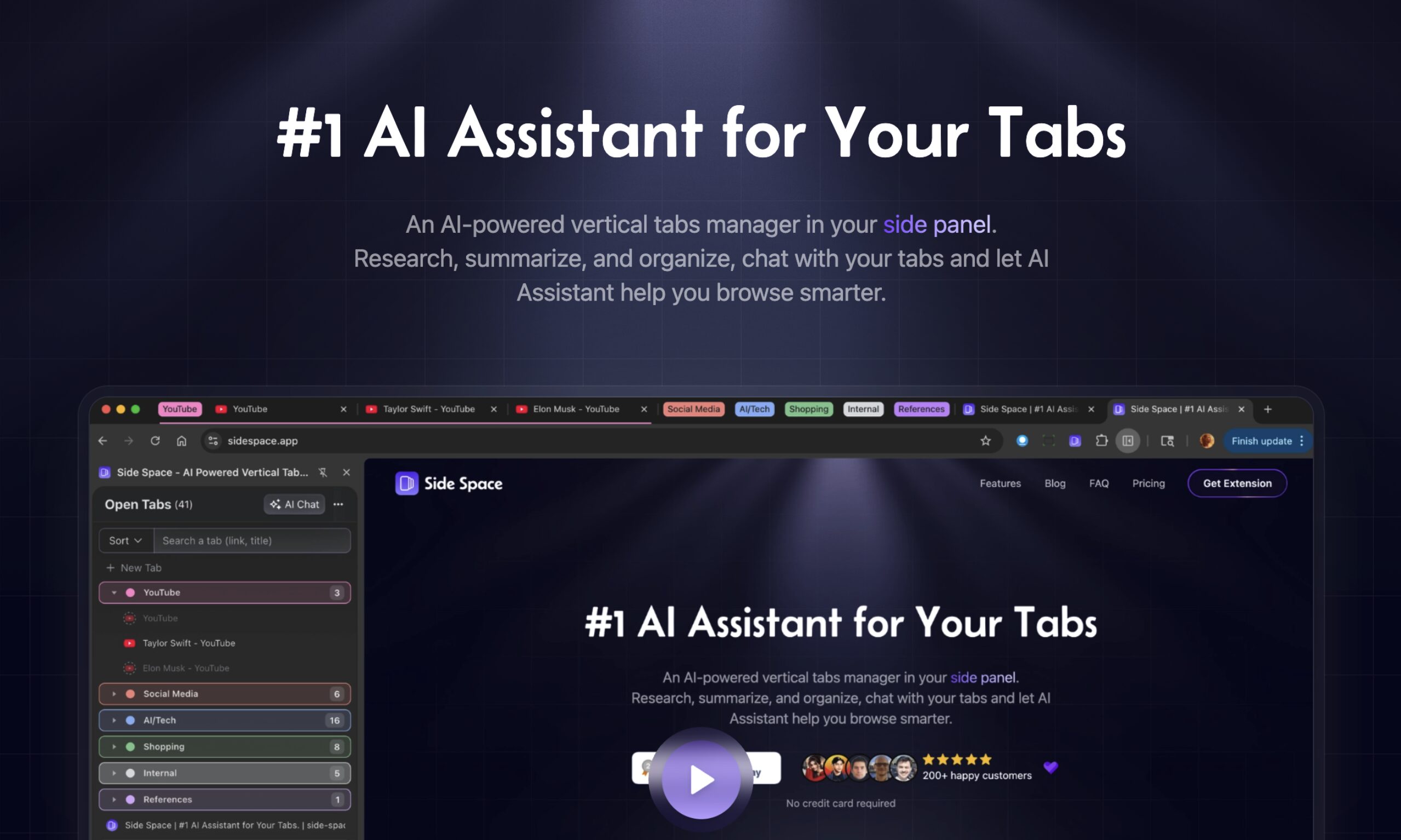
Browser tab overload has become a universal productivity challenge in modern digital work. Side Space addresses this problem as an AI-powered vertical tabs manager that transforms your browser’s side panel into an intelligent workspace. Beyond simple tab organization, the platform enables research, summarization, and direct conversation with your tabs through an embedded AI assistant called Side Copilot. The tool supports multiple browsers including Chrome, Edge, Brave, Vivaldi, Firefox, Zen, and Comet, making it accessible across different browsing preferences.
Key Features
Side Space combines vertical tab management with AI capabilities to enhance research and browsing workflows:
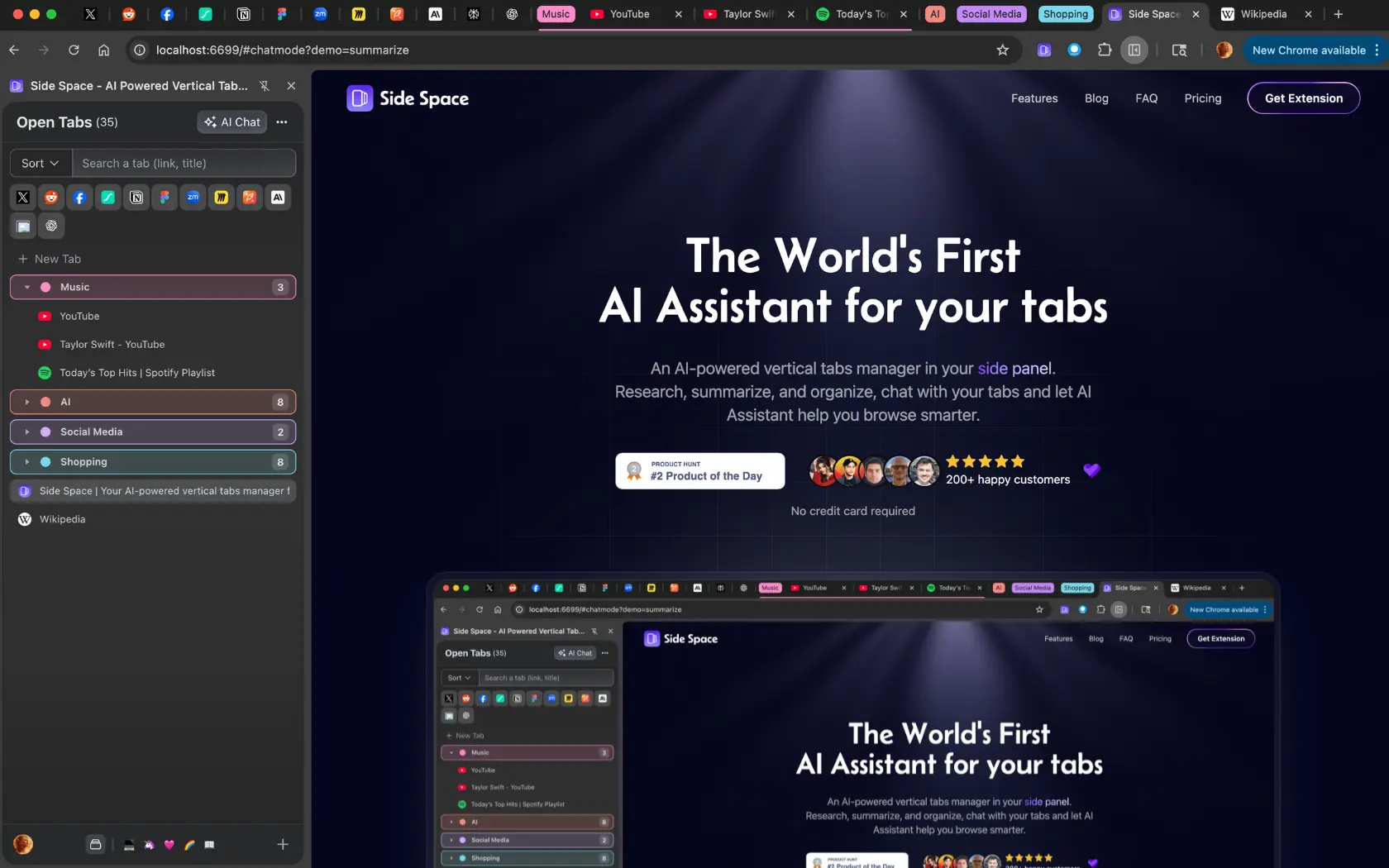
- AI Tab Grouping: Automatically clusters and organizes tabs by topic, context, or content using AI analysis. A single click on “Group By AI” sorts tabs into logical, color-coded groups like Research, Productivity, or Development.
- Vertical Tabs Panel: Repositions tabs from the horizontal bar to a vertical sidebar, providing a cleaner, scrollable list that improves navigation when managing many open pages.
- Side Copilot Chat Mode: Summarizes, extracts, and explains content from open pages. Ask questions about any tab’s content and receive contextual answers without navigating away from your current work.
- Side Copilot Agent Mode: Automates browser tasks including grouping tabs by rules, restoring closed windows, executing research commands, and performing workflow automation through natural language instructions.
- Cross-Browser Cloud Sync: Synchronizes saved spaces across devices with a single login, ensuring organized tabs remain accessible regardless of which browser or computer you use.
- Space Management: Create dedicated workspaces for different projects or contexts. Save, restore, and reorder tabs using drag-and-drop functionality within customizable themed spaces.
- Memory Optimization: Automatically suspends inactive tabs to reduce browser memory consumption, keeping the system responsive even with many open pages.
- Group Guardian: Automatically groups new tabs based on predefined URL patterns, maintaining organization without manual intervention.
- BYOK Support: Bring Your Own Key functionality allows users to connect their own AI model API keys for enhanced privacy and control over AI features.
How It Works
After installation, Side Space integrates a dedicated AI sidebar into the browser window. Open tabs immediately appear in a vertical list within the side panel. The extension offers multiple interaction modes:
- Save to Spaces: Click to save current tabs into themed spaces that sync to the cloud. Organize different projects or contexts into separate spaces for quick switching.
- AI Organization: Use the AI grouping feature to automatically sort open tabs by content and purpose. The system analyzes tab titles and URLs to create logical groupings.
- Chat and Automate: Open Side Copilot to ask questions about page content, generate summaries, or issue natural language commands to automate tab management tasks.
Use Cases
The platform serves various productivity needs across different user profiles:
- Research Sessions: Academics, students, and professionals can maintain organized source materials while using Side Copilot to summarize and synthesize information across multiple open pages.
- Content Summarization: Quickly extract key points from lengthy articles, documentation, or reports without reading every word. The AI provides concise summaries on demand.
- Multi-Project Management: Power users juggling multiple projects benefit from spaces that keep work, personal, and side project tabs completely separated and easily switchable.
- Information Retrieval: Instead of clicking through dozens of tabs to locate specific information, ask Side Copilot to find and surface relevant content from open pages.
- Browser Automation: Use Agent Mode to execute repetitive tasks like closing inactive tabs, grouping related pages, or organizing sessions through conversational commands.
Pros and Cons
Advantages
- Intelligent Organization: The combination of vertical layout and AI-powered grouping significantly reduces browser clutter and cognitive load when managing many tabs.
- Conversational AI Assistant: Side Copilot enables direct interaction with tab content through natural language, accelerating research and information synthesis.
- Multi-Browser Support: Works across Chrome, Edge, Brave, Vivaldi, Firefox, Zen, and Comet, providing flexibility regardless of browser preference.
- Cloud Synchronization: Spaces sync automatically across devices, ensuring consistent organization wherever you browse.
- Memory Efficiency: Tab suspension prevents resource-heavy pages from slowing down the browser.
Disadvantages
- Browser Extension Limitations: As an extension rather than a standalone application, functionality remains contained within the browser environment.
- Learning Curve for Agent Mode: Advanced automation features require familiarity with rule configuration and command syntax.
- Free Tier Restrictions: The free plan limits users to 5 spaces and 1,000 URLs for AI grouping, which may prove insufficient for heavy users.
How Does It Compare?
Side Space competes in an evolving landscape of tab management solutions, each with distinct approaches:
Workona focuses on project-based workspace organization with deep integration for cloud applications like Google Docs, Trello, and Slack. It excels at team collaboration and cross-device synchronization but lacks the AI-powered chat and summarization features that distinguish Side Space.
Toby emphasizes visual organization and team collaboration through collections and shared spaces. While effective for resource curation and team workflows, it does not offer AI-driven automatic grouping or conversational interfaces.
Dia Browser from The Browser Company represents a different approach entirely, building AI capabilities directly into a dedicated browser rather than an extension. Dia allows users to chat with tabs, reference multiple pages in conversations, and leverage browsing history for context. Users preferring a complete browser replacement with native AI integration may find Dia compelling.
Opera One with Aria Tab Commands integrates agentic AI directly into the browser, allowing natural language commands to manage tabs, create tab islands, and automate organization. This browser-native approach provides seamless AI integration but requires switching to Opera as the primary browser.
VertiTab offers AI smart grouping and comprehensive vertical tab management specifically designed for Chrome sidebars. It provides similar core functionality with features like tab snapshots and picture-in-picture support.
Sidebery for Firefox provides powerful tree-style tab organization with extensive customization options but without AI features. Users prioritizing manual control and hierarchical tab structures may prefer this open-source alternative.
Side Space distinguishes itself through the combination of multi-browser support, AI-powered organization, and the Side Copilot assistant that enables both passive summarization and active browser automation within an extension format.
Final Thoughts
Side Space 2.0 represents a meaningful advancement in browser tab management by embedding AI capabilities directly into the browsing workflow. The combination of vertical tab organization, intelligent grouping, and conversational AI through Side Copilot addresses the core challenges of information overload and tab chaos. Researchers, students, developers, and anyone managing complex browsing sessions will find practical value in the automated organization and summarization features. The free tier provides sufficient functionality to evaluate whether the AI-driven approach suits individual workflows, while the lifetime deal at \$39 offers accessible long-term access for users who commit to the platform.