Table of Contents
spacecake
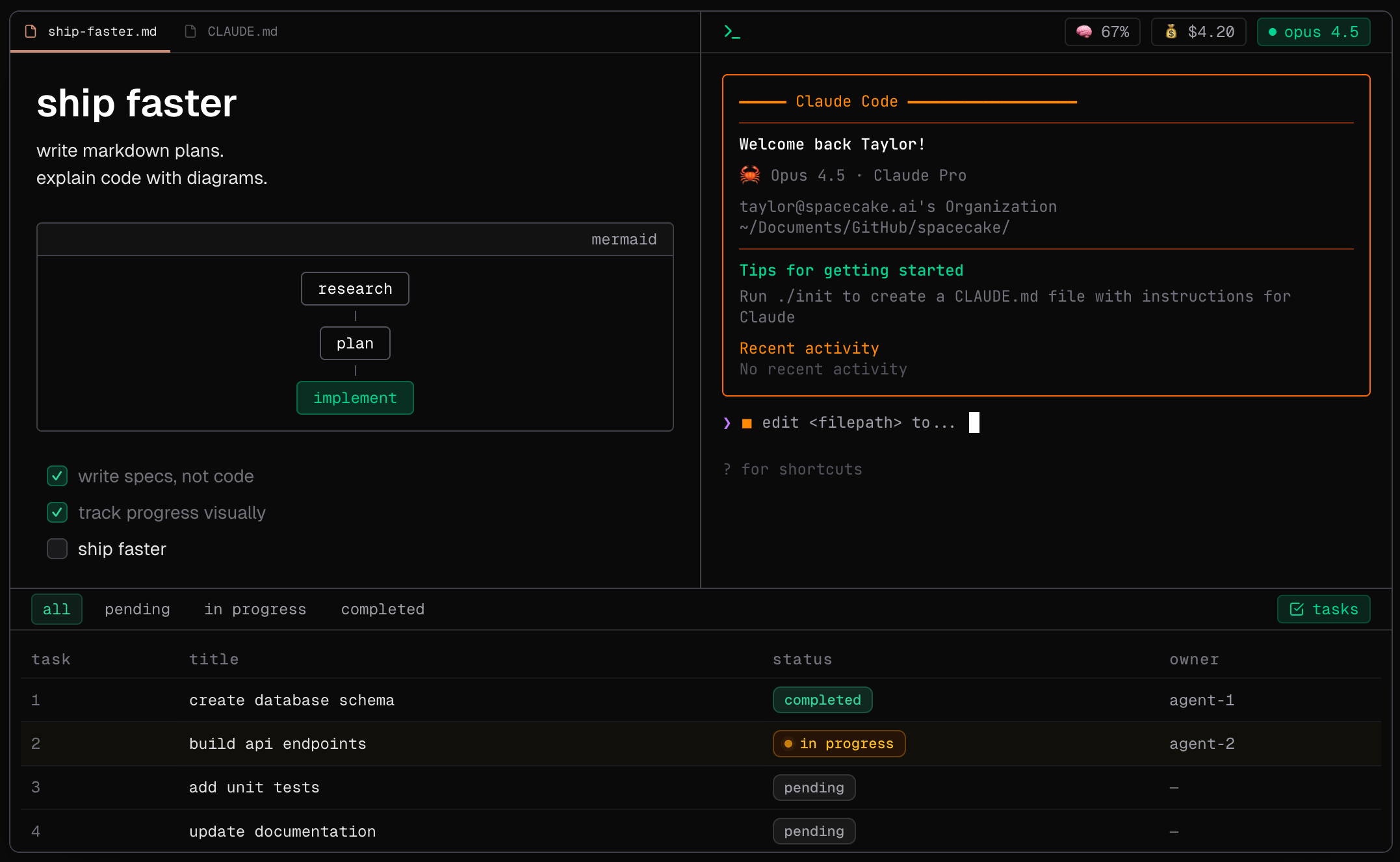
Terminals are great for running agents, but terrible for editing markdown specs. spacecake is an open-source desktop app designed to supercharge your workflow with Claude Code. It combines a Notion-style visual Markdown editor with an integrated Ghostty terminal, giving you a dedicated command center for agentic coding.
Key Features
- Visual Markdown Editor: A “Notion-style” WYSIWYG editor for writing specs, plans, and documentation without leaving the agent’s context.
- Integrated Ghostty Terminal: Runs Claude Code directly inside a high-performance terminal window, side-by-side with your specs.
- Real-Time Cost & Context Monitor: A persistent status bar tracks your context window usage (e.g., “🧠 67%”) and accumulating API costs (e.g., “💰 $4.20”) live, preventing bill shock.
- Agent Task Dashboard: A dedicated table view that syncs with Claude Code to show exactly what tasks the agent has queued, what is in progress, and what is completed.
- Rich Code Blocks: Powered by CodeMirror for syntax highlighting and easy editing of code snippets within your markdown plans.
How It Works
Instead of tab-switching between a terminal window (running Claude) and a separate notes app (writing prompts/specs), users launch spacecake to do both in one interface. You write a detailed “Spec.md” in the visual editor, then run claude in the adjacent terminal pane to execute the plan. As Claude works, spacecake intercepts the agent’s internal state to populate the Task Panel, giving you a structured view of the agent’s “To-Do List” rather than just a streaming wall of text.
Use Cases
- Spec-Driven Development: Writing comprehensive “Product Requirement Documents” (PRDs) in Markdown and having Claude implement them immediately in the same window.
- Cost-Aware Coding: keeping a close eye on token spend during long, complex refactoring sessions with expensive models (like Claude 3.7 Opus).
- Agent Monitoring: debugging “stuck” agents by checking the Task Panel to see which specific step is hanging.
- Documentation First: Writing technical docs and having the agent verify the code against them simultaneously.
Pros and Cons
- Pros: Open-Source and free; Solves the “Context Blindness” of terminal CLIs by visualizing usage stats; Visual Task Tracking is superior to scrolling through terminal logs; Integrated Workflow reduces context switching; Built on the modern, fast Ghostty terminal.
- Cons: Claude Code specific (value is limited if you don’t use Anthropic’s CLI tool); Desktop app experience is newer and less mature than VS Code; “WYSIWYG” markdown might frustrate power users who prefer raw text.
Pricing
- Free: Open-source software (MIT License). You only pay for your own API usage via Anthropic.
How Does It Compare?
spacecake is a specialized “Agent Wrapper” rather than a full IDE. Here is how it stacks up:
- Standard Terminal (iTerm / Warp) + Claude Code: The default way. It works, but it’s “blind.” You don’t know your context usage or cost until it’s too late, and reading markdown in a terminal is painful. spacecake adds the GUI layer (Cost, Context, Tasks) that the CLI is missing.
- Cursor / Windsurf: These are full AI Code Editors (IDEs). They are powerful but replace your entire editor (VS Code). spacecake is lighter—it’s meant for the Agentic workflow of “Planning & Executing,” sitting alongside your IDE rather than replacing it.
- Trae: A new adaptive AI IDE. Like Cursor, it’s a heavy, all-in-one tool. spacecake is for the developer who prefers the Command Line (CLI) workflow but wants better visibility tools.
- Obsidian / Notion: Great for writing specs, but they don’t run code. spacecake brings that “Notion” writing experience directly to where the code executes.
Final Thoughts
spacecake is a love letter to the “Claude Code” CLI. As more developers shift from “Autocomplete” (Copilot) to “Autonomous Agents” (Claude Code), the terminal has become the new center of gravity. spacecake acknowledges this shift but fixes the terminal’s biggest UX flaws: lack of visibility and poor text editing. It turns the “Black Box” of an agent run into a transparent, manageable cockpit. If you are a heavy user of Anthropic’s CLI tools, this is an essential utility to keep your costs down and your sanity up.