Table of Contents
Translator
Translator is an open-source desktop application designed to democratize video localization by combining best-in-class AI models into a single offline-capable workflow. Launched in January 2026, it addresses the high cost barrier of commercial video translation services by allowing users to bring their own API keys and run the entire pipeline locally. The tool is particularly valuable for content creators, educators, and small businesses who need professional-quality multilingual videos without recurring SaaS fees.
Core Features
- Integrated YouTube Downloader: Built-in functionality to fetch videos directly from YouTube URLs, eliminating the need for separate download tools or browser extensions.
- Whisper-Powered Transcription: Leverages OpenAI’s Whisper model for industry-leading speech recognition accuracy across diverse accents and audio quality levels.
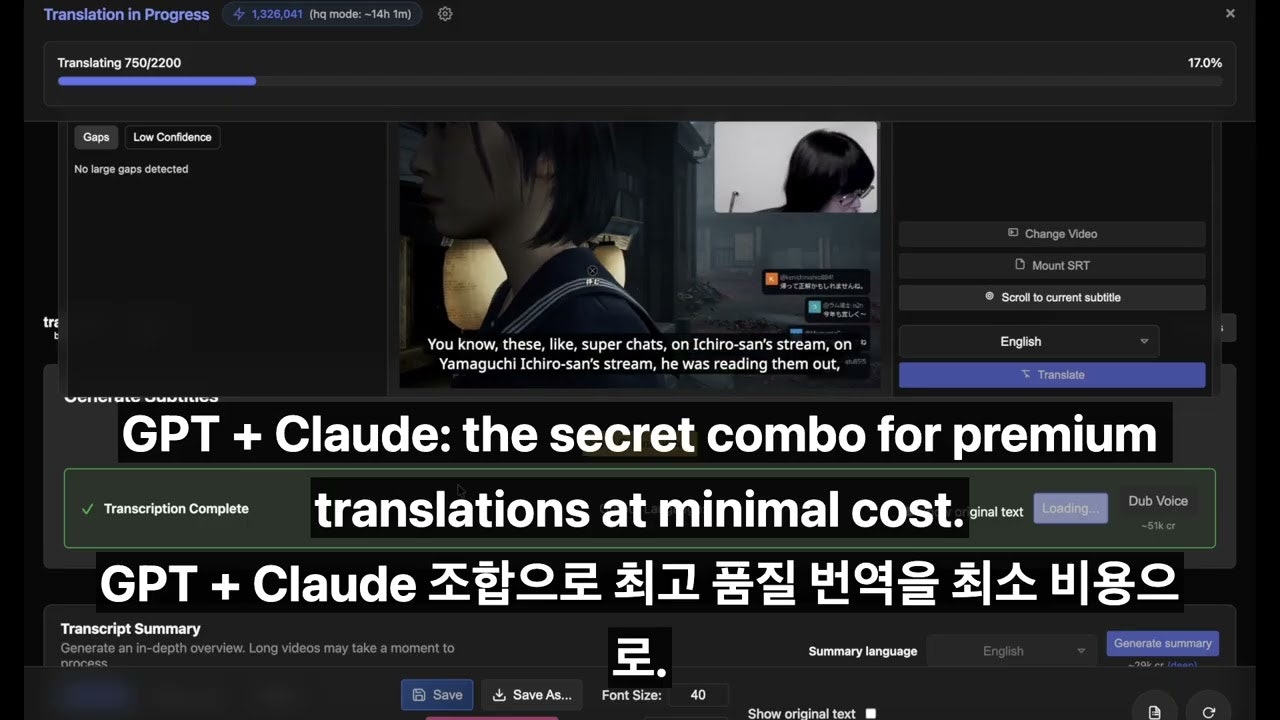
- Dual-LLM Translation Pipeline: Uses GPT models for the initial translation pass, then employs Claude to review and refine for cultural nuance and grammatical accuracy, reducing translation errors significantly.
- AI Voice Synthesis: Generates natural-sounding dubbed audio in the target language, with support for multiple voice profiles and emotional tones.
- Visual Subtitle Editor: Includes a timeline-based editor for fine-tuning subtitle timing, formatting, and styling before final export.
- Local Processing Option: Can run entirely on-device for users concerned about data privacy or working with sensitive content.
How It Works
Users begin by pasting a YouTube URL or uploading a local video file. The app downloads and extracts the audio track, which Whisper then transcribes into text with timestamps. This transcript is sent to GPT for translation into the target language, and Claude performs a second-pass review to catch contextual errors. The polished translation is then synthesized into audio using AI voice models, and the app automatically syncs the new audio track with the original video timing.
Best Use Cases
- Educational Content Localization: Teachers and course creators translating lecture videos into multiple languages to reach international students without hiring professional dubbing studios.
- YouTube Creator Expansion: Channels looking to publish the same content in Spanish, Hindi, or Japanese to tap into new viewer demographics.
- Corporate Training Materials: Companies needing to translate HR onboarding videos or compliance training across global offices while maintaining brand voice.
- Documentary Subtitling: Independent filmmakers creating multilingual subtitle tracks for festival submissions or streaming distribution.
Pros and Cons
- Pros: Completely free software with no subscription lock-in; open-source codebase allows for community improvements and customization; privacy-first design with local processing; dual-LLM approach significantly improves translation quality over single-model systems.
- Cons: Requires users to manage their own API keys and understand usage costs; desktop-only (no mobile or web version); setup complexity higher than plug-and-play SaaS tools; final quality depends on user-configured model choices.
Pricing
Free (Open Source with API Costs): The application itself is free to download and use. However, users must supply their own API keys for OpenAI (Whisper, GPT), Anthropic (Claude), and voice synthesis services. Typical costs for a 10-minute video range from $0.50 to $3.00 depending on model selections, making it far cheaper than subscription services for occasional use.
How Does It Compare?
- Rask AI: A premium SaaS platform ($60-$200/month) offering similar AI dubbing and translation. Rask is faster and more polished out of the box, but Translator is drastically more cost-effective for users who only process a few videos monthly.
- HeyGen Video Translate: Focuses heavily on avatar-based video creation with translation as a secondary feature. HeyGen excels at creating synthetic presenters but lacks Translator’s dual-LLM quality review workflow for pure translation.
- Kapwing: A browser-based video editor with AI translation features. Kapwing is more accessible for beginners but operates entirely in the cloud, raising privacy concerns for sensitive content.
- ElevenLabs Dubbing: Specialized in voice cloning and dubbing, with extremely realistic voice synthesis. However, it doesn’t handle the full pipeline (download, transcription, translation) like Translator does.
- pyVideoTrans: Another open-source desktop tool for video translation. While similar in concept, Translator’s dual-LLM quality review (GPT + Claude) is a key differentiator for accuracy.
Final Thoughts
Translator represents a compelling middle ground between expensive commercial services and DIY manual workflows. For users comfortable with technical setup and API key management, it offers a transparent, customizable, and privacy-respecting approach to video localization. While it may not match the one-click simplicity of Rask AI or HeyGen, its open-source nature ensures that users retain full control over their content and costs, making it ideal for budget-conscious creators who prioritize quality and privacy.