Table of Contents
Overview
Managing digital information across countless folders, applications, and files creates friction in daily workflows. Traditional file search requires remembering exact names, locations, or keywords, often leading to frustrating hunt-and-peck sessions through nested directory structures. Vector introduces a fundamentally different approach to macOS search by leveraging on-device machine learning to understand natural language queries and semantic meaning rather than relying on exact keyword matches.
Built as a Spotlight alternative for Apple Silicon Macs, Vector brings lightning-fast, privacy-focused intelligent search directly to your desktop. The tool prioritizes workflow efficiency by making information retrieval effortless while ensuring all processing happens locally on your machine without cloud dependencies. This eliminates the privacy concerns inherent in cloud-based search solutions while delivering near-instantaneous results through optimized local processing.
Key Features
Vector delivers comprehensive search capabilities through advanced local machine learning and intelligent indexing:
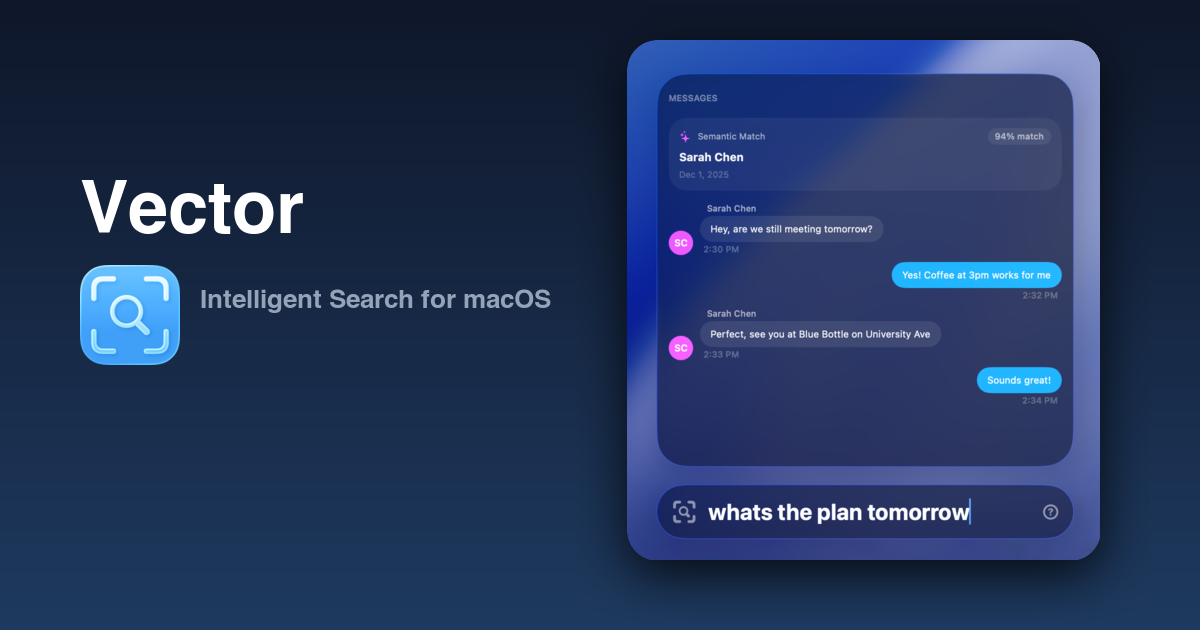
Natural Language Search: Query your Mac conversationally using phrases like “that presentation from last week’s meeting” or “When was Joseph planning on visiting?” rather than rigid keywords. The semantic understanding goes beyond simple text matching to interpret intent and context, enabling discovery of relevant content even when you cannot recall precise filenames or specific terms. The system understands entity recognition, distinguishing between a person’s name triggering contact results versus dictionary definitions.
Complete On-Device Processing: All data analysis, indexing, and machine learning inference occur locally on your Mac without any cloud connectivity requirements. Your files, messages, and personal information never leave your device, ensuring maximum privacy and security. The embedding models and routing intelligence operate entirely through the Neural Engine and local CPU, eliminating concerns about data exposure to third-party services or cloud providers.
Comprehensive Multi-Source Indexing: Vector intelligently indexes applications for instant launching, documents and files across your filesystem, iMessage conversation history for semantic search, clipboard history for quick access to previously copied content, and system utilities including weather, maps, Wikipedia, contacts, and calendar. This unified interface eliminates the need to remember which tool or location contains the information you seek.
Optimized Low-Latency Performance: Experience near-instantaneous search results through a custom-built indexing engine specifically designed for speed. Vector delivers significantly faster and more reliable results compared to Spotlight, which can suffer from indexing delays and inconsistent performance. The deterministic app-first search behavior ensures application results remain stable and consistent while typing, avoiding the frustrating result-shifting common in other launchers.
Dual Machine Learning Model Architecture: Vector employs two specialized models working in tandem. The routing model analyzes your query to determine which data sources to activate, ensuring relevant results without unnecessary processing overhead. The embedding model handles semantic intelligent search across iMessage conversations and file contents, understanding meaning beyond literal keyword matching. Both models are compact and optimized for Apple Silicon’s Neural Engine.
Ambient Contextual Intelligence: The ambient mode intelligently surfaces information based on time of day and inferred context. Calendar events appear prominently in the morning, weather forecasts display before you leave for the day, and map information surfaces when you’re heading out. This proactive intelligence adapts to your patterns and reduces the need for explicit queries.
Integrated Productivity Utilities: Access essential tools directly through the search interface including real-time weather forecasts, address lookup and mapping, Wikipedia knowledge queries, contact information retrieval, calendar event viewing, calculation with currency conversions, and a quick-access emoji picker. These integrated capabilities eliminate context switching to dedicated applications for routine tasks.
Built-in Clipboard Management: Never lose previously copied text, images, file paths, or color codes with the integrated clipboard history system. A dedicated keyboard shortcut provides instant access to your clipboard timeline, with all data stored securely on your local device rather than cloud services. This feature alone can justify Vector for users who frequently reference previously copied information.
How It Works
Vector utilizes sophisticated yet lightweight machine learning models running directly on Apple Silicon Macs, specifically designed to leverage the Neural Engine for efficient processing. The system meticulously indexes data stored on your local system through an asynchronous background process that monitors file changes and new content.
During initial setup, Vector performs a complete indexing pass across your enabled data sources. For semantic search capabilities, the embedding model processes text content to generate vector representations capturing semantic meaning. These embeddings enable similarity-based retrieval where conceptually related content ranks highly even without shared keywords. The indexing process can consume up to 800 MB of memory during active indexing but drops below 100 MB during idle operation after completion.
When you input a search query, the routing model first analyzes your text to determine query intent and identify which data sources are most relevant. This multi-stage pipeline ensures only applicable indexes are searched, maintaining responsiveness even as the indexed corpus grows. For semantic queries about files or messages, the embedding model encodes your query into the same vector space as the indexed content, enabling distance-based similarity matching.
Vector offers two embedding model options. The default BGE-Small model occupies only 64 MB and provides sufficient semantic understanding for most contextual searches across local files and messages. Users requiring enhanced performance, additional language support, or more sophisticated semantic matching can download the BGE-M3 model at 1.1 GB, which delivers more accurate results and broader multilingual capabilities.
Unlike cloud-based solutions that analyze query semantics remotely, Vector’s semantic analysis happens entirely through on-device inference. The macOS 26 Natural Language framework and Accelerate numerical computation framework provide the foundation for this local processing, ensuring no query text or file content transmits across networks.
Use Cases
Vector addresses specific productivity scenarios where traditional search falls short:
Semantic File Discovery: Locate documents based on conceptual content rather than exact filenames. Instead of remembering whether you named that tax document “2024_tax_return.pdf” or “taxes_2024_final.pdf,” simply search “that PDF about taxes” and Vector’s semantic understanding retrieves relevant matches. This dramatically reduces the cognitive load of file organization and retrieval.
Rapid Application Launching: Access your most-used applications with unparalleled speed through deterministic, stable search results. Vector’s app-first search priority ensures application matches appear consistently without shifting as you type, eliminating the frustration of accidentally selecting wrong items when results reorder mid-typing. Keyboard shortcuts remain muscle memory.
Message History Recovery: Retrieve lost conversations or understand context through conversational search of your iMessage history. Queries like “conversation about the project deadline” or “messages from Sarah about dinner plans” surface relevant threads based on semantic content rather than requiring precise keyword recall. This contextual retrieval proves invaluable when you remember the topic but not the exact wording.
Clipboard Timeline Access: Recover previously copied content through instant clipboard history search. Whether you need to find a URL from yesterday, a code snippet from last week, or a color hex value from this morning, Vector’s clipboard manager maintains a searchable timeline with everything stored securely on your device.
Integrated Utility Access: Eliminate application switching for routine tasks by accessing weather forecasts, address mapping, contact information, calendar events, calculations, and reference information directly through Vector’s unified interface. This reduces workflow interruption and maintains focus on primary tasks.
Pros and Cons
Advantages
Uncompromising Privacy Through Local Processing: Vector’s complete on-device architecture ensures your searches, files, messages, and all indexed content remain exclusively on your Mac. No data transmits to cloud services, eliminating risks of data breaches, unauthorized access, or third-party data collection. This local-first approach addresses the fundamental privacy concerns many users have with cloud-dependent alternatives.
One-Time Purchase Model: Vector employs a straightforward “pay what you want” pricing structure on Gumroad, providing lifetime access without recurring subscription fees. This contrasts favorably with competitor subscription models that create ongoing costs. The developer explicitly states the goal is making great tools accessible to all, allowing users to choose their payment level based on value received and personal circumstances.
Performance and Speed Advantages: Multiple independent reviews report Vector delivers faster search results than native Spotlight, particularly for file searches. The custom indexing engine and optimized Neural Engine utilization provide near-instant responsiveness. The deterministic search behavior prevents the frustrating result-shifting that plagues other launchers, maintaining productivity flow.
Comprehensive Feature Integration: Vector consolidates capabilities typically requiring multiple separate tools into a unified interface. The combination of app launching, semantic file search, message search, clipboard management, emoji picker, and integrated utilities reduces tool sprawl and simplifies workflows. Users can accomplish more without juggling multiple applications.
Clean, Native Design Language: Vector implements the macOS Tahoe design aesthetic including Liquid Glass visual effects and smooth animations, feeling like an Apple-designed tool rather than third-party software. The interface remains minimalist and distraction-free, with extensive customization options for panel positioning and data source configuration to match individual workflows.
Disadvantages
Apple Silicon and macOS Tahoe Exclusivity: Vector requires macOS 26.0 or later and Apple Silicon Macs, excluding Intel-based Macs and users on earlier operating system versions. This hardware requirement limits the potential user base to those with M1 or newer processors who have upgraded to the latest macOS release. Users with older equipment cannot benefit from Vector’s capabilities.
Paid Application Without Free Trial: Unlike competitors like Raycast offering freemium models, Vector requires payment at launch without a publicly available free trial option. While the “pay what you want” model provides flexibility, users must purchase before fully evaluating fit for their workflows. This creates friction compared to alternatives where users can extensively test before committing financially.
Early Development Stage: Vector launched in late 2024, making it a relatively new entrant without long-term operational history or extensive community ecosystem. Early-stage products may contain undiscovered bugs, lack certain features, or undergo significant changes as development continues. Users should expect ongoing refinement rather than a completely mature, stable experience.
Semantic Search Limitations: Independent reviewers note that while Vector’s semantic search capabilities are functional, performance does not universally exceed Spotlight for all query types. The default BGE-Small model provides basic semantic understanding but may miss nuances, and even the larger BGE-M3 model shows room for improvement. These limitations reflect the inherent challenges of natural language understanding rather than implementation deficiencies.
Feature Overlap with Native Tools: For casual users rarely venturing beyond basic search functionality, Vector’s advantages over native Spotlight may feel marginal. Some integrated utilities like weather and maps may not match the depth or accuracy of dedicated native applications. Users with simple search needs may find the added tool unnecessary.
Memory Requirements During Indexing: Enabling semantic search triggers initial indexing that can consume up to 800 MB of memory temporarily. While this drops to under 100 MB at idle, the indexing process may impact performance on machines with limited RAM or heavy concurrent workloads. Users should ensure adequate available memory before enabling full semantic capabilities.
How Does It Compare?
The macOS productivity launcher landscape in late 2025 features diverse options serving different user needs and philosophies. Understanding where Vector fits requires examining established players and emerging alternatives across multiple dimensions.
Established Productivity Launchers
Raycast
Raycast represents the current standard for extensible productivity launchers on macOS, having evolved from a Spotlight alternative into a comprehensive productivity platform. The application offers app launching, file search, system commands, and window management as baseline capabilities, but differentiates through its vast extension ecosystem exceeding 1,000 community-contributed plugins.
Core free features include calculator with natural language support, clipboard history management up to 30 days, snippet expansion for frequently typed text, window management commands for arrangement and resizing, and quick links for streamlined navigation. The deterministic search engine ensures stable results without mid-typing result shuffling.
Raycast Pro, available via subscription at approximately 8 dollars monthly, unlocks AI integration with ChatGPT and GPT-4o for summarization, translation, and content generation directly within the interface, unlimited clipboard history beyond the 30-day free tier, cloud synchronization of settings and configurations across multiple Macs, custom themes for personalized appearance, and advanced translator features.
The extension ecosystem represents Raycast’s primary differentiator. Users can quickly install plugins for GitHub integration, Notion connectivity, Slack commands, Spotify control, two-factor authentication code generation, timers and productivity tracking, and thousands of specialized utilities. These extensions transform Raycast from a launcher into a unified command center for digital workflows.
September 2024 brought a significant expansion announcement: Raycast for Windows launching in 2025, with a beta program beginning in mid-2025. The Windows version aims for feature parity with macOS, though full Pro capabilities including cloud sync and notes remain on the roadmap during the beta period.
Compared to Vector, Raycast offers substantially broader extensibility and third-party integration capabilities through its plugin architecture. The freemium model allows extensive evaluation before payment, contrasting with Vector’s upfront purchase. However, Raycast’s subscription model for Pro features creates ongoing costs, and its broader feature set may feel like overkill for users seeking focused, privacy-centric search. Vector’s complete on-device processing without any cloud dependencies provides stronger privacy guarantees than Raycast’s cloud sync and AI features.
Alfred
Alfred stands as the veteran productivity launcher for macOS with over a decade of development and refinement. The application employs a one-time purchase model for its Powerpack priced at approximately 29 GBP (40 USD), providing lifetime access without subscriptions. A free version offers core functionality including app launching, file search, web search configuration, and basic system commands.
The Powerpack unlocks advanced capabilities including comprehensive clipboard history storing text, images, file paths, and color codes, snippet expansion for frequently typed content with placeholder variables, workflow automation linking hotkeys, keywords, and actions without coding, custom web searches directly from the interface, file actions and navigation commands, contact integration for rapid lookups, music player control, system commands for sleep, trash, and screensaver, and terminal integration for command line access.
Alfred’s workflow system represents its flagship advanced feature. Users can chain together triggers, inputs, actions, and outputs to create sophisticated automations. The Alfred Gallery hosts thousands of community-created workflows for specialized tasks like temporary email generation, Homebrew package management, process termination, and do-not-disturb scheduling. While workflow creation requires no programming, complex workflows demand time investment to master.
The application emphasizes customization and control, allowing extensive configuration of search scope, appearance, keyboard shortcuts, and behavior. Users preferring granular control over their productivity tools find Alfred’s flexibility compelling, though this complexity creates a steeper learning curve compared to simpler alternatives.
January 2025 coverage continued positioning Alfred as the premier productivity choice for macOS power users willing to invest in mastering advanced features. The lack of subscription model appeals to users preferring one-time purchases, and the decade-plus development history provides confidence in stability and longevity.
Compared to Vector, Alfred offers significantly deeper automation capabilities through workflows and broader customization options. The one-time purchase aligns with Vector’s pricing philosophy, though Alfred’s Powerpack costs more than Vector’s minimum “pay what you want” threshold. Vector’s semantic search through local ML models and exclusive focus on privacy-first on-device processing differentiates it from Alfred’s more traditional keyword-based approach. Users choosing between them should consider whether they prioritize automation depth (favoring Alfred) or semantic understanding with absolute privacy (favoring Vector).
Apple Spotlight
Spotlight serves as macOS’s native search functionality, deeply integrated into the operating system and available without additional installation or cost. The tool indexes applications, documents, system preferences, contacts, calendar events, emails, and web search suggestions, accessible via Command+Space by default.
Spotlight’s strengths lie in its zero-configuration operation, universal availability across all Macs, tight OS integration providing privileged access to system information, and completely free access without purchases or subscriptions. The interface remains clean and unobtrusive, reflecting Apple’s design sensibilities.
However, Spotlight suffers from well-documented limitations. Indexing reliability proves inconsistent, with users frequently reporting delayed or incomplete results. The search algorithm relies primarily on keyword matching with limited semantic understanding, requiring users to remember specific terms rather than describing concepts. Result ordering can shift as you type, causing accidental selections. Privacy-conscious users note that Spotlight sends some queries to Apple’s servers for web suggestions and Siri knowledge, though this can be disabled in system settings.
Performance varies significantly based on system load and index status. Many users experience frustratingly slow results, particularly after system updates that trigger re-indexing. The inability to customize search scope, appearance, or behavior limits adaptation to individual workflows.
Compared to Vector, Spotlight provides broader out-of-box functionality including email and system preference searches that Vector does not currently index. However, Vector delivers superior performance through custom indexing, genuine semantic search capabilities via ML models, complete privacy without any external queries, deterministic search behavior preventing result shifting, and extensive customization options. Users satisfied with Spotlight’s basic functionality and willing to accept its limitations may not require Vector’s capabilities, but those frustrated by Spotlight’s inconsistency or desiring semantic search find Vector a meaningful upgrade.
Alternative Productivity Launchers
LaunchBar
LaunchBar represents a mature third-party launcher with strong emphasis on file management and automation. The application features instant search across applications, files, and bookmarks, instant send functionality allowing file operations through simple keyboard commands, snippet management and expansion, clipboard history, calculator and dictionary integration, and extensive customization options.
LaunchBar differentiates through its innovative instant send feature, enabling users to chain actions like “find file, then send to application” through fluid keyboard interactions. The application learns from usage patterns to improve result ranking over time.
The one-time purchase model aligns with Alfred and Vector, though pricing typically exceeds both. Users valuing sophisticated file operations and workflow automation find LaunchBar compelling, though its interface feels less modern than newer alternatives and the learning curve remains steep.
Compared to Vector, LaunchBar offers deeper file management capabilities but lacks native semantic search through ML models. Vector’s modern design language and on-device AI differentiate it from LaunchBar’s more traditional approach.
Quicksilver
Quicksilver stands as the pioneering open-source productivity launcher for macOS, predating both Alfred and Raycast. The application remains free and open-source with extensive plugin support enabling customization and feature extension.
Core capabilities include instant application, file, and document launching with fuzzy matching that improves through learned usage patterns, command chaining allowing complex multi-step operations, comprehensive plugin architecture covering system control, clipboard management, and third-party integration, and deep customization through configuration options.
The open-source nature appeals to technically inclined users preferring transparency and community-driven development. However, Quicksilver’s development pace has slowed compared to commercial alternatives, and the interface feels dated by modern standards. The learning curve remains exceptionally steep, requiring significant investment to master advanced features.
Compared to Vector, Quicksilver provides greater extensibility through plugins but requires more technical expertise to configure and maintain. Vector’s modern interface, semantic search capabilities, and zero-configuration approach make it more accessible to mainstream users, while Quicksilver serves the open-source enthusiast community willing to invest time in customization.
HoudahSpot
HoudahSpot represents a specialized alternative enhancing rather than replacing Spotlight. The application provides advanced Spotlight search capabilities with sophisticated filtering, saved searches, custom criteria combinations, and result organization options. The developer remains active with ongoing updates and engagement.
HoudahSpot targets users satisfied with Spotlight’s indexing but frustrated by its limited query capabilities. The tool enables complex searches difficult or impossible through Spotlight’s basic interface, particularly valuable for power users working with large file collections requiring precise filtering.
Compared to Vector, HoudahSpot serves a different use case. HoudahSpot enhances Spotlight’s existing index with more powerful query tools, while Vector replaces the entire search experience with semantic understanding and unified interface. Users needing advanced Spotlight filtering may complement Vector with HoudahSpot rather than choosing between them.
Monarch Launcher
Monarch Launcher positions itself as a lightweight, privacy-focused alternative emphasizing minimalism. Key features include no tracking or telemetry, ad-free experience, no registration requirements, dark mode support, and command palette interface.
The lightweight nature and privacy focus align philosophically with Vector, though Monarch offers simpler functionality without semantic search capabilities. The commercial paid model without free tier limits trial opportunities.
Compared to Vector, Monarch provides simpler, lighter functionality suitable for users desiring basic launching without advanced features. Vector’s semantic search and integrated utilities offer substantially more capability at the cost of slightly higher resource usage.
Fenn
Fenn represents a specialized semantic file search tool for macOS using vector-based search with local processing. Reddit discussions from mid-2025 mention Fenn as an option for users seeking semantic file discovery, though the subscription model draws criticism from users preferring one-time purchases.
Limited public information exists about Fenn’s current status, feature set, or pricing, making direct comparison difficult. The vector-based semantic search approach conceptually aligns with Vector’s ML-powered semantic capabilities, though implementation details and performance remain unclear.
Vector’s Competitive Position
Vector occupies a focused niche addressing users prioritizing privacy-first semantic search with modern design language and reasonable pricing. The platform’s positioning reflects several strategic choices distinguishing it from established alternatives.
Against extensibility-focused launchers like Raycast and workflow-heavy tools like Alfred, Vector differentiates through exclusive focus on search quality rather than breadth of integrations. The semantic understanding via on-device ML models provides capabilities neither competitor offers natively. Users seeking plugin ecosystems and extensive third-party integrations benefit more from Raycast or Alfred, while those prioritizing intelligent search with absolute privacy find Vector’s approach more aligned.
Compared to native Spotlight, Vector delivers measurably superior performance, genuine semantic search, complete privacy without external queries, and deterministic behavior preventing result shifting. The modest one-time cost proves acceptable for users frustrated by Spotlight’s limitations, though casual users satisfied with basic functionality may not perceive sufficient value to justify purchasing an alternative.
Against other privacy-focused alternatives like Monarch Launcher, Vector provides substantially more sophisticated capabilities through ML-powered semantic search and integrated utilities, justifying higher resource usage and cost. Against advanced Spotlight enhancers like HoudahSpot, Vector provides a fundamentally different experience through unified search interface rather than query filtering enhancements.
Vector’s early development stage means limited community ecosystem, fewer third-party integrations, and potential undiscovered issues compared to decade-old alternatives like Alfred or Quicksilver. However, this also reflects modern architecture leveraging contemporary macOS capabilities like Neural Engine optimization and macOS 26 design language that older tools cannot easily adopt.
The platform particularly suits several user profiles: those frustrated by Spotlight’s inconsistency and poor semantic understanding, privacy-conscious users uncomfortable with cloud-dependent search, owners of recent Apple Silicon Macs running current macOS who can leverage optimizations, users preferring semantic conversational search over keyword matching, and individuals valuing clean, native-feeling design integrated into macOS aesthetics. Power users requiring extensive automation, third-party integrations, or complex workflows may find Vector insufficient as their sole productivity tool, better served by Raycast or Alfred either alone or complementing Vector.
Final Thoughts
Vector represents a thoughtful, focused solution addressing genuine pain points in macOS search and productivity workflows. The platform successfully delivers on its core promise: intelligent, privacy-preserving search that understands natural language queries and provides near-instant results through optimized local processing.
The semantic search capabilities enabled by on-device machine learning models provide meaningful advantages over traditional keyword-based approaches. Users can discover content based on conceptual understanding rather than exact term recall, reducing cognitive load and friction in information retrieval. While the implementation does not achieve perfection, with reviewers noting room for improvement particularly in the default BGE-Small model, it delivers practical value for everyday searches across files and messages.
Vector’s unwavering commitment to privacy through exclusive on-device processing addresses fundamental concerns many users have with cloud-dependent alternatives. In an era where productivity tools increasingly rely on cloud services, Vector’s local-first architecture ensures your searches, files, and personal information never leave your Mac. This represents a genuine competitive advantage for privacy-conscious users unwilling to compromise data security for convenience.
The one-time purchase model with flexible “pay what you want” pricing creates accessibility while avoiding subscription fatigue. Users gain lifetime access without recurring costs, contrasting favorably with subscription-dependent competitors that accumulate expenses over years of use. This pricing philosophy demonstrates developer commitment to tool accessibility over revenue maximization.
Performance improvements over native Spotlight, particularly faster file search and deterministic result stability, eliminate frustrations that drive users to seek alternatives in the first place. The integrated utilities including clipboard management, emoji picker, and contextual ambient mode consolidate functionality typically requiring separate tools, reducing workflow context switching.
However, prospective users should carefully evaluate Vector against their specific needs and alternatives. The requirement for Apple Silicon Macs running macOS 26 or later excludes significant user segments with older hardware or those delaying OS upgrades. The lack of free trial or freemium tier requires purchasing before full evaluation, creating friction compared to Raycast’s try-before-buy approach.
Early development stage means limited operational history, smaller community compared to established alternatives, and potential for undiscovered issues or significant changes as the tool matures. Users requiring mission-critical stability may prefer decade-old alternatives with proven track records despite less sophisticated features.
Feature overlap with native Spotlight may make value proposition less compelling for casual users satisfied with basic search. Those rarely venturing beyond simple application launching and file finding by name may not perceive sufficient benefit to justify purchasing an alternative tool. Similarly, users requiring extensive automation, workflow customization, or third-party integrations find Raycast or Alfred more suitable despite Vector’s semantic advantages.
For macOS users frustrated by Spotlight’s limitations, prioritizing privacy, and seeking intelligent search that understands conversational queries, Vector delivers meaningful value. The tool represents genuine innovation in applying on-device machine learning to desktop productivity, offering a glimpse into the future where semantic understanding becomes standard rather than exceptional. Vector succeeds as a focused solution to specific problems rather than attempting to become an all-encompassing productivity platform, a strategic choice that serves its target audience well while limiting broader appeal.
Users should consider Vector alongside alternatives including trying Raycast’s free tier for extensibility and plugin ecosystem, evaluating Alfred if workflow automation and deep customization matter more than semantic search, reconsidering whether improved Spotlight configuration might suffice for basic needs, or waiting for Vector to mature if early-stage risk concerns outweigh immediate frustrations with current tools. The optimal choice depends on individual priorities regarding privacy, search intelligence, automation depth, and willingness to invest in learning advanced features.
For those who value what Vector offers, the tool represents a worthwhile addition to the macOS productivity toolkit, either as a Spotlight replacement or complement to other specialized tools in a comprehensive workflow system.