Table of Contents
Overview
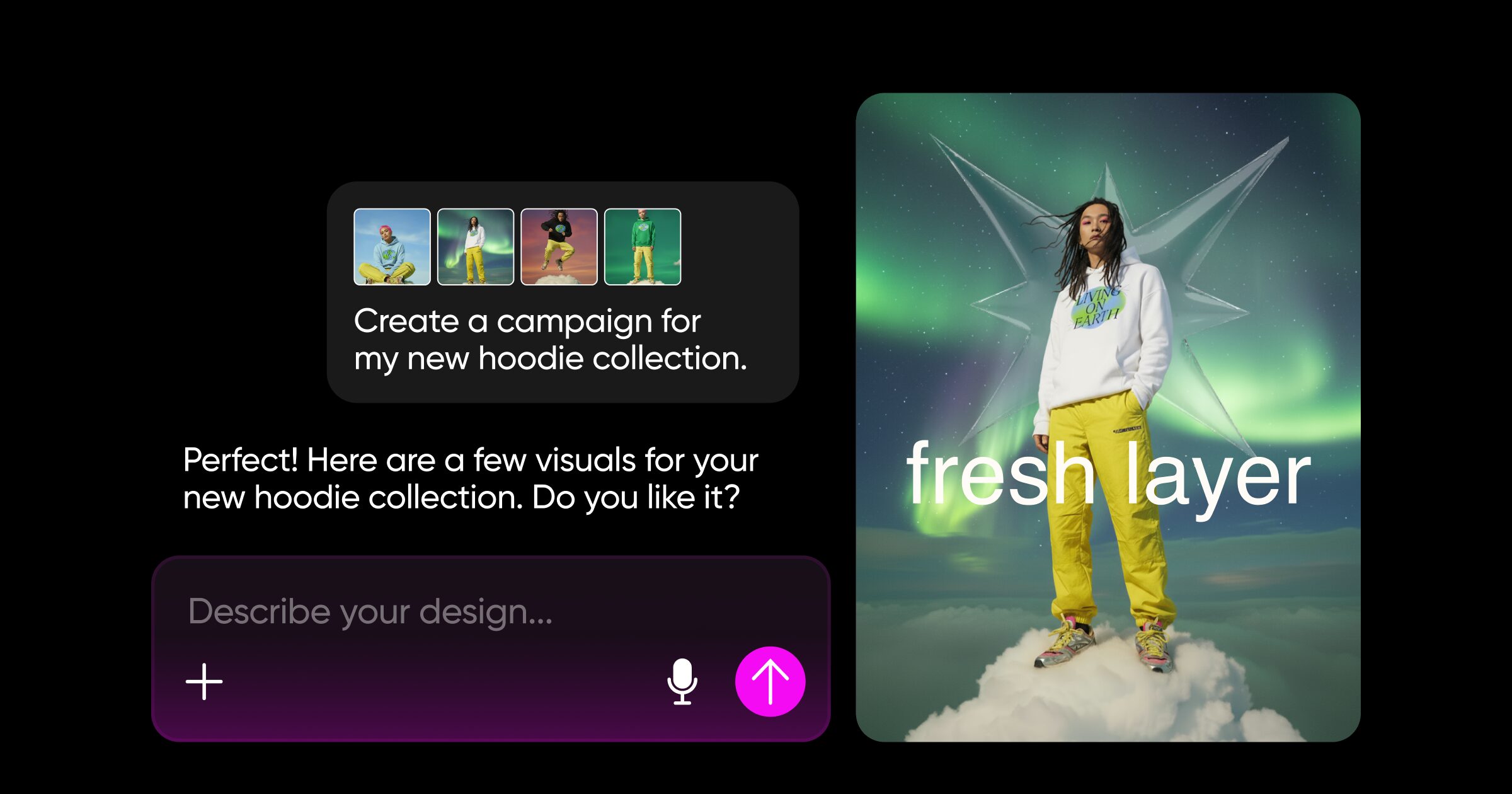
Picsart transforms creative workflows through Vibe Design, an AI-powered platform combining conversational intelligence with professional-grade creative tools. Announced at Web Summit 2025 in Lisbon on November 12, Picsart Vibe Design comprises two flagship products—Picsart Assistant and Picsart Flows—serving the company’s 130 million monthly active users across 150+ countries. Rather than requiring users to master complex design interfaces or master AI prompt engineering, Vibe Design operates on the philosophy that imagination leads and technology follows—users describe creative goals conversationally, and AI handles technical execution automatically. The platform processes unlimited creative workflows on single infinite canvas, supports real-time team collaboration, maintains every generated asset as fully editable layers, and leverages proprietary AI specifically trained on design patterns rather than generic language models.
Key Features
Picsart Vibe Design combines conversational creativity with professional-grade workflow automation:
- Picsart Assistant: Conversational AI partner that translates natural language descriptions—plain English or voice commands—into fully editable, multi-layered designs. Rather than requiring prompt engineering or tool navigation, users simply describe creative goals (“make it modern,” “try a softer look,” “professional social media card for holiday promotion”), and AI generates complete design specifications automatically.
- Goal-Oriented Creation: Users describe desired outcomes rather than commanding specific tools. AI automatically selects appropriate models, generates assets, and structures layers without requiring users to understand underlying technical decisions.
Voice-to-Design: Speak naturally to create visuals—no typing required. System transcribes voice input and converts descriptions directly into design outputs, enabling hands-free creative ideation and iteration.
Multi-Layered Generation: Every AI-generated element remains fully editable across separate layers. Rather than flat outputs requiring complete regeneration, users adjust individual elements, colors, text, or layouts without starting over.
Adaptive Intelligence: System learns from user preferences and past conversations, improving recommendations and outputs over time. Recognizes user’s preferred style, color palettes, and design patterns automatically.
Context Intelligence: Automatically tailors designs based on purpose and audience. System generates different outputs for social media ads vs. print brochures vs. email headers, adjusting dimensions, text length, visual hierarchy accordingly.
Picsart Flows: Infinite canvas workflow builder enabling teams to combine images, video, text, and AI tools into single unified creative environments. Create complex workflows once, then automate and reuse across campaigns without rebuilding from scratch.
No-Code Workflow Automation: Connect AI models and creative tools through visual node interfaces without writing code. Drag and drop connections between image generation, text processing, video editing, and other tools to build sophisticated multi-step workflows.
Pre-Built Templates and Prompts: Template library with AI-generated workflow prompts for common scenarios (social campaigns, product visuals, branded assets). Start with templates and customize or build from scratch.
Real-Time Team Collaboration: Multiple team members work simultaneously on shared Flows with real-time synchronization. In-canvas chat enables direct team communication without leaving creative environment.
External AI Model Integration: Advanced users connect preferred AI models (OpenAI, Anthropic, Stability AI, etc.) alongside Picsart’s native tools. Mix and match best-of-breed models for specific creative needs.
Repeatable Workflows: Save and reuse Flows across campaigns and projects. Execute workflow once, then automate repetition with parameter adjustments—same workflow generates hundreds of variants through data connections.
Integrated Asset Management: 300+ million editable templates, photos, stickers, and creative elements directly accessible within workflows. Access entire Picsart library without external tools or file management.
150+ Native Design Tools: Complete suite of design capabilities—text editing, color correction, background removal, resizing, cropping, filters, effects—integrated directly into Flows. No tool switching or separate software required.
How It Works
Vibe Design operates as seamless conversation-to-creation pipeline:
Start with Natural Language: Describe creative goal through text or voice to Picsart Assistant. More specific descriptions yield more accurate outputs, but system understands intent from general descriptions like “modern design” or “professional look.”
AI Analyzes and Generates: Proprietary AI (trained specifically on design patterns, not generic internet content) analyzes description and automatically selects appropriate AI models. Generates initial design specification with multi-layered structure.
Produce Fully Editable Output: System generates complete design with every element on separate, editable layers. Instead of flat images, users receive structured designs where text layers, image layers, background layers remain independently modifiable.
Refine Through Conversation: Users review generated design and request adjustments conversationally—”make the text bigger,” “try a different color scheme,” “make it more minimalist.” AI implements changes without requiring interface navigation or technical knowledge.
Build or Join Flows: For complex multi-step workflows, users create Flows by connecting AI tools and design elements visually. Teams collaborate on shared Flows with real-time updates visible to all participants.
Automate and Scale: Once workflow functions correctly, save as reusable Flow. Apply to multiple assets, different datasets, or campaign variations. System executes saved workflow automatically across hundreds of assets.
Export and Distribute: Generate final assets in formats optimized for target platform—social media native dimensions, print-ready specifications, email template formats. Download or directly publish to social platforms and content management systems.
Use Cases
Vibe Design serves diverse creative scenarios across industries:
- Social Media Content Production: Generate posts, reels, carousel designs, and stories for multiple social platforms in minutes. Apply consistent branding across different content formats automatically.
Marketing Campaign Automation: Create complete campaign visual assets—display ads, email headers, landing page graphics, social promotions—from single creative brief. Scale campaigns across geographies with localized variations through data-connected Flows.
Brand Asset Generation: Generate product visuals, hero images, icons, and branded templates at scale. Maintain brand consistency across thousands of assets while enabling rapid iteration.
E-commerce Product Photography: Generate product mockups, lifestyle shots, and promotional graphics from simple product descriptions. Create unlimited variations for different seasons, campaigns, or market segments.
Rapid Design Prototyping: Quickly visualize design concepts before committing to production. Test multiple visual directions in hours instead of days, enabling data-driven design decisions.
Team Collaboration on Creative Projects: Distributed teams work on shared creative projects simultaneously, providing feedback directly on canvas without file exchanges or version management complexity.
Agency Asset Fulfillment: Agencies automate asset production for multiple client campaigns. Use Flows to generate hundreds of client-specific assets following brand guidelines automatically.
Content Localization: Generate campaign assets in multiple languages and cultural variations. Adapt layouts, color schemes, and messaging for different markets through single unified workflow.
Pros & Cons
Advantages
- Genuinely Conversational Creation: Natural language interface with voice support removes barrier between creative vision and execution. No learning curve for complex interfaces or prompt engineering required.
Fully Editable AI Outputs: Unlike flat AI-generated images, every element remains editable across separate layers. Adjust individual components without regenerating entire design.
Purpose-Built Design AI: Proprietary AI trained specifically on design patterns rather than general-purpose models. Generates design-appropriate outputs understanding typography, composition, color harmony.
Non-Disruptive Workflow Integration: Connects seamlessly with existing creative software (Photoshop, After Effects, design tools) rather than requiring replacement. Augments existing workflows rather than requiring migration.
Unified Creative Environment: 150+ design tools, video capabilities, asset library, and external AI models integrated into single platform. Eliminates tool switching and file management complexity.
Enterprise-Grade Collaboration: Real-time team collaboration, permission controls, audit trails, and version management suitable for larger organizations and complex projects.
Significant Cost Reduction: All-in-one platform eliminates need for multiple software subscriptions and external AI service fees. Particularly cost-effective for teams managing substantial creative output.
Disadvantages
Learning Curve for Professional Workflows: While conversation is intuitive, advanced Flows and workflow automation require understanding workflow concepts and data connections. Professional users accustomed to direct tool control may find abstraction frustrating.
Reliance on AI Quality: Output quality depends on underlying AI models. When AI misinterprets creative intent or generates suboptimal designs, users must explicitly guide system through refinement.
Export Limitations for Specialized Formats: While supporting common formats, specialized design files (complex Adobe formats, niche industry specifications) may require post-export adjustment in dedicated software.
Subscription-Based Pricing: Access to advanced features requires paid subscriptions. While significantly cheaper than traditional software subscriptions, eliminates free unlimited usage model.
Early-Stage Integration: Picsart Flows and Assistant announced November 2025, so edge cases and advanced scenario handling continue evolving. Teams with mission-critical workflows should validate stability.
How Does It Compare?
Vibe Design occupies a distinct position within design platforms, emphasizing conversational, AI-first creation rather than traditional interface-driven design or rigid workflow templates.
Canva provides all-in-one design platform emphasizing ease-of-use, template library (100+ million assets), and AI assistance through Magic Studio. Canva launched “Canva AI” (conversational AI assistant) offering similar voice/text-to-design capabilities. Canva excels for non-technical users seeking simple designs with extensive template library. However, Canva’s collaborative features remain simpler than Picsart’s real-time Flows, and Canva’s design output doesn’t match Picsart’s professional-grade tool depth. Canva serves casual creators; Picsart serves professional creators and agencies. Canva emphasizes templates; Picsart emphasizes conversational workflows.
Adobe Express functions as simplified version of Creative Cloud combining design, photo editing, and video tools with Firefly AI image generation. Express emphasizes Creative Cloud integration for users already invested in Adobe ecosystem. While Express includes “AI Assistant” (beta) for similar conversational capabilities, Adobe’s primary focus remains supporting Photoshop, Illustrator, and Premiere workflows rather than fully autonomous design creation. Adobe Express serves teams invested in Creative Cloud; Picsart serves teams seeking independent creative platform.
Figma specializes in collaborative design and prototyping, emphasizing team collaboration and hand-off to developers. Figma Make (Config 2025 launch, May 2025) enables prompt-to-code capabilities enabling designers to create interactive prototypes from text descriptions. However, Figma remains interface-driven rather than purely conversational, and Figma’s primary focus is UI/UX design and product development rather than marketing/brand asset creation. Figma serves product design teams; Picsart serves marketing and brand teams. Figma generates components; Picsart generates complete designs.
Traditional Design Software (Adobe Creative Suite, CorelDRAW, Sketch) requires learning complex interfaces and mastering tool workflows. AI integration remains supplementary rather than foundational. These platforms serve professional designers seeking maximum control and customization.
Vibe Design’s distinctive positioning emerges through: conversational interface (voice or text-first interaction rather than traditional tools), proprietary design-specific AI (trained on design patterns rather than general internet content), fully-editable AI outputs (layered structures enabling granular adjustments), infinite workflow automation (Flows enabling complex multi-step creative pipelines), and professional-grade team collaboration (real-time editing with permission controls). While Canva emphasizes accessibility and templates, Adobe Express emphasizes Creative Cloud integration, and Figma emphasizes product design collaboration, Picsart specifically optimizes for conversational, AI-first marketing and brand asset creation at scale.
Final Thoughts
Picsart Vibe Design represents meaningful evolution in creative technology by demonstrating that AI can become truly conversational partner rather than command-line tool. Its combination of natural language interfaces, professional-grade design tools, infinite collaborative Flows, and proprietary design-specific AI creates compelling value for marketing teams, creative agencies, and individual creators managing substantial design workloads.
For teams producing high-volume marketing assets, creative agencies scaling operations without proportional headcount growth, or individual creators seeking friction-free design workflows, Vibe Design delivers practical efficiency improvements through automation and conversational interaction.
However, teams requiring specialized design capabilities (motion graphics, complex illustration), those deeply invested in Adobe or other proprietary ecosystems, or professional product designers should evaluate platform fit carefully. Vibe Design optimizes specifically for marketing and brand asset creation rather than comprehensive design system management or specialized animation workflows.