
Table of Contents
Overview
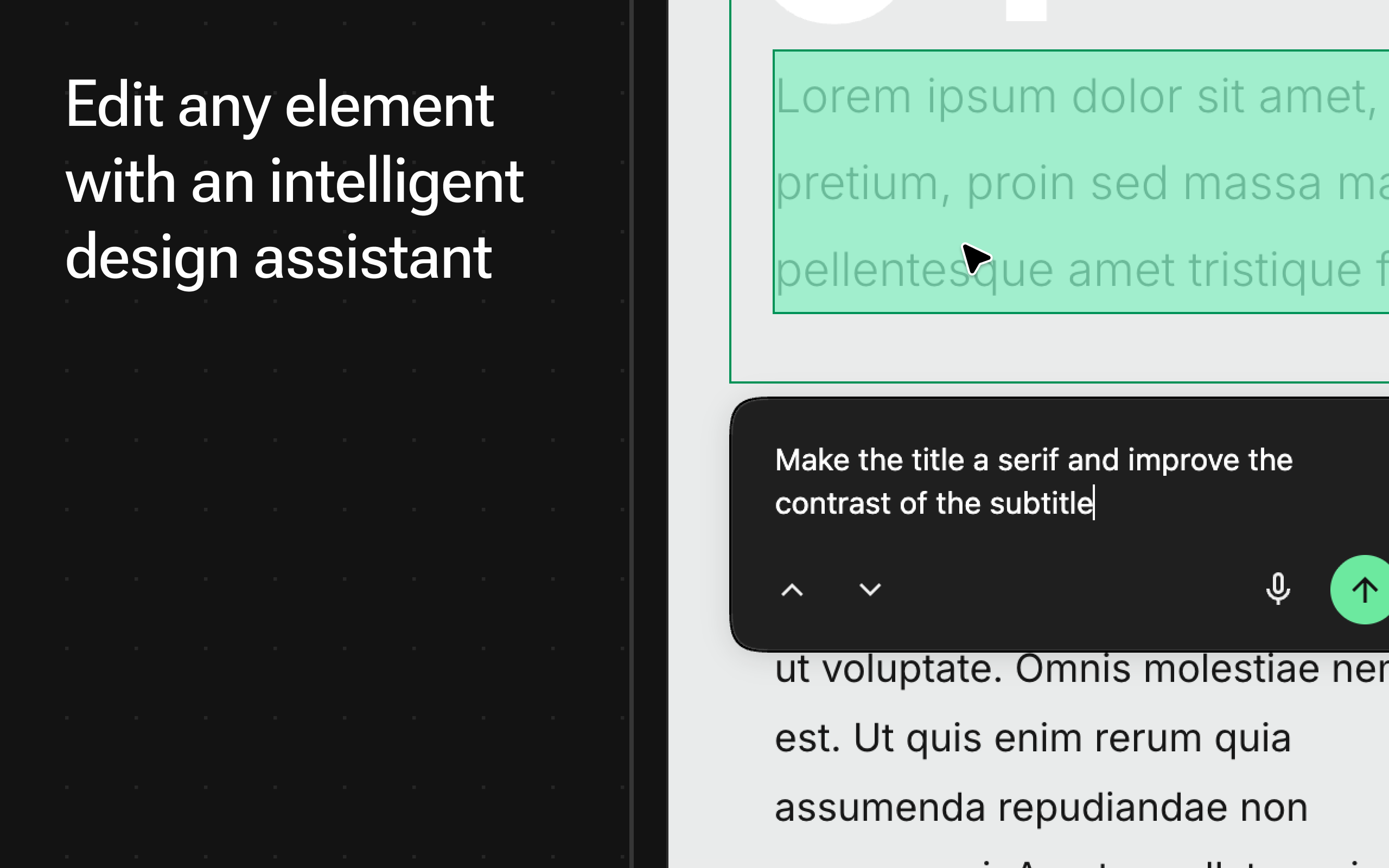
VibeCSS is a Chrome extension that enables AI-powered CSS editing directly on live webpages. The extension allows users to modify web design elements through natural language commands without requiring coding knowledge or developer tools. Users can select any element on a page, describe desired changes in plain language, and watch AI instantly apply those CSS modifications.
Key Features
- Natural Language CSS: No coding knowledge required—describe changes in conversational language
- Live Editing: Works directly on any live webpage with real-time preview
- Element Selector: Point-and-click interface for selecting target elements
- Instant Preview: See changes immediately as they’re applied
- Context-Aware Styling: Considers existing site palette, typography, and layout to ensure changes blend naturally
- Atomic State Engine: Manages CSS specificity and conflict resolution to reduce layout breakage
- HTML Modification Capability: Can modify HTML structures for more flexible prototypes
How It Works
Install the extension from the Chrome Web Store, click the extension icon to activate it, then select any element on a webpage. Type a prompt describing your desired change (for example, “make this button round and neon blue” or “add a hover animation”). The AI generates the appropriate CSS code and injects it into the page in real-time. Changes are temporary by design—refreshing the page resets it to the original state.
Use Cases
- Rapid Prototyping for Web Designers: Test visual concepts instantly without leaving the browser
- Developers Testing UI Changes Quickly: Validate style modifications before implementing in code
- Non-Coders Customizing Their Own Sites: Modify personal websites or web applications without technical knowledge
- Learning CSS Through AI Examples: Study how natural language translates to actual CSS properties
- Product Teams Validating Design Ideas: Collaborate on visual changes during review sessions
Pros \& Cons
Advantages
- Extremely Fast Visual Feedback: See style changes instantly without code-compile-refresh cycles
- Lowers Barrier to Entry: Enables non-technical users to experiment with web design
- Context-Aware Adjustments: AI considers existing site design for cohesive modifications
- No Developer Tools Required: Streamlines workflow by eliminating DevTools navigation
- Safe Experimentation: Temporary changes allow risk-free design exploration
Disadvantages
- Changes Are Local/Temporary: Modifications disappear on page refresh unless manually copied
- Generated CSS May Be Unoptimized: AI-produced code might not follow best practices or be production-ready
- HTML Modifications Can Affect Functionality: Some requests require HTML changes that may detach event handlers
- Browser Limitation: Currently available only as Chrome extension
- Chrome Store Rating: Currently shows 0 ratings, indicating limited user feedback
- Privacy Considerations: Extension accesses website content, requiring trust in developer’s data handling
How Does It Compare?
CSS Peeper
- Key Features: Style inspection, color palette extraction, typography analysis, contrast scanner, asset export
- Strengths: 500,000+ users, mature feature set, excellent for extracting design properties, strong accessibility tools
- Limitations: Read-only inspection (no editing), requires manual code implementation, primarily for analysis not modification
- Differentiation: VibeCSS enables active editing; CSS Peeper focuses on passive inspection and extraction
VisBug
- Key Features: Open-source design debugging, element manipulation, distance measurement, accessibility inspection, multi-select editing
- Strengths: Google Chrome Labs project, completely free and open-source, production-tested by large teams, comprehensive design debugging
- Limitations: Requires manual styling knowledge, no AI assistance, steeper learning curve for non-designers, primarily for tweaking not generation
- Differentiation: VibeCSS provides AI-powered generation; VisBug offers manual design tool interactions with professional-grade precision
Framer
- Key Features: AI wireframing, Workshop component builder, advanced vector editing, integrated analytics, A/B testing
- Strengths: Complete design-to-publish platform, 30% of Y Combinator startups use it, over 200 marketplace plugins, professional-grade prototyping
- Limitations: Full platform (not just Chrome extension), subscription-based pricing, focused on new creation rather than editing existing sites
- Differentiation: Framer is a comprehensive design platform; VibeCSS is lightweight extension for quick edits on existing pages
Webflow (Designer)
- Key Features: Visual website builder, CMS integration, e-commerce capabilities, hosting, custom animations
- Strengths: 3.5 million users worldwide, enterprise-grade features, clean code export, professional hosting, no-code workflow
- Limitations: Requires building within Webflow ecosystem, cannot edit external live sites, steeper learning curve, subscription pricing
- Differentiation: Webflow is for creating new websites from scratch; VibeCSS edits any existing webpage instantly
Final Thoughts
VibeCSS represents an innovative approach to web design prototyping by combining natural language processing with live page manipulation. The extension successfully lowers the barrier for rapid visual experimentation, enabling designers and developers to test ideas without leaving the browser environment. Its context-aware styling and specificity management demonstrate thoughtful engineering for a prototype tool.
However, users should understand its limitations: changes are temporary by design, the tool serves prototyping rather than production deployment, and generated CSS requires review before implementation. The current lack of user ratings suggests the product is early-stage, though the concept aligns with broader “vibe coding” trends in AI-assisted development.
For professionals, VibeCSS works best as a complementary tool alongside established solutions like CSS Peeper for inspection, VisBug for manual precision, and full platforms like Framer or Webflow for comprehensive design workflows. The extension’s value lies in its speed and accessibility for quick visual iteration, making it valuable for design reviews, client presentations, and educational purposes.