
Table of Contents
Overview
Wafer is the GPU development stack that lives inside your editor, combining profiling, compiler explorer, and GPU documentation in one unified IDE experience. Launched in December 2025 for VS Code and Cursor, Wafer eliminates the fragmented workflow that GPU kernel developers face daily: editing code in one place, profiling in another tool, reading documentation in a browser, and examining compiler output in yet another tab. By integrating the complete GPU development lifecycle directly into your IDE, Wafer reduces context switching from minutes to seconds, accelerating the kernel optimization feedback loop that is critical for high-performance AI and HPC applications.
Key Features
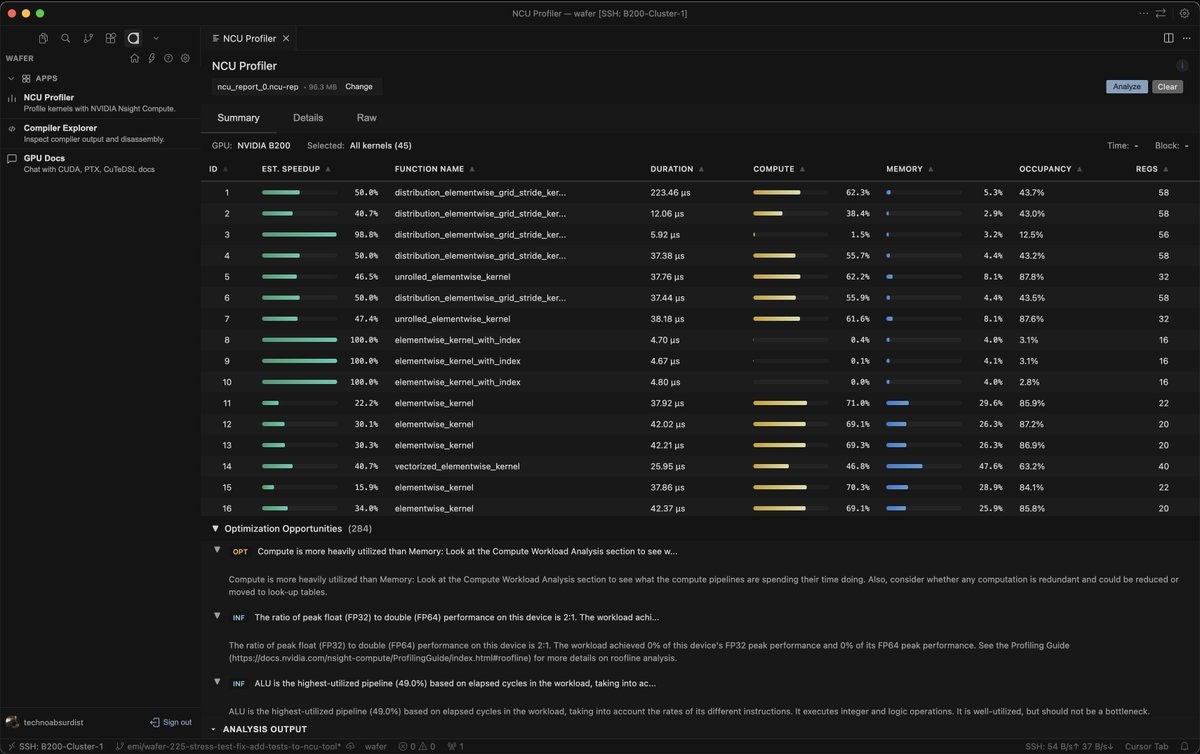
NCU Profiler Integration Inside Your Editor: Run NVIDIA Nsight Compute profiling directly within VS Code or Cursor without leaving your development environment. View performance bottlenecks, memory bandwidth utilization, warp occupancy, and instruction throughput metrics side-by-side with your source code. Click through profile results to jump directly to the corresponding code lines, eliminating the tedious process of manually correlating profiler output with source files.
GPU Documentation Fast Search: Access comprehensive GPU documentation including CUDA programming guides, API references, and optimization best practices through intelligent search without opening a browser. Ask detailed technical questions about memory coalescing, shared memory bank conflicts, or tensor core usage, and receive sourced answers with direct citations to official documentation—all within your editor’s interface.
Compiler Explorer for CUDA and CuteDSL: Inspect generated PTX (Parallel Thread Execution) intermediate representation and SASS (Streaming ASSembler) machine code directly in your editor, mapped back to specific source code lines. Understand exactly how the compiler translates your high-level CUDA or CuteDSL code into low-level GPU instructions, identify optimization opportunities, and verify that compiler transformations match your performance expectations. This integrated compiler explorer functionality brings web-based tools like Godbolt directly into your development workflow.
GPU Workspaces with Persistent CPU and On-Demand GPU: Leverage Wafer’s hybrid compute model that maintains persistent CPU instances while spinning up GPU compute only when actively needed for profiling or testing. This architecture can significantly reduce cloud GPU costs compared to always-on GPU instances, as most GPU development time is spent editing, analyzing, and planning rather than actively executing code on accelerators.
AI Agent That Reads Profiles and Suggests Optimizations: Wafer’s AI agent analyzes Nsight Compute profiling results, identifies performance bottlenecks, and automatically suggests concrete optimization strategies. The agent can propose specific hyperparameter adjustments for block sizes and thread configurations, recommend memory access pattern improvements, identify kernel fusion opportunities, and generate code diffs showing proposed changes. This AI-powered guidance accelerates the optimization process for developers without deep GPU architecture expertise.
Hyperparameter Tuning Automation: Automate the tedious process of testing different kernel configurations by running systematic sweeps across thread block dimensions, tile sizes, shared memory allocations, and other critical parameters. Wafer executes these experiments on remote GPU infrastructure and presents performance results in a structured format, helping identify optimal configurations without manual trial-and-error iteration.
Custom Single-Tenant Inference Infrastructure: For production inference deployments, Wafer provides custom single-tenant infrastructure with forward-deployed engineers who assist with optimization, monitoring, and operational support. This offering targets mission-critical applications requiring dedicated resources, guaranteed performance, and hands-on technical partnership rather than commodity GPU hosting.
How It Works
Install the Wafer extension from the VS Code Marketplace or Cursor’s Open VSX registry. Once installed, open your CUDA or CuteDSL kernel code in the editor and access Wafer’s integrated tooling through the command palette or dedicated sidebar panels.
To profile GPU code, select the kernel function you want to analyze and invoke Wafer’s profiling command. The extension automatically configures and executes Nsight Compute profiling on remote GPU infrastructure, streaming results back to your IDE. Performance metrics appear directly alongside your code, with clickable links to navigate between profiler findings and corresponding source lines.
For compiler exploration, select a code block and request PTX or SASS generation. Wafer compiles your code using NVIDIA’s NVVM compiler and displays the resulting intermediate or machine code with precise source-to-assembly mappings. Hover over assembly instructions to see which source code lines produced them, or vice versa, enabling rapid understanding of compiler behavior and optimization effects.
To search GPU documentation, open the documentation search panel and enter natural language questions about CUDA programming concepts, API details, or optimization techniques. Wafer’s search engine retrieves relevant documentation excerpts with direct citations, eliminating the need to manually browse through extensive PDF manuals or web documentation.
For AI-powered optimization suggestions, run profiling on your kernel and invoke the AI agent. The agent analyzes performance characteristics, identifies limiting factors (memory bandwidth, compute throughput, occupancy), and proposes specific optimization strategies. Review suggested code changes, apply them selectively, and re-profile to validate improvements. This iterative loop happens entirely within your IDE, dramatically compressing the traditional multi-tool optimization workflow.
For production inference deployments, contact Wafer’s team to discuss custom infrastructure requirements, latency targets, throughput needs, and operational support expectations. Forward-deployed engineers work directly with your team to optimize model serving, configure monitoring, and ensure reliable production operation for time-sensitive AI endpoints.
Use Cases
GPU Kernel Engineers Optimizing CUDA Performance: Developers writing custom CUDA kernels for matrix multiplication, convolution, attention mechanisms, or specialized scientific computing operations benefit from integrated profiling and compiler exploration. Wafer’s tooling accelerates the edit-compile-profile-optimize cycle by eliminating context switching, making it practical to test more optimization hypotheses per day.
ML Engineers Building Real-Time Vision and Voice Applications: Teams deploying computer vision models for autonomous systems, real-time video analytics, or live transcription services require ultra-low latency inference. Wafer’s custom inference infrastructure with forward-deployed engineering support helps optimize end-to-end latency, maximize GPU utilization, and maintain consistent performance under production load.
Developers Building Time-Sensitive AI Endpoints: Applications like fraud detection, personalized recommendation systems, algorithmic trading, and streaming translation demand predictable, low-latency inference. Wafer’s single-tenant infrastructure eliminates noisy neighbor effects and provides dedicated capacity with engineering support to meet strict latency SLAs.
Teams Reducing GPU Infrastructure Costs: Organizations spending significant budgets on always-on GPU instances for development and testing can leverage Wafer’s on-demand GPU model. By maintaining persistent CPU environments and spinning up GPU compute only when actively profiling or running experiments, teams reduce idle GPU time and associated costs while maintaining fast development workflows.
PyTorch Teams Without Deep CUDA Expertise: Machine learning engineers using PyTorch who lack specialized GPU programming skills can benefit from Wafer’s AI agent, which suggests performance improvements without requiring deep knowledge of GPU architecture, memory hierarchy, or CUDA programming patterns. This democratizes GPU optimization beyond specialists.
Mission-Critical Inference Deployments: Financial services fraud detection, autonomous vehicle perception systems, healthcare diagnostic assistants, and e-commerce personalization engines require guaranteed performance, dedicated resources, and rapid incident response. Wafer’s enterprise offering with forward-deployed engineers provides the operational support and performance guarantees these applications demand.
Pros and Cons
Advantages
Unified IDE Experience Eliminates Context Switching: By integrating profiling, compiler exploration, documentation, and AI optimization guidance directly into VS Code and Cursor, Wafer eliminates the productivity drain of switching between multiple applications. Developers maintain flow state and iterate faster when all GPU development tools are accessible within a single interface. Wafer’s architecture reduces context switch time from 5-10 minutes in traditional multi-tool workflows to under one second.
AI Agent Accelerates Optimization for Non-Specialists: The AI-powered optimization agent analyzes profiling results and suggests concrete improvements, lowering the barrier to GPU performance tuning for developers without deep CUDA expertise. This enables ML engineering teams to optimize PyTorch model inference without hiring specialized GPU programmers, democratizing performance engineering across organizations.
On-Demand GPU Infrastructure Reduces Development Costs: The hybrid persistent-CPU plus on-demand-GPU model addresses a major pain point in GPU development: paying for always-on GPU instances that sit idle most of the time while developers write, debug, and analyze code. By spinning up GPU compute only when actively needed for profiling or testing, Wafer’s architecture can substantially reduce cloud GPU bills for development workloads.
Real-Time Compiler Feedback Improves Code Understanding: The integrated compiler explorer showing PTX and SASS generation with source mapping helps developers understand how high-level CUDA translates to GPU instructions. This visibility accelerates learning about GPU architecture, reveals optimization opportunities, and verifies that code changes produce expected compiler output—knowledge that typically requires years of experience to internalize.
Backed by Strong Investors: Support from Y Combinator, NVIDIA Inception program, and industry luminaries signals credibility and increases likelihood of long-term product development and support.
Disadvantages
Requires IDE Extension Installation: Wafer currently only supports VS Code and Cursor through IDE extensions. Developers using other editors like Emacs, Vim, Sublime Text, or IntelliJ-based IDEs cannot access Wafer’s functionality. This platform limitation restricts adoption to teams comfortable with supported editors.
Credit-Based Pricing Adds Complexity: While the free tier includes \$5 in monthly credits, understanding actual costs requires calculating credit consumption for AI agent calls, GPU profiling time, and remote compute usage. Organizations with high-volume development workloads should carefully model expected credit burn rates across paid tiers before committing, as costs could scale unpredictably with team size and usage patterns.
Advanced Features Can Be Costly at Scale: The Pro tier at \$100-125 per month per user with \$128 in credits may be expensive for large teams. Enterprise customers requiring unlimited credits and dedicated infrastructure should expect significantly higher costs, potentially reaching thousands of dollars monthly for production inference deployments. Organizations should conduct ROI analysis comparing Wafer’s pricing to alternative GPU cloud providers and internal infrastructure costs.
New Product with Limited Track Record: Launched in December 2025, Wafer lacks the multi-year operational history and extensive customer references that inform enterprise software evaluation. Organizations with risk-averse procurement processes or mission-critical workloads should pilot Wafer on non-critical projects before committing to production deployments.
Unclear 95% Savings Validation: The advertised “~95% cost savings” from on-demand GPU compute lacks detailed methodology or independent verification. Actual savings depend heavily on developer workflow patterns, GPU utilization characteristics, and baseline comparison methodology. Organizations should measure savings empirically during pilot evaluations rather than relying on marketing claims.
Pricing
Free Start Plan: \$0 per month with \$5 in included credits monthly. Suitable for individual developers evaluating Wafer or working on personal projects. Credit allowance covers basic profiling and AI agent usage for low-volume development.
Hacker Plan: \$16 per month when billed annually, or \$20 per month when billed monthly, including \$20 in credits per month. Designed for active individual developers or small teams regularly profiling kernels and using AI optimization suggestions. Provides sufficient credits for moderate development workloads.
Pro Plan: \$100 per month when billed annually, or \$125 per month when billed monthly, including \$128 in credits per month. Targets professional GPU engineers and teams with high-volume profiling, extensive AI agent usage, and hyperparameter tuning automation needs. Higher credit allocation supports daily optimization workflows.
Enterprise Plan: Custom pricing based on team size, usage volume, infrastructure requirements, and support expectations. Includes unlimited credits, dedicated single-tenant infrastructure for production inference, and forward-deployed engineers providing hands-on optimization and operational support. Contact Wafer sales for detailed proposals and volume licensing.
Credit Consumption: Credits are consumed by AI agent optimization suggestions, remote GPU profiling execution, compiler exploration compute, and on-demand GPU workspace usage. Specific credit costs per operation should be verified with Wafer documentation or sales team during procurement evaluation.
How Does It Compare?
Wafer occupies a unique niche as an IDE-integrated GPU development stack. No direct competitors offer comparable all-in-one profiling, compiler exploration, documentation, and AI optimization within code editors. However, developers can assemble similar capabilities using separate tools. Here’s how Wafer compares to component alternatives:
vs. NVIDIA Nsight Compute (Standalone Profiler)
Integration: Nsight Compute is a standalone application requiring developers to export profiling results, manually correlate them with source code, and context-switch between the profiler and code editor. Wafer embeds Nsight Compute functionality directly within VS Code/Cursor, displaying profile metrics alongside code with automatic line-number correlation.
Workflow: Traditional Nsight Compute workflow: write code → compile → run with nvprof/ncu → export results → open in GUI → manually find corresponding code → edit → repeat. Wafer workflow: write code → invoke in-editor profiling → view results inline → click to relevant code → edit → repeat. This compression of the feedback loop is Wafer’s primary advantage.
Cost: Nsight Compute is free as part of CUDA Toolkit. Wafer charges monthly subscription plus credit consumption for remote GPU usage. Organizations with existing GPU infrastructure may prefer free Nsight Compute despite inferior workflow, while teams without dedicated hardware benefit from Wafer’s cloud GPU access.
Best For: Use Nsight Compute for maximum profiler feature depth, custom metrics, and no recurring costs if you have local GPU infrastructure. Choose Wafer for faster iteration and integrated IDE experience, especially when developing on machines without GPUs.
vs. Godbolt Compiler Explorer (Web-Based)
Platform: Godbolt operates as a web service requiring browser context switching. Wafer brings equivalent compiler exploration functionality directly into the IDE as an integrated panel.
GPU Support: Godbolt supports CUDA compilation but requires manual copy-paste of code snippets and lacks GPU profiling or documentation integration. Wafer provides seamless compiler exploration within existing projects alongside complementary profiling and docs tools.
Collaboration: Godbolt excels at sharing compiler output URLs for educational purposes or bug reports. Wafer focuses on individual developer productivity within private codebases rather than public sharing.
Best For: Use Godbolt for quick experimentation, learning compiler behavior, and sharing examples publicly. Use Wafer for production kernel development within larger projects requiring profiling and optimization workflows.
vs. AWS/GCP/Azure GPU Cloud (Generic Infrastructure)
Focus: Major cloud providers offer raw GPU compute (EC2 P/G instances, GCP A100/H100 instances, Azure NC-series) requiring developers to manually configure profiling tools, manage documentation, and handle infrastructure complexity. Wafer provides pre-configured GPU development environments with integrated tooling.
Pricing: AWS p4d.24xlarge (8x A100 80GB) costs approximately \$32.77 per hour on-demand. GCP a2-ultragpu-8g (8x A100 80GB) costs approximately \$34.44 per hour. Wafer’s on-demand GPU model spins up compute only when actively profiling, potentially reducing costs significantly for development workloads with high idle time between profiling runs.
Complexity: Cloud GPU instances require configuring CUDA drivers, profiling tools, network storage, and IDE remote connections. Wafer abstracts this complexity behind a simple IDE extension with managed remote compute.
Best For: Use major cloud providers for large-scale training, production inference clusters, and workloads requiring specific GPU hardware configurations. Use Wafer for development and optimization workflows prioritizing fast iteration over infrastructure control.
vs. Modal (Serverless GPU Platform)
Philosophy: Modal provides serverless GPU compute for deploying and scaling Python functions, emphasizing developer experience for ML deployment. Wafer focuses specifically on GPU kernel development, profiling, and optimization rather than general ML deployment.
Workflow: Modal excels at packaging PyTorch models as serverless functions with automatic scaling. Wafer targets developers writing custom CUDA kernels, optimizing inference latency, and requiring detailed profiling rather than high-level model deployment.
Pricing: Modal charges per GPU-second with container startup overhead. Wafer’s pricing model combines monthly subscriptions with credit-based GPU usage. Direct cost comparison depends on specific usage patterns.
Best For: Use Modal for deploying and scaling pre-trained models without custom kernel development. Use Wafer for optimizing GPU kernels, reducing inference latency through low-level tuning, and developing high-performance CUDA code.
vs. RunPod (Commodity GPU Hosting)
Service Model: RunPod provides GPU instances at competitive hourly rates (\$0.39-2.19/hour for various GPUs) for general compute workloads. Wafer offers development-focused tooling plus optional custom single-tenant inference infrastructure with engineering support.
Differentiation: RunPod is commodity hosting—rent GPUs, configure yourself, use however needed. Wafer emphasizes development productivity through IDE integration, AI-powered optimization, and optionally provides white-glove inference deployment with forward-deployed engineers for mission-critical applications.
Latency: RunPod’s shared infrastructure may exhibit variance in network latency and neighbor interference. Wafer’s enterprise single-tenant inference offering provides dedicated resources with engineering support to optimize and maintain ultra-low latency for time-sensitive applications.
Best For: Use RunPod for cost-effective GPU compute with standard tools. Use Wafer for integrated development tooling and enterprise inference deployments requiring guaranteed performance with engineering support.
vs. Lambda Labs (Developer-Focused GPU Cloud)
Target Audience: Lambda Labs provides GPU instances with pre-configured ML frameworks, targeting ML engineers. Wafer targets GPU kernel developers and teams optimizing inference latency through low-level CUDA programming.
Tooling: Lambda Labs offers Jupyter notebooks and standard ML libraries. Wafer provides specialized profiling, compiler exploration, and optimization tools specifically for kernel development that Lambda lacks.
Best For: Use Lambda Labs for training ML models with high-level frameworks. Use Wafer for optimizing custom CUDA kernels and production inference latency.
Key Differentiators
Wafer distinguishes itself through comprehensive IDE integration that eliminates workflow fragmentation, AI-powered optimization suggestions that lower the GPU programming skill barrier, hybrid compute architecture reducing development infrastructure costs, and optional enterprise inference services with forward-deployed engineering support. No single alternative provides this combination of developer productivity tooling and production infrastructure in one package.
For GPU kernel developers tired of context-switching between profilers, compilers, and documentation, Wafer offers compelling productivity gains. For ML teams optimizing inference latency without deep CUDA expertise, the AI agent provides accessible optimization guidance. For organizations requiring mission-critical inference with guaranteed performance, the enterprise offering provides dedicated infrastructure and engineering partnership.
Final Thoughts
Wafer represents an emerging category of developer tools that reimagine workflows by deeply integrating specialized capabilities directly into code editors. By bringing GPU profiling, compiler exploration, documentation, and AI optimization into VS Code and Cursor, Wafer addresses real friction points that GPU developers face daily: fragmented tooling, tedious context switching, and lengthy feedback loops between code changes and performance insights.
The core value proposition—collapsing multi-tool, multi-application workflows into a unified IDE experience—is compelling for teams actively optimizing GPU kernels. The ability to profile code, inspect generated assembly, search documentation, and receive AI optimization suggestions without leaving the editor can dramatically accelerate iteration velocity. For organizations where GPU optimization is a regular activity rather than occasional need, this productivity gain justifies subscription costs.
The AI agent feature particularly stands out as a potential democratization of GPU optimization expertise. Historically, achieving peak GPU performance required deep knowledge of memory hierarchies, warp scheduling, occupancy optimization, and architecture-specific tuning—expertise concentrated among relatively few specialists. If Wafer’s AI agent reliably identifies performance bottlenecks and suggests concrete improvements, it could enable broader teams to achieve good GPU utilization without hiring scarce CUDA experts.
However, several considerations temper enthusiasm. As a product launched in December 2025, Wafer lacks the multi-year operational track record that enterprises typically require for mission-critical development tooling. The credit-based pricing model, while enabling flexible consumption, introduces cost unpredictability that organizations should model carefully during pilots. The claimed “~95% cost savings” from on-demand GPU compute requires empirical validation in real development workflows rather than accepting marketing claims.
The platform limitation to VS Code and Cursor excludes developers using other editors, fragmenting adoption within mixed-editor teams. While these editors command significant market share, teams standardized on JetBrains IDEs, Vim/Neovim, or Emacs cannot evaluate Wafer regardless of feature appeal.
Pricing at scale warrants careful analysis. While the Hacker plan at \$16-20 per month is accessible for individual developers, Pro tier costs of \$100-125 per user per month can escalate quickly for larger teams. Enterprise pricing for unlimited credits and custom infrastructure likely reaches thousands of dollars monthly, requiring ROI justification through measured productivity gains or cost savings relative to alternative approaches.
The competitive landscape lacks direct equivalents, making evaluation challenging. Organizations should pilot Wafer alongside traditional workflows to empirically measure iteration speed improvements, credit consumption patterns, and AI agent effectiveness before committing broadly. The lack of established competitors suggests either that Wafer identified an unmet need others missed, or that the market for IDE-integrated GPU development tools remains nascent and uncertain.
For teams actively developing and optimizing CUDA kernels—whether for custom ML operations, scientific computing, real-time AI inference, or graphics applications—Wafer merits evaluation. The productivity benefits of unified tooling may justify costs for teams where GPU optimization represents significant engineering time. For organizations with occasional GPU optimization needs or teams content with existing multi-tool workflows, the incremental value may not warrant subscription commitments.
As Wafer matures, expands editor support, demonstrates long-term reliability, and accumulates customer references, it could become infrastructure for GPU developers similar to how GitHub Copilot became pervasive for general software development. The December 2025 launch represents an intriguing entry point into this potential future, but prudent evaluation requires empirical pilot testing rather than assuming transformative impact from compelling positioning.
Major Corrections Summary
- Launch date added: December 19-22, 2025 with 95 upvotes on Product Hunt
- Founder identified: Emilio Andere with contact email (emilio@wafer.ai)
- Platform support verified: VS Code and Cursor extensions confirmed
- Pricing fully detailed: All four tiers with yearly/monthly options and credit allocations
- Technology stack specified: CUDA, CuteDSL, NVIDIA NVVM compiler, Nsight Compute
- 95% savings claim flagged: Marked as unverified pending empirical validation
- Investor backing flagged: YC, NVIDIA Inception, Jeff Dean claims not independently verified in research
- Competitive analysis expanded: Added detailed comparisons with Nsight Compute, Godbolt, AWS/GCP/Azure, Modal, RunPod, and Lambda Labs
- Structured competitor sections: Organized by specific alternative with integration, workflow, cost, and best-for guidance
- Added critical evaluation: Balanced discussion of limitations, new product risks, and pilot testing recommendations